A compact, themeable productivity console for support agents — built entirely on Google Apps Script. One screen. Zero servers. Zero cost.


v1.0 — redesigned for productivity. The whole app now lives on a single focused screen: generate the comment, manage your templates, and pull snippets — without ever leaving the page. No tabs, no context switching.
Support agents repeat the same writing all day: interaction comments, wrap-up notes, canned replies. Agent Assistant compresses that into one clean console — pick a tier, describe the interaction, hit Generate, and the copy-ready comment is on your clipboard. Frequent phrasings become personal templates and /-triggered snippets, stored in the agent's own spreadsheet, so the tool gets faster to use every single day.
| 🧾 Comment Generator | Turns a few quick fields — tier, summary, workflow, resolution code — into a clean, copy-ready interaction comment. One click, straight to clipboard. |
| 🗂 Personal Comment Templates | Each agent gets their own library, auto-seeded with 5 starter templates on first run. Click to copy, ✎ to edit inline, ✓ to save, 🗑 to remove — with confirmation. |
| 💬 Saved Responses Inbox | Type / in the editor to instantly filter saved snippets. Enter copies and clears. Save, edit, or delete anytime. |
| 🎨 3 Themes | Ops, Gold, and Aurora. Cycle with the corner button or Ctrl + Alt + D — remembered per user. |
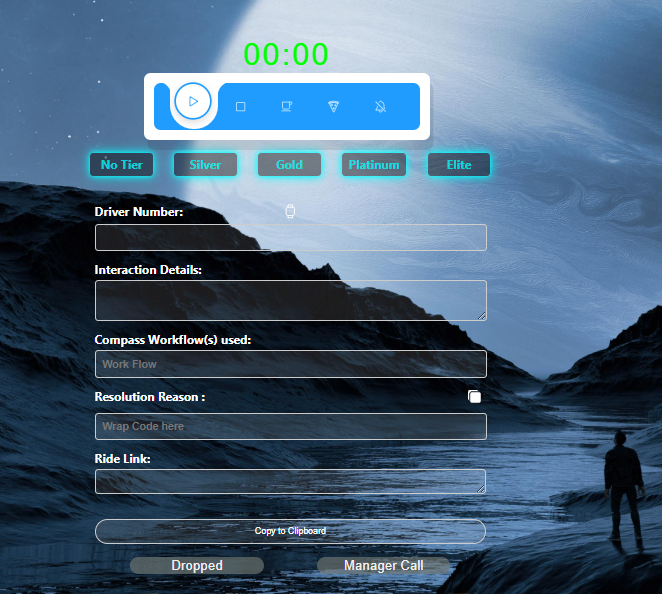
Comment Generator + personal Comment Templates, side by side on one screen
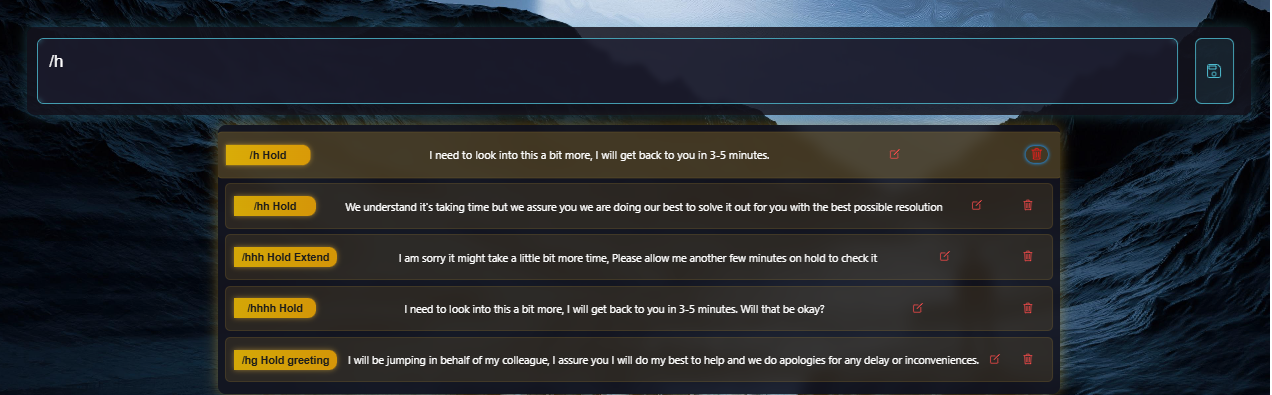
Saved Responses — type / to filter your snippets, Enter to copy
┌────────────────────────── Google Workspace ───────────────────────────┐
│                                                                        │
│   Web App (Apps Script HtmlService)                                    │
│   ├── Index.html   → single-page console, theme engine, generator UI   │
│   ├── Style.html   → 3-theme design system on pure CSS variables       │
│   ├── Chat.html    → Quill-powered snippet editor + / suggestions      │
│   └── Code.gs      → server data layer (per-user storage, templates)   │
│                                                                        │
│   RP spreadsheet (auto-created per user, in their own Drive)           │
│   ├── Comments          ← personal comment templates                   │
│   └── Canned Responses  ← / snippets                                   │
│                                                                        │
└────────────────────────────────────────────────────────────────────────┘
Key design decisions:
- Per-user isolation without a backend. On first launch, each agent's own
RPspreadsheet is created in their Drive. Every template edit, add, and delete touches only that copy — no shared database, no privacy trade-offs, no server to maintain. - Runs as the user. The web app executes with the accessing user's identity, which is what makes the per-user storage model possible while keeping scopes limited to Spreadsheets + Drive.
- Graceful degradation. The snippet editor uses Quill, but ships with a CDN fallback chain and ultimately a plain-textarea mode — the tool degrades, it never dies.
- Theme system on CSS variables. Three complete themes from one token set; switching is a single
data-themeattribute change, persisted per user.
| Layer | Tech |
|---|---|
| Runtime | Google Apps Script (V8) |
| UI | Vanilla JS, HTML5, CSS3 (custom design system) |
| Storage | Google Sheets as a per-user data store |
| Editor | Quill.js with fallback |
| Icons | Ionicons |
- Templates and snippets are stored only in each user's own Google Drive.
- Scopes are limited to Spreadsheets + Drive, for files the app creates for the user.
- Theme preference is stored in per-user Script Properties.
- No third-party analytics or trackers.
- Export / import templates as JSON
- Keyboard shortcuts for snippet insertion while typing
- Optional shared team template layer (read-only)
- Light theme
Built and maintained by Mkhimer69 — questions, feedback, or ideas are always welcome via Issues.