

Prebooked is the powerful new booking widget that connects your website directly to the Fully Booked Mobile APP (iOS and Android), allowing you to receive minibus enquiries instantly and manage them on the go.
With Prebooked, you can transform your website into a fully interactive sales and customer management tool — making it easier than ever to win more bookings and grow your business.
To see it live in action, click here.
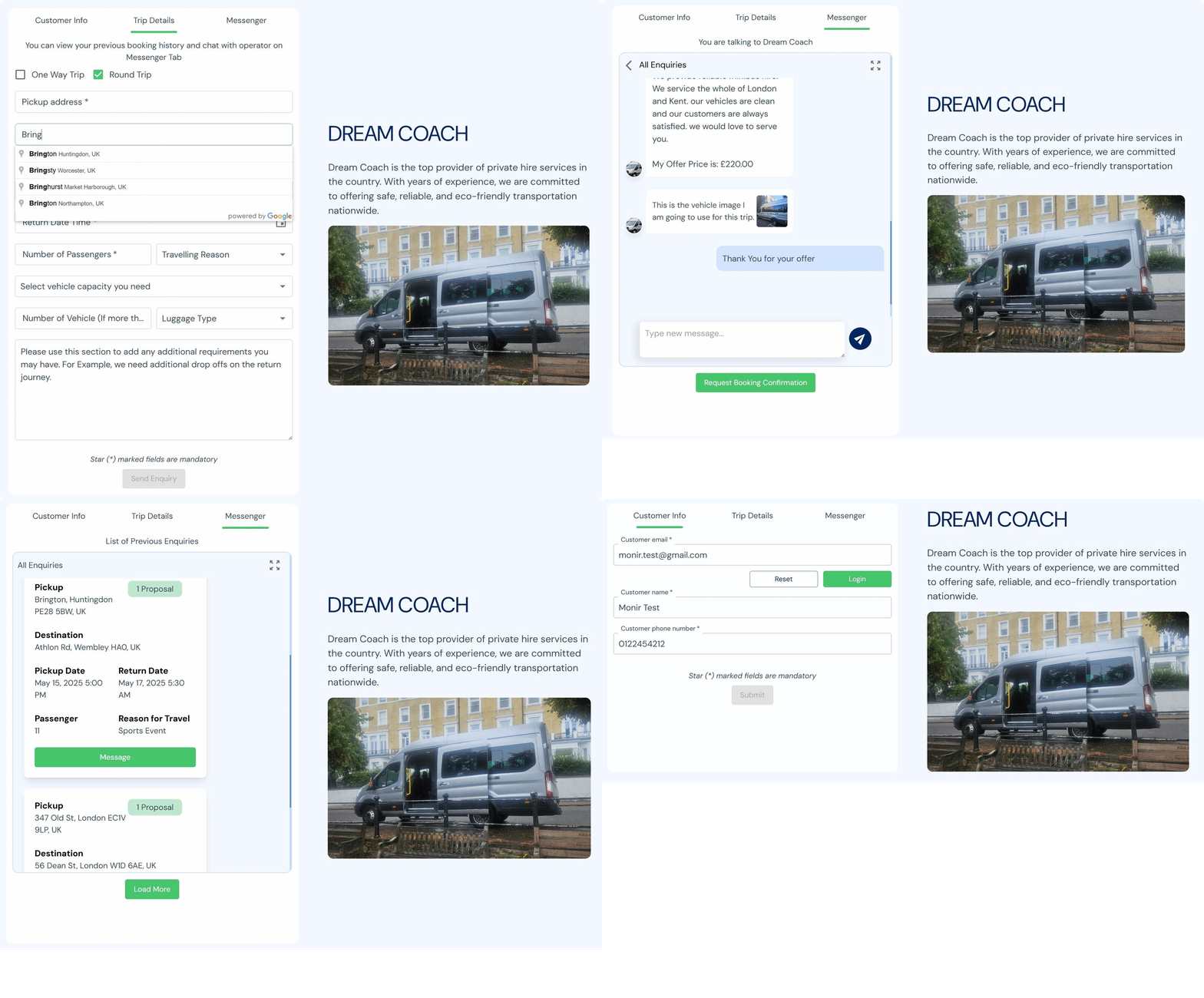
The Prebooked widget is designed to work everywhere on the web!
You can seamlessly integrate it into any platform, CMS, or custom website — no matter what you're building with.
- ⚛️ React.js
- ⚡ Next.js
- 🌐 WordPress
- ✨ Elementor
- 🧩 Wix
- 🎨 Webflow
- 🏛️ Squarespace
- 🛒 Shopify
- 🧬 Drupal
- 🧩 Joomla
- 👻 Ghost
- ✏️ Blogger
- 🏬 Magento
- 🖥️ Custom HTML/CSS/JS websites
- 🌍 Any CMS or Website Builder you use
To use the Prebooked widget you have to be a minibus or coach operator. You have to install our Mobile App available on both iOS and Android stores. Click the link and create profile with the given on screen instruction.
npm install prebookedyarn add prebookedNote: With just a single import, you're ready to use the Booking Form Component. The widget takes up the full width and height of its wrapper
<div>, so adjust the wrapper's dimensions to see the best design layout.
import { Prebooked } from 'prebooked';

const BookingForm = () => {
  return <Prebooked user_id='YOUR_FULLY_BOOKED_APP_USER_ID' />;
};

export default BookingForm;export interface PrebookedProps {
user_id: string; // (Mandatory) User ID obtained from Fully Booked Mobile App
primaryColor?: string; // Primary color used for the design
primaryColorLight?: string; // Primary Color Light Variant
secondaryColor?: string; // Secondary Color for The widget design
secondaryColorLight?: string; // Secondary Color Light Variant for Widget Design
warningColor?: string; // Warning color used for any error
grayColor?: string; // Gray Color used for borders/backgrounds
fontName?: string; // Font Must be Imported from Google in head tag and use the name convension for tailwind font name.
fontColor?: string; // Color of the Font
lightBgColor?: string; // Background color used in conversation window
lighterBgColor?: string; // Background color used in Conversation window
globalBgColor?: string; // Global background color to match the website
menuNames?: string[]; // Tabs name for the widget
tripInstruction?: string; // Instruction showed in booking form
tripNote?: string; // Trip note displayed in extra information textarea of booking form
borderColor?: string; // Color of the borders
conversationNote?: string; // Notes on conversation
inputPadding?: string; // Padding for Input Field if Big size needed can be increased
messengerEnquiryItemWidth?: string; // Enquiry Item width can be adjusted based on the given width of the widget
messengerDesktopHeight?: string; // Messenger Box Height on Desktop
messengerMobileHeight?: string; // Messenger Box Height on Mobile
messengerConversationHeight?: string; // Messenger Conversation Height
// Scrollbar Styles (Conversation Scrollbar Design)
scrollbarWidth?: string; // Width of the Scrollbar
scrollbarHeight?: string; // Height of the Moveable line
scrollbarTrackColor?: string; // Track Background Color
scrollbarThumbColor?: string; // Thumb Color of the Scrollbar
scrollbarThumbHoverColor?: string; // Thumb Color on Hover
scrollbarBorderRadius?: string; // Border Radis of scrollbar
}| Field For | Field ID | Default |
|---|---|---|
| Menu Names | menuNames |
['Customer Info', 'Trip Details', 'Messenger'] |
| Trip Instruction | tripInstruction |
You can view your previous booking history and chat with operator on Messenger Tab |
| Trip Note | tripNote |
Please use this section to add any additional requirements you may have. For Example, we need additional drop offs on the return journey. |
| Conversation Note | conversationNote |
To ensure timely responses and proper handling of your booking, kindly use this chat for all communication. |
| Font Name | fontName |
DM_Sans |
| Input Padding | inputPadding |
8.5px 10px |
| Messenger Enquiry Item Width | messengerEnquiryItemWidth |
340px |
| Messenger Desktop Height | messengerDesktopHeight |
750px |
| Messenger Mobile Height | messengerMobileHeight |
800x |
| Messenger Conversation Height | messengerConversationHeight |
600px |
| Scrollbar Width | scrollbarWidth |
3px |
| Scrollbar Height | scrollbarHeight |
3px |
| Scrollbar Border Radius | scrollbarBorderRadius |
3px |
| Color Name | Field ID | Preview | Hex Code |
|---|---|---|---|
| Primary Color | primaryColor |
 |
#47C56C |
| Primary Color Light | primaryColorLight |
 |
#BFE7D0 |
| Secondary Color | secondaryColor |
 |
#002661 |
| Secondary Color Light | secondaryColorLight |
 |
#AAB7CD |
| Warning Color | warningColor |
 |
#BE3927 |
| Gray Color | grayColor |
 |
#747474 |
| Font Color | fontColor |
 |
#324A59 |
| Light Background Color | lightBgColor |
 |
#D3E4FF |
| Lighter Background Color | lighterBgColor |
 |
#F3F8FF |
| Global Background Color | globalBgColor |
 |
#FFFFFF |
| Border Color | borderColor |
 |
#C4C4C4 |
| Scrollbar Track Color | scrollbarTrackColor |
 |
#9CBEF6 |
| Scrollbar Thumb Color | scrollbarThumbColor |
 |
#598AD7 |
| Scrollbar Thumb Hover Color | scrollbarThumbHoverColor |
|
#002661 |
Note: This widget is developed using react and tailwind. All the styles and fonts are included already. If you want to change the font name then you must have to include that font at the top of
index.cssof your project. The font name must follow the tailwind convensions. For example,DM Sansshould be written asDM_Sans. The way tailwind accept custom font namefont-['DM_Sans'].
To use Prebooked with WordPress or Elementor Website, You can install our Plugin named Prebooked. Click here to download the plugin zip file.
Here are the steps needs to make Prebooked works on your WordPress or Elementor Website.
👉 1. Extract the zip file, and Upload the plugin files to the /wp-content/plugins/prebooked directory, or install the plugin through the WordPress plugins screen directly by selecting the zip file. Or try searching this widget from WordPress Plugin Directory by typing the name Prebooked.
👉 2. Activate the plugin through the Plugins screen in WordPress
👉 3. Use the plugin settings to configure your booking form. You have to get approval of the domain and then use the user id from Fully Booked Mobile app. Ohterwise the plugin won't load.
👉 4. After installing and activating the widget, Use the shortcode [prebooked_widget] anywhere where you want to add the booking form.
Note: This booking form widget will look good with 50% width of the full webpage or 40% width even better for desktop view. So use two column layout to make it perfect. Make sure to enable auto update the plugin, or notice email alert to stay updated with latest version of the widget.
⚙️ 3. Using <script> Tag for All Other CMS (Squarespace, Wix, Webflow and more) and Pure HTML/JS Website
<div id="prebooked_widget"></div>

<script src="https://unpkg.com/prebooked@1.1.2/dist/umd/prebooked.umd.js
"></script>
<script>
  Prebooked.renderWidget('prebooked_widget', {
    user_id: 'YOUR_FULLY_BOOKED_APP_USER_ID',
  });
</script>
Please visit the npm package to see the latest version and update the prebooked@version code accordingly. If the currrent code is 1.5.0 then the umd bundle link will be, https://unpkg.com/prebooked@1.5.0/dist/umd/prebooked.umd.js. Make sure to use the latest version otherwise some features may not available.
Note: This booking form widget script includes all styles fonts and designs along with it. you just have to use the umd bundle and the div id along with the function. All the props available is given above. No need to add any additional css or fonts. If you change the font name make sure the new font is loaded on head tag of your html. Otherwise the font will not work. If you are using Google Maps API script for other purposes on your website already and see any issues installing widget with places auto complete please contact admin support. Before contacting admin support you just make sure your existing API key has the
Places APIandMaps JavaScript APIfeature enabled or not.
-
Easy integration with zero code (script-based) or full control (React component)
-
Fully customizable via props
-
Lightweight and performance-optimized
-
Works perfectly with both static and dynamic websites
-
Customer Account Creation: Allow customers to quickly create accounts and manage their own bookings and enquiries directly from your website.
-
Instant Price Sending: Send tailored quotes and pricing information in real-time as soon as an enquiry comes in.
-
Vehicle Showcase: Upload and display vehicle photos and details to help customers choose the perfect option.
-
Live Chat: Chat instantly with potential customers to answer questions, build trust, and close deals faster.
-
Showcase Reviews and Previous Work: Display testimonials and completed trips to build credibility and showcase your experience.
-
Booking Confirmations & Invoices: Confirm trips and send official booking confirmations and invoices directly through the widget — without needing extra apps or emails.
-
Fully Integrated with Fully Booked App: All enquiries, bookings, chats, and payments are synced and manageable from the Fully Booked operator app.
-
Faster response times = more bookings.
-
A smoother, more professional customer journey.
-
Increased trust and engagement through live interaction.
-
Fewer missed leads with instant enquiry notifications.
-
A fully branded, seamless experience — no third-party redirects or clunky forms.
-
Bring your website to life with Prebook — and turn visitors into confirmed customers effortlessly.
📚 To read more, visit Fully Booked Documentation
Note: This repository does not sharing the original codebase, as it is not open source projecct. The code is copywrited by Fully Booked App Ltd.