
A C# Windows Forms application for browsing PLC symbols and reading or writing values through Beckhoff TwinCAT ADS.
This industrial software project connects a desktop interface to a PLC runtime: discover symbols, inspect their metadata, and work with their values from one window.
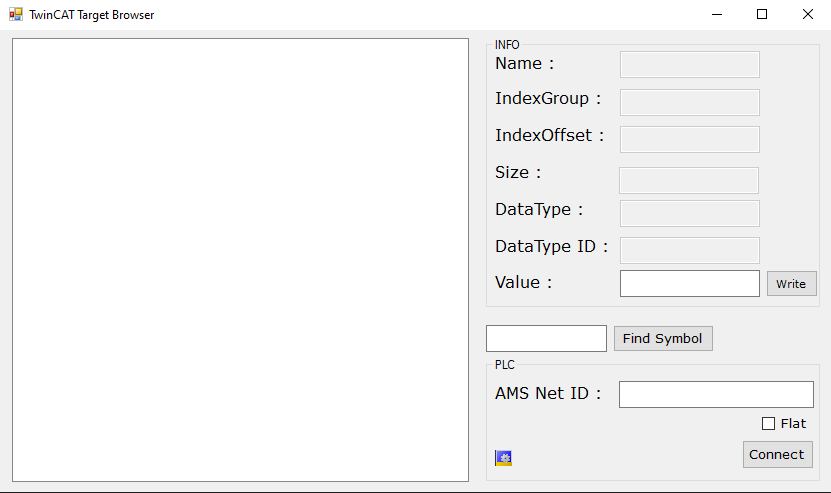
- Connect to a target by AMS Net ID using ADS port
851. - Browse symbols under
MAINandGVLin a hierarchical or flat view. - Search by symbol-name segment or look up a symbol directly.
- Inspect name, data type, byte size, index group, and index offset.
- Read symbol values and write values back to the selected symbol, including Boolean values.
| Component | Implementation |
|---|---|
| Language and UI | C# and Windows Forms |
| Target framework | .NET Framework 4.6.1 |
| PLC communication | TwinCAT.Ads assembly, referenced as version 4.3.20.0 |
| Target runtime | TwinCAT 3 PLC Runtime 1, ADS port 851 |
Requirements:
- Windows with Visual Studio and the .NET desktop development tools.
- The .NET Framework 4.6.1 targeting pack required by the existing project.
- A compatible TwinCAT ADS .NET library installed locally.
- A reachable TwinCAT PLC runtime and a configured ADS route.
git clone https://github.com/umutkonmus/BeckhoffTargetBrowser.git
cd BeckhoffTargetBrowser- Open
TargetBrowser.slnin Visual Studio. - Check the
TwinCAT.Adsreference inTargetBrowser/TargetBrowser.csproj. Its currentHintPathis relative to the original development machine; update it to your installedTwinCAT.Ads.dll. - Build the solution and run
TargetBrowser. A Release build producesTargetBrowser/bin/Release/TargetBrowser.exe.
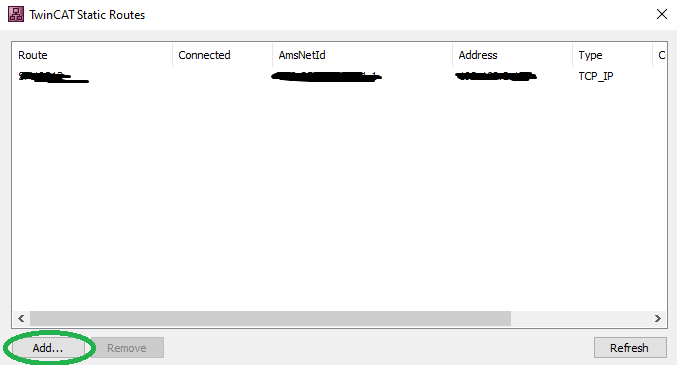
- Add the target route using the TwinCAT route configuration tool.
- Start the application and enter the target AMS Net ID. Leaving it empty attempts a connection to the local TwinCAT system.
- Connect and load symbols. Choose the flat or hierarchical view.
- Select a symbol to inspect its metadata and current value, or use the symbol lookup controls.
- If needed, enter a compatible value and use the write control.
The write control changes the PLC value. Use a test runtime or an explicitly authorized target when exploring the application.
- Form1.cs: ADS connection, symbol traversal, lookup, value reads, and writes.
- Form1.Designer.cs: Windows Forms controls and event bindings.
- TargetBrowser.csproj: framework target and ADS assembly reference.
The integration uses TcAdsClient, TcAdsSymbolInfoLoader, ReadSymbol, and WriteSymbol.
This is a focused desktop integration example. The current source uses a fixed ADS port and filters the initial symbol list to MAIN and GVL. It does not implement a configurable multi-runtime connection manager or a durable monitoring service.
The project retains its original .NET Framework and ADS API dependencies. Building on a new machine requires resolving the local assembly reference; compatibility with newer ADS API generations has not been verified. There is no automated test suite in this repository.
- ADS assembly missing: correct the
TwinCAT.Adsreference path before building. - Connection fails: check the AMS Net ID, ADS route, network connectivity, and target runtime port.
- Symbol list is empty: confirm the target exposes symbols under
MAINorGVL. - Read or write fails: check the selected symbol, supported data type, and supplied value.