
🇬🇧 English · 🇫🇷 Français · 🇮🇹 Italiano · 🇩🇪 Deutsch · 🇪🇸 Español · 🇷🇺 Русский · 🇨🇳 中文 · 🇯🇵 日本語 · 🇬🇷 Ελληνικά · 🇷🇴 Română · 🇸🇪 Svenska · 🇸🇦 العربية · 🇮🇷 فارسی


Nimbus Backup is an open-source (GPL-3.0) Windows backup client for Proxmox Backup Server (PBS). A modern GUI to back up Windows servers and workstations to PBS — VSS-consistent snapshots, scheduled jobs, file and disk modes, snapshot browsing and restore, multi-PBS support, and a Windows service — plus command-line tools for directory and full-machine backups. Looking for offsite, immutable PBS storage without self-hosting? See the managed service below.
Nimbus Backup is the RDEM Systems build of Proxmox Backup Client GO: the GUI we developed has been merged upstream, and both projects now share the same code base (see Relationship with upstream).
📖 Full documentation, installation guide and PBS hosting: nimbus.rdem-systems.com
🔏 Official builds only from us. Nimbus Backup releases are published only on github.com/rdemsystems/NimbusBackupClient and nimbus.rdem-systems.com. Since 0.4.1, every official Windows binary (GUI, service, MSI) is code-signed by RDEM SYSTEMS: right-click the file → Properties → Digital Signatures, or run
Get-AuthenticodeSignature. Forks of this GPL project exist that still carry the Nimbus Backup name and RDEM Systems as author; their builds are not made, signed or supported by RDEM Systems.
Each release ships:
NimbusBackup.msi— installer (GUI + Windows service), recommended for productionNimbusBackup.exe— standalone GUInimbus-backup-cli-<version>-windows.zip/-linux.tar.gz/-macos.tar.gz— command-line toolsSHA256SUMS.txt— checksums
⚠️ Windows says "virus detected" (e.g.Trojan:Win32/Sabsik.FL.A!ml) or shows a SmartScreen warning? This is a known false positive for Go/Wails applications — it is not a virus. The!mlsuffix means it comes from a machine-learning model that flags low-prevalence executables (and, up to 0.4.0, unsigned ones). Read why this happens and how to verify the download.
Every release ships SHA-256 checksums and a signed build-provenance attestation (cryptographic proof the binary was produced by this repo's CI, from a specific commit):
Get-FileHash .\NimbusBackup.msi -Algorithm SHA256   # compare against SHA256SUMS.txt
gh attestation verify .\NimbusBackup.msi --repo rdemsystems/NimbusBackupClient
VirusTotal. Each release's notes link the VirusTotal report of that build's installer (published only when the scan is clean). Earlier reports, 0 detections: 0.2.108 · 0.2.107 · 0.2.106
🔏 Code signing: since 0.4.1,
NimbusBackup.exe, its service andNimbusBackup.msiare Authenticode-signed by RDEM SYSTEMS (Azure Artifact Signing); Properties → Digital Signatures shows the publisher. SmartScreen may still warn on a new release until its reputation is established: check that the publisher is RDEM SYSTEMS, then More info → Run anyway. The command-line tools are not signed yet; the build-provenance attestation and checksums above cover every file.
The Nimbus Backup GUI is Windows-only (the CLI tools also build for Linux and macOS). For file-level backups on Linux, use Proxmox's own proxmox-backup-client — we package it for the distributions Proxmox doesn't cover:
👉 rdemsystems/unofficial-proxmox-backup-client — signed package repositories for Debian/Ubuntu, Fedora/RHEL/Rocky/AlmaLinux, Arch and Alpine (amd64 & arm64). Proxmox's official static binary, repackaged unchanged — not patched, not recompiled.
Don't want to self-host Proxmox Backup Server? Use our fully managed, offsite immutable PBS datastores: 👉 Configure your backup & see pricing
- ✅ From €12/TB/month
- ✅ 1 TB free trial
- ✅ A ready-made offsite target for your PBS — air-gapped, immutable datastores
- ✅ NimbusBackup — Managed PBS hosting in France
- Complete Proxmox Backup guide — PBS deployment best practices (🇬🇧 EN)
- Back up Windows with Proxmox Backup Server — Windows-specific deployment guide (🇬🇧 EN)
- PBS vs Veeam — Proxmox Backup Server comparison (🇬🇧 EN)
- In this repo: multi-PBS user guide · unattended deployment examples · bare-metal restore with Clonezilla · changelog
- 🌍 Multi-language — English, French, Italian, German, Polish and Brazilian Portuguese interface
- User-friendly configuration with connection testing (API token or username/password)
- Real-time backup progress with speed and ETA, cancel at any time, a Running tab
- VSS (Volume Shadow Copy) for consistent backups: one snapshot for a whole multi-folder backup, one shadow copy per volume
- Multi-folder backup, file and disk (full machine) modes; folders can run in parallel (recommended: CPUs / 4)
- Disk backups restore in Proxmox VE as a VM matching the machine (CPUs, RAM, firmware, NICs with their MACs, dedicated VM ID)
- Snapshot browsing, file search (wildcards) and restore, NTFS ACLs included
- Multi-PBS server support with a PBS server per job, certificate fingerprint pinning (TOFU)
- 🔒 Client-side encryption (AES-256-GCM), key files compatible with
proxmox-backup-clientand Proxmox VE - Windows service mode + scheduled backups, backup history with one-click rerun
- Debug logging for troubleshooting
proxmoxbackup-directory— directory (PXAR) backups with deduplication, stream backups (-backupstream, e.g. amysqldumppipe), exclusions (-exclude "*.tmp", repeatable, or-exclude-from file;"exclude"in the JSON config), several directories at once (-parallel N, recommended: CPUs / 4), e-mail notifications, JSON config fileproxmoxbackup-machine— full live machine backups as a bootable disk image (FIDX): VSS on Windows, incremental, parallel hashingproxmoxbackup-nbd— NBD server to mount a disk backup on Linux (file-level restore, bare-metal restore from a patched Clonezilla live ISO)
 Multi-PBS server management with status indicators
 Easy server configuration with connection testing
 Real-time backup progress with ETA and speed
When backing up an entire drive (e.g. D:\), Nimbus Backup automatically excludes:
System folders: System Volume Information (VSS storage, can be 100+ GB), $RECYCLE.BIN, Recovery.
System files: pagefile.sys, hiberfil.sys, swapfile.sys.
Why it matters: a drive may report 1.03 TB used while the real files are ~141 GB. Without exclusions the backup would include VSS snapshots (wasted space and time); with them the backup size matches the real data.
Recommendation: use file mode (default) with auto-exclusions for file-level backups; use disk mode in a separate job for bare-metal restore (includes everything).
- Input validation and credential sanitization (secrets redacted from logs)
- Path-traversal prevention
- Retry logic with exponential backoff
- CI gates on every build: tests,
golangci-lint,gosec,go mod tidy, and an end-to-end suite against a real PBS (restores with the officialproxmox-backup-client, PBS verify)
Backups can be encrypted on the client before they leave the machine, with
the same scheme as the official proxmox-backup-client (AES-256-GCM, keyed chunk
digests). The PBS server only stores opaque data and never sees
the key — useful on a shared or managed PBS.
The encryption was developed upstream by Tiziano Bacocco (tizbac/proxmoxbackupclient_go); the paper key, the QR code export and the key import are Nimbus Backup additions.
- GUI: PBS Configuration → Edit → Encryption key file — create a key file or pick an
existing one (from
proxmox-backup-client key create --kdf noneor a PVE storage); its fingerprint is shown. Then keep a copy off the machine: Print (paper key) saves a printable page with the key and its QR code (the format ofproxmox-backup-client key paperkey), optionally passphrase-protected. Import a key from text or a QR code turns a scanned QR code or a paper key back into a key file. The GUI only uses unprotected key files: importing a passphrase-protected key unlocks it and saves the new key file without a passphrase — keep that file as safe as the key itself. - CLI:
-keyfile path/to/key.json(or"keyfile"in the JSON config); a passphrase-protected key takes-keyfile-passphrase, or prompts for it. - Bare-metal restore: the patched Clonezilla ISO restores encrypted disk backups too (key from a USB stick, with its passphrase if any) — see PATCH-CLONEZILLA.md.
- Compatible with
proxmox-backup-client, verified in CI on every build against a real PBS: a folder encrypted by Nimbus Backup with a key created byproxmox-backup-clientis restored by the official client with the same key (and refused without it), and an encrypted disk backup made by the official client is read back by Nimbus Backup. Proxmox VE uses the same key files.
⚠️ Without the key, encrypted backups are unrecoverable. The first encrypted backup uploads everything again (no deduplication with unencrypted backups). Backup IDs, archive names and sizes stay visible to the server; file contents, file names and the catalog are encrypted.
Nimbus Backup installs and configures entirely from files — no interactive setup.
Two paths, both covered by ready-to-use examples in
examples/automation/:
- Command line — one JSON file per host carries the whole backup
(
proxmoxbackup-directory.exe --config file.json); schedule via the Windows Task Scheduler. Reliable exit codes (0OK,1fatal,2locked,3partial) so your orchestrator detects failures. Best for pure infrastructure-as-code. - GUI/service (MSI) — a single
config.jsoncarries the PBS connection, backup settings and the schedule (scheduled_jobs). Push the file, restart theNimbusBackupservice: jobs are reconciled idempotently andnextRunis computed for you. No timestamp math in your Jinja2 template.
The service reads its configuration from C:\ProgramData\ProxmoxBackupClient\
(since 0.4.0; see Upgrading).
📖 Full walkthrough: Automate Windows backup to PBS with Ansible.
- Download
NimbusBackup.msi(or the standaloneNimbusBackup.exe) from the releases - Install it / run it with administrator privileges (required for VSS)
- Configure your PBS connection and test it
- Select directories to back up
- Start the backup — or schedule it
The client only needs the DatastoreBackup role on the target datastore — no admin account:
- In the PBS UI, create a user (e.g.
nimbus@pbs) and an API token for it (e.g.nimbus@pbs!laptop01). - In Datastore → Permissions (or Configuration → Access Control → Permissions), grant
DatastoreBackupon/datastore/<name>— or on/datastore/<name>/<namespace>if you back up into a namespace. - Privilege-separated token ("Privilege Separation" checked, the default): grant the role to the token itself (
nimbus@pbs!laptop01), not only to the user — the effective rights are the intersection of both. This is the most common cause of "permission denied".
DatastoreBackup lets the client create backups and list and restore its own backup groups. Deleting or pruning snapshots needs DatastorePowerUser.
Installing 0.4.0 or later over an existing install upgrades it in place (same MSI identity, same NimbusBackup service). The data folder moves from C:\ProgramData\NimbusBackup to the shared C:\ProgramData\ProxmoxBackupClient: on first start, your configuration, scheduled jobs, history and API token are copied over once (existing files are never overwritten). The old folder is kept, marked with COPIED-TO-ProxmoxBackupClient.txt, so a downgrade still works. Snapshots taken by older versions can still be restored to their original location.
- Windows 10/11 or Windows Server (64-bit)
- Administrator rights (for VSS snapshots)
- Network access to a Proxmox Backup Server
- Go 1.25 or later
- Node.js 20 or later
- Wails CLI:
go install github.com/wailsapp/wails/v2/cmd/wails@v2.13.0(the version CI uses)
cd gui
npm install --prefix frontend
wails build      # or: wails dev  (hot reload)
Or build everything (CLI + GUI + service) with the Makefile: make install-deps && make (see make help). Windows toolchain and Docker cross-build: BUILD.md.
The brand is picked from the executable name: NimbusBackup.exe runs as Nimbus Backup, any other name as the neutral "Proxmox Backup Client" (gui/brand.go).
Nimbus Backup started as a fork of tizbac/proxmoxbackupclient_go (Proxmox Backup Client in Go, by Tiziano Bacocco, GPLv3), to which we added the Windows GUI, the service, scheduling, multi-PBS and restore. In September 2026, upstream merged that GUI back and made it brand-neutral ("Proxmox Backup Client GUI"). In October 2026 (0.4.1), Nimbus Backup was rebuilt on upstream's current code, adopting upstream's client-side encryption: the two projects share the same code base.
Nimbus Backup 0.4.1 is built on upstream's master at commit 3c1b989 (9 October 2026). No upstream release has this code yet: upstream's latest release, v1.1.3 (May 2026), predates the GUI merge.
What this repository adds on top of upstream is a documented patch series (patches/), most of it offered upstream:
- Features: paper key and key import (QR code), parallel folder backups, one VSS snapshot per multi-folder backup, CLI exclusions, a Proxmox VE VM config generated from the real machine.
- Fixes not yet merged upstream (restore of
proxmox-backup-client's compressed encrypted backups, the PBS server chosen for a service backup, PBS refusal reasons, restore with username/password servers, window maximise…) — sent upstream as they are merged. - The Nimbus Backup identity —
NimbusBackup.exe/.msi, theNimbusBackupservice, and the MSI upgrade code of existing installs, so they keep upgrading in place. - Upgrade path from Nimbus Backup ≤ 0.3.0 (data-folder migration, legacy snapshot metadata).
- Release pipeline — build-provenance attestation, checksums, VirusTotal reports.
We re-merge upstream regularly; upstream's own releases are published at tizbac/proxmoxbackupclient_go.
Thanks to everyone who helped Nimbus Backup:
- Tácio Andrade (MultiTI) — Brazilian Portuguese translation (#16).
The code shared with upstream also comes from its contributors. Contributions are welcome: see the open issues, or open a pull request against master.
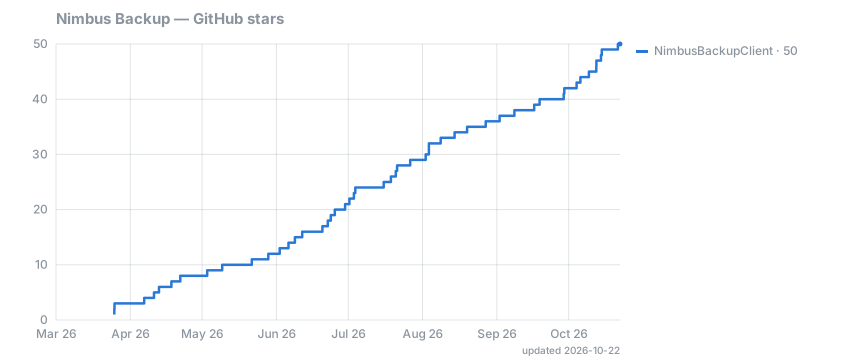
Redrawn every day · daily log (CSV). If Nimbus Backup is useful to you, a star helps others find it.
This software is provided as-is. While we strive for reliability, we take no responsibility for any data loss or damage. Always test your backups and verify restoration before relying on them in production.
This project is not affiliated with Proxmox Server Solutions GmbH. "Proxmox" and related names are the property of their respective owners and are used here only to state compatibility.
GPLv3 — see the LICENSE file.
NimbusBackupClient is developed and maintained by RDEM Systems, a French infrastructure provider specialized in Proxmox VE/PBS managed services and NTP/NTS infrastructure. We operate 16 public NTS servers (live status; 11 of them are listed in the community reference), and provide fully managed PBS hosting for users who don't want to self-host. We also maintain unofficial-proxmox-backup-client, signed proxmox-backup-client packages for Linux distributions Proxmox doesn't officially support.
© 2024-2026 RDEM Systems and Proxmox Backup Client GO contributors.