


UTFool /pron. as beautiful/ is a Unicode-based object-oriented
programming language designed for trans-compilation to any other
object-oriented source (e.g. Java, JavaScript or Python).
UTFool is highly flexible on the lexical level. Keywords, delimiters and operators are replaceable by any unique sequence of symbols. Besides of the usual forms of comments, the UTFool source can contain expletives and aliases in order to increase readability. UTFool does support language-specific solutions as well, by allowing embedded code fragments from the target language.
Defining your own vocabulary, you can design your own programming dialect with UTFool. In order to easily understand other sources, you can translate them to your dialect. Developer teams can use their common dialect, as a coding convention. With UTFool you can be concise or eloquent, according to your style.
Notice the moderate vocabulary of the grammar.
The aim is to give you the widest room for creating your own terms.
You can define several aliases for the same keyword in order to
increase the expressiveness of your code.
You can even override a keyword and make it free to use as a name,
if you intend to trans-compile your script to a language
where this name is used for a function or class.
Instead of iterate you can write e.g.
repeat, loop, for, 🔁 or ∀ within the very same project.
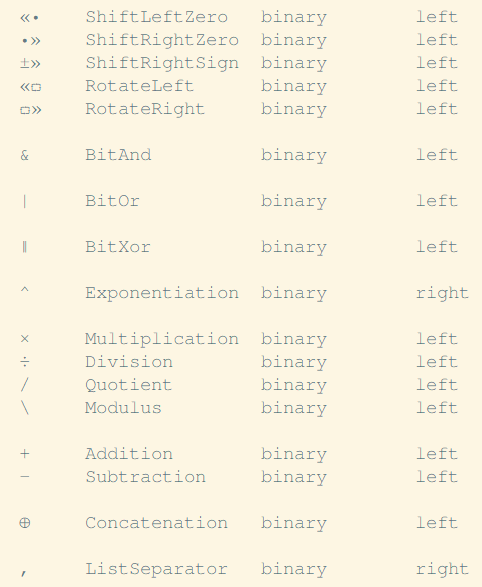
Have you even wondered why bitwise operators have lower precedence than relational operators, or why bit-shift is weaker than addition? This heritage from C can be overridden now in UTFool. UTFool offers you the freedom to arbitrarily redefine the precedence of binary operators.
An example of a reasonable new order:
|
/ sample: part of the operator precedence file /
|
|---|
UTFool source code gets created in a UTF-8 encoded text file. Due to the extended usage of the Unicode character set, it is advisable to setup a font with great coverage of the Basic or even the Supplementary Multilingual Plane. GNU FreeMono is a good choice.
Beyond the font selection, another common need is the easy typing of the different Unicode symbols on any keyboard. AutoHotkey offers the simplest solution by smart macros and handy shortcuts, making you able to insert any Unicode sequence on a keystroke or two.
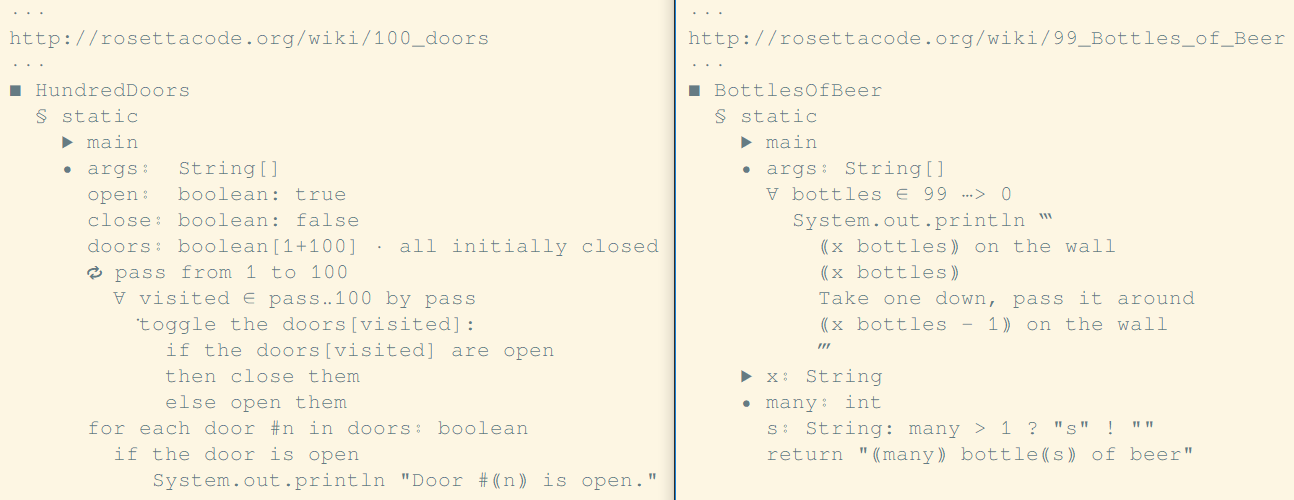
Regarding the text editors you find a wide selection on the web. You can use Atom on any platform, or the lightweight Notepad2 on Windows. They both provide you the aesthetic appearance of UTFool sources. Have a taste of it here, and see more on RosettaCode.org:
You find the first release of the Java trans-compiler in the Java.jar executable. The transpilation requires the TSV files next to the JAR file. TSV files contain the specification for redefinable lexical elements. Their current content is aligned to the sources located in JavaCompiler and RosettaCode folders.
The easiest was of trans-compiling any source file is just dropping the file into a subdirectory next to the translator (the same way as JavaCompiler or RosettaCode), and running Translate.bat on a double-click.
For further switches run java -jar Java.jar --help