






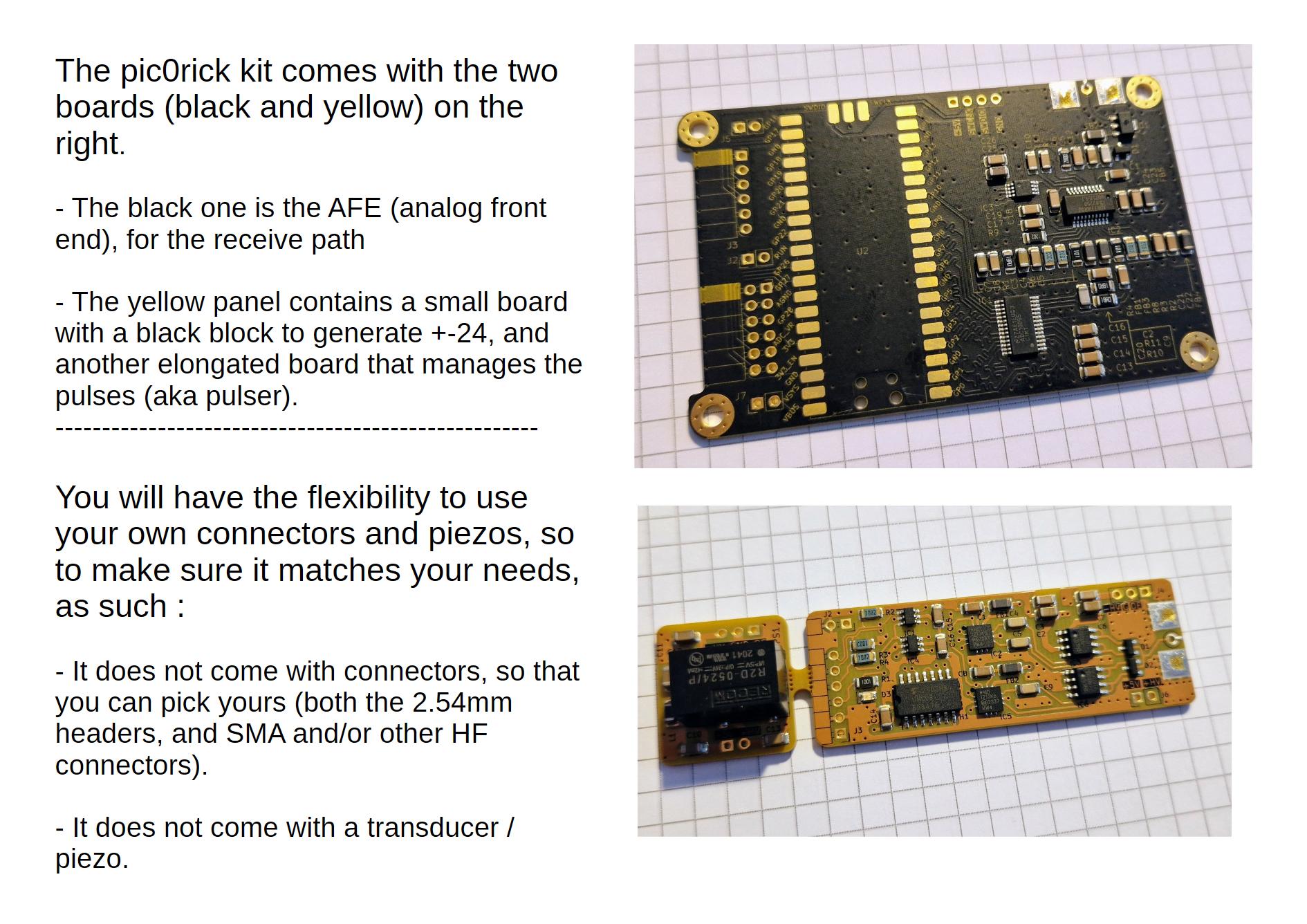
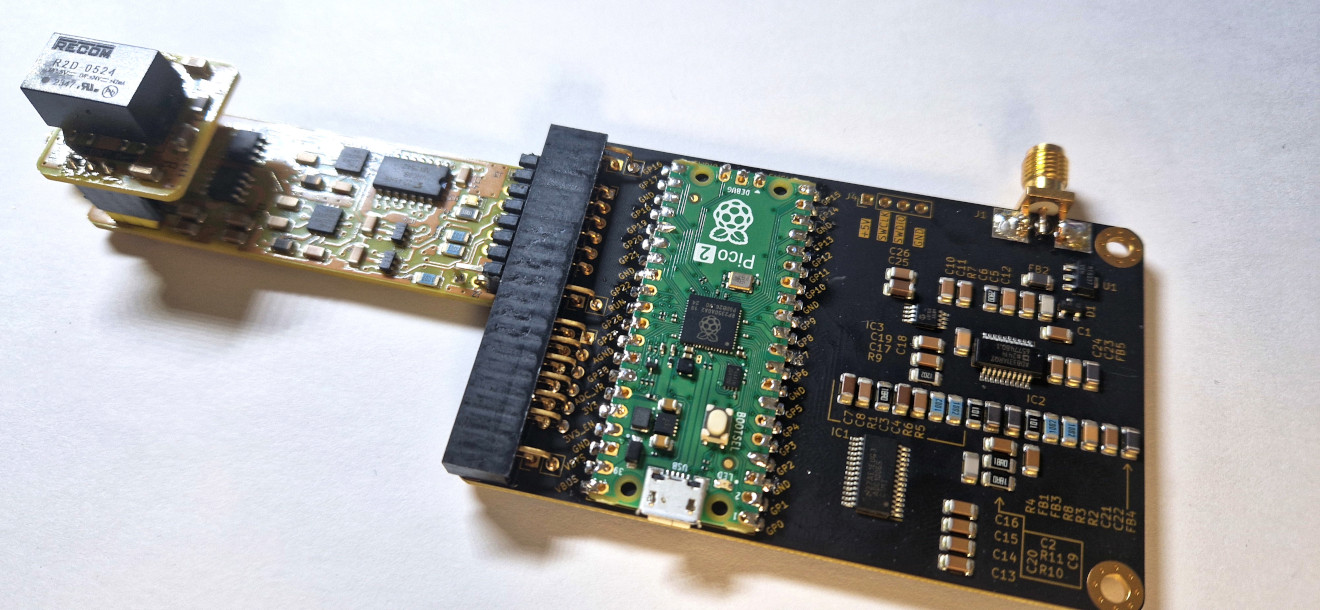
The pic0rick is a very central board for an ultrasound pulse-echo system. It is composed of a main board, based on the RP2040 (or RP2350) and easy to solder SMD, to which a single, and a double PMOD connector can connect to addons:
- The main board is equipped with a 60Msps, 10bit ADC. Front end is protected against high-voltage pulses, and features a proven time-gain compensation system consisting in a AD8331 (7.5 dB to 55.5dB) with a controlling (MCP4812) SPI DAC.
- The single PMOD connector can plug to the Pulser board, which can be equipped with a simple +-25V generation board. Together, they generate the pulse on behalf of the pic0rick main board. The setup can generate three-level pulses ( with a pair of MD1210 + TC6320 ).
- The double PMOD connector can be used for virtually anything. The current code allows for a VGA to be connected, which displays acquisitions from the board.
The current system uses both PIOs (one for the acquisition, the other for the VGA) which leaves the other resources of the rp2040 relatively free to use for your own priorities.
Published documents include:
- KiCad design files for the main board
- KiCad design files for the pulser + hv boards
- KiCad design files for the MUX
- KiCad design files for other boards =)
- rp2040/rp2350 firmware for the microcontroller.
I know the PMODs aren't strictly speaking PMODs, I needed to have 5V facility on the header =)
And if you want to discuss the project - meet us on our chat.
| Path | Contents |
|---|---|
firmware/ |
The unified RP2040/RP2350 firmware (CMake project adc-pulse). One source tree with -DMUX / -DDSP build options. hw/ = shared acquisition + pulser + spi1 DAC; dsp/ = RP2350 DSP (CMSIS-DSP Hilbert envelope + binary protocol); max/ = MAX14866 mux. version.yaml + CHANGELOG.md track the firmware version; build.sh builds all 6 variants into dist/. |
python/ |
Host stack (pic0rick package): device.py (serial driver), dsp.py (binary frame protocol), ndt_acquisition.py (echo/thickness analysis + HDF5), and the example_*.ipynb notebooks. |
hardware/ |
KiCad design files and build.sh fabrication outputs — main board (adc/), pulser + HV (pulser/), MUX (mux/), VGA (vga/), PSRAM (psram/). |
docs/ |
Documentation: dsp_output_formats.md, dsp_test_guide.md, images/, data/, fw_history/ (maintainer-curated reference .uf2 baselines), and claude/ (cross-session engineering notes). |
.github/workflows/ |
CI: builds all firmware variants and publishes a release on push to main. |
- pic0rick main board + pulser board + HV board (assembled)
- USB-C cable
- Python 3.9+
- A piezoelectric transducer (e.g. 5 MHz single-element contact probe)
The firmware is a single source tree (firmware/) with build options:
-DMUX(default on) — MAX14866 HV multiplexer support.-DDSP(RP2350/pico2only) — on-board Hilbert-envelope DSP + binary protocol (see DSP build below).
cd firmware && ./build.sh          # builds all 6 variants into firmware/dist/:
#   rp2040-{mux,nomux}, rp2350-{mux,nomux}, rp2350-{mux,nomux}-dsp
Prebuilt firmware/rp2040.uf2 / firmware/rp2350.uf2 are the default (mux,
non-DSP) builds. CI publishes all variants as release assets.
- Hold the BOOTSEL button on the RP2040/RP2350 while connecting USB — the board mounts as a USB mass-storage device. (After the first flash you can instead send the
reboot-dfucommand over serial to re-enter the bootloader without the button.) - Copy the compiled
.uf2file into the drive. The board reboots automatically. - Verify: open a serial terminal at 115,200 baud. You should see the
run>prompt (stdio build). Sendversionto confirm the firmware version, board and options.
pip install pyserial numpy h5py scipy matplotlibClone this repo and add python/ to your path, or run notebooks from the python/ directory.
The examples below target the DSP build (-DDSP, RP2350) — the recommended
firmware, which streams CRC-checked binary frames. For the plain stdio build
see Serial commands.
from pic0rick.device import Pic0rick
from pic0rick.ndt_acquisition import UltrasonicAcquisition

probe = Pic0rick()           # auto-detects the USB serial port
print(probe.version()['raw'])

# Set TGC gain (raw DAC value 0–1023; higher = more gain)
probe.set_gain(300)

# Configure and arm the pulser so the capture transmits
probe.configure_pulse(negative_ns=200, damp_ns=2000, positive_ns=200,
                      order="pos-first")
probe.arm_pulser()

frame = probe.read_raw()     # 8000-sample raw ADC frame (CRC-checked)
signal = frame.samples()     # numpy uint16, 0..1023
# envelope = probe.read_fft().samples()   # 4096-sample Hilbert envelope
probe.disarm_pulser()
On the stdio (non-DSP) build instead use
probe.dac(gain),probe.pulse_adc_trigger(pon, poff, damp),probe.read().
Or use the higher-level acquisition wrapper (drives the DSP build for you):
acq = UltrasonicAcquisition.from_probe(
    Fech=60e6,
    pon=70,        # pulse-on duration [ns]
    poff=70,       # pulse-off duration [ns]
    damp=6000,     # damping duration [ns]
    gain=300,      # raw DAC value (0–1023)
    target="1018 steel 25 mm",
    h5_path="my_scan.h5",
)
acq.plot()The stdio build exposes a text protocol at 115,200 baud (USB CDC), with a run>
prompt:
| Command | Arguments | Description |
|---|---|---|
start acq <pon> <poff> <damp> |
nanoseconds | Fire pulse, DMA-capture 8000 samples |
write dac <N> |
0–1023 | Set TGC gain (MCP4812 10-bit DAC) |
read |
— | Return last captured buffer (hex, comma-separated 10-bit values) |
write mux <hex> |
hex word | Write the MAX14866 shift register (MUX builds) |
set mux / clear mux |
— | Pulse the MAX14866 SET / CLR line (MUX builds) |
version |
— | Print firmware version, board/chip, options, git hash, release URL |
reboot-dfu |
— | Reboot into the USB bootloader (BOOTSEL) for reflashing |
The DSP build uses different commands (
dac write,read_raw,read_fft, …) and a binary protocol — see DSP build.
pon / poff / damp — expressed in nanoseconds from Python. The firmware converts them to 125 MHz clock cycles internally (divides by 8).
gain — raw 10-bit DAC value (0–1023) controlling the VGAIN pin of the AD8331 TGC amplifier (7.5 dB to 55.5 dB range). The example notebook uses values in the 0–500 range.
Building with -DDSP=ON (RP2350/pico2) adds an on-board DSP path: a float32
CMSIS-DSP Hilbert envelope. Instead of the text REPL it speaks a binary framed
protocol (64-byte header + CRC32) with two capture modes:
read_raw— 8000 raw ADC samples (no FFT).read_fft— 4096-sample Hilbert envelope.
plus acq raw|envelope|alaw, stream start|stop, dsp scale|selftest,
dac write <0..1023>, pulse config <neg_ns> <damp_ns> <pos_ns> <neg-first|pos-first>,
pulser arm|disarm, status, help, version, reboot-dfu.
Drive it from Python with pic0rick.dsp and these Pic0rick methods:
version(), status(), set_gain(n), configure_pulse(...),
arm_pulser()/disarm_pulser(), read_raw(), read_fft(), capture(payload).
The frame and status formats are documented in
docs/dsp_output_formats.md; see
docs/dsp_test_guide.md and the
python/example_dsp.ipynb / python/example_simple.ipynb notebooks.
Transducer
   │
   ├──► TX path: PIO pulser GPIO11/12 (P+/P-) + GPIO16/17 (PDAMP/OE) → MD1213 + TC6320 → ±25V three-level pulse
   │
   └──► RX path: T/R protection → AD8331 TGC (gain set by MCP4812 DAC)
                  → 60 Msps 10-bit ADC (PIO + DMA, 8000 samples/acquisition)
                  → USB CDC → Python
The ADC samples are 10-bit unsigned (0–1023, mid-scale = 512). The ndt_acquisition wrapper normalises them to float32 in the range ≈ [−1, 1]:
signal = (adc_count - 512) / 512.0

Beware. This is not a standard development, more of a proof of concept. It lives on a separate branch here.
Only using the pico to setup gain and trigger acquisitions. The screen displays the gain value (0 to 9, with a 100x divider). Displays raw buffer of acquisition.

Within a game card footprint


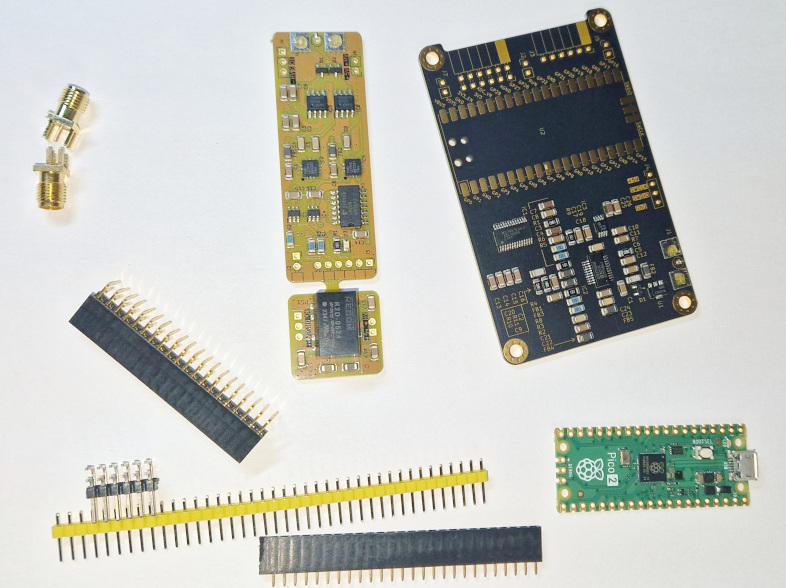
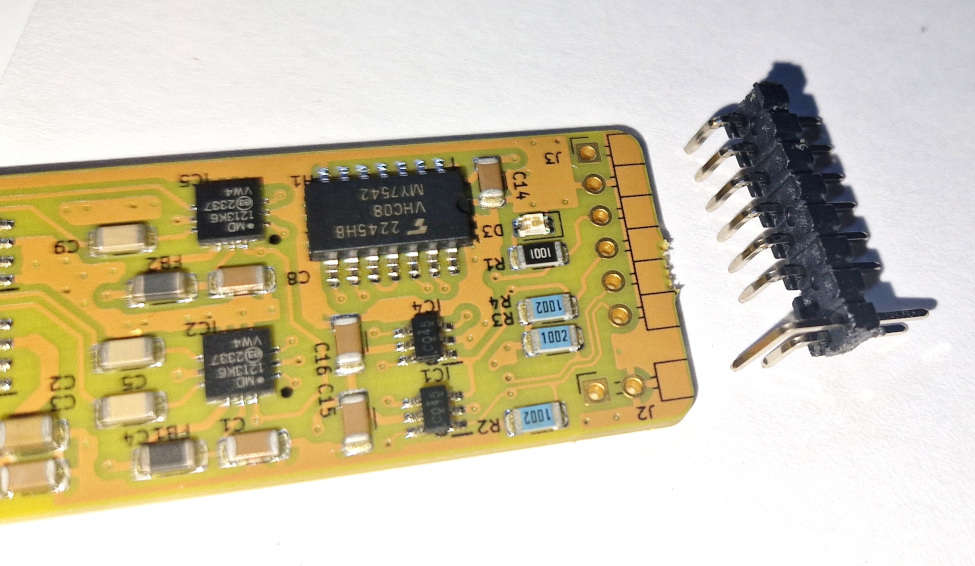
You will need to get a few headers, a raspberry pico, and SMA connectors
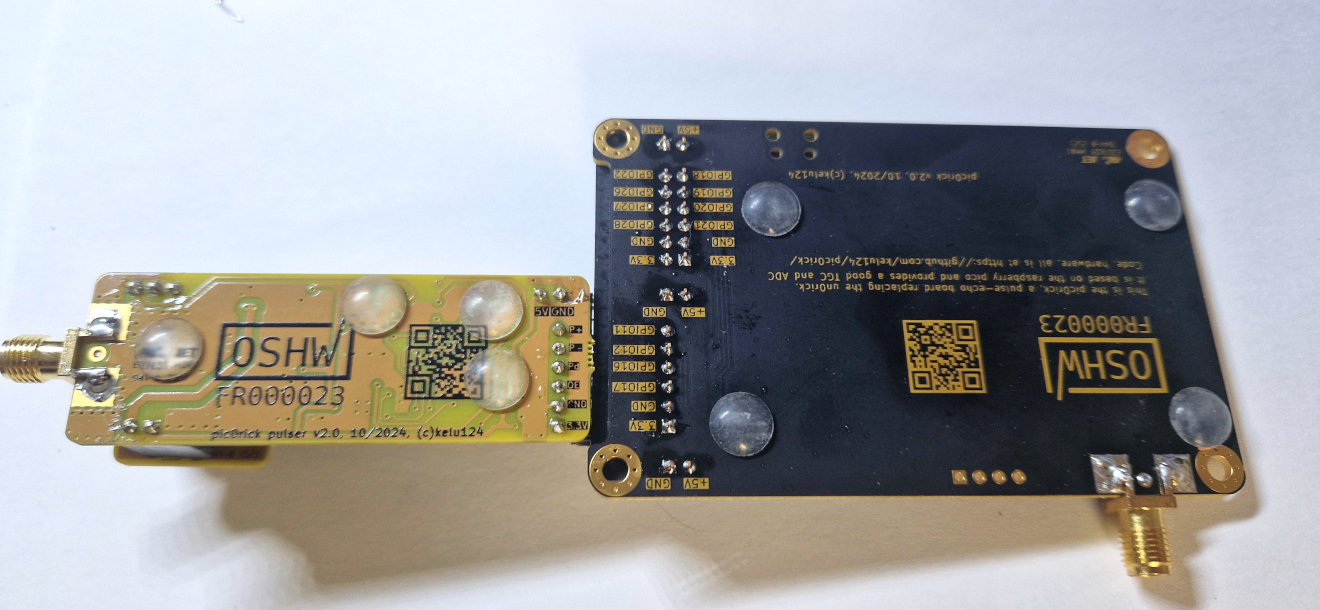
This work is based on three previous TAPR projects, the echOmods project, the un0rick project, and the lit3rick project - their boards are open hardware and software, developped with open-source elements as much as possible.
Copyright Luc Jonveaux (kelu124@gmail.com) 2024
- The hardware is licensed under TAPR Open Hardware License (<www.tapr.org/OHL>)
- The software components are free software: you can redistribute it and/or modify it under the terms of the GNU General Public License as published by the Free Software Foundation, either version 3 of the License, or (at your option) any later version.
- The docs is licensed under a Creative Commons Attribution-ShareAlike 3.0 Unported License.
This project is distributed WITHOUT ANY EXPRESS OR IMPLIED WARRANTY, INCLUDING OF MERCHANTABILITY, SATISFACTORY QUALITY AND FITNESS FOR A PARTICULAR PURPOSE.