

MintCam is a lightweight, feature-rich webcam application for Linux Mint. It provides a clean, dark-themed interface with live preview, photo capture, video recording, and advanced features like QR scanning, focus assist, face auto-framing, and time-lapse support.
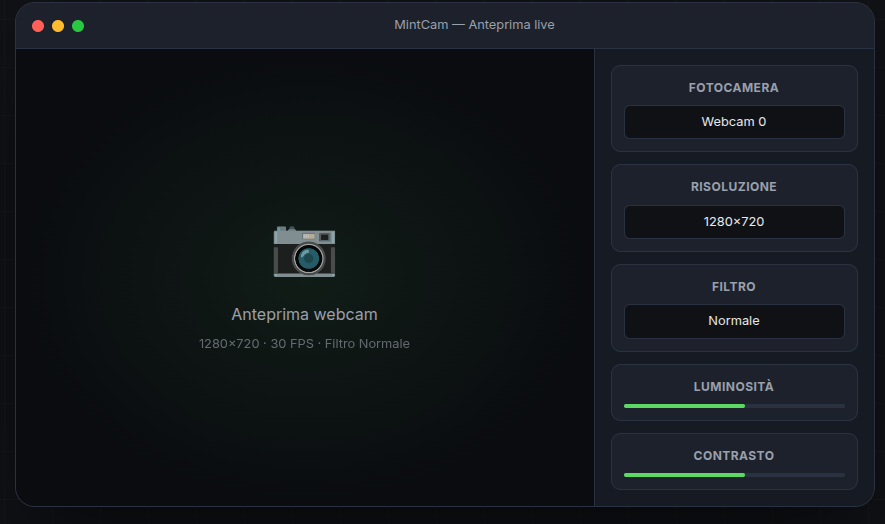
- Live webcam preview with real-time FPS counter
- Photo capture (single and burst modes)
- Video recording with automatic codec detection (mp4v, XVID, MJPG fallback)
- QR/Barcode scanner integration
- Focus assist with visual indicator (Laplacian variance scoring)
- Face auto-framing using OpenCV face detection
- Time-lapse recording with automatic MP4 assembly
- Filters: Normal, Grayscale, Sepia, Negative, High Contrast
- Adjustments: brightness, contrast, saturation
- Composition grid overlay
- Live mirror toggle
- Multiple aspect formats: 16:9, 4:3, 9:16
- Photo timer: 3, 5, 10 seconds
- Photo burst: 3, 5, 10, 15 shots
- Preview pause
- Recording duration limit (auto-stop clips)
- Adjustable photo quality
- Autostart with system
- Dark theme UI
- Custom icon
- OS: Linux Mint 21+ (Ubuntu 22.04+)
- Python: 3.10 or newer
- System packages:
v4l-utils,ffmpeg,libxcb-cursor0 - Python packages:
opencv-python,pyzbar,Pillow
Download the latest .deb from Releases and install:
sudo dpkg -i dist/mintcam_0.1.0_all.debgit clone https://github.com/jeaders/MintCam.git
cd MintCam
python3 -m venv .venv
source .venv/bin/activate
pip install -r requirements.txt
./run.shAfter installation, you can:
- Search for MintCam in the Linux Mint menu
- Or run from terminal:
mintcam
- Or from the source directory:
./run.sh
| Shortcut | Action |
|---|---|
| Space | Capture photo |
| R | Start/stop recording |
| F | Toggle focus assist |
| G | Toggle grid |
| M | Toggle mirror |
| Q | Toggle QR scanner |
Photos and videos are saved to:
~/MintCam/photos/     - Captured images
~/MintCam/recordings/  - Recorded videos
~/MintCam/logs/        - Application logs
To verify your webcam is detected:
v4l2-ctl --list-devices
v4l2-ctl --list-formats-ext -d /dev/video0- Open Menu → Preferences → Startup Applications
- Click "Add"
- Name:
MintCam - Command:
mintcam - Save
After installing via .deb, run once from terminal to initialize the user virtual environment:
/usr/bin/mintcamMake sure you're not setting a clip duration limit. Disable "Limit duration" in settings if recording cuts off.
Verify your camera works with v4l2-ctl (see above). Ensure no other application is using the camera.
Install dependencies:
pip install pyzbar Pillow
sudo apt install libzbar0sudo dpkg --purge mintcam || true
rm -rf ~/.local/share/mintcam
rm -f ~/.local/share/applications/mintcam.desktopMintCam/
├── app/
│ ├── main.py # Application entry point
│ ├── camera.py # Webcam capture thread
│ ├── recorder.py # Video recording with codec fallback
│ ├── settings.py # Settings persistence
│ ├── storage.py # File management
│ └── ui/
│ ├── main_window.py # Main UI window
│ └── styles.py # Dark theme stylesheet
├── assets/ # Logo and banner images
├── tests/ # Unit tests
├── requirements.txt # Python dependencies
├── packaging/ # .deb packaging files
├── build-deb.sh # Build .deb package script
└── run.sh # Run from source script
./build-deb.shThe package will be created in dist/.
- Initial public release
- Live webcam preview with FPS counter
- Photo capture (single, burst, timer)
- Video recording with codec auto-detection
- QR/Barcode scanner
- Focus assist with visual indicator
- Face auto-framing
- Time-lapse recording
- Filters and adjustments (brightness/contrast/saturation)
- Dark theme UI
- .deb package for Linux Mint
- AppStream metadata for Software Manager
Prototype without a defined license. See PRIVATE_README.md for internal documentation.
© 2026 Alex Mirici - Web Developer
Report issues at https://github.com/jeaders/MintCam/issues