
A suite of small Mac tools in one menu bar app, built with Electron; macOS today, Windows next. Why it exists: Personal software thesis.
Download for Mac (macOS 14+, Apple Silicon), or try every program in the browser, without an account, at machetetools.com.
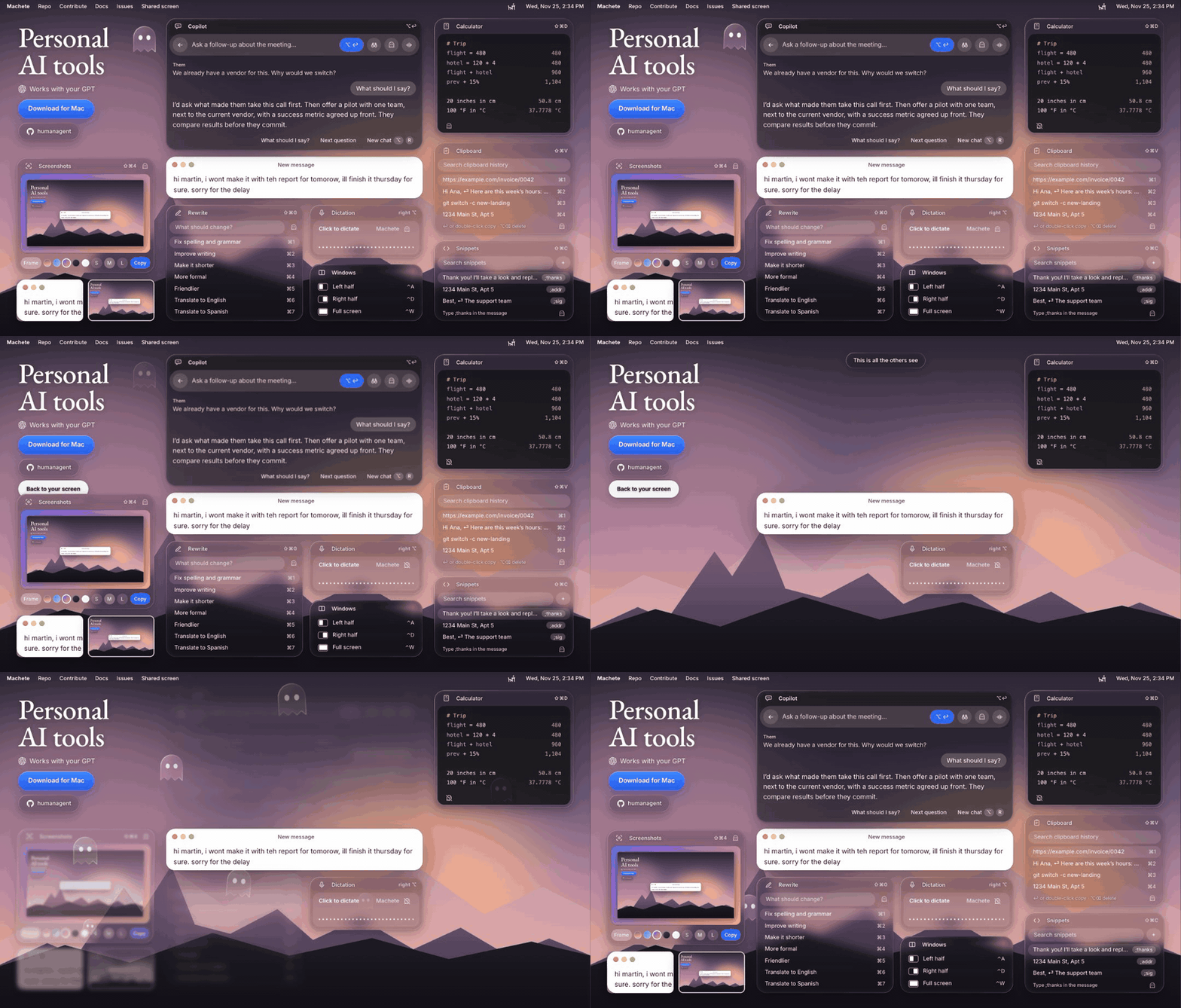
- Copilot: a minimal, translucent panel that sees your screen, listens to your conversation, and answers using your ChatGPT plan via Sign in with ChatGPT.
- Dictation: speak, and the words are typed into the app you're in.
- Windows: snap the focused window left, right or full screen.
- Clipboard: a searchable history of what you copied.
- Snippets: abbreviations that become text as you type, in any app.
- Rewrite: fixes or rewrites the text you selected, in any app.
- Screenshots: the screen or an area, with a frame around it if you want.
- Calculator: a notepad that calculates as you type (
$20 in eur - 5%,20 inches in cm).
- Plain-text answers: short, direct text you can read at a glance, with code rendered as a code block when needed.
- Bots: switchable profiles (General, Sales, and the ones you make), each with an editable system prompt and context. Drop notes or documents (PDF, Word, TXT, Markdown) into a bot's context.
- Follow mode: watches the screen and the conversation and only speaks up when you make a mistake, without reopening a hidden panel.
- Recording: on-device transcription of your mic ("Me") and system audio ("Them"); the transcript is sent as context with every question. Each recording is saved as its own session, named automatically; open any of them from Sessions to read the full transcript. Optional auto-answer when the other side asks a question.
- Uses your ChatGPT subscription: Sign in with ChatGPT (OAuth with PKCE, loopback redirect), streaming Responses API requests billed to your Plus/Pro plan. Copilot and Rewrite need it; Dictation works without it, and with it the text is cleaned up. The rest never asks.
- Windows: ⌃A, ⌃D and ⌃W put the focused window on the left half, the right half or the whole screen (needs Accessibility).
- Clipboard history: ⇧⌘V lists the last 200 texts you copied; type to filter, ↩, ⌘1–9 or a double click copies it for your next ⌘V (it never pastes by itself), ⌥⌫ deletes. Text only; what password managers mark as concealed is never kept.
- Snippets: type an abbreviation in any app and it becomes its text (at the start of a word, or anywhere if it starts with a symbol like
;). ⇧⌘C searches and edits them; ↩ or a double click copies one for your next ⌘V. Needs Input Monitoring and Accessibility. - Rewrite: select text in any app and press ⇧⌘G: ChatGPT fixes spelling and grammar in place. ⌥⇧⌘G opens a panel with more (improve, shorter, formal, friendlier, translate) or any instruction you type. ⌘Z brings the original back. The selected text is sent to ChatGPT only when you press it; needs Accessibility and being signed in. In terminals the result is copied instead of pasted.
- Screenshots: ⇧⌘3 takes the screen with the pointer, ⇧⌘4 an area (Space picks a window, Esc cancels). Each one floats at the bottom left until you copy it, save it to the Desktop, drag it into an app (Duplicate first, to drag it more than once) or close it. The pencil opens the editor, which adds a frame: your wallpaper or a color behind it, rounded corners and a shadow. Needs Screen Recording.
- Calculator: ⇧⌘D opens a sheet where every line shows its result: arithmetic, percentages (
15% of 200,200 + 10%), units (5 kg in lb,100 °F in °C), currencies with daily rates (100 usd in ars), variables (rent = 1200),prev,sum,# headings,Label: 3 * 4. Click a result to copy it. - Ghosts: every panel stays out of screenshots and screen shares. The ghost in each shows that one, until you click it again or quit. Only the screenshots' floating previews always stay hidden.
- Private Copilot: stays out of sight until you call it. No Dock icon, resizable by dragging its edges.
The menu bar item has one line per program (Windows' turns its shortcuts on and off) and Settings: one page with the ChatGPT account and model, permissions, and each program's settings and shortcuts. Click a shortcut and press the new keys: a combination, or a right-hand modifier on its own (right ⌘). The arrow brings the default back.
The defaults:
| Keys | Action |
|---|---|
| ⌥↩ | Ask about the screen |
| ⌥S | What should I say? |
| ⌥Space | Type a question |
| ⌥M | Start / stop recording |
| ⌘[ or ⌥\ | Show / hide |
| ⌥R | New chat |
| right ⌥ or ⌥D | Dictate into the app you're in |
| ⌃A / ⌃D | Window to the left / right half |
| ⌃W | Window full screen |
| ⇧⌘G / ⌥⇧⌘G | Fix / rewrite the selected text |
| ⇧⌘3 / ⇧⌘4 | Screenshot: screen / area |
| ⇧⌘V | Clipboard history |
| ⇧⌘C | Snippets |
| ⇧⌘D | Calculator |
Machete is a monorepo of mini apps, and you can add one: bun run new-app color-picker "Color picker" makes one that already works. CONTRIBUTING.md has the rest.
Requires macOS 14+, Xcode command-line tools and Bun 1.4+. Bun is the whole toolchain: package manager, bundler, type checker, formatter and test runner.
bun install
bun start              # builds the macOS helper and the app, launches Electron
bun run lint           # bun check (strict TypeScript) + bun fmt --check
bun run format         # bun fmt
bun test               # unit and integration tests
bun test --coverage    # with the coverage report (thresholds in bunfig.toml)
bun run pack           # dist/mac-arm64/Machete.app
bun run dist           # DMG
Grant Screen & System Audio Recording, Microphone, Speech Recognition and, for dictation, Accessibility to Machete (or to your terminal when running bun start).
bun run pack builds a local, ad-hoc signed app (hardened runtime) to try on this Mac. Ad-hoc builds lose macOS permissions every time they are rebuilt.
A real release is signed with a Developer ID Application certificate and notarized by Apple: push a v* tag and .github/workflows/release.yml builds, signs, notarizes, verifies (codesign, spctl, stapler) and publishes the DMG. It needs an Apple Developer Program membership and five repository secrets, listed at the top of the workflow. Locally, bun run dist does the same when the certificate is in the keychain and APPLE_API_KEY, APPLE_API_KEY_ID and APPLE_API_ISSUER are set.
100% TypeScript on Effect: every service is a Context.Service built by a Layer, every failure is a typed error, every value that crosses a boundary (disk, IPC, the helper) is a Schema.
apps/          one folder per mini app (see CONTRIBUTING.md): its manifest (app.ts), services, Electron side, preloads
               and renderers. index.ts lists the manifests, main.ts what they do
  copilot/       the Copilot panel and the Bots window: AppState (asks, Follow, auto-answer), ProfileStore, ContextFiles,
                 domain.ts / ipc.ts / logic.ts / strings.ts / markdown.ts
  dictation/     Dictation (speak → typed into the focused app) and its pill
  rewrite/       presets.ts (the instructions), Rewrite (read, ask, replace), the panel
  windows/       window snapping
  clipboard/     ClipboardHistory (clipboard.json) and the picker; history.ts is the pure part
  screenshot/    Screenshots (macOS's screencapture), frame.ts (the frame, pure), the floating previews and the editor
  snippets/      Snippets (snippets.json, synced to the helper's keyboard watch) and the panel
  calculator/    evaluate.ts (the parser, pure), Calculator (calculator.json: the sheet and daily rates), the panel
core/          what every app stands on
  main.ts        the layer graph and Electron's lifecycle (quit interrupts the program, finalizers run)
  app.ts         what a manifest is
  hotkeys.ts, settings.ts   every shortcut as data (pure), and the Settings window's contract
  domain.ts, ipc.ts, channels.ts, permissions.ts   shared schemas and the permissions guide's contract
  services/      NativeHelper (the macOS helper: JSON lines, events on a PubSub), ModifierTaps, Auth (Sign in with
                 ChatGPT), ChatGpt (Responses API, streamed), Settings, AppPaths, JsonFile, FileLogger, PermissionsGuide
  electron/      Apps (the running apps), Hotkeys, the menu bar, the Settings and permissions windows, Panel, Runner
  preload/, renderer/   Settings, the permissions guide and the renderer runtime
native/        machete-native, Swift, one folder per app plus Core/ and Speech/; main.swift is the JSON-lines server
scripts/       build.ts (Bun.build; the windows come from the manifests), new-app.ts and native.ts
test/          bun test: core/, apps/<id>/, every app's manifest, the generator, the real helper and the bundle
Data lives in ~/Library/Application Support/Machete/ (profiles.json, siwc.json, settings.json, clipboard.json, snippets.json, calculator.json, recorded sessions in sessions/; Chromium's data in electron/). Logs go to ~/Library/Logs/Machete.log (diagnostics only, never audio or transcript text).
Everything in src/ is cross-platform except what machete-native provides:
- Screen capture:
desktopCapturer, excluding Machete's windows (content protection already hides them). - Hidden from screen share:
setContentProtection(true)maps toWDA_EXCLUDEFROMCAPTURE. - Transcription: whisper.cpp (on-device) or a cloud model, microphone + WASAPI loopback for system audio.
- Context files: a PDF/Word parser.
- Icons: SF Symbols can't ship on Windows; swap
assets/iconsfor an equivalent set. - Hotkeys already map ⌥ to Alt and ⌘ to Ctrl.