Write disk images to USB drives on Windows 10/11, then verify that every byte was written correctly.
Current release: 2.0.0 — durable deployment campaigns, safe resumable writes, bounded multi-drive deployment, audit reports, clone read-back verification, and structured boot-confidence diagnostics.




Flint writes disk images (ISO, IMG, DD) to USB drives on Windows 10/11, then
reads the drive back and verifies that every byte was written correctly — so
you can trust the result before you boot from it. It needs no installation
(a portable flint.exe, or one pip install), and it never touches a drive
until you confirm the target by typing its serial number. The same engine is
available as a fully scriptable command line for power users and IT teams.
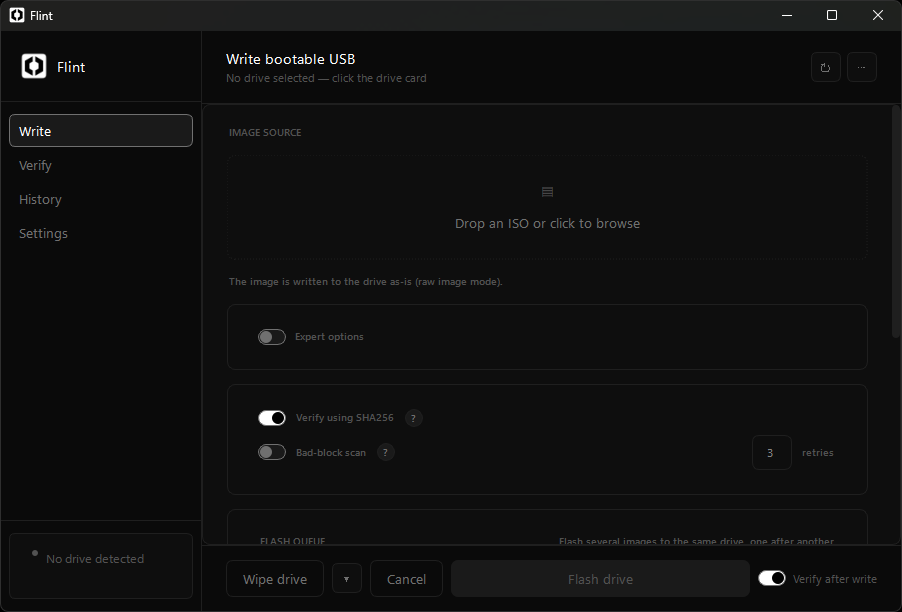
Flashing an ISO: the image is hashed up front, the target drive is confirmed by typing its serial, and the drive is read back after the write.
Contents
- Features
- Comparison
- Download & install
- Quick start
- Safety & limitations
- Operations
- Headless mode
- Troubleshooting
- Development
- Contributing
- Support
- License
- One-click flash — drag & drop or browse for an image; a SHA-256 checksum is computed automatically to confirm the file isn't corrupted.
- Drive safety — every detected USB drive is listed by model, size, and serial; you must type the serial before any write or wipe.
- Verify after write — optionally re-reads the entire drive and compares it byte-for-byte against the source image, reporting the exact location of any mismatch.
- Bad-block scan — retries unreadable sectors up to three times and reports any that permanently fail, so a faulty drive is caught before it matters.
- Expert mode — choose the partition scheme (GPT / MBR), target firmware (UEFI / Legacy BIOS), filesystem (FAT32 / NTFS / exFAT), and write strategy (raw byte-for-byte image or file copy).
- Persistence — keep changes across reboots on a Linux live USB stick. Windows To Go — build a portable Windows drive from an installation ISO.
- Backup & clone — image a USB drive to a file, or copy one drive byte-for-byte to another; both are verified by read-back.
- Wipe — securely erase a drive with zero-fill, a single random pass (NIST SP 800-88 clear), or a three-pass DoD 5220.22-M overwrite; the final pattern is always confirmed by reading the drive back.
- Checksum sidecars — a
.sha256file next to your image is validated before flashing; a mismatch blocks the write. - Flash history — every operation is logged with an exportable report.
- Headless mode — every feature is also a CLI command —
list,flash,verify,scan,wipe,backup,clone,queue,flash-all,deploy,report,doctor,completions— with machine-readable output and documented exit codes for scripts and CI. - Portable or pip — run
flint.exewith no install, orpip install flint-usbon a machine with Python 3.10+.
| Feature | Flint | Rufus | balenaEtcher | Ventoy |
|---|---|---|---|---|
| Post-write SHA-256 verification | ✅ | — | ✅ | — |
| Byte-level mismatch reporting | ✅ | — | — | — |
| Bad-block / media scan | ✅ | ✅ | — | — |
| Wipe (NIST / DoD), read-back verified | ✅ | — | — | — |
| Full headless CLI | ✅ | Limited | — | Limited |
| Fleet / batch mode | ✅ | — | — | — |
| Backup & clone (verified) | ✅ | Partial | — | — |
| Typed confirmation safety | ✅ | — | — | Partial |
| Operation history / audit trail | ✅ | — | — | — |
| Multi-boot ISOs on one drive | — | — | — | ✅ |
| Cross-platform (Win / Mac / Linux) | — | — | ✅ | Partial |
Flint's edge is confidence: it reads the drive back after every write and verifies the result, where most tools stop at "wrote the file." The full walkthrough is on the comparison page.
- Latest release — download
flint.exe. No installer, no dependencies, no telemetry. - Windows 10/11, 64-bit. Runs elevated, so Windows may ask for administrator permission on every launch.
SmartScreen warning. The executable is currently unsigned, so Windows may show a "Windows protected your PC" dialog on first run. This is expected for unsigned open-source builds — click More info → Run anyway. Verify the download against the published SHA-256 checksum first:
certutil -hashfile flint.exe SHA256Compare the result with
flint.exe.sha256on the release page.
Install via pip (Python 3.10+ or later, 64-bit)
Windows users with Python 3.10+ can install Flint from PyPI. Because pip generates the launcher locally, there is no SmartScreen warning and no download verification needed:
pip install flint-usbIf
flintis not recognized: Python's Scripts directory is not on your PATH. Run this once to fix it:$scripts = python -c "import sysconfig; print(sysconfig.get_path('scripts'))" [Environment]::SetEnvironmentVariable("Path", "$env:Path;$scripts", "User")New terminals only — restart the terminal after running it.
This installs a GUI and a CLI:
flint          # open the GUI
flintw         # GUI without console window
flint --help   # CLI usage
pip pulls in PyQt6, psutil, pywin32, and wmi as dependencies. On first run Flint prompts for administrator privileges automatically. The native writer extension is compiled into the wheel for full write performance.
- Pick an image — drag & drop an ISO/IMG file onto the drop zone, or click it to browse (Ctrl+O). A SHA-256 checksum is computed immediately.
- Choose the target drive — click the drive card; model, size, and serial are shown (F5 rescans).
- Flash — confirm the target by typing the drive serial or name when prompted, then it writes and re-reads the drive to verify the result.
Flint runs elevated and asks for administrator permission when started. Every write and wipe is permanent — the typed confirmation is what prevents overwriting the wrong drive.
- 64-bit Windows only.
- Flint writes images directly to disks — this permanently erases all data on the target. Always confirm the target drive and back up important data.
- When file-copy mode targets a FAT32 drive, Flint refuses images that contain files over 4 GiB (FAT32 cannot store them) unless you switch the filesystem to NTFS or exFAT.
- Flash history is stored locally on your machine.
Verification
- Verify after write re-reads the drive after writing (streaming SHA-256, live speed and remaining time).
- Verify using SHA-256 compares the read-back digest against the image and reports the offsets of any mismatched regions, so a bad flash is a located, reported event.
- Bad-block scan retries failed reads up to the configured number of times (default 3) and reports the 4 KiB-aligned offsets of sectors that never read back; unreadable chunks are skipped so the rest of the image is still checked.
- Checksum sidecars — if a
*.sha256file sits next to your image (ubuntu.iso.sha256orubuntu.sha256), Flint reads it, verifies the image digest against it, and shows the result under the image source. A mismatch blocks flashing — a corrupt or wrong image can never erase a drive by accident. - On mismatch, Flint offers to retry the write or abort. A cancelled verification is reported as completed-but-unverified — never as a false success.
Expert mode
Expert mode is enabled by default and can be turned off with the toggle on the Flash screen. It adds:
- Partition scheme (GPT / MBR / Auto), target system (UEFI / Legacy / Auto), and filesystem (FAT32 / NTFS / exFAT).
- Write mode: raw (DD) or file-copy. File-copy mode repartitions and formats the drive, then copies the image contents onto it. It is Windows-only, requires elevation, and is skipped for hybrid ISOs, which are always written raw so their boot record survives.
- Buffer size for raw writes (4–64 MiB) and an optional native writer using unbuffered disk I/O for maximum throughput.
- Persistence (Linux) and Windows To Go (Windows) options — see below.
- Inline ? buttons beside every option open the in-app reference.
Security warning: every option on this panel repartitions or rewrites a physical drive. Wrong combinations can make a drive unbootable or erase it without recovery. Only use these options when you know what your target firmware and bootloader require; back up data first.
Persistence & Windows To Go
- Persistence keeps changes between reboots on live Linux sticks (Ubuntu
casper-rw, Debian live overlay). It requires an ext4 formatting tool such as WSL'smke2fsor a nativemke2fs/makefsbinary. - Windows To Go applies a Windows installation ISO to the drive so it boots as a portable Windows installation (requires NTFS and elevation).
- Both features require file-copy mode, are mutually exclusive, and are only shown for supported images.
Back up, clone & wipe
- Back up (drive picker → "Backup this drive to an image…") streams a USB
drive into a
.imgfile, locking the drive's volumes while reading. The backup's SHA-256 is shown in the completion report. - Clone (drive picker → "Clone this drive to another…") copies a drive onto a second drive byte-for-byte. The target must be at least as large as the source, must be a different drive, and requires the same typed confirmation as a flash.
- Wipe methods (the ▾ menu next to "Wipe drive"):
- Zero fill (fast) — single pass of zeros
- Random data (NIST SP 800-88 clear) — single pass of random data
- DoD 5220.22-M — zeros, then ones, then random data (three passes)
Every wipe ends with a read-back pass that confirms the final pattern; a wipe that cannot be verified is reported as failed, and the result is recorded in history.
Every feature is available headless (command-line only, no GUI) for imaging
labs, scripts, and CI. In the examples below, flint is the CLI — whether
from the downloaded flint.exe or the pip-installed launcher. Commands that
need it relaunch elevated automatically (one UAC prompt); list, doctor,
and completions need no privileges at all. The older --cli flag is still
accepted as a compatibility alias:
flint list
flint flash  --image image.iso --drive E: --confirm <serial> [--verify]
flint verify --drive E: [--sha256 <hex> --image image.iso]
flint scan   --drive E: [--retries <1-10>]
flint wipe   --drive E: --confirm <serial> [--method zero|random|nist|dod]
flint backup --drive E: --out backup.img [--confirm <serial>]
flint clone  --from E: --to F: --confirm <serial of --to>
flint queue  --file list.txt --drive E: --confirm <serial>
flint flash-all --image image.iso [--image image2.iso ...] --confirm ARM [--timeout <seconds>]
flint deploy --image image.iso --drive E: --drive F: --confirm ARM [--parallel 2]
flint report --integrity
flint doctor
flint completions | Out-File -Append $PROFILE
flint help [<command>]
--driveaccepts a serial number, volume letter (E:), or physical path (\\.\PHYSICALDRIVE1); it only selects the drive.--confirmis the safety check: it must match the full serial of the drive being destroyed, validated against the live drive list — a wrong serial can never match another drive.flint listprints every detected drive with the exact serial--confirmexpects.flash-allis fleet mode: it writes every--imageto every drive that is — or becomes — plugged in, until the time budget expires (default 3600 s). Arming requires the literal wordARM.deploywrites one image to explicit target drives as a durable campaign. Targets run with bounded concurrency (default 2), are tracked independently, and produce per-target NDJSON state records with--json. Use--parallelto set concurrency from 1 to 8; usequeuewhen writing multiple images to one drive.report --integrityverifies the tamper-evident chain for audited operation records;report --out history.jsonexports the local history store.- Audit records use a stable operation schema:
timestamp,operation,success,verified, target identity, duration, source/image digest when available, error details, and optional boot or wipe evidence. Audited records also carryintegrity_prevandintegrity_sha256;report --integritydetects edits and reordering. - Boot checks report layout evidence with an explicit
valid,warning, orfailedstatus. They are diagnostics, not a guarantee that every firmware implementation will boot the drive. flashalso accepts--resume(continue an interrupted write from where it left off),--check-fake(probe for counterfeit capacity),--bypass-tpm,--dry-run(preview without writing), and--quiet. Seeflint flash --helpor the CLI reference for the full list.- When
--confirmis omitted on an interactive terminal, the serial is prompted for; a piped command without--confirmis refused, never guessed. verifywithout a digest runs a read-only bad-block scan (equivalent toflint scan); with--sha256it compares only the image's byte range against the drive, so--imageis required to know how many bytes to check.- The queue file holds one image path per line (
#comments allowed); images are flashed to the same drive in order, stopping on the first failure. --jsonswitches all output to NDJSON (progress, results, drive lists, doctor reports);FLINT_PROGRESS=jsonis equivalent andFLINT_VERIFY=1makesflashverify by default.- Streams are split: data and the final
RESULT ok|fail|cancelled: …line go to stdout;FLINT <pct> <speed>MB/s ETA <sec>sprogress and notes go to stderr, so scripts capture stdout as pure data without2>&1noise. - Exit codes:
0OK,1failure,2cancelled,3usage/validation error,4elevation denied. - Persistent deployment jobs can be inspected and controlled after a restart:
flint deploy --status,flint deploy --cancel --job <id>, andflint deploy --retry --job <id>. Run or resume a job withflint deploy --run --job <id>. Retry is allowed only for failed, cancelled, or resumable jobs and never bypasses target identity checks. flint completions --shell powershell|bash|zshprints a shell completion script (commands, options, and live drive serials); for exampleflint completions --shell bash | tee ~/.bashrc.
- "Windows protected your PC" — expected for unsigned builds. Verify the checksum, then click More info → Run anyway.
flintis not recognized after pip install — Python's Scripts directory is not on your PATH; run the PATH-fix snippet in Download & install.- "Drive path unavailable" — the drive was disconnected or re-enumerated; refresh (F5) and re-pick it.
- Flash succeeded but verification failed — re-flash once. If it fails again at the same offsets, the drive is likely failing hardware or counterfeit capacity; replace it.
The complete symptom guide lives in the manual's troubleshooting section.
- Windows 10/11 (64-bit) — Flint is Windows-native (uses pywin32, wmi, and raw disk access).
- Python 3.10–3.13 (64-bit).
- Git for Windows.
- A C compiler (Visual Studio Build Tools or MSVC) to optionally build the native writer extension. Without it, Flint falls back to a pure-Python write path automatically.
git clone https://github.com/gowthvm/Flint.git
cd Flint

python -m venv .venv
.\.venv\Scripts\Activate.ps1

python -m pip install --upgrade pip
pip install -r requirements.txt
pip install -r requirements-dev.txt
Then build the optional native writer extension:
python setup.py build_ext --inplaceThis compiles core/_native_writer.c into a .pyd in core/. If compilation
fails, the build is tolerated and Flint uses the pure-Python fallback.
Run these before opening a PR — they mirror CI exactly:
# Lint
ruff check .

# Type check
mypy core ui main.py --ignore-missing-imports

# Tests (full suite, a few minutes)
python -m pytest -qpip install pyinstaller==6.22.0
python -m PyInstaller --clean --noconfirm flint.specProduces dist\flint.exe — a single-file, UAC-admin, windowed build. The spec
bundles ui/reference.html and ui/flint.ico, includes pywin32/wmi/psutil
hidden imports, and auto-includes the native writer .pyd if present.
Flint/
├── main.py               # Entry point — GUI + CLI dispatch
├── __main__.py
├── core/                 # Backend logic
│   ├── version.py        # APP_VERSION
│   ├── cli.py            # Argument parsing and headless commands
│   ├── writer.py         # Buffered and direct write paths
│   ├── _native_writer.c  # Optional C extension (setup.py compiles it)
│   ├── drives.py         # Drive enumeration and detection
│   ├── verify.py         # Byte-level verification
│   ├── checksum.py       # SHA-256 / hash utilities
│   ├── wipe.py, clone.py, backup.py
│   ├── fleet.py          # Multi-device ("fleet") writes
│   ├── persistence.py, tpm_bypass.py
│   ├── decompress.py     # .zip / .gz / .xz / .zst
│   ├── history.py, updates.py, settings.py, diagnostics.py
│   └── ...
├── ui/                   # PyQt6 GUI
│   ├── window.py         # Main window
│   ├── dialogs.py, style.py, chamfer.py
│   ├── reference.html    # Embedded in-app reference (bundled into the exe)
│   └── flint.ico
├── tests/                # pytest suite (unit + pytest-qt)
├── scripts/
│   └── sign.ps1          # Code-signing helper
├── flint-web/            # Docs / marketing website (Vercel)
├── setup.py              # Builds the optional C extension only
├── pyproject.toml        # Build config, project metadata, ruff config
├── flint.spec            # PyInstaller spec
├── requirements.txt      # Pinned runtime dependencies
├── requirements-dev.txt  # Pinned dev/test dependencies
└── mypy.ini              # mypy config
- Fork & branch off
main. Use a descriptive branch name (fix/drive-detection,feat/ntfs-label). - Install all dependencies (runtime + dev) and build the native extension as shown above.
- Write or update tests for any new functionality or bug fix. Tests live
in
tests/and are namedtest_<module>.py. - Run the full gate suite before pushing:
All three must pass.
ruff check .
mypy core ui main.py --ignore-missing-imports
python -m pytest -q
- Open a PR against
main. CI runs the same gates on Windows with Python 3.11.
What to include in a PR:
- Code changes with passing tests.
- Updated docstrings or help text if user-facing behavior changed.
- A changelog-ready description (even if you don't edit the changelog).
Avoid:
- Unpinned dependency bumps (pin versions and re-run the gates).
- Secrets, keys, or signing credentials in code or commits.
- Changes to
flint-web/unless directly related to your feature.
- Full manual — user guide, CLI reference, and FAQ: https://flintweb.vercel.app
- Report issues and open pull requests on GitHub: https://github.com/gowthvm/Flint
MIT License — Copyright (c) 2026 Gowtham G.K