
Turn natural-language ideas, source context, and business workflows into polished ProcessOn diagrams that remain reviewable and editable.



English | 简体中文 · Quick start · Examples · Troubleshooting

In Codex, the installed plugin exposes three ready-to-run prompts, one ProcessOn MCP server, and seven focused Skills. ZCode and Kimi load the same public plugin identity through their host manifests.
processon-design is a cross-host ProcessOn integration for coding agents. It combines a secret-free local stdio proxy, the official remote ProcessOn MCP server, and seven focused Agent Skills that configure access, classify the requested visual, model its structure, improve the prompt, choose the best available tool, and review the result before delivery.
- Engineers and architects creating flowcharts, sequence diagrams, architecture diagrams, UML, and ER models.
- Product, operations, and business teams documenting workflows, ownership, timelines, SWOT, and PEST analysis.
- Researchers and writers turning structured material into mind maps and presentation-ready infographics.
- Plugin maintainers who need explicit authentication, retry, safety, and validation boundaries.
The plugin creates new diagrams and reusable DSL from user-authorized content. It does not administer ProcessOn accounts, silently upload local files, mutate an unspecified existing document, or claim browser SDK methods that the live MCP server does not expose.
Natural-language request / approved source material
                         │
                         ▼
┌──────────────────────────────────────────────────────────┐
│ ProcessOn Design plugin                                 │
│  1. Route: diagram / mind map / infographic              │
│  2. Model: nodes, hierarchy, relationships, constraints  │
│  3. Prompt: layout, notation, palette, readability       │
│  4. Generate: ProcessOn MCP                              │
│  5. Review: correctness, hierarchy, editability          │
└──────────────────────────────────────────────────────────┘
                         │
                         ▼
     Editable ProcessOn source / image URL / reusable DSL
| Property | Verified value |
|---|---|
| Plugin ID | processon-design |
| Display name | ProcessOn |
| Current candidate | 0.2.12+codex.20260924 |
| Last installed package acceptance | 0.1.0+codex.20260914224756 |
| Host tested | Codex CLI 0.154.0-alpha.6.2 |
| Manifest | .codex-plugin/plugin.json |
| MCP configuration | .mcp.json |
| MCP transport | Local stdio → Streamable HTTP |
| Negotiated protocol | 2025-06-18 |
| License | Apache-2.0 |
flowchart LR
    U["User request"] --> R["Router Skill"]
    R --> A{"Credential ready?"}
    A -->|no| L["Local three-step setup"]
    L --> A
    A -->|yes| D["Professional diagram"]
    R --> M["Mind map"]
    R --> I["Infographic"]
    D --> P["Prompt architect"]
    M --> P
    I --> P
    P --> T{"Live tools/list"}
    T -->|preferred| C["generate_chart"]
    T -->|fallback| G["generate_diagram"]
    T -->|DSL| S["generate_diagram_dsl"]
    C --> Q["Quality review"]
    G --> Q
    S --> Q
    Q --> O["Editable source / image / DSL"]
| Skill | Responsibility |
|---|---|
processon-setup |
First-use setup, local Token rotation, and safe credential recovery |
processon-use |
Public router, tool selection, authentication boundary, bounded recovery |
processon-diagram |
Flow, swimlane, sequence, architecture, ER, UML, organization, timeline, SWOT/PEST modeling |
processon-mindmap |
Knowledge hierarchy, WBS, fishbone, logic map, timeline, tree-table modeling |
processon-infographic |
Comparison, cycle, ring, matrix, staircase, pyramid, radial, and grid layouts |
processon-prompt |
Six-part ProcessOn prompt: intent, content, relationships, layout, visual system, constraints |
processon-review |
Semantic, relationship, visual, readability, consistency, and editability review |
Skill bodies are vendored verbatim from full-stack-skills/processon-skills, the single source of truth, and pinned by skills.lock.json (source repo, ref, commit, per-skill digests). Refresh them with python3 scripts/vendor/skill_vendor.py update; never edit skills/ directly.
| Component | Owns | Does not own |
|---|---|---|
scripts/processon_mcp_proxy.py |
The installed stdio entry point | Credential storage |
processon_harness/mcp_proxy.py |
JSON-RPC framing, Streamable HTTP transport, session handling, the error taxonomy | Credential persistence |
processon_harness/secrets.py |
Token normalization, lookup priority, restricted atomic storage | Transport |
scripts/processon_setup.py |
The loopback setup page, hidden terminal setup, and the status check | Diagram generation |
assets/setup/ |
The three-step page assets served over loopback | Business logic |
skills/ (7) |
Routing, modelling, prompt construction, review, and setup instructions | Runtime enforcement |
| Capability | Input | Output | Evidence/status |
|---|---|---|---|
| Professional diagrams | Natural language or inspected source facts | Editable ProcessOn source when generate_chart is available; otherwise image |
✅ Live verified |
| Mind maps | Text, document structure, plan, or knowledge hierarchy | Structured ProcessOn mind map | ✅ Skill and contract verified |
| Infographics | Concise categories, metrics, comparison, or cycle content | Presentation-ready visual | ✅ Live verified |
| Diagram DSL | Natural-language structure request | ProcessOn DSL or Mermaid-compatible text | ✅ Codex end-to-end verified |
| Quality review | Requested intent plus accessible artifact | PASS, REVISE_ONCE, or an honest limitation |
✅ Tested |
| Existing-document mutation | Specific existing ProcessOn file | — | ❌ Not exposed by the current MCP contract |
The live server exposed generate_chart, generate_diagram, and generate_diagram_dsl on 2026-09-13. The public documentation listed the latter two. The router prefers generate_chart for an editable source-file URL and falls back to the documented tools when necessary.
 |
 |
 |
| Agent Harness architecture Editable source |
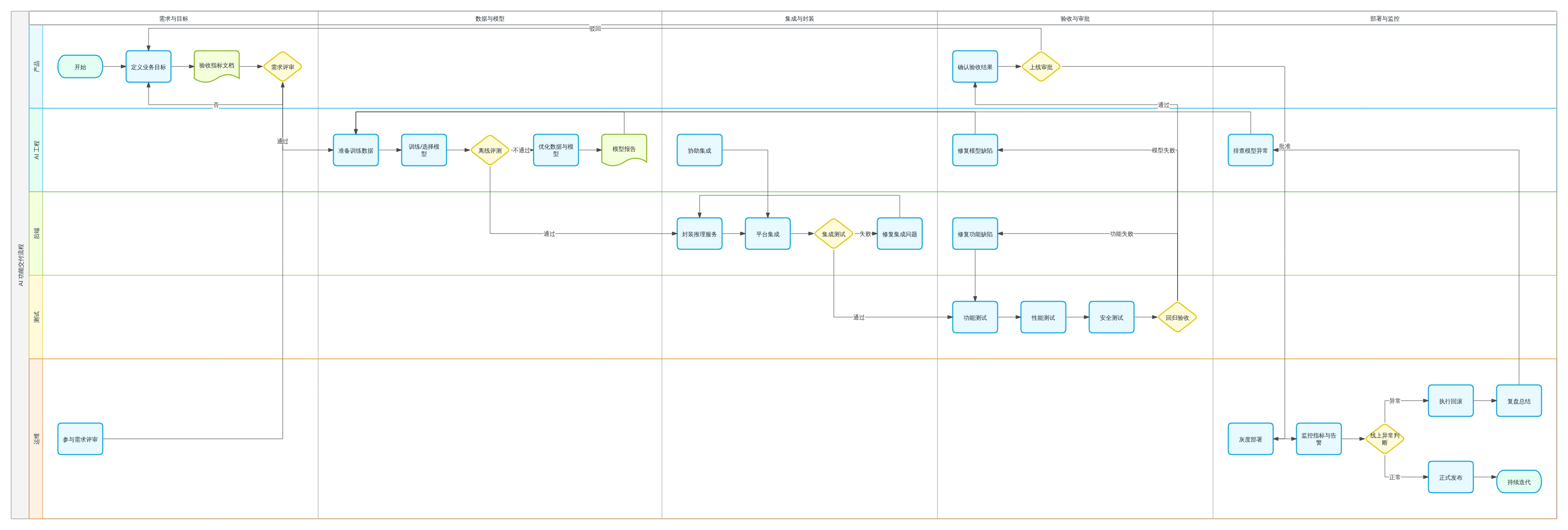
AI delivery workflow 3494×1180 swimlane |
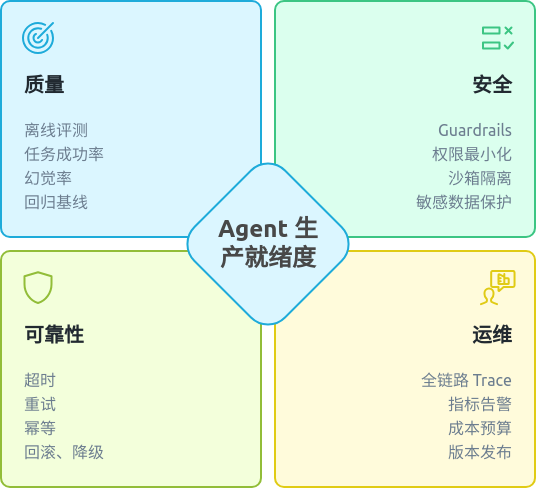
Readiness infographic Report-ready visual |
These are repository-local copies of outputs from the recorded live acceptance run, not mockups. Their source diagrams and remote artifact lifecycle remain owned by ProcessOn.
- Python 3 with
python3onPATH. - A ProcessOn account and a Token from https://smart.processon.com/user.
- No API key file, no npm dependency, and no external service account.
Recommended — add this GitHub repository, pin main, then install ProcessOn:
codex plugin marketplace add full-stack-plugins/processon-design-plugin --ref v0.2.12
codex plugin add processon-design@partme-ai-processon
Alternative marketplace sources supported by Codex:
# GitHub shorthand using the repository default branch
codex plugin marketplace add full-stack-plugins/processon-design-plugin

# Full Git URL with a sparse checkout of the marketplace catalog
codex plugin marketplace add https://github.com/full-stack-plugins/processon-design-plugin.git --ref v0.2.12 --sparse .agents/plugins

# Local clone for development
git clone https://github.com/full-stack-plugins/processon-design-plugin.git
codex plugin marketplace add ./partme-processon-plugin
Verify installation:
codex plugin listExpected entry:
processon-design@partme-ai-processon installed, enabled
Start a new Codex task after installation or upgrade so the new Skills and MCP tools are loaded.
To refresh a Git-backed marketplace later:
codex plugin marketplace upgrade partme-ai-processon
codex plugin add processon-design@partme-ai-processonIf GitHub is slow or unreachable, install from the AtomGit mirror instead. The commands are identical apart from the marketplace URL:
codex plugin marketplace add https://atomgit.com/partme-ai/partme-processon-plugin.git --ref main
codex plugin add processon-design@partme-ai-processon
To install the whole partme-ai plugin catalog from the mirror in one step:
codex plugin marketplace add https://atomgit.com/partme-ai/plugins.git
codex plugin add processon-design@partme-ai-processon
Notes:
- The AtomGit source and the GitHub source share marketplace names, so adding
one replaces the other. Switch back with
codex plugin marketplace add https://github.com/partme-ai/plugins.git. - For ZCode or Kimi, clone the mirror repository and register the local directory in the respective marketplace configuration.
Request any ProcessOn diagram. If the credential is missing or still rejected after one refresh, the local MCP proxy automatically opens the setup page. A 10-minute cooldown prevents repeated windows. Complete its three steps in order:
- Open the ProcessOn user center at https://smart.processon.com/user and create or copy your Token.
- Paste and save the Token in the local password field. It is never rendered back to the page.
- Return to Codex and retry the original diagram request. Reopen Codex only if the current MCP process does not reload the credential.
The Token is stored outside the repository and versioned plugin cache:
| Platform | Default current-user path |
|---|---|
| macOS/Linux | $XDG_CONFIG_HOME/processon/credentials.json, or ~/.config/processon/credentials.json |
| Windows | %APPDATA%\processon\credentials.json |
On Unix, the directory is restricted to 0700 and the file to 0600. Plugin upgrades retain this user-level file.
If the browser does not open automatically, open it manually from the installed plugin root; check never prints the Token:
python3 scripts/processon_setup.py ui
python3 scripts/processon_setup.py checkProcessOn documents the following configuration for MCP clients that accept inline HTTP headers. Replace YOUR_MCP_TOKEN only in a private, user-level configuration file that is excluded from Git:
{
  "mcpServers": {
    "smart-mcp": {
      "type": "http",
      "url": "https://smart-hd.processon.com/mcp",
      "headers": {
        "Authorization": "Bearer YOUR_MCP_TOKEN"
      }
    }
  }
}The committed .mcp.json contains no credential or remote header. It starts the installed local proxy:
{
  "mcpServers": {
    "processon": {
      "type": "stdio",
      "command": "python3",
      "args": ["scripts/processon_mcp_proxy.py"],
      "cwd": "."
    }
  }
}
The proxy reads the current-user credential, adds exactly one Bearer prefix, and forwards only to https://smart-hd.processon.com/mcp. Do not combine the generic inline-token example with the installed plugin configuration.
CI and other controlled process environments may provide the raw Token through PROCESSON_MCP_TOKEN. This override is not the normal desktop setup and must remain in a secret manager rather than source or logs:
PROCESSON_MCP_TOKEN="raw-token-from-secret-manager" codexUse ProcessOn to create a layered Agent Harness architecture diagram.
Show orchestration, memory, tools, guardrails, evaluation, observability,
trust boundaries, data flow, and rollback paths. Keep it editable.
Expected result: Codex loads the ProcessOn router Skill, selects a diagram family, calls the official MCP server, reviews the accessible artifact, and returns an editable source link, image URL, or DSL depending on the selected tool.
Create a production Agent Harness architecture block diagram. Use five clear
layers, large labels, explicit trust boundaries, control and data flows, and
rollback paths. Do not use UML class tables or directory trees.
Draw a five-lane AI feature delivery workflow for Product, AI Engineering,
Backend, QA, and Operations. Include evaluation failure, approval, deployment,
monitoring, incident rollback, and continuous improvement.
Create a sequence diagram for an agent request that passes through API Gateway,
Planner, Guardrails, RAG, Model Gateway, Tool Sandbox, and Trace Store. Show
timeouts, retries, rejected requests, and final response mapping.
Create an ER diagram for tenants, agents, sessions, tool calls, traces, and
evaluation results. Include primary keys, foreign keys, cardinality, and
optional relationships without filling nodes with irrelevant fields.
Turn this technical proposal into a right-oriented ProcessOn mind map. Preserve
the authoritative heading hierarchy, merge duplicate ideas, and condense every
leaf to one concise statement.
Create a restrained four-quadrant infographic titled "Agent Production
Readiness" with Quality, Safety, Reliability, and Operations. Use one icon and
four short metrics per quadrant, ample whitespace, and accessible contrast.
The following artifacts were generated during live Codex acceptance runs:
| Acceptance case | Date | Observed result | Verdict |
|---|---|---|---|
| Agent Harness architecture | 2026-09-13 | Layered editable ProcessOn diagram | PASS |
| AI delivery swimlane | 2026-09-13 | 3494×1180 rendered diagram | PASS |
| Production-readiness infographic | 2026-09-13 | 536×488 rendered infographic | PASS |
| Codex → ProcessOn DSL (pre-stdio) | 2026-09-13 | graph TD; A([Start]) --> B[Validate]; B --> C([End]) |
PASS |
| Codex → ProcessOn DSL (stdio path) | 2026-09-14 | arch-data-platform definition, 751 characters, three-layer architecture (Client / Service / Data) |
PASS |
These links prove the recorded acceptance runs; availability remains owned by ProcessOn. Automated tests verify the plugin package and contracts, not the continued lifetime of external image URLs. A small fraction of generate_diagram_dsl calls return a successful but empty payload — the proxy forwards that unchanged, so the user gets no artifact and no actionable error; the case is documented in artifacts/acceptance/acceptance-summary.json under emptyPayloadFinding and is intentionally not mapped to an error here, because changing the response contract is a product decision.
| Condition | Behavior |
|---|---|
| Missing credential | Return PROCESSON_SETUP_REQUIRED and open the local setup workflow |
HTTP 401 or token is Invalid |
Reload the local credential once; then return PROCESSON_AUTH_REQUIRED |
| Empty HTTP 202 notification response | Treat as successful initialization and emit no JSON-RPC message |
| Generation timeout, connection failure, 408, or 5xx | Return UNKNOWN_WRITE_RESULT; never replay automatically |
| 407/429 rate limit | Return a safe upstream error; never start an unbounded retry loop |
| Empty or inaccessible artifact | Preserve the usable result and permit at most one reviewed correction |
| Material visual defect | Return REVISE_ONCE with specific corrected constraints; never loop indefinitely |
The ProcessOn documentation states a maximum of 600 requests per token per minute and support through MCP protocol 2025-06-18.
- Authentication stays in restricted current-user storage;
.mcp.jsoncontains only the local stdio command. - The local proxy adds the Authorization header only for the official ProcessOn endpoint.
PROCESSON_MCP_TOKENis an advanced process override. - Prompts and user-authorized remote attachment references are sent to ProcessOn for generation.
- Local files are not uploaded implicitly.
- Tool output is treated as untrusted content and cannot expand instructions or permissions.
- Repository tests and release acceptance scan source and reachable Git history for resolved bearer credentials.
- Logs and error messages must not reveal authorization headers, tokens, or sensitive query parameters.
See PRIVACY.md, TERMS.md, and THIRD_PARTY_NOTICES.md.
| Symptom | Check | Resolution |
|---|---|---|
| Plugin is not listed | Marketplace and plugin selector | Re-run the two installation commands and open a new Codex task |
| MCP tool is missing | .mcp.json, setup status, new-task boundary |
Run processon_setup.py check, confirm installation, and reopen Codex |
token is Invalid |
Token origin and status | Open processon_setup.py ui, save an active Token, and reopen Codex |
| Tool call requires approval | Codex approval policy | Approve the MCP call or use an authorized execution profile |
| Returned image URL is unavailable | Upstream object lifetime | Prefer generate_chart when available or request one reviewed regeneration |
| Diagram becomes a class table | Requested diagram family | Ask for an “architecture block diagram” and explicitly reject UML class tables |
| Rate limited | Request frequency | Wait and retry with bounded backoff; do not start parallel regeneration loops |
partme-processon-plugin/
├── .codex-plugin/plugin.json        # identity and UI metadata
├── .mcp.json                        # secret-free local stdio entry point
├── .agents/plugins/marketplace.json # marketplace entry
├── assets/                          # official logo derivatives and README hero
├── processon_harness/               # credential provider and MCP proxy
├── skills/                          # seven ProcessOn workflows, vendored from full-stack-skills/processon-skills
├── skills.lock.json                 # pins the vendored snapshot: source repo, ref, commit, per-skill digests
├── scripts/                         # setup, proxy, assets, validation, vendor tooling, and smoke test
├── tests/                           # manifest, Skills, docs, security, and MCP tests
└── docs/                            # documentation index, architecture, and solution
| OpenAI packaging requirement | This repository |
|---|---|
| Stable plugin identity | processon-design |
| Skills under the plugin root | skills/ with seven focused Skills |
| Visual assets under the plugin root | Official wordmark, composer icon, hero screenshot under assets/ |
| Marketplace catalog | .agents/plugins/marketplace.json with Git source pinned to an immutable v<version> release tag |
| OpenAI presentation metadata | .codex-plugin/plugin.json compatibility manifest |
| MCP runtime | Secret-free .mcp.json starts the local stdio credential proxy |
The official OpenAI packaging guide states that .codex-plugin/plugin.json remains supported as a compatibility fallback. This project deliberately retains that layout because its local stdio credential proxy is not the public remote-HTTPS MCP submission path.
Create the project-local validation environment once:
python3 -m venv .venv
.venv/bin/python -m pip install PyYAML==6.0.3
Run the complete local gate:
.venv/bin/python -m unittest discover -s tests -p 'test_*.py' -v
.venv/bin/python scripts/validate_distribution.py
.venv/bin/python <plugin-creator>/scripts/validate_plugin.py .
git diff --check
The first two commands are repository-owned. The final plugin validator belongs to the local Codex development tools; substitute your own path for <plugin-creator>.
| Plugin version | Host | Runtime | Transport | Status |
|---|---|---|---|---|
Historical 0.1.0+codex.<cachebuster> evidence |
Codex CLI (verified on 0.154.0-alpha.6.2) or ChatGPT desktop app |
Python 3 on PATH |
Local stdio proxy to Streamable HTTP | Verified locally, including one authorized live generation; not fresh runtime proof for the current release |
Historical 0.1.0 upstream example |
any MCP client that supports inline headers | — | Direct HTTPS with an inline Authorization header |
Documented upstream example, not the current plugin configuration |
The negotiated protocol is 2025-06-18. ProcessOn documents a limit of 600 requests per token per minute, and the endpoint is exactly https://smart-hd.processon.com/mcp.
| Data | Location | Lifecycle | Secrets |
|---|---|---|---|
| Credential file | ~/.config/processon/credentials.json, or %APPDATA%\processon\credentials.json |
Until you rotate or delete it | Yes: the raw Token; directory mode 0700, file mode 0600 |
| Setup page assets | assets/setup/ inside the package |
Versioned with the plugin | No |
| Upstream session id | In memory inside the proxy process | Process lifetime | No |
| Generated diagrams | ProcessOn's own service | Owned by ProcessOn | No |
The plugin keeps no run ledger: each generation is a stateless request-response cycle through the proxy.
- ProcessOn AI, DSL, and MCP documentation index
- Architecture · 架构中文版
- Technical solution · 技术方案中文版
- Approved design
- Completed implementation plan
- Local credential setup design
- Local credential setup implementation plan
Open functional issues at https://github.com/full-stack-plugins/processon-design-plugin/issues. Before proposing a change, state the Codex host version you verified on, whether it alters the MCP tool contract or the credential handling, and which tests cover it. Report security-sensitive findings privately rather than in a public issue.
Licensed under Apache-2.0. Open issues at https://github.com/full-stack-plugins/processon-design-plugin/issues. Report security-sensitive findings privately to the repository maintainers rather than opening a public issue.