
English | Bahasa Indonesia


A high-performance out-of-tree Linux kernel driver with DKMS automation, specifically patched for the MediaTek MT7668 combo module (SDIO IDs 037A:7608 / 037A:6602) dual-band 802.11a/b/g/n/ac 2x2 MIMO.
Specially engineered to overcome Amlogic G12A (S905X2) SDIO host controller architectural quirks, and physically tested & validated directly on FiberHome HG680-FJ TV boxes.
This project builds upon and evolves the foundational implementation from junglon/mt7668-driver (originally targeted for ZTE B860H V5), extending it with enterprise-grade multi-core SMP affinity, Dedicated AP Mode (ap0), UsrMerge filesystem compliance, strict multi-driver co-existence with MT7663, and modern Linux LTS kernel compatibility.
Note
Tested & Validated Environment: This driver has been thoroughly tested and verified on official Armbian by Ophub releases:
- Debian 13 (Trixie) with kernel
6.12.112-ophub - Target Board: FiberHome HG680-FJ (Amlogic S905X2 / Meson G12A)
Ophub releases include specific Device Tree (DTB) and power/clock tuning for Amlogic TV boxes.
Warning
Compatibility Statement for Other Kernel Versions:
While DKMS architecture provides automated dynamic compilation across Linux kernels, 100% out-of-the-box compatibility is not guaranteed for untested kernel releases (such as mainline vanilla kernels, non-LTS releases, or future kernel trees that introduce breaking internal netdev/cfg80211 API changes). If you encounter compilation failures or driver issues on other kernels, please open a GitHub Issue attaching your uname -a and dmesg logs.
The FiberHome HG680-FJ (Amlogic S905X2 / G12A) TV box was manufactured across production batches with two different internal Wi-Fi chipset variants:
| Hardware Variant | Physical Module | Internal Core Chipset | Recommended Linux Driver |
|---|---|---|---|
| Variant A | MediaTek MT7668 | MediaTek MT7668 (037A:7608 / 037A:6602) |
This DKMS Driver (mt7668-dkms) |
| Variant B | AMPAK MT7661RSN | MediaTek MT7663 (037A:7663) |
elsangithub/mt7663-driver |
- MT7668 Units (Variant A): Requires this DKMS package (
mt7668-dkms) for complete dual-band initialization and full throughput operation. - AMPAK MT7661RSN / MT7663 Units (Variant B): Requires our companion
mt7663-dkmspackage. - Clean Coexistence: Isolates firmware configuration to
/lib/firmware/wifi.cfgalongside strict module blacklisting, ensuring system images remain conflict-free.
Execute the following in your STB terminal:
cat /sys/bus/sdio/devices/*/device 2>/dev/null || cat /sys/bus/sdio/devices/*/vendor 2>/dev/null- If the output reports
0x7608or0x6602(with vendor0x037a), your device is powered by the MediaTek MT7668 module and requires this driver! - If it reports
0x7663or0x7603, your device has the MediaTek MT7663 module.
- Pure Standalone Wi-Fi: 100% stable operation without needing Ethernet cables connected (
eth0down). - Dual-Band 2.4 GHz & 5 GHz VHT80: Full 802.11ac 2x2 MIMO support with physical link speeds up to 867 Mbps PHY, delivering 95.66 Mbps real-world download throughput with ultra-low latency (3 ms ping, 0.0% packet loss).
- Dedicated SoftAP / Hotspot Mode (
ap_mode=1): Modular dynamic creation of a standalone virtual interface (ap0) alongsidewlan0for 5 GHz Hotspot Routers and Wi-Fi Repeaters. - Native SMP Multi-Core CPU Affinity: Kernel worker threads (
hif_thread,rx_thread, andmain_thread) are pinned at the kernel C level (set_cpus_allowed_ptr) to CPU 1, 2, and 3, permanently protecting CPU0 from starvation. - Dynamic Hardware IRQ Routing: SDIO bus hardware interrupts (
ffe03000.mmc) are dynamically routed to CPU 2 and 3 via udev rules, eliminating system lag and latency jitter. - RPS Network Packet Steering: SoftIRQ network stack processing is balanced across CPU 1, 2, and 3 (
rps_cpus: e), maximizing throughput under continuous load. - FIFO Underflow & Overflow Fast-Path: Instant hardware interrupt clearing for
WASR_RX0/1_UNDER_FLOWandWASR_TX1_OVER_FLOWinnic.c, eliminating chip panic resets during traffic floods. - Hard Dummy Bluetooth Driver Blacklist: Employs
install ... /bin/truerules in/etc/modprobe.d/blacklist-mt7668-bluetooth.confto completely avoid SDIO bus lockups caused by incompatible in-tree Bluetooth modules (btmtksdio). - Zero-Hang Warm Reboot: Built-in
mt7668-shutdown.servicequiesces the MMC SDIO controller before shutdown, guaranteeing 100% hardware redetection upon warm reboot (sudo reboot). - Balanced Thermal Profile: Radio parameters are calibrated for a cool, stable SoC operating temperature at ~53 °C.
Important
DO NOT run apt install linux-headers-$(uname -r) on Armbian Ophub!
Debian/Ubuntu upstream repositories do not provide custom Ophub kernels. On Armbian Ophub, matching kernel headers are already pre-installed in /usr/src/linux-headers-$(uname -r).
sudo apt update
sudo apt install -y dkms build-essential wgetls -d /usr/src/linux-headers-$(uname -r)(If the directory exists, your system is 100% ready for DKMS).
# Download the latest official v2.0.1 release
wget https://github.com/elsangithub/mt7668-driver/releases/download/v2.0.1/mt7668-dkms_2.0.1_all.deb

# Install package (DKMS will compile the module for your active kernel in ~15-20 seconds)
sudo dpkg -i mt7668-dkms_2.0.1_all.debThe driver loads automatically after installation. To ensure all udev performance rules and services synchronize cleanly:
sudo rebootnmcli device wifi list# Connect to your Wi-Fi SSID
sudo nmcli dev wifi connect "YOUR_SSID" password "YOUR_PASSWORD"
# Commit changes to persistent storage
synciw dev wlan0 linkExample output (5 GHz band):
Connected to e8:43:68:3e:27:3e (on wlan0)
	SSID: YOUR_SSID
	freq: 5785.0
	signal: -47 dBm
	tx bitrate: 173.0 MBit/s (scales dynamically up to 867 Mbps under load)
grep -E "CPU|mmc" /proc/interruptsSDIO interrupts (ffe03000.mmc) are distributed to CPU2 / CPU3, keeping CPU0 completely unburdened.
Starting with v2.0.0, the wlan_mt7668 kernel driver introduces modular Dedicated AP Mode support featuring an independent virtual interface ap0.
Configurable via /etc/modprobe.d/mt7668.conf:
| Value | Mode Description | Use Case Scenario |
|---|---|---|
ap_mode=0 (Default) |
Pure Client Mode (STA) (wlan0 only) |
Standard desktop, server, or client TV box use. Zero overhead, lightweight. |
ap_mode=1 |
Dedicated AP Mode (ap0 + wlan0) |
Hotspot router, Wi-Fi repeater, or paired with router web interfaces & hostapd. |
ap_mode=2 |
Dual AP Mode | Spawns two independent virtual AP interfaces. |
ap_mode=3 |
P2P + AP Concurrent Mode | Concurrent Wi-Fi Direct and access point operation. |
Execute the following to persist AP mode across boots:
echo "options wlan_mt7668 ap_mode=1" | sudo tee /etc/modprobe.d/mt7668.conf
sudo reboot
Upon boot, ap0 will be created automatically alongside wlan0.
To keep this kernel driver repository lightweight, clean, and purely focused on kernel-level DKMS hardware support, all Web UI management interfaces, DHCP/DNS orchestration, and dynamic routing automation have been separated into our official companion repository:
👉 mt7663-router-webui (Official GitHub Repository)
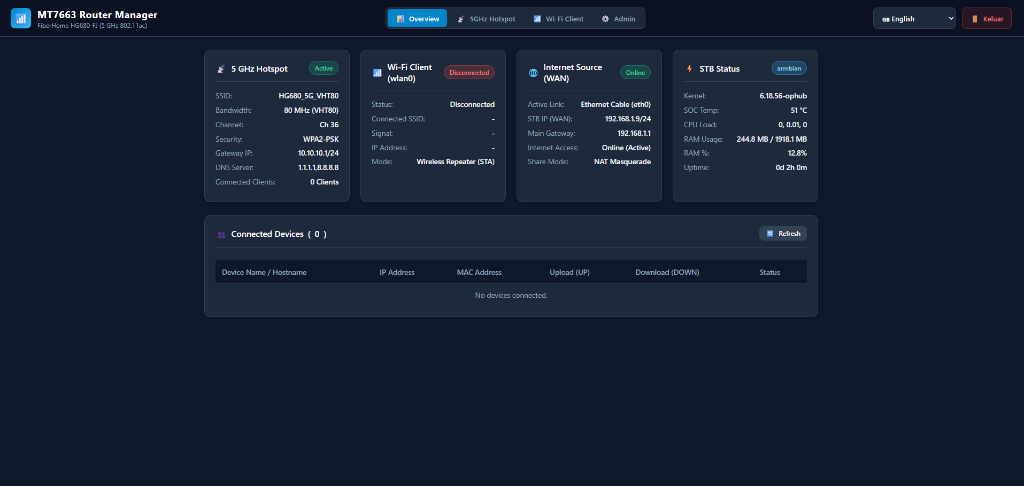
- Zero-Dependency WSGI Web Dashboard: Built-in lightweight Python 3 Web UI running on port
8080(ultra-low footprint:< 25 MBRAM usage). - Live Hardware & Network Telemetry: Real-time monitoring of Amlogic SoC temperature, CPU load, RAM usage, and per-device real-time upload/download bandwidth.
- Turnkey Hotspot & Client Management: One-click Wi-Fi station scanner, interactive SoftAP configurator (
ap0with WPA2/WPA3 Personal, 20/40/80 MHz channel widths, and custom upstream DNS presets). - Dual-Band Wireless Repeater Mode (DBDC Concurrent): Seamless orchestration of simultaneous client uplink (
wlan0) and broadcast hotspot (ap0) with automatediptablesNAT masquerading. - Full Bilingual Support: Instant on-the-fly switching between English and Bahasa Indonesia.
# To install the companion Web UI & Hotspot Manager alongside this driver:
sudo apt install ./mt7663-router-webui_1.0.1_all.debIf you ever wish to remove this driver and revert your system to clean factory state:
sudo apt purge -y mt7668-dkms- Shuts down Wi-Fi interfaces (
ip link set dev wlan0 down). - Unloads kernel modules from RAM (
rmmod wlan_mt7668). - Unregisters DKMS module and cleans build artifacts from
/var/lib/dkms/mt7668/. - Removes module autoload configurations from
/etc/modules-load.d/wlan_mt7668.conf. - Disables and deletes the shutdown service
/etc/systemd/system/mt7668-shutdown.service. - Removes performance tuning rules and scripts (
/etc/udev/rules.d/99-mt7668-performance.rules,/etc/sysctl.d/99-mt7668-throughput.conf,/usr/lib/udev/mt7668-irq-tune.sh). - Restores pre-existing stock firmware backup from
/usr/lib/firmware/backup_stock_mt7668/if present.
- MediaTek Inc.: Original chipset architecture and driver baseline.
- junglon/mt7668-driver: Invaluable reference implementation and insights on MediaTek wireless drivers for Amlogic platforms (specifically ZTE B860H V5).
- Ophub & Armbian Community: Custom Linux kernels and build tooling for Amlogic TV boxes.
- Van der Decken: Maintainer and developer.
This driver is licensed under Dual BSD / GPL-2.0. See LICENSE for full details.