
English | Bahasa Indonesia


Patched, high-performance out-of-tree Linux kernel driver for the MediaTek MT7663 / MT7661 (AMPAK MT7661RSN, SDIO ID 037A:7663 / 037A:7603) dual-band 802.11a/b/g/n/ac combo module.
Tuned specifically for Amlogic G12A (S905X2) SDIO controller architecture constraints, tested and physically verified on the FiberHome HG680-FJ.
Note
Verified Environments: This driver has been specifically tested and validated on the following Armbian by Ophub releases:
- Debian 12 (Bookworm) with kernel
6.18.56-ophub - Debian 13 (Trixie) with kernel
6.12.112-ophub - Debian 12 (Bookworm) with kernel
5.10.272-ophub(with Universal DTBdtbfix/meson-g12a-hg680-fj-uni.dtb)
Ophub builds incorporate specific device tree (DTB) and power/clock tree patches for Amlogic TV boxes.
Warning
Compatibility Disclaimer for Other Kernel Versions:
While DKMS enables automatic compilation on other Linux versions, there is always a possibility of incompatibility with untested kernel releases (e.g., mainline vanilla kernels, non-LTS releases, or newer kernel versions with breaking internal network APIs). If you encounter build or runtime errors on other versions, please open a GitHub Issue with your uname -a and dmesg logs.
The FiberHome HG680-FJ (Amlogic S905X2 / G12A) TV box was shipped by the factory with two different internal Wi-Fi module variants depending on the production batch:
| Hardware Variant | Physical Module | Internal Core Chipset | Required Linux Driver |
|---|---|---|---|
| Variant A | MediaTek MT7668 | MediaTek MT7668 | Separate MT7668 driver (e.g. junglon/mt7668-driver) |
| Variant B | AMPAK MT7661RSN | MediaTek MT7663 (037A:7663) |
This DKMS Driver Package (mt7663-dkms) |
- MT7668 Units: Handled by separate driver projects dedicated to the MT7668 module (such as the community driver by junglon). This package does not target MT7668.
- AMPAK MT7661RSN (MT7663) Units: Requires this out-of-tree DKMS package (
mt7663-dkms) to initialize the SDIO hardware and provide full Dual-Band (2.4 GHz & 5 GHz) operation. - Safe Coexistence: This driver uses an isolated firmware configuration file (
/lib/firmware/wifi_mt7661.cfg), ensuring that shared disk images between MT7668 and MT7663 units will not conflict.
Run the following command on your TV box terminal:
cat /sys/bus/sdio/devices/*/device 2>/dev/null || cat /sys/bus/sdio/devices/*/vendor 2>/dev/nullIf the output shows vendor 0x037a and device 0x7663 or 0x7603, your board is equipped with the AMPAK MT7661RSN (MT7663) module and requires this driver.
Note
Kernel Support: Linux 6.x & Linux 5.10 (with Universal DTB Patch)
- Linux 6.x+ (Recommended, e.g. 6.6 / 6.12 / 6.18): Supported out-of-the-box with the stock Ophub DTB.
- Linux 5.10 LTS (e.g. 5.10.272-ophub): Fully supported! In the stock Ophub DTB, the 32.768 KHz reference clock is missing the
amlogic,meson-g12a-ee-pwmcompatible binding. Simply apply our universal DTB fix (dtbfix/meson-g12a-hg680-fj-uni.dtb), and Wi-Fi works seamlessly on Kernel 5.10!
- Pure Standalone Wi-Fi: 100% stable operation with Ethernet cable disconnected (
eth0down). - Dual-Band 2.4 GHz & 5 GHz: Full 802.11n 2x2 MIMO on 2.4 GHz (up to 62+ Mbps TCP) and 802.11ac VHT on 5 GHz (up to 73+ Mbps TCP, 3.2 ms latency, 0.0% packet loss).
- Amlogic G12A SRAM Burst Protection: Resolves the infamous
WASR_TX1_OVER_FLOWand SDIO FIFO stalls caused by Amlogic's 1536-byte single-request hardware constraint (amlogic,dram-access-quirk). - Native SMP Multi-Core CPU Affinity: Kernel worker threads (
rx_thread,hif_thread,main_thread) automatically bind to CPUs 1, 2, and 3 (set_cpus_allowed_ptr), completely offloading packet and bus processing from CPU0. - Instant Udev Hardware IRQ Routing: SDIO interrupt line (
ffe03000.mmc) is mapped automatically to CPU 2 and 3 on device registration, keeping system timers on CPU0 responsive without jitter. - Zero-Hang Warm Reboots: Clean SDIO bus shutdown sequence via
mt7663-shutdown.serviceandmmc-pwrseqhardware reset pin pulsing ensures 100% reliable detection across soft reboots (sudo reboot).
Important
Do NOT run apt install linux-headers-$(uname -r) on Armbian Ophub!
Standard Debian/Ubuntu repositories do not host custom Ophub kernels. On Armbian Ophub, kernel headers are already pre-installed in /usr/src/linux-headers-$(uname -r).
sudo apt update
sudo apt install -y dkms build-essential wgetls -d /usr/src/linux-headers-$(uname -r)(If the folder appears, your system is 100% ready for DKMS).
# Download the latest verified release package (v1.0.12)
wget https://github.com/elsangithub/mt7663-driver/releases/download/v1.0.12/mt7663-dkms_1.0.12_all.deb

# Install package (DKMS will compile the module for your active kernel in ~15-20s)
sudo dpkg -i mt7663-dkms_1.0.12_all.debsudo rebootnmcli device wifi list# Connect to your Wi-Fi SSID
sudo nmcli dev wifi connect "YOUR_SSID" password "YOUR_PASSWORD"
# Flush disk cache to ensure NetworkManager profile is permanently saved to storage
synciw dev wlan0 linkExpected output (5 GHz band):
SSID: YOUR_5G_SSIDfreq: 5180.0(Channel 36) or5785.0(Channel 157)signal: -38 dBmto-50 dBmtx bitrate: 156.0 MBit/s(or higher)
grep -E "CPU|mmc" /proc/interruptsSDIO interrupts (ffe03000.mmc) accumulate heavily on CPU2/CPU3, leaving CPU0 unburdened!
Starting in v1.0.8, the wlan_mt7663_sdio kernel driver introduces modular Dual-Band Concurrent (DBDC) support with an independent virtual interface ap0.
The driver exposes a runtime module parameter configurable via /etc/modprobe.d/:
ap_mode=0(Default):- Pure Wi-Fi Client mode (
wlan0only). - Minimum memory footprint, zero extra virtual interfaces, zero background overhead. Perfect for desktop or standard server use.
- Pure Wi-Fi Client mode (
ap_mode=1:- Dual-Interface Mode: Initializes
ap0alongsidewlan0. - Enables high-performance 5 GHz 802.11ac VHT80 (866 Mbps) or 2.4 GHz (HT40) SoftAP hotspot broadcasting while maintaining simultaneous client connectivity on
wlan0.
- Dual-Interface Mode: Initializes
To enable dual-interface mode manually in the driver:
echo "options wlan_mt7663_sdio ap_mode=1" | sudo tee /etc/modprobe.d/wlan_mt7663_sdio.conf
sudo rebootTo keep this kernel driver lean, lightweight, and strictly focused on core DKMS hardware support, all Web UI management, DNS/DHCP orchestration, and automated routing have been decoupled into the official standalone companion package:
👉 mt7663-router-webui (GitHub Repository)
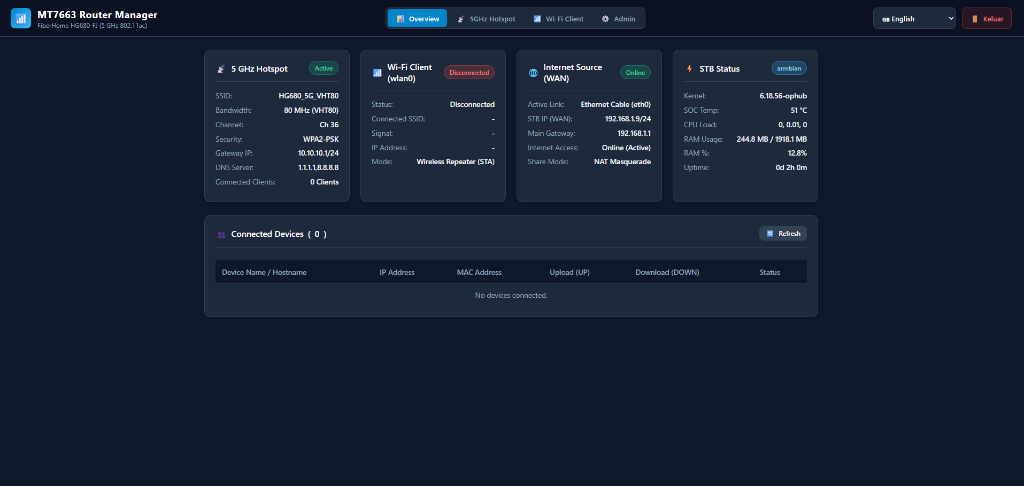
- Zero-Dependency WSGI Router Dashboard: Embedded Python 3 Web UI running on port
8080(< 25 MB RAM). - Live Hardware Telemetry: Real-time Amlogic SoC temperature, CPU load, RAM breakdown, and per-device TX/RX bandwidth.
- Turnkey SoftAP & Client Manager: One-click Wi-Fi scanner, interactive hotspot configurator (SSID, WPA2/WPA3, 20/40/80 MHz, DNS presets).
- Dual-Band Wireless Repeater (DBDC): Automated NetworkManager dispatcher and iptables NAT masquerade for seamless wireless internet repetition.
- Bilingual Support: Instant toggle between English and Bahasa Indonesia.
# To install the Web UI & Hotspot Manager on top of this driver:
sudo apt install ./mt7663-router-webui_*_all.debIf you ever wish to remove this driver and restore your system, the package includes automated cleanup routines (prerm and postrm) that leave no orphan configurations behind.
Unregisters and removes the DKMS module:
sudo dpkg -r mt7663-dkmsRemoves the package, compiled DKMS modules, udev rules, sysctl tuning, shutdown service, and firmware configurations:
sudo apt purge -y mt7663-dkms- Shuts down the Wi-Fi network interface (
ip link set dev wlan0 down). - Unloads the kernel module (
rmmod wlan_mt7663_sdio). - Removes DKMS registration and binaries from
/var/lib/dkms/mt7663-dkms/. - Removes auto-load configuration from
/etc/modules-load.d/wlan_mt7663_sdio.conf. - Stops, disables, and deletes
/etc/systemd/system/mt7663-shutdown.service. - Deletes udev IRQ routing rule
/etc/udev/rules.d/99-mt7663-performance.rules. - Deletes TCP buffer tuning
/etc/sysctl.d/99-mt7663-throughput.conf.
Tip
Applicability: This fix is completely optional and applies to ALL FiberHome HG680-FJ units (regardless of whether your box uses the MT7668 or MT7663 Wi-Fi chipset). It is specifically recommended if you run Armbian booted from a MicroSD card (/dev/mmcblk1).
- Fix MicroSD Cards Completely Undetected / Not Recognized:
On many FiberHome HG680-FJ units running the stock DTB, inserted MicroSD cards are completely undetected by the operating system (missing from
lsblk/fdisk -l, with no/dev/mmcblk1node created). This occurs because the stock DTB attempts 1.8V I/O voltage switching that the board hardware does not support, alongside floating card-detect GPIO lines. This fixed DTB solves this immediately, allowing previously unrecognized MicroSD cards to be detected and mounted normally. - Wi-Fi TX Burst Voltage Sag & False Card Removal:
During heavy Wi-Fi transmission (e.g., speedtests, large downloads), rapid current spikes cause a momentary voltage drop (voltage sag) across the shared 3.3V board power rail. The stock Device Tree uses a mechanical card-detection switch (
cd-gpios = <0x2f 0x2f 0x01>), which misinterprets this momentary voltage drop as physical card ejection (mmc1: card aaaa removed). When running the operating system from MicroSD, this triggers an immediate Read-Only Filesystem / Kernel Panic crash. - Sector 0 I/O Error:
Stock DTB allows clock speeds up to 200 MHz (
max-frequency = <0xbebc200>). The unshielded PCB traces on HG680-FJ cannot reliably maintain 200 MHz signal integrity, causing CRC corruption on modern SDXC cards. - I/O Voltage Mismatch:
Stock DTB points
vqmmc-supplyto 1.8V (VDDAO_1V8), whereas the physical HG680-FJ MicroSD slot is hardwired to 3.3V.
- Replaces mechanical
cd-gpioswithnon-removable;(locking the card permanently in software like internal eMMC; completely immune to voltage noise and Wi-Fi transmission sag). - Caps
max-frequencyto a rock-solid 50 MHz (0x2faf080/ standard High-Speed). - Locks
vqmmc-supplyto 3.3V (VDDAO_3V3).
The pre-compiled binary is provided in the repository under dtbfix/meson-g12a-hg680-fj-uni.dtb and as a direct download from GitHub Releases. You can apply it using either method below:
Directly download the Universal DTB and overwrite your stock DTB:
# 1. Backup the original DTB
sudo cp /boot/dtb/amlogic/meson-g12a-hg680-fj.dtb /boot/dtb/amlogic/meson-g12a-hg680-fj.dtb.bak

# 2. Download and apply Universal DTB directly from official release
sudo wget -O /boot/dtb/amlogic/meson-g12a-hg680-fj.dtb https://github.com/elsangithub/mt7663-driver/releases/download/v1.0.12/meson-g12a-hg680-fj-uni.dtb

# 3. Reboot the device
sudo reboot
(If you cloned the repository locally, you can alternatively use: sudo cp dtbfix/meson-g12a-hg680-fj-uni.dtb /boot/dtb/amlogic/meson-g12a-hg680-fj.dtb)
Download the fixed DTB with its own name and update your boot configuration:
# 1. Download the fixed DTB to your boot directory
sudo wget -O /boot/dtb/amlogic/meson-g12a-hg680-fj-uni.dtb https://github.com/elsangithub/mt7663-driver/releases/download/v1.0.12/meson-g12a-hg680-fj-uni.dtb

# 2. Edit your boot environment file
sudo nano /boot/uEnv.txt
Update the FDT= line to point to the fixed DTB:
FDT=/dtb/amlogic/meson-g12a-hg680-fj-uni.dtbSave and exit (Ctrl + O, Enter, Ctrl + X), then reboot:
sudo reboot| Component | Root Cause in Stock Driver | Solution in This Package |
|---|---|---|
| Amlogic SDIO Burst | Host max_req_size = 1536 due to amlogic,dram-access-quirk. Driver buffered 4096B, triggering multi-CMD53 splitting and WASR_TX1_OVER_FLOW. |
Clamped coalescing buffer flush in kalDevWriteData (sdio.c) to host->max_req_size (1536B) and enforced netdev MTU to 1408. |
| CPU0 Bottleneck | ARM GICv2 routes all SPI interrupts to CPU0 by default; MediaTek's internal affinity code relied on proprietary Android kernel APIs (mt_sched_setaffinity). |
Replaced with standard Linux kernel set_cpus_allowed_ptr() in gl_kal.c to bind rx_thread and hif_thread to CPUs 1-3. |
| Hardware IRQ Routing | Race conditions during early boot systemd timing. | Integrated dynamic trigger into /usr/lib/udev/mt7663-irq-tune.sh via 99-mt7663-performance.rules. |
| PMTU Packet Drops | Asymmetric MTU (1408 local vs 1500 remote) caused silent packet blackholes when path discovery was disabled (tcp_mtu_probing = 0). |
Automated net.ipv4.tcp_mtu_probing = 1 and tcp_moderate_rcvbuf = 1 in /etc/sysctl.d/99-mt7663-throughput.conf (0.0% packet loss). |
| 802.11ac Performance | Stock configuration defaulted aggregation and beamforming to disabled. | Enabled AmsduInAmpduTx 1, VhtAmsduInAmpduTx 1, StaVHTBfee 1 (Beamforming), StbcRx 1, and doubled processing loops (HifTxLoop 32, OsTxLoop 16). |
| Warm Reboot Reliability | Always-on power rails on TV boxes leave MT7663 state machine active after SoC reset, leading to CMD5 probe timeout (error -110). | Integrated mt7663-shutdown.service to unbind host MMC controller prior to reset, triggering clean hardware reset sequence. |
| DFS Radar CAC Guard | Fatal compile error too many arguments to function 'cfg80211_cac_event' on Linux kernels 6.1..6.11. |
Implemented preprocessor guard #if KERNEL_VERSION(6, 12, 0) <= CFG80211_VERSION_CODE for universal 6.1..6.18+ support. |
| Multi-Driver Coexistence | Collision on bus name = "wlan" and /proc/net/wlan when MT7668 driver is present on same STB image. |
Isolated SDIO bus identifier to wlan_mt7663_sdio and procfs directory to /proc/net/wlan_mt7663 (0 conflict). |
If you update or switch kernel versions on your TV box:
- Confirm that kernel headers for your active kernel are present:
ls -d /usr/src/linux-headers-$(uname -r) - Run any of the following commands to rebuild the driver for your new kernel (~15-20 seconds):
- Option 1: Reinstall the Package (Easiest)
sudo dpkg -i mt7663-dkms_1.0.12_all.deb
- Option 2: Trigger via DKMS
sudo dkms autoinstall
- Option 3: Reconfigure Package
sudo dpkg-reconfigure mt7663-dkms
- Option 1: Reinstall the Package (Easiest)
- Reboot the device to load the new module and initialize hardware:
sudo reboot
This project is licensed under the Dual BSD / GPL-2.0 license. See the LICENSE file for the full license text.
- MediaTek Inc.: Original chipset architecture and driver baseline.
- junglon/mt7668-driver: Invaluable reference implementation and insights on MediaTek wireless drivers for Amlogic platforms.
- Ophub & Armbian Community: Custom Linux kernels and build tooling for Amlogic TV boxes.
- Van der Decken: Maintainer and developer.