
This project forked from: janino-compiler/janino
This fork extends Janino with java 8 syntax compile.
- Full compile spring-boot 2.7.x, total 2233 source files.
- Full compile Apache Dubbo 2.7.x, total 115 modules, 1402 source files.
- Full compile Elasticsearch 6.1.5, total 55 modules, 3626 source files.
- Full compile Apache commons-lang, total 264 source files.
- Bootstrap compilation on miniJVM is supported.
Release 4.0.0 published in maven
<dependency>
    <groupId>io.github.digitalgust</groupId>
    <artifactId>commons-compiler</artifactId>
    <version>4.0.1</version>
</dependency>

<dependency>
    <groupId>io.github.digitalgust</groupId>
    <artifactId>janino</artifactId>
    <version>4.0.1</version>
</dependency>

<dependency><!-- Not need this if using io.github.digitalgust.janino -->
    <groupId>io.github.digitalgust</groupId>
    <artifactId>commons-compiler-jdk</artifactId>
    <version>4.0.1</version>
</dependency>
| Module | Purpose |
|---|---|
commons-compiler |
Shared compiler/evaluator interfaces, compiler-factory discovery, resource utilities and the standalone Javac / Jar command-line tools. A compiler backend is required for compilation. |
janino |
The Java compiler backend: parsing, type checking, bytecode generation, in-memory compilation and expression/script/class-body evaluators. Depends on commons-compiler; no JDK compiler is required. |
commons-compiler-jdk |
Optional implementation of the same interfaces using the JDK's javax.tools.JavaCompiler. Requires a JDK compiler; an alternative to the Janino backend. |
commons-compiler-tests |
Shared regression tests run against the Janino and JDK backends. Not needed by applications at runtime. |
janino-parent |
Maven parent and reactor: shared versions, build settings and aggregation of the four modules above. Produces no runtime jar. |
Both tools have standalone main() entry points in org.codehaus.commons.compiler.tools.
Run them by class name with -cp; the examples below assume commons-compiler.jar and
janino.jar are in the current directory, Java sources are under src/, and resources
are under resources/. Use the actual jar filenames if they include a version suffix.
Examples use Windows classpath separators (;); use : on Linux/macOS.
Javac discovers a compiler backend on its application classpath. With the two jars below,
it uses Janino and can run on a JRE without the JDK javac executable:
java -cp "commons-compiler.jar;janino.jar" org.codehaus.commons.compiler.tools.Javac -source 8 -target 8 -encoding UTF-8 -d build/classes src
java -cp "commons-compiler.jar;janino.jar" org.codehaus.commons.compiler.tools.Javac -help
Source arguments can be individual .java files or directories, which are scanned recursively.
The java -cp before the main class loads the tool and backend; the tool's own -cp
after the main class supplies dependencies of the code being compiled.
To use the JDK backend instead, replace janino.jar with commons-compiler-jdk.jar
and run with a JDK compiler available.
| Option | Meaning |
|---|---|
-d <dir> |
Destination directory for generated class files. |
-cp <path>, -classpath <path>, --class-path <path> |
Classpath of source dependencies; separate entries with the platform path separator. |
-bootclasspath <path> |
Bootstrap API classes used for compilation, e.g. minijvm_rt.jar. |
-sourcepath <path> |
Directories in which to find referenced Java source files. |
-encoding <name> |
Source encoding, e.g. UTF-8. |
-source <release> |
Source language version, e.g. 8 or 1.8. |
-target <release> |
Generated class-file version, e.g. 8 or 1.8; specify 8 for Java 8 features and metadata. |
--release <release> |
Sets both source and target versions, e.g. --release 8. Does not select the corresponding historical JDK API; supply the intended APIs through -bootclasspath / -cp. |
-g:lines,vars,source, -g:none |
Select debug attributes (any subset of lines, vars, source) or disable them. Default is lines,source; plain -g retains the current settings. |
-parameters |
Emit reflection parameter names (target 8+). |
-verbose |
Print compilation progress. |
-version, --version |
Print the tool version. |
-help, -h, --help |
Print supported options. |
@<file> |
Read additional arguments from a file, one argument per line. Blank lines and lines starting with # are ignored. |
-nowarn, -proc:none and -XDcompilePolicy=simple are accepted and ignored.
This is a subset of the JDK command line; other options are rejected.
For example, an argument file named compile.args can contain:
-source
8
-target
8
-encoding
UTF-8
-d
build/classes
src
java -cp "commons-compiler.jar;janino.jar" org.codehaus.commons.compiler.tools.Javac @compile.argsArgument-file lines are not shell-tokenized: do not put an option and its value on the same
line, and do not add quotes around paths containing spaces. The file uses the JVM's default
text encoding. Resources are packaged separately with Jar.
Jar needs only commons-compiler.jar; it requires neither a compiler backend nor the JDK
jar executable. It writes a manifest automatically and can combine classes and resources:
java -cp commons-compiler.jar org.codehaus.commons.compiler.tools.Jar cf app.jar -C build/classes . -C resources .
java -cp commons-compiler.jar org.codehaus.commons.compiler.tools.Jar cfe app.jar com.example.Main -C build/classes . -C resources .
java -cp commons-compiler.jar org.codehaus.commons.compiler.tools.Jar tvf app.jar
java -cp commons-compiler.jar org.codehaus.commons.compiler.tools.Jar xf app.jar
The second example sets Main-Class for an application whose entry point is
com.example.Main. Extraction writes into the current working directory; change directory
first to choose a destination.
Jar {ctx}[vf0me] [jarfile] [manifest] [entrypoint] [-C dir] inputs...
| Flag / argument | Meaning |
|---|---|
c, t, x |
Create, list or extract; select exactly one operation. |
f <jarfile> |
Archive filename; required for every operation. |
v |
Verbose output. |
0 |
Store entries without compression (create only). |
m <manifest> |
Use a supplied manifest file (create only). |
e <entrypoint> |
Set the manifest's Main-Class (create only). |
-C <dir> |
Resolve following input paths relative to this directory; may be repeated (create only). |
inputs... |
Files/directories to archive recursively. For list/extract, optional entry names or directory prefixes select entries; no wildcard matching. |
Combine flags into one argument, e.g. cf, cfe or tvf (a leading - is also accepted).
Values for f, m and e follow in the same order as those letters in the flag string:
java -cp commons-compiler.jar org.codehaus.commons.compiler.tools.Jar cfm app.jar MANIFEST.MF -C build/classes .
java -cp commons-compiler.jar org.codehaus.commons.compiler.tools.Jar tf app.jar com/example/
The supported operations are create/list/extract; archive update (u) is not implemented.
From miniJVM/binary/win_x64, using the published runtime and compiler jars, for example:
.\mini_jvm.exe -bootclasspath ../lib/minijvm_rt.jar -cp "../libex/commons-compiler.jar;../libex/janino.jar" org.codehaus.commons.compiler.tools.Javac -bootclasspath ../lib/minijvm_rt.jar -source 8 -target 8 -encoding UTF-8 -d D:/work/classes D:/work/src
.\mini_jvm.exe -bootclasspath ../lib/minijvm_rt.jar -cp ../libex/commons-compiler.jar org.codehaus.commons.compiler.tools.Jar cf D:/work/app.jar -C D:/work/classes .
Replace D:/work with your project directory. The VM's -bootclasspath loads its runtime;
the compiler's separate -bootclasspath selects the APIs the source code is compiled against.
Both tools return exit code 0 on success; compilation/I/O failures return 1, and invalid
arguments or other exceptions return 2.
Here is the description from the original repository:
A super-small, super-fast Java compiler

Janino is a super-small, super-fast Java compiler.
Janino can not only compile a set of source files to a set of class files like JAVAC, but also compile a Java expression, a block, a class body, one .java file or [a set of .java files](#janino-as-a compiler) in memory, load the bytecode and execute it directly in the running JVM.
JANINO is integrated with Apache Commons JCI ("Java Compiler Interface") and JBoss Rules / Drools.
JANINO can also be used for static code analysis or code manipulation.
What's this all about? Check out this PDF presentation for a quick start. (Notice that some of the information is outdated, e.g. the references to CODEHAUS, which has passed away some time 2015.)
The major design goal was to keep the compiler small and simple, while providing an (almost) complete Java compiler.
The following elements of the Java programming language are implemented (or, where noted, partially implemented):
- Java 1.4 language features:
packagedeclaration,importdeclarationclassdeclarationinterfacedeclaration- Inheritance (
extendsandimplements) - Static member type declaration
- Inner (non-static member, local, anonymous) class declaration
- Class initializer, instance initializer
- Field declaration, method declaration
- Local variable declaration
- Class variable initializer, instance variable initializer
- Block statement (
{...}) if ... elsestatement- Basic
forstatement whilestatementdo ... whilestatementtry ... catch ... finally statementthrowstatementreturnstatementbreakstatementcontinuestatementswitchstatementsynchronizedstatement- All primitive types (
boolean,char,byte,short,int,long,float,double) - Assignment operator
= - Compound assignment operators
+=,-=,*=,/=,&=,|=,^=,%=,<<=,>>=,>>>= - Conditional operators
? ... :,&&,|| - Boolean logical operators
&,^,| - Integer bitwise operators
&,^,| - Numeric operators
*,/,%,+,-,<<,>>,>>> - String concatenation operator
+ - Operators
++and-- - Type comparison operator
instanceof - Unary operators
+,-,~,! - Parenthesized expression
- Field access (like
System.out) - Superclass member access (
super.meth(),super.field) this(reference to current instance)- Alternate constructor invocation (
this(a, b, c);) - Superclass constructor invocation (
super(a, b, c);) - Method invocation (
System.out.println("Hello")) - Class instance creation (
new Foo()) - Primitive array creation (
new int[10][5][]) - Class or interface array creation (
new Foo[10][5][]) - Array access (
args[0]) - Local variable access
- Integer literal (decimal, hex and octal)
- Floating-point literal (decimal)
- Boolean, character, string literal
nullliteral- Numeric conversions: Unary, binary, widening, narrowing
- Reference conversions: Widening, Narrowing
- Assignment conversion
- String conversion (for string concatenation)
- Cast
- Constant expression
- Block scope, method scope, class scope, global scope
throwsclause- Array initializer (
String[] a = { "x", "y", "z" }) - Primitive class literals (
int.class) - Non-primitive class literals (
String.class) - References between uncompiled compilation units
- Line number tables ("
-g:lines") - Source file information ("
-g:source") - Local variable information information ("
-g:vars") - Handling of
[@deprecated](https://github.com/deprecated)doc comment tag - Accessibility checking (
public,protected,private, default) - Checking of "definite assignment"
- Methods that compile to more than 32 KB
assert, with assertion status cached at class initialization and disabled-operand short circuitingStringBuilderclass used for string concatenation
- Java 5 language features:
- Generics with parameterized member types and method inference (partial type checking; see limitations)
- Autoboxing, enhanced
for, varargs, enums and annotations
- Java 7 language features:
- Diamond inference from target types and constructor arguments in tested contexts, multi-catch, try-with-resources and string
switch
- Diamond inference from target types and constructor arguments in tested contexts, multi-catch, try-with-resources and string
- Java 8 language features:
- Lambdas and static, bound, unbound, constructor, array and qualified/unqualified
supermethod references, compiled through anonymous-class desugaring, including arrayclonereferences and array constructors with unboxing/widening - Default and static interface methods, including direct-superinterface calls (
I.super.m()) - Intersection casts, including functional targets such as
(F & Marker) () -> value - Generic constructors, explicit invocation/reference type arguments and inferred checked exceptions in tested cases
- Runtime parameter annotations, repeatable annotations, type-parameter/receiver annotations and supported
Codetype annotations - Qualified enclosing-class calls (
Outer.super.m()) through generated bridges
- Lambdas and static, bound, unbound, constructor, array and qualified/unqualified
Language support, available library APIs and JVM bytecode support are separate requirements.
Custom functional interfaces can be used without java.util.function; referenced library classes must still
exist on the compilation class path and at runtime. Interface default/static methods and interface super
calls require a compatible JVM and a target version of at least 8.
The core compiler can run on a JRE without a JDK or third-party runtime libraries. The optional
commons-compiler-jdk implementation requires a JDK compiler.
Current fork validation uses JDK 8 and miniJVM. Maven still builds the compiler with source/target 7; the validated miniJVM self-compilation artifacts use target 8 (class-file major version 52). Java 7 compatibility and newer-JRE compatibility must be checked separately for the chosen build and features; the upstream historical JRE matrix is not a current validation claim for this fork.
The following elements of the Java programming language are not implemented (or, where noted, are only partially implemented):
- Java 9 language features:
- Diamond operator with inner classes
- Modules: Partially implemented; modular compilation units are parsed and unparsed, but not compilable
- Java 10 language features:
- Local variable type inference: Partially implemented; parsed and unparsed, but not compilable
- Java 11 language features:
- Lambda parameter type inference: Partially implemented; parsed and unparsed, but not compilable
See the reference-consumer conversion fix, unchecked cast and miniJVM text-library fix, lambda and common-upper-bound inference fix, dependent and recursive inference fix, array, diamond and reference-annotation fix, parameterized method-reference fix, 2026-10-13 owner and capture follow-up and Java 8 audit for fixes, validation evidence and remaining examples.
JANINO is available under the New BSD License.
If you are using MAVEN, add this entry to your POM file:
(Replace "***" with the latest version of JANINO.)
If you are not using MAVEN, do the following instead:
All packages are signed with one of these PGP keys. Make sure to check the package signatures to prevent supply chain attacks:
Key #1 Key #2 Key #3
If you're using an IDE like ECLIPSE, you can optionally download "janino-version-sources.jar" and "commons-compiler-version-sources.jar" and configure them as the source attachments. That'll get you tooltip JAVADOC and source level debugging into the JANINO libraries.
Use one of the features, e.g. the "expression evaluator", in your program:
Compile, run, ... be happy!
The ShippingCost class demonstrates how easy it is to use Janino as an expression evaluator.
The ExpressionDemo class implements a command line-based test environment for the expression evaluator.
The ScriptDemo class implements a command line-based test environment for the script evaluator.
The ClassBodyDemo class implements a command line-based test environment for the class body evaluator.
The DeclarationCounter class implements a command-line utility that counts class, interface, field and local variable declarations in a set of Java source files.
The complete version change log is available here.
The full JAVADOC documentation for JANINO is available online for the latest version, and for download for all versions.
The specifications of the Java programming language:
- James Gosling, Bill Joy, Guy Steele, Gilad Bracha, Alex Buckley: The Java Language Specification, Java SE 8 Edition; Oracle America, Inc., 2013
- Tim Lindholm, Frank Yellin, Gilad Bracha, Alex Buckley: The Java Virtual Machine Specification, Java SE 8 Edition; Oracle America, Inc., 2013
Books that refer to the JANINO technology:
Say you build an e-commerce system, which computes the shipping cost for the items that the user put into his/her shopping cart. Because you don't know the merchant's shipping cost model at implementation time, you could implement a set of shipping cost models that come to mind (flat charge, by weight, by number of items, ...) and select one of those at run-time.
In practice, you will most certainly find that the shipping cost models you implemented will rarely match what the merchant wants, so you must add custom models, which are merchant-specific. If the merchant's model changes later, you must change your code, re-compile and re-distribute your software.
Because this is so unflexible, the shipping cost expression should be specified at run-time, not at compile-time. This implies that the expression must be scanned, parsed and evaluated at run-time, which is why you need an expression evaluator.
A simple expression evaluator would parse an expression and create a "syntax tree". The expression "a + b * c", for example, would compile into a "Sum" object who's first operand is parameter "a" and who's second operand is a "Product" object who's operands are parameters "b" and "c". Such a syntax tree can evaluated relatively quickly. However, the run-time performance is about a factor of 100 worse than that of "native" Java code executed directly by the JVM. This limits the use of such an expression evaluator to simple applications.
Also, you may want not only do simple arithmetics like "a + b * c % d", but take the concept further and have a real "scripting" language which adds flexibility to your application. Since you know the Java programming language already, you may want to have a syntax that is similar to that of the Java programming language.
All these considerations lead to compilation of Java code at run-time, like some engines (e.g. JSP engines) already do. However, compiling Java programs with ORACLE's JDK is a relatively resource-intensive process (disk access, CPU time, ...). This is where Janino comes into play... a light-weight, "embedded" Java compiler that compiles simple programs in memory into JVM bytecode which executes within the JVM of the running program.
OK, now you are curious... this is how you use the ExpressionEvaluator:
Notice: If you pass a string literal as the expression, be sure to escape all Java special characters, especially backslashes.
The compilation of the expression takes 670 microseconds on my machine (2 GHz P4), and the evaluation 0.35 microseconds (approx. 2000 times faster than compilation).
There is a sample program "ExpressionDemo" that you can use to play around with the ExpressionEvaluator, or you can study ExpressionDemo's source code to learn about ExpressionEvaluator's API:
Analogously to the expression evaluator, a ScriptEvaluator API exists that compiles and processes a Java "block", i.e. the body of a method. If a return value other than "void" is defined, then the block must return a value of that type.
As a special feature, it allows methods to be declared. The place and order of the method declarations is not relevant.
Example:
As for the expression compiler, there is a demo program "ScriptDemo" for you to play with the ScriptEvaluator API:
Check the source code of ScriptDemo to learn more about the ScriptEvaluator API.
Analogously to the expression evaluator and the script evaluator, a ClassBodyEvaluator exists that compiles and processes the body of a Java class, i.e. a series of method and variable declarations. If you define a contract that the class body should define a method named "main()", then your script will look almost like a "C" program:
The "ClassBodyDemo" program (source code) demonstrates this:
The SimpleCompiler compiles a single .java file ("compilation unit"). Opposed to normal Java compilation, that compilation unit may declare more than one public type.
Example:
It returns a ClassLoader from which you can retrieve the classes that were compiled.
To run this, type:
The Compiler compiles a set of .java files ("compilation units"), and creates .class files. Each compilation unit may declare a different package, and the compilation units may reference each other, even in a circular manner.
Example:
However the Compiler can be reconfigured to read the compilation units from a different source, and/or to store the classes in a different place, e.g. into a Map, which is then loaded into the VM through a ClassLoader:
The JavaSourceClassLoader extends Java's java.lang.ClassLoader class with the ability to load classes directly from source code.
To be precise, if a class is loaded through this class loader, it searches for a matching ".java" file in any of the directories specified by a given "source path", reads, scans, parses and compiles it and defines the resulting classes in the JVM. As necessary, more classes are loaded through the parent class loader and/or through the source path. No intermediate files are created in the file system.
Example:
If the Java source is not available in files, but from some other storage (database, main memory, ...), you may specify a custom ResourceFinder instead of the directory-based source path.
If you have many source files and you want to reduce the compilation time, you may want to use the CachingJavaSourceClassLoader, which uses a cache provided by the application to store class files for repeated use.
JANINO has a sister project "jsh" which implements a "shell" program similar to "bash", "ksh", "csh" etc., but with Java syntax.
The Compiler class mimics the behavior of ORACLE's javac tool. It compiles a set of "compilation units" (i.e. Java source files) into a set of class files.
Using the "-warn" option, Janino emits some probably very interesting warnings which may help you to "clean up" the source code.
The BASH script "bin/janinoc" implements a drop-in replacement for ORACLE's JAVAC utility:
If you want to use JANINO with TOMCAT, just copy the "janino.jar" file into TOMCAT's "common/lib" directory, and add the follwing init parameter section to the JSP servlet definition in TOMCAT's "conf/web.xml" file:
Apart from compiling Java code, JANINO can be used for static code analysis: Based on the AST ("abstract syntax tree") produced by the parser, the Traverser walks through all nodes of the AST, and derived classes can do all kinds of analyses on them, e.g. count declarations:
This is the basis for all these neat code metrics and style checking.
If you want to read a Java compilation unit into memory, manipulate it, and then write it back to a file for compilation, then all you have to do is:
The AstTest.testMoveLocalVariablesToFields() test case demostrates how to manipulate an AST.
JANINO can be configured to use not its own Java compiler, but an alternative implementation. Alternative implementations must basically implement the interface ICompilerFactory. One such alternative implementation is based on the javax.tools API, and is shipped as part of the JANINO distribution: commons-compiler-jdk.jar.
Basically there are two ways to switch implementations:
The performance of the code generated by the JDK-based implementation is the same as with the JANINO implementation; the compilation, however, is slower by a factor of 22 (measured by compiling the expression "a + b"; two ints, see below). The main reason is that the javax.tools compiler loads the required JRE classes through the classpath, when JANINO uses classes that are already loaded into the running JVM. Thus, CompilerDemo (the drop-in replacement for JAVAC) is not faster than JAVAC (measured by compiling the Janino source code, see below).
| Activity | Janino | JDK |
|---|---|---|
Compile expression "a + b" |
0.44 ms | 9.84 ms |
| Compile Janino source code | 6.417 s | 5.864 s |
(Measured with JDK 17 and JRE 17.)
Warning: JRE 17 reports "System::setSecurityManager will be removed in a future release", so you should not use the Janino sandbox with JRE 17+.
Because the bytecode generated by JANINO has full access to the JRE, security problems can arise if the expression, script, class body or compilation unit being compiled and executed contains user input.
If that user is an educated system administrator, he or she can be expected to use JANINO responsibly and in accordance with documentation and caveats you provide; however if the user is an intranet or internet user, no assumtions should be made about how clumsy, frivolous, creative, single-minded or even malicious he or she could be.
JANINO includes a very easy-to-use security API, which can be used to lock expressions, scripts, class bodies and compilation units into a "sandbox", which is guarded by a Java security manager:
import java.security.Permissions;
import java.security.PrivilegedAction;
import java.util.PropertyPermission;
import org.codehaus.janino.ScriptEvaluator;
import org.codehaus.commons.compiler.Sandbox;

public class SandboxDemo {

    public static void
    main(String[] args) throws Exception {

        // Create a JANINO script evaluator. The example, however, will work as fine with
        // ExpressionEvaluators, ClassBodyEvaluators and SimpleCompilers.
        ScriptEvaluator se = new ScriptEvaluator();
        se.setDebuggingInformation(true, true, false);

        // Now create a "Permissions" object which allows to read the system variable
        // "foo", and forbids everything else.
        Permissions permissions = new Permissions();
        permissions.add(new PropertyPermission("foo", "read"));

        // Compile a simple script which reads two system variables - "foo" and "bar".
        PrivilegedAction<?> pa = se.createFastEvaluator((
            "System.getProperty(\"foo\");\n" +
            "System.getProperty(\"bar\");\n" +
            "return null;\n"
        ), PrivilegedAction.class, new String[0]);

        // Finally execute the script in the sandbox. Getting system property "foo" will
        // succeed, and getting "bar" will throw a
        //    java.security.AccessControlException: access denied (java.util.PropertyPermission bar read)
        // in line 2 of the script. Et voila!
        Sandbox sandbox = new Sandbox(permissions);
        sandbox.confine(pa);
    }
}
The official documentation of the Java security manager is ORACLE: Java Essentials: The Security Manager. Actions that are guarded by permissions include:
These are the "really evil things" that an attacker might do. However actions that are not guarded are:
Luckily, the Thread constructor does some reflection, so thread creation by scripts can be prevented by not allowing new RuntimePermission("accessDeclaredMembers").
Memory allocation can not be guarded, however, com.sun.management.ThreadMXBean.getThreadAllocatedBytes(long threadId) appears to count the number of bytes ever allocated by a thread, and may thus be a good measure to detect excessive memory allocation by a running script.
The generated classes can be debugged interactively, even though they were created on-the-fly.
All that needs to be done is set two system properties, e.g. when starting the JVM:
(The second property is optional; if not set, then the temporary files will be created in the default temporary-file directory.)
When JANINO scans an expression, script, class body or compilation unit, it stores a copy of the source code in a temporary file which the debugger accesses through its source path. (The temporary file will be deleted when the JVM terminates.)
Then when you debug your program
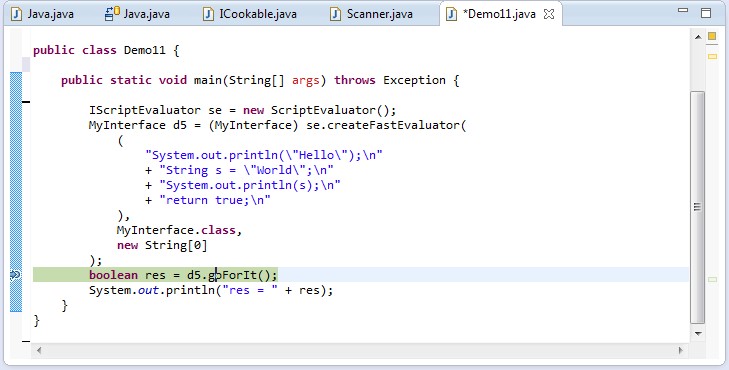
, you can step right into the generated code
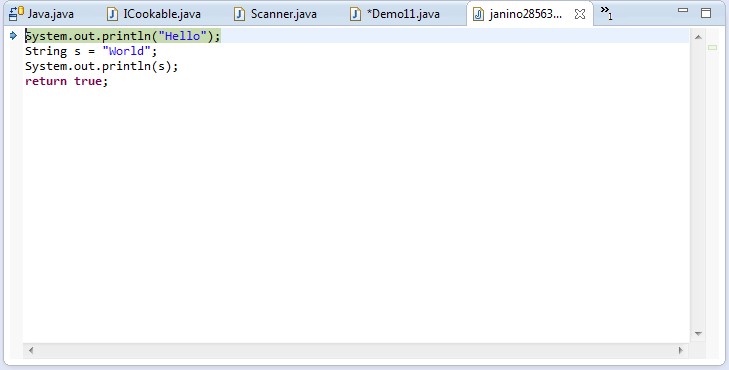
, and debug it:

As you can see, you can even inspect and modify fields and variables - everything your debugger supports.
If you think you have found a bug in Janino, proceed as follows:
If you require support, this is the place to ask for it.
Feel free to submit feature requests here.
I appreciate your feedback. Let me know how you want to utilize Janino, if you find it useful, or why you cannot use it for your project.
The JANINO code repository is here. You have to check out at least the following projects:
Optional:
Then you can build the JAR files, the source archives and the JAVADOC archives by running mvn install in the janino-parent project.
If you want to contribute, turn to me: arno att unkrig dott de. Any support is welcome, be it bug reports, feature requests, documentation reviews or other work. Help building a better world with JANINO!