


See what an app you run sends home, and what it still sends after you opt out.
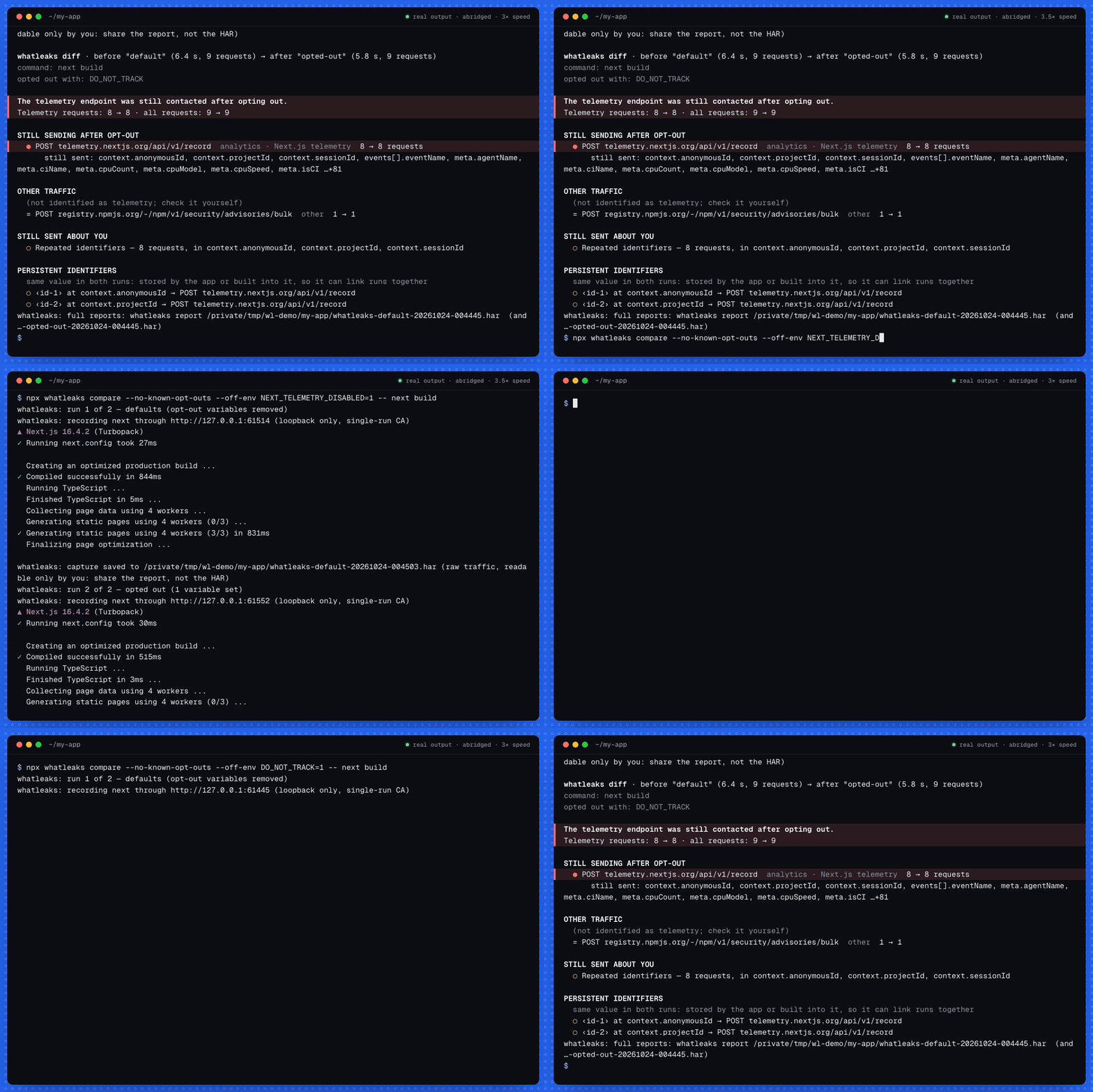
Real output of whatleaks 0.1.0 from npm on next build (Next.js 16.4.2), recorded on 2026-10-24 and replayed, abridged and sped up (recordings). The 55-second video: whatleaks.me/media/whatleaks-demo.mp4.
whatleaks runs a command through a local, single-run proxy and tells you:
- where the app's traffic went
- how often
- which fields each payload carried, with redacted samples
- whether any of it is about you: your username, hostname, home path, MAC address (also as a hash), machine id, git email
whatleaks compare runs the command twice, first with defaults and then opted out of
telemetry, and shows what is still sent.
Docs, the benchmark and an FAQ are at whatleaks.me.
$ whatleaks compare --no-known-opt-outs --off-env DO_NOT_TRACK=1 -- ./node_modules/.bin/next build
…
The telemetry endpoint was still contacted after opting out.
Telemetry requests: 8 → 8 · all requests: 9 → 9

STILL SENDING AFTER OPT-OUT
  ● POST telemetry.nextjs.org/api/v1/record  analytics · Next.js telemetry  8 → 8 requests
      still sent: context.anonymousId, context.projectId, context.sessionId, events[].eventName, meta.agentName, meta.ciName, meta.cpuCount, meta.cpuModel, meta.cpuSpeed, meta.isCI …+81

OTHER TRAFFIC
  (not identified as telemetry; check it yourself)
  = POST registry.npmjs.org/-/npm/v1/security/advisories/bulk  other  1 → 1

STILL SENT ABOUT YOU
  ○ Repeated identifiers — 8 requests, in context.anonymousId, context.projectId, context.sessionId

PERSISTENT IDENTIFIERS
  same value in both runs: stored by the app or built into it, so it can link runs together
  ○ ‹id-1› at context.anonymousId → POST telemetry.nextjs.org/api/v1/record
  ○ ‹id-2› at context.projectId → POST telemetry.nextjs.org/api/v1/record
That is real output from Next.js 16.4.2 on 2026-10-21. DO_NOT_TRACK=1 does not stop
Next.js telemetry. Next.js never says it does: its documented switch is
NEXT_TELEMETRY_DISABLED=1, and with that set whatleaks saw telemetry go from 8
requests to 0. The run log is in docs/e2e/. On 2026-10-24 the published
0.1.0, run with npx, gave the same results: 8 → 8, and 8 → 0.
The idea comes from hand-made telemetry investigations, like the
Trae IDE writeup (954 points on Hacker
News). The top comment there questioned the method: was the app restarted after
telemetry was turned off? compare answers that by construction. It runs the same
command twice, in fresh processes, and keeps both captures.
Needs Node ≥ 22.12. Run it with npx:
npx whatleaks run -- <command>
or install the whatleaks command:
npm install -g whatleaks
or, with Homebrew, which brings its own Node:
brew install devanshranjan10/tap/whatleaks
The install pulls about 195 packages (41 MB), mostly the proxy library,
mockttp. Recent npm versions may say they
skipped an install script for tls-impersonate. Nothing needs approving: mockttp loads
that native module only to mirror TLS fingerprints, which whatleaks never turns on, and
it ships prebuilt binaries anyway.
From source:
git clone https://github.com/devanshranjan10/whatleaks && cd whatleaks
npm ci && npm run build
node dist/cli.js --help
CI builds and tests every commit on Ubuntu and macOS with Node 22.12.0, 22, 24 and 26, then installs the packed package into an empty project and captures a real request.
whatleaks run [options] -- <command> [args...]       capture one run and print a report
whatleaks compare [options] -- <command> [args...]   run twice (defaults, then opted out) and diff
whatleaks report <file.har>                          analyse a HAR from whatleaks or any other tool
whatleaks diff <before.har> <after.har>              diff two captures
whatleaks opt-outs                                   list the opt-out variables `compare` sets
Examples:
# What does my build send?
whatleaks run -- npm run build

# Does the documented opt-out work? Every known opt-out variable (32) is set in the second run.
whatleaks compare -- ./node_modules/.bin/next build

# Test one specific switch, and fail CI if telemetry is still sent.
whatleaks compare --no-known-opt-outs --off-env DO_NOT_TRACK=1 --strict -- ./node_modules/.bin/turbo run build

# Long-running or interactive apps: stop after 60 seconds.
whatleaks run --duration 60 -- some-dev-server

# Tools whose opt-out is a setting, not an environment variable: two runs plus a diff.
whatleaks run --label on  -- my-tool
# (turn telemetry off in the tool's settings)
whatleaks run --label off -- my-tool
whatleaks diff whatleaks-on-*.har whatleaks-off-*.har

# Already have a HAR capture from another tool?
whatleaks report capture.har --md report.md
Useful options:
| Option | What it does |
|---|---|
--md <file>, --json <file> |
Write the report (or, for compare and diff, the diff) as Markdown or JSON. The Markdown has every field and full payload samples. |
--samples <n> |
Payload samples per endpoint (default 2). |
--duration <s> |
Stop the app after this many seconds, together with the processes whatleaks tracked for it. |
--linger <s> |
After the app exits, wait up to this long for processes it left running (default 10 s). Some tools send telemetry from a detached helper after they exit. |
--grace <s> |
After the app exits, keep recording at least this long (default 1 s), for helpers that start sending a moment later. |
--passthrough <host> |
Tunnel a host without decrypting it, e.g. *.mybank.com. It is still counted. |
-e KEY=VALUE |
Extra environment variable for the app. |
--strict |
compare and diff: exit 1 if a known telemetry endpoint (from the catalog) is still contacted in the second run, or if the second run did not exit cleanly. |
--raw |
Turn off redaction (see below). |
--no-watch |
Do not sample for connections that bypass the proxy. |
Every run saves its capture as a HAR file
(whatleaks-<label>-<time>.har). The file is readable only by you and is never
redacted.
The first part of whatleaks report on the Next.js capture, unedited apart from the
cut at the end:
whatleaks · ./node_modules/.bin/next build · 3.7 s · exit 0
9 requests to 2 destinations · ≈10.6 KB sent · 8 to known telemetry endpoints
activity |  █ ▃   █ ▃▃        | over 3.7 s

WHAT IT SENT ABOUT YOU
  ○ Repeated identifiers: 3 ids reused across requests (‹id-1› ×8, ‹id-2› ×8, ‹id-3› ×8)
      in context.anonymousId, context.projectId, context.sessionId

WHERE IT WENT
  DESTINATION           CATEGORY                       REQUESTS      SENT
  telemetry.nextjs.org  analytics · Next.js telemetry         8  ≈10.3 KB
  registry.npmjs.org    other                                 1    ≈321 B

ENDPOINTS
  POST telemetry.nextjs.org/api/v1/record  analytics · Next.js telemetry
      8 requests · first +0.5s · every ~223 ms · ≈10.3 KB · status 204×8
      fields: context.anonymousId (id, same in every request), context.projectId (id, same in every request), context.sessionId (id, same in every request), events[].eventName, meta.agentName, meta.ciName, meta.cpuCount, meta.cpuModel …+83
      sample (+0.5s):
        {
          "context": {
            "anonymousId": "‹id-1›",
            "projectId": "‹id-2›",
            "sessionId": "‹id-3›"
          },
…
The full report is in docs/e2e/next-build-report.txt
and, as Markdown with all 91 fields and two payload samples,
docs/e2e/next-build-report.md.
When a payload carries something about you, the report says what, how it was encoded and where it appeared. This line is from the test suite's synthetic capture:
  ● A MAC address of this machine as sha256 — 3 requests to api.segment.io
      in batch[].context.device.id
-
Single-run CA. Each run generates a fresh certificate authority. Its private key stays in memory. Its certificate is written to a private temp folder that is deleted when the run ends.
-
Loopback proxy. The proxy is built on mockttp and listens on
127.0.0.1only. mockttp would listen on every interface by default; whatleaks forces loopback, and a test checks it. -
Standard environment variables. whatleaks points the app at the proxy and tells it to trust the run's CA:
-
proxy:
HTTP(S)_PROXYin both cases,NODE_USE_ENV_PROXY=1 -
CA:
NODE_EXTRA_CA_CERTS,SSL_CERT_FILE,REQUESTS_CA_BUNDLE,CURL_CA_BUNDLE,GIT_SSL_CAINFO,DENO_CERT -
Java:
JAVA_TOOL_OPTIONSwith the proxy and a truststore file whatleaks writes itself (the JVM ignores the variables above). -
Node: a small preload (
NODE_OPTIONS=--require).- On Node older than 22.21 it routes
http,httpsandfetchthrough the proxy. - On newer Node it gives agents the app creates itself the proxy settings. Node's built-in support covers only the global agent.
- On every Node it tunnels
node:http2, which reads no proxy variables.
- On Node older than 22.21 it routes
-
Python (
PYTHONPATH) and Ruby (RUBYOPT): small hooks for builds that ignoreSSL_CERT_FILE, such as Apple's/usr/bin/python3and the macOS system Ruby. The Python hook also makes aiohttp honour the proxy variables, astrust_env=Truewould. A client given its own CA file keeps it. -
All three hooks also report each direct TCP connection and UDP destination as it opens, to a file in the run's private temp folder (see "Not-visible traffic").
-
--no-preloadturns all three off.
Trust reaches only the app's own process tree. Nothing is installed in your system's trust store, and no system proxy settings change.
-
-
Process tree.
- whatleaks follows the processes the app starts, identified by pid and start time.
- It also adopts any process connected to the proxy, which catches detached helpers whose parent already exited.
- A process that was re-parented to launchd, started during the run, in the app's folder, is treated as a likely helper. whatleaks waits for it but never signals it unless it connects to the proxy.
- So it can wait for late telemetry, and stop everything on
--duration, on Ctrl-C, or when the wait ends.
-
Not-visible traffic. An app that refuses the CA, such as one that pins certificates, fails that request. whatleaks lists the host by name, with a count, under "not visible". It does not try to get around pinning. Connections that ignore the proxy are listed by address and process:
- macOS:
netstat -anvWevery 20 ms while the app is busy and every 100 ms when it idles. A closing sweep finds connections that already closed, because macOS keeps the owner of a TIME_WAIT socket. - Linux:
/procat the same rates, so nops,lsofornetstatis needed. - Elsewhere:
lsofevery 0.5 s. - Node, Python and Ruby also report each direct socket themselves as it opens, so even ones that last a millisecond are listed, with the hostname asked for.
- macOS:
-
Analysis.
- Requests are grouped into endpoints, with path ids templated
(
/users/123→/users/:id). - JSON, NDJSON, form and binary bodies are decoded.
- Every field is inventoried.
- Payloads are searched for this machine's identifiers, raw and as md5, sha1 and sha256 hex and base64. The local values are read into memory only and never written.
- Endpoints are classified from a catalog of 69 known telemetry hosts, each with a
source link. Otherwise a URL keyword guess is used, always marked
?. - Headlines and
--strictcount only catalog hosts. Guesses are listed separately, as "possibly telemetry".
- Requests are grouped into endpoints, with path ids templated
(
Reports are meant to be shared, so by default:
- this machine's identifiers become labels (
‹home›,‹sha256(mac)›, …) - secret-looking headers, fields and query parameters become
‹redacted› - emails become
‹email› - id-shaped values (install ids, session ids, tokens) become per-report aliases
(
‹id-1›). The same value always gets the same alias, so you can still follow it through the report. - control characters are neutralised, so a payload cannot inject terminal escapes
--raw turns this off.
Redaction is pattern-based, so read a report before you post it. The HAR file holds the raw traffic: share the report, not the HAR.
Measured in docs/BENCHMARK.md; method notes in
docs/ACCURACY.md. In short:
-
Lab with exact ground truth. 46 scenarios and 594 attempts on macOS, 43 and 567 on Linux, covering Node 20/22/26, Bun, curl, four Python HTTP clients and Apple's Python, Ruby, Go, Java, WebSockets,
node:http2, raw TCP and UDP, and late helpers. Two other tools ran on the same scenarios:Silently missed macOS Linux whatleaks 3.4 % 3.0 % mitmproxy 12.2.3 (12.3.0 on Linux), given the same environment 38 % 40 % HTTP Toolkit server 1.27.3, with its own interception 67 % 70 % the build before this benchmark (43 scenarios) 48 % – - whatleaks reached the best outcome its rules allow in 97 % of attempts on both platforms.
- Every remaining miss is from a Go program, which whatleaks loads no hook into: a
connection reset within 10 ms, UDP sent with
sendto(), and once a connection the server closed at once. The same from Node, Python or Ruby was caught every time. - Nothing the app did not send was ever credited to it.
-
Real tools, against each tool's own debug output: whatleaks matched 5 of 5, HTTP Toolkit 4 of 5, mitmproxy 3 of 5.
- Next.js 16.4.2: 22 of 22 events, on Node 22 and on Node 20.
- Wrangler 4.151: 3 of 3 events.
- Turborepo 2.11: 10 of 17 events. The other 7 never leave the process before turbo exits.
- mitmproxy saw none of Next.js on Node 20 or of Turborepo. HTTP Toolkit missed
Astro's event (Node 26
fetch).
-
Identity detection:
- all 8 planted identifier kinds were found in every run, including inside WebSocket messages;
- none of the planted decoys was flagged.
-
Linux: the full lab in Docker (Debian, Node 20 to 26, Python, Go, Java), and a check in a container with no
ps,lsofornetstat. -
Classification: endpoints are labelled from a catalog of known telemetry hosts, or by keyword guesses marked
?, which can mislabel ordinary APIs.
Measured limits are in docs/BENCHMARK.md.
- Platforms.
- macOS and Linux (Docker, arm64) are benchmarked.
- Linux is also checked in a slim container (
bench/linux/check.mjs) with nops,lsofornetstat. - Windows is untested and has no backend: process watching would be off there.
- Only processes you launch through whatleaks. GUI apps, Electron apps, browsers and system daemons were not tested.
- Apps that refuse the CA cannot be read, only named.
- Go programs on macOS (they read only the system keychain) and pinned clients refuse the CA.
- whatleaks names the host and counts the refusals. It does not try to get around pinning.
- Connections that bypass the proxy are named, not read.
- Examples: raw sockets, UDP, and HTTP clients that ignore proxy variables other
than
node:http2and aiohttp, which whatleaks routes through the proxy. - From Node, Python and Ruby, each one is reported by whatleaks's hook as it opens,
with the hostname the app asked for. That includes UDP sent with
sendto(). - From other programs (Go, Rust, C), they are found by polling, which misses very
short ones:
- a socket closed by the app is found afterwards on macOS (TIME_WAIT keeps its owner); on Linux a closed socket has no owner, so only open ones count;
- one reset within about 10 ms is often missed (Go in the lab: caught 10 to 30 %);
- UDP sent with
sendto()leaves no address for any watcher and is never seen.
- Examples: raw sockets, UDP, and HTTP clients that ignore proxy variables other
than
- Not covered by the Node preload: the
undicinpm package with its own dispatcher, andnode:http2over plain-texthttp:(h2c). Their connections are named as direct connections. - Late helpers outside the project folder. A detached helper whose parent exits at
once is waited for when it runs in the app's folder. One that runs from
/or your home folder, and first connects more than--graceseconds after the exit, is missed. Raise--gracefor tools like that. - Node 22 prints a warning. On Node 22, the app prints an
UNDICI-EHPAexperimental warning when it starts. That is Node's built-in proxy support, which whatleaks turns on. - Uploads over 8 MiB are counted and marked cut off. The first MiB is kept and scanned.
- Imported HAR from other tools: the reader handles browser-devtools-style and mitmproxy-style HAR, including their WebSocket messages. It was tested with hand-made samples, not real exports from Proxyman, Charles or HTTP Toolkit.
compareruns defaults first. Events a tool sends only on first use can make a "stopped" result look better than it is. A "still sending" result is always a direct observation. Repeat a comparison before trusting a stop.- Exact matching only. Identity matching cannot see salted hashes. Redaction and classification are pattern-based.
- Next.js on Node 24 and 26. Next.js 16.4.2's telemetry fails inside the process
on Node 24.22 and 26.0, with or without whatleaks, so you will see none there. The
Next.js examples above used Node 22.23.3. See
docs/e2e/README.md§3.
npm ci
npm run check     # typecheck, lint, tests (all offline; integration tests use local servers only)
npm run build
- Tests use recorded fixtures and loopback servers only.
test/fixtures/real/holds scrubbed captures of realnext buildruns.- Design notes are in
docs/:- the spec:
docs/superpowers/specs/ - the decision log:
DECISIONS.md - research:
RESEARCH.md - progress:
PROGRESS.md
- the spec:
MIT