

The grid paper store doesn't stock the one you actually need. Make it yourself, in the exact spacing, color, and pattern you want, and print it in under a minute.


Created by Bilal Malik
Follow on Github bilalmlkdev
Grid paper is one of those things that's almost never exactly right. The notebook at the store has 5mm squares when you needed 4mm. The dot grid is too faint to see or too dark to write over. You need one sheet of isometric paper for a single sketch and the only option is buying an entire pad of it.
So people end up hand-ruling paper, screenshotting grids off the internet at the wrong resolution, or just working on the wrong grid because the right one isn't available. None of that is a good use of anyone's time.
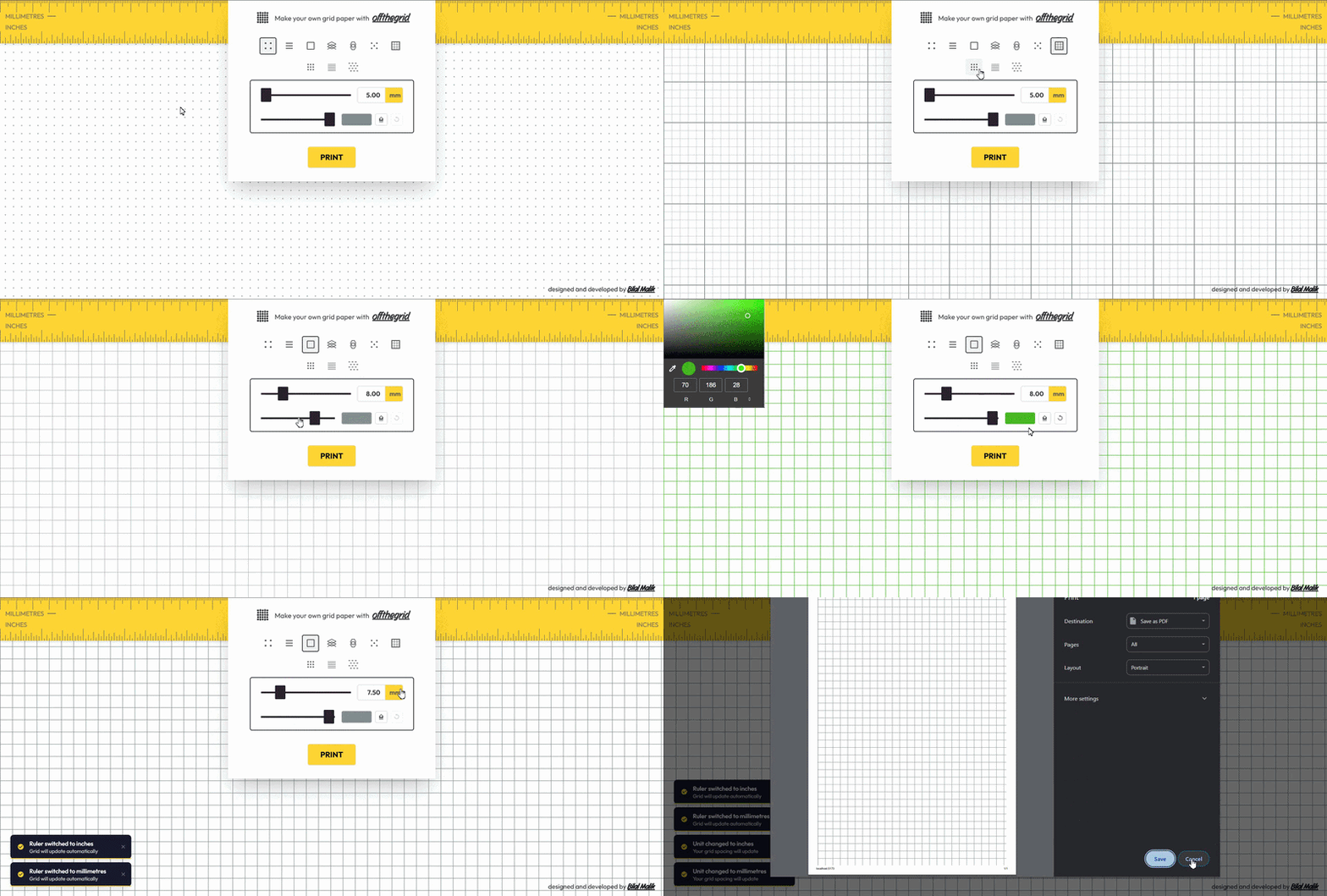
Gridpaper skips the compromise. Pick a pattern, set the exact spacing in mm or inches, pick a color and opacity, and print it - it's your grid, sized the way you actually need it, not the way a notebook manufacturer decided to sell it.
- You're not limited to whatever a store happens to stock. Ten-plus patterns ship built in - dot grid, lined, square, isometric, hex, cross, graph, large dot, music staff, isometric dots - covering journaling, sketching, drafting, tabletop maps, and composition without hunting down a specialty notebook for each one.
- You stop eyeballing spacing. A slider or a direct numeric input sets the exact gap between lines, in millimeters or inches, with the ruler updating live so what you see is what prints.
- You get the contrast you actually want. Pick any color, dial opacity from barely-there to bold, and reset to default in one click if you overshoot.
- What prints is just the grid. No ads, no UI chrome, no browser print artifacts - a clean sheet, accurately rendered, ready for a printer tray.
- Your setup is still there next time. Pattern, spacing, color, and opacity are saved locally the moment you set them - no account, no sign-in, nothing to lose if you close the tab.
Every pattern is its own renderer - drawDotGrid, drawHexGrid, drawMusicStaff, and so on - each one a pure function that takes spacing, color, and opacity and draws that pattern to canvas. Adding a new pattern means writing one more renderer, not touching the ones that already exist.
State - the active pattern, spacing, unit, color, opacity - lives in a Zustand store, and every change flows straight through to the canvas via a debounced redraw, so dragging the spacing slider stays smooth instead of redrawing on every pixel of mouse movement.
Print uses the browser's native print pipeline against the same canvas you're already looking at, so there's no separate "export" step that might render differently from the on-screen preview.
| Action | How |
|---|---|
| Pick a pattern | Click any pattern icon in the control panel |
| Set spacing | Drag the slider, or click the value and type a number |
| Switch units | Click mm or in next to the spacing value |
| Change color | Click the color swatch or the picker icon |
| Reset color | Click the ↺ reset button next to the picker |
| Adjust opacity | Drag the opacity slider |
| Flip ruler units | Click anywhere on the ruler at the top |
| Click PRINT |
- Bullet journaling - a dot grid at exactly the spacing your handwriting wants, not whatever spacing a specific notebook brand chose.
- Sketching and drafting - isometric or cross-hatch grids for 3D work and technical drawing, without buying a pad you'll use twice.
- Music composition - staff paper on demand, no trip to a music store for a single blank page.
- Teaching and worksheets - graph paper with bold major lines and light minor divisions, printed in the exact quantity a lesson actually needs.
| Technology | Purpose |
|---|---|
| React 19 | UI framework |
| TypeScript | Type safety across pattern renderers and store |
| Tailwind CSS v4 | Styling |
| Zustand | Grid and notification state |
| Vite | Build tool |
| use-debounce | Keeps slider-driven redraws smooth |
gridpaper
├── public
│   └── favicon
├── src
│   ├── components
│   │   ├── Canvas          PatternRenderer
│   │   ├── Controls          ControlPanel, Ruler
│   │   └── UI                  Loader, Notification, PrintButton, SpacingControl, OpacityControl
│   ├── hooks                    useDebouncedGrid, useNotification
│   ├── patterns                  one renderer per grid type (dotGrid, drawHexGrid, drawMusicStaff, ...)
│   ├── store                      gridStore, notificationStore
│   ├── types
│   ├── utils
│   ├── App.tsx
│   ├── main.tsx
│   └── index.css
├── index.html
├── package.json
├── tsconfig.json
└── vite.config.ts
- Node.js 18+ (LTS recommended)
- npm, yarn, or pnpm
Clone the repository and move into it.
git clone https://github.com/bilalmlkdev/gridpaper.git
cd gridpaper
Install dependencies and start the dev server.
npm install
npm run dev
For a production build:
npm run buildContributions are welcome - yes, even yours.
- Fork the repository.
- Create a feature branch:
git checkout -b feature/amazing-feature - Commit your changes:
git commit -m "Add amazing feature" - Push it:
git push origin feature/amazing-feature - Open a Pull Request.
Keep to ES6+ syntax, format with Prettier, write commit messages that explain the reasoning, and check for console errors before submitting. If your change adds a pattern or a control, update this README's relevant section too.
MIT License

Copyright (c) 2026 Bilal Malik

Permission is hereby granted, free of charge, to any person obtaining a copy
of this software and associated documentation files (the "Software"), to deal
in the Software without restriction, including without limitation the rights
to use, copy, modify, merge, publish, distribute, sublicense, and/or sell copies
of the Software. The above copyright notice and this permission notice shall
be included in all copies or substantial portions of the Software.

THE SOFTWARE IS PROVIDED "AS IS", WITHOUT WARRANTY OF ANY KIND, EXPRESS OR
IMPLIED, INCLUDING BUT NOT LIMITED TO THE WARRANTIES OF MERCHANTABILITY,
FITNESS FOR A PARTICULAR PURPOSE AND NONINFRINGEMENT. IN NO EVENT SHALL THE
AUTHORS OR COPYRIGHT HOLDERS BE LIABLE FOR ANY CLAIM, DAMAGES OR OTHER
LIABILITY, WHETHER IN AN ACTION OF CONTRACT, TORT OR OTHERWISE, ARISING FROM
OUT OF OR IN CONNECTION WITH THE SOFTWARE OR THE USE OR OTHER DEALINGS IN THE
SOFTWARE.