


DraftLoop turns candidate-owned sources into a job-specific CV with grounded evidence, independent AI critique, and final human control.
It is designed for candidates who want useful drafting assistance without giving up traceability or control of their source material. Claims remain connected to candidate-provided evidence, provider and model identities are visible, and the candidate decides what to approve and export.
Current maturity: DraftLoop is an alpha. Its capabilities are integrated and deterministically validated, but private quality checks show drafts that still cover fewer job requirements than a manually tailored CV, and no representative consented outcome has been recorded. The roadmap and current status record the evidence and remaining gaps. This project is not production-ready.
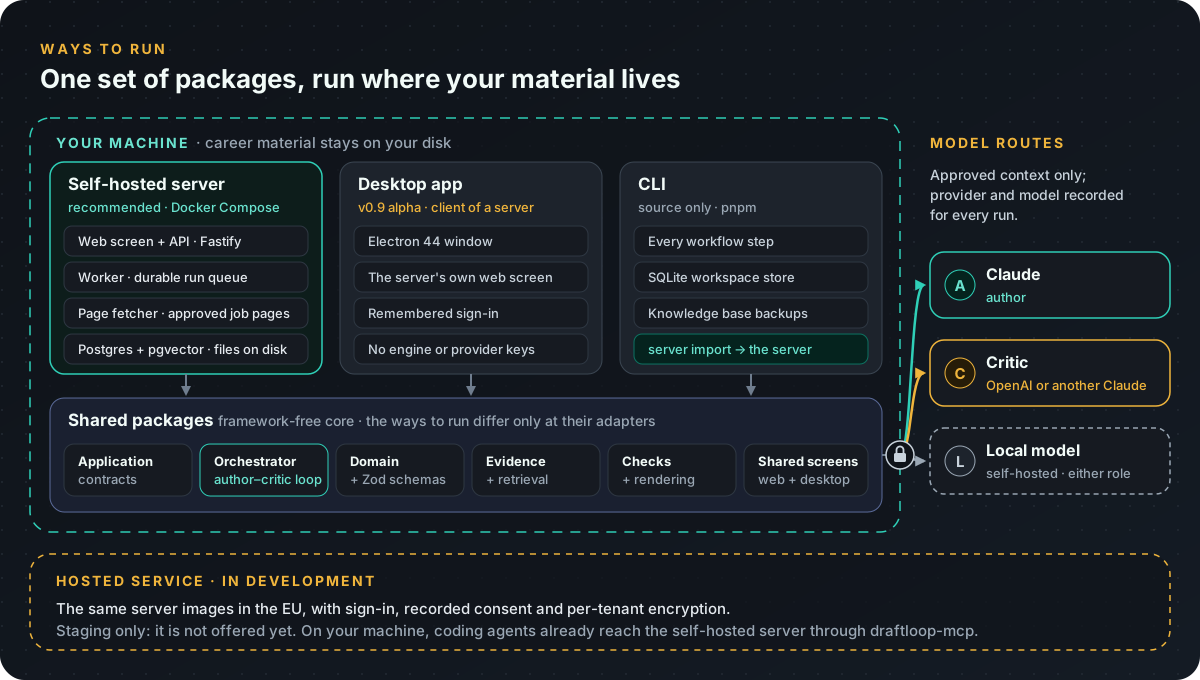
| Way to run | Status | What it is |
|---|---|---|
| Self-hosted server | Recommended | The web screen, API, worker and database on your own machine with Docker. Your files stay on your disk. |
| Desktop app | Alpha (v0.9.0) | DraftLoop's desktop version beside the web screen, for your self-hosted server and the hosted service once it opens. Workspaces from the retired v0.8 alpha move to the server with one command. |
| CLI | Source only | Every workflow step from a terminal, over the same packages. |
| Hosted service | In development | The same server in the EU with sign-in and consent (ADR 0011). It is not offered yet. |
All of them run the same packages and the same author–critic loop, and differ only at their adapters; see the architecture overview.
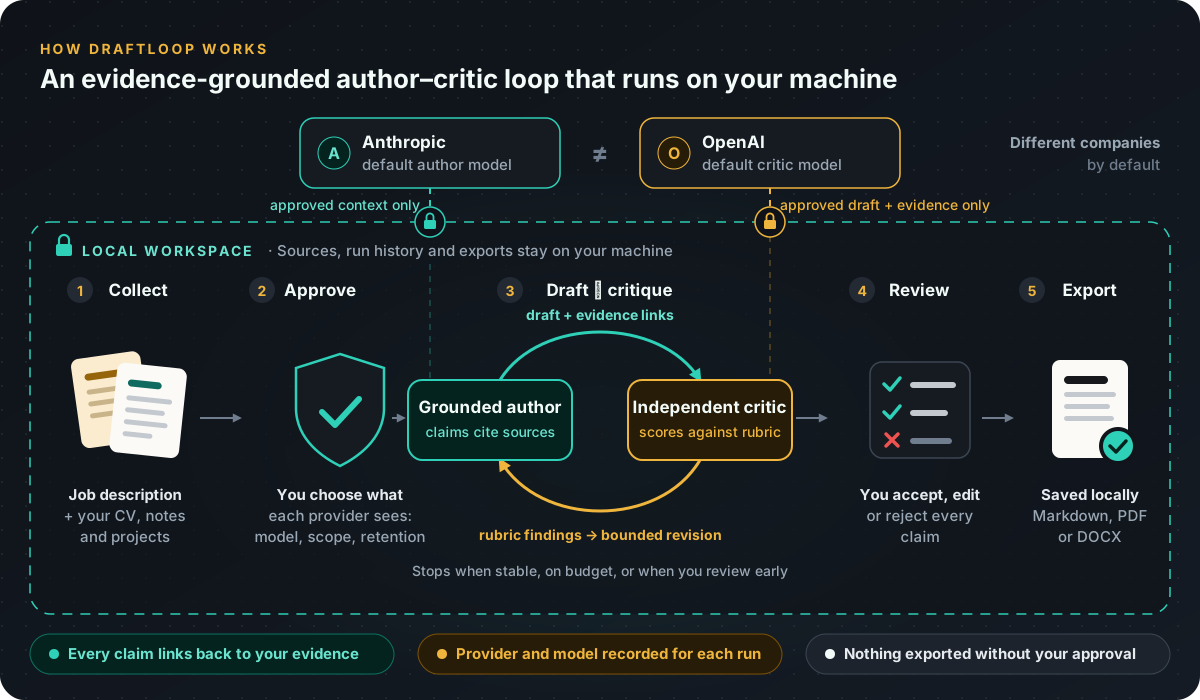
DraftLoop keeps the job description and career evidence in your own store, then applies an evidence-grounded evaluator–optimizer workflow: an author generates, an independent critic evaluates against a rubric, and accepted feedback drives bounded revision. The default cross-company pairing is Anthropic as author and OpenAI as critic; Anthropic-only pairs use a different Claude model as critic. ADR 0003 records DraftLoop's adaptation and controls.
The loop is an assistant, not an authority. DraftLoop does not independently verify a career, contact past employers, replace interviews, or turn a candidate's source material into permission to invent facts.
The self-hosted server needs only Docker with the Compose plugin: no clone, no
Node and no build. Its images are published on GitHub Container Registry with
each server-v* release on the releases page.
On Linux or macOS, download the install script and install a release. Set
VERSION to the newest server-v* release, without the server-v prefix:
VERSION=0.15.0
curl -fsSL -o /tmp/draft-loop-server https://raw.githubusercontent.com/akoita/draft-loop/main/deploy/local/bin/draft-loop-server
bash /tmp/draft-loop-server install "$VERSION"
Then add your keys and start the stack:
- Put each provider key in its own file in
~/draft-loop-server/keys/:anthropic_api_key, andopenai_api_keyfor the default OpenAI critic. A local model such as Ollama can replace either; see Local models. - Run
~/draft-loop-server/bin/draft-loop-server up. The first start pulls the images, creates a random owner token and database passwords, and prints what to do next. - Open http://127.0.0.1:8080 and sign in with the token that
~/draft-loop-server/bin/draft-loop-server tokenprints.
On Windows, download draft-loop-server.ps1 from the same
deploy/local/bin folder and run
.\draft-loop-server.ps1 install 0.15.0 in PowerShell, with the newest
version; the other commands are the same. The self-hosted server guide covers
settings, upgrades, backup and restore, privacy, and moving a desktop
workspace to the server.
On the self-hosted server, your coding agent can record notable work it helped
ship through the draftloop-mcp MCP server. Each note waits for your review
before it becomes career evidence; see the
agent channel.
The desktop app is a first-class DraftLoop client beside the web screen: an Electron app over a DraftLoop server's own web screen, pointed at your self-hosted server or at the hosted service once it opens. It ships from v0.9.0 (ADR 0011, D9) and needs a server at 0.14.0 or later to remember your sign-in.
The v0.8 alpha with its own local engine is retired: its code left the
repository after v0.9.0. To keep a v0.8 workspace, send its applications and
career evidence to a self-hosted server with draft-loop server import; see
Coming from the desktop app.
Download the newest desktop release for your platform
and its SHA256SUMS file. Releases from v0.9.0 hold the desktop client; the
v0.8 alpha releases hold the old app with its own engine. Packages are
platform-specific ZIP archives, including Windows x64. Compare the ZIP's digest
with its line in SHA256SUMS:
# Linux
sha256sum "./<downloaded-archive>.zip"

# macOS
shasum -a 256 "./<downloaded-archive>.zip"
On Windows, run (Get-FileHash .\your-download.zip -Algorithm SHA256).Hash in
PowerShell. Extract the ZIP and launch the executable from the extracted
folder. The packages are not signed and do not update themselves; the client
says when a newer version is on the releases page.
On first launch the client opens this computer's self-hosted server
(http://127.0.0.1:8080) when it answers, or a picker where you add another
server by its https address. It never starts the server itself: run
draft-loop-server up first. It needs its server to work; there is no offline
drafting. See the desktop client
for what it stores on your computer.
DraftLoop has no npm package: from a clone, use Node.js 24.22.1 and pnpm 10.18.3:
pnpm install --frozen-lockfileThe source-only CLI and the desktop client run from the clone. The desktop client opens your self-hosted server:
pnpm --filter @draft-loop/cli start --help
pnpm --filter @draft-loop/desktop-client start
Every CLI command group, from opportunity briefs to candidate knowledge bases, is documented with runnable examples in the CLI and desktop operations reference. Live use requires an explicit provider-transmission approval and configured provider credentials, and may incur provider cost. Keep real candidate material out of the repository.
List each job requirement as its own bullet line in job.md. A run started
without a reviewed opportunity brief refuses long unbulleted paragraphs, such as
a pasted web page, before any provider call.
The server has two Compose stacks in a clone:
pnpm server:upandpnpm server:testrun the development stack, with a Cloud Storage emulator, Keycloak and no provider calls; see the local server stack, which also walks through the web screen and the sign-in mode.pnpm self-hosted:upbuilds and starts the self-hosted stack from source, andpnpm self-hosted:testchecks it the way a person installs it.
For the normal quality gate, run:
pnpm format:check
pnpm lint
pnpm typecheck
pnpm test
pnpm validateDraftLoop can use a pinned, local embedding model (Apache-2.0; Granite, about
313 MB for the default 311m tier and 98 MB for 97m, or the experimental
EmbeddingGemma 2 eg2-text tier at about 175 MB). It runs on your machine
and is never downloaded implicitly. The files are fetched only when you run
install with --confirm; without it, the command prints what would be
downloaded and exits.
pnpm --filter @draft-loop/cli start embeddings status [--tier 311m|97m|eg2-text] [--verify]
pnpm --filter @draft-loop/cli start embeddings install [--tier 311m|97m|eg2-text] [--from <dir>] --confirm
pnpm --filter @draft-loop/cli start embeddings remove [--tier 311m|97m|eg2-text]
Use --from <dir> to import the files offline from a directory that mirrors the
model repository layout. Every file is checked against its pinned SHA-256
checksum before the model becomes available. The default location is your
per-user data directory; set DRAFT_LOOP_EMBEDDING_MODEL_ROOT (or pass
--model-dir) to choose another.
Choose how a workspace searches its knowledge with retrieval mode
(lexical, the default, semantic, or hybrid). Runs fall back visibly to
lexical retrieval when the local model or index is unavailable; see the
CLI reference.
pnpm --filter @draft-loop/cli start retrieval mode ./workspace [lexical|semantic|hybrid] [--tier 311m|97m|eg2-text] [--json]When the critic judges requirement coverage, run output prints a
Coverage judgement: summary and status lists each requirement's assessment;
see Requirement coverage in run output.
evidence-usage shows, for each author call of a saved run, how many retrieved
chunks it was sent and how many its draft cites, as counts and ranks only.
| Area | Technology or boundary |
|---|---|
| Runtime | TypeScript, Node.js 24.22.1, pnpm 10.18.3 |
| User interfaces | React 19 and Vite screens shared by the web and the desktop; Electron 44; Commander CLI |
| Product core | Framework-free domain contracts, Zod schemas, orchestrator ports |
| Server | Fastify API typed by Zod, a worker on a pg-boss run queue, a separate page fetcher |
| Providers | Explicit Anthropic and OpenAI SDK adapters; OpenAI-compatible local models on the server |
| Data and output | Postgres with pgvector on the server; SQLite via Drizzle ORM on the desktop; Markdown, PDF, and DOCX exports |
| Packaging | Server images on GitHub Container Registry with Docker Compose; desktop ZIP archives |
| Quality | Biome, ESLint, Markdownlint, Vitest, GitHub Actions |
The architecture overview is the entry point: it maps the ways to run, the components and a run's path in diagrams, then links the detailed views of the hosted service, storage and tenancy, candidate evidence, drafting and review, and runtime and trust.
Career evidence lives in a portable Candidate Knowledge Base (CKB): versioned source files with a lexical index, and optional local semantic retrieval. Runs read only the source versions a workspace selects; see Candidate evidence.
- On your machine (self-hosted server, desktop, or CLI), career evidence, run history, and exports stay on your disk. A provider receives only context covered by an explicit approval, and the workspace shows the provider, model, transmission scope, and retention choice. A local model keeps everything on the machine.
- Independent review is a product constraint: the author and the critic are different models, by default from different companies, and their identities and versions are recorded with each run.
- Model presets range from economy (Claude Haiku 5.5 with GPT-6 Luna) to standard (Claude Opus 5.5 with GPT-6.1 Sol), plus Anthropic-only pairs with a different Claude critic and opt-in development authors. Their CV quality is unvalidated; see CLI model profiles and the model strategy.
- The hosted service is designed to store material only with recorded consent, in the EU with per-tenant encryption, and to send providers only approved material under zero-retention terms (ADR 0011). It is not offered yet.
- DraftLoop prepares artifacts. It does not submit applications, publish documents, send messages, or perform uncontrolled web research on a user's behalf.
- Documentation map · Roadmap and current status · Release history
- Architecture overview · Candidate evidence · Drafting and review
- Runtime and trust · Hosted service · Storage and tenancy · Architecture decision records · CLI and desktop operations reference
- Privacy and evaluation · Threat model · Server threat model
- Self-hosted server · Local server stack · Client-server version (ADR 0011) · Client-server delivery plan
- Contributing · Releasing
Human approval is mandatory before an artifact is exported. DraftLoop can help prepare a CV, but the candidate remains responsible for factual review, final approval, and every action beyond it.