
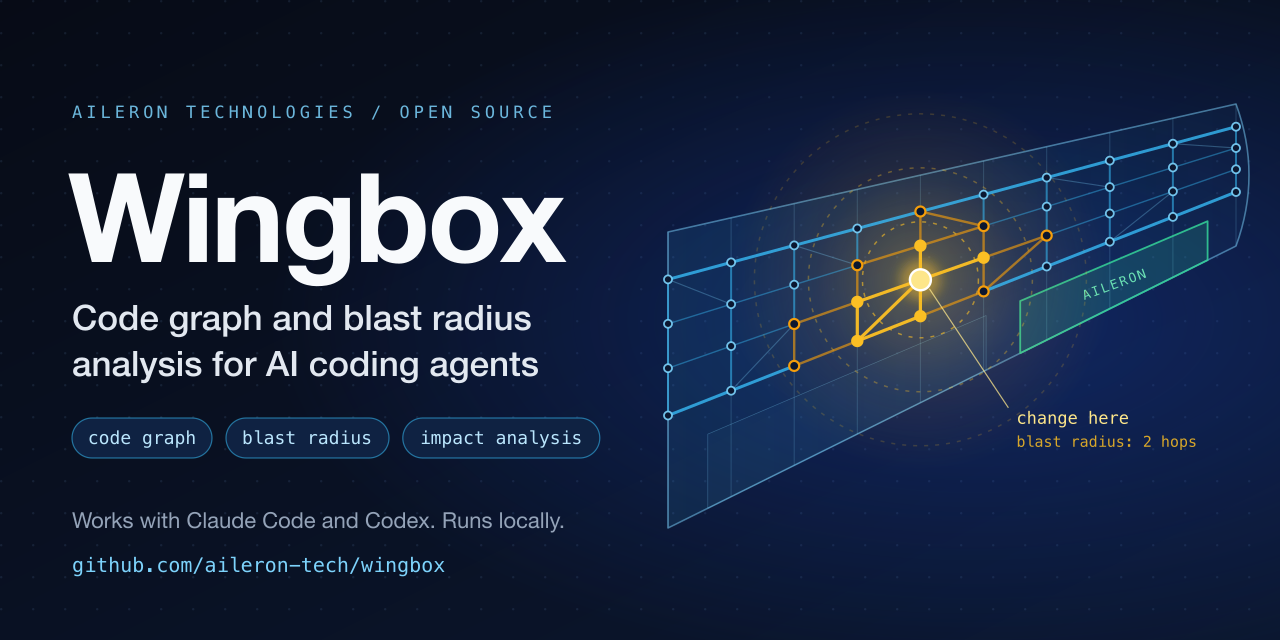
Give your coding agent a map of your codebase. 2-4x cheaper, no missed files.
Up to 5x faster, up to 8.8x fewer tokens, up to $484 saved per 1,000 questions, no missed files.
Your agent sees every file a change touches before it edits, so it no longer forgets a fix. 2-4x cheaper per answer than its own search or another code-graph tool: benchmarks.
Wingbox builds a local code graph (a code knowledge graph made by static parsing, with no model) of your repository so that AI coding agents and developers can see dependencies, call flows, architecture boundaries and the blast radius of a change before editing code. It works as an agent skill in Claude Code, Codex, Gemini CLI, Cursor and GitHub Copilot, as an MCP server for any MCP client, and from the command line. It supports Python, TypeScript, Rust, C, C++, C#, Java, Go, Ruby, Rails, PHP, Laravel (Blade, Livewire), Dart, Flutter, Free Pascal, and Lazarus.
Runs fully locally: no network access, no model, no telemetry. It can be used inside a security perimeter and on a machine with no internet.
macOS, Linux and Windows: on Windows it runs natively, from PowerShell, cmd or Git Bash, with no WSL.
Website: wingbox.dev: benchmarks with charts, a sample report and the live map.
Install:
pipx install wingbox && wingbox install| PyPI: the command, then the skill, an always-on block and a search hook for every coding assistant on the machine. Then type/wingboxin your agent.The graph keeps itself fresh: in Claude Code a hook marks every edited file, and the next search patches only those files into the graph (about a second on a 1,200-file project); changes made by git or an editor are found too. See Keeping the graph fresh.
Skill only:
npx skills add aileron-tech/wingbox| skills.shRelease notes: Changelog · What is next: Roadmap
Note: Wingbox was formerly published as
codespaces. The skill, the scripts and the generated files were renamed on 2026-11-15; see the Changelog for the old and new names.
Understand a large codebase before you change it. Wingbox is an architecture-aware code search and impact analysis tool for Python, TypeScript, TSX, Rust, C, C++, C#, Java, Go, Ruby, Ruby on Rails, PHP, Laravel, Blade, Livewire, Dart, Flutter, Free Pascal, and Lazarus repositories. It helps developers and AI coding agents find the right module, trace dependencies, measure change impact, and read only the source files that matter.
Use it for codebase architecture discovery, dependency graph search, blast-radius analysis, call-flow tracing, monorepo navigation, and safer AI-assisted coding.
Everything runs on your machine. The code graph is built by deterministic static parsing: no LLM call, no vector database, and no network access to build or query it. Wingbox does not embed your code.
pipx install wingbox && wingbox installwingbox build .The first line installs the command and sets up your coding assistants: it lists
what it adds, lets you untick items, and writes only your own settings in your home
folder. The second maps the repository you are in into its .wingbox/ folder. Then
ask your agent, or run wingbox impact path/to/file.
The one install brings the parsers of every supported language: there is nothing to add per language.
With Homebrew, on macOS or Linux: brew install aileron-tech/wingbox/wingbox && wingbox install
(tap).
No terminal? Install with a click
- Claude Desktop: download the extension, open the file, press Install, choose your project folder and switch it on. Wingbox builds the map the first time you ask.
- Codex app: Settings > Plugins > Add > Add a marketplace, paste
aileron-tech/wingboxas the source, then press + next to Wingbox under Personal.
Both start Wingbox with uv, which has to be on the machine.
Wingbox is safe to run on code that must not leave the company:
- No network. Building and querying the graph open no network connection.
Run it with the network switched off to see for yourself:
docker run --rm --network none -v "$PWD":/repo wingbox(PowerShell:docker run --rm --network none -v "${PWD}:/repo" wingbox). The one command that reaches the network iswingbox update, which runs your package installer (pipx, uv or pip) when you ask it to. Wingbox listens on no port either. Serving the MCP server to another machine is a separate package,wingbox-http, that you install and start yourself; it only answers the requests that reach it and opens no connection of its own. - No model, no account, no key, no telemetry. Nothing is sent to a model or to a service, and nothing is collected about its use.
- Your code is read, never run. Wingbox parses source files with its own
parsers and calls
gitfor the ignore rules; it does not execute the code, the tests or the build of the repository. The--lspoption, off by default, starts a language server that is installed on the machine. - The results stay in one folder of the repository,
.wingbox/: the graphindex.sexp,REPORT.mdandmap.html. The map is one HTML file that loads nothing from outside and opens offline. - Works on a machine with no internet. Fetch the package and its pinned
dependencies once (
pip download wingbox -d wheels), carry the folder inside, and install withpip install --no-index --find-links wheels wingbox. - Deterministic and open. The same code gives the same graph; the source is MIT licensed and small enough to review.
Where Wingbox writes. Nothing else on the machine is changed:
| Command | Writes to |
|---|---|
wingbox build (and the refresh after a change) |
the repository's .wingbox/ |
wingbox init (project setup) |
the project's .wingbox/ and .gitignore |
wingbox install (your assistants) |
the assistants' files and ~/.wingbox/, plus Git's global excludes file with --global-gitignore |
Three tests of the repository keep this true: the package imports no module that opens network connections, the map page loads no outside resource, and the write-scope test checks the project and home paths each command may change.
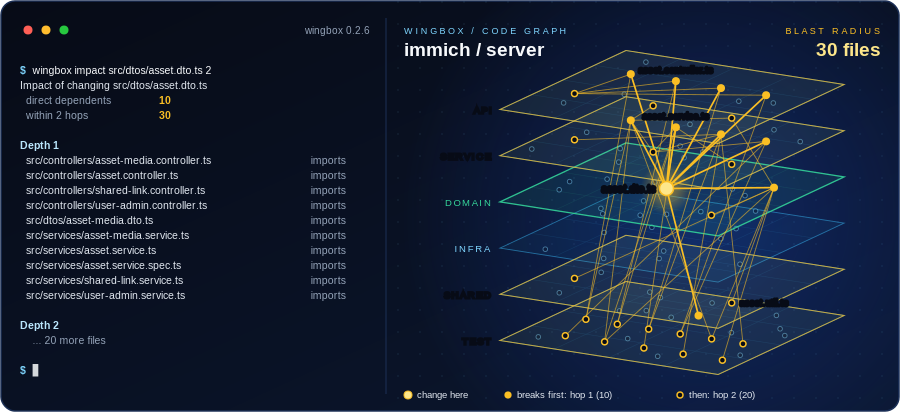
Once the graph is built, an agent asks what a change breaks before it edits
anything. Real output on the server of
immich (commit e5d6eb7, 707 modules):
$ wingbox impact src/dtos/asset.dto.ts 2 --human
Impact of changing src/dtos/asset.dto.ts
  direct dependents   10
  within 2 hops       30

Depth 1
  src/controllers/asset-media.controller.ts   imports it
  src/controllers/asset.controller.ts         imports it
  src/controllers/shared-link.controller.ts   imports it
  src/controllers/user-admin.controller.ts    imports it
  src/dtos/asset-media.dto.ts                 imports it
  src/services/asset-media.service.ts         imports it
  src/services/asset.service.ts               imports it
  src/services/asset.service.spec.ts          imports it
  src/services/shared-link.service.ts         imports it
  src/services/user-admin.service.ts          imports it

Depth 2
  src/controllers/index.ts                                 through src/controllers/asset-media.controller.ts (or 3 other files): imports it
  src/controllers/asset-media.controller.spec.ts           through src/controllers/asset-media.controller.ts (or 1 other file): imports it
  src/controllers/asset.controller.spec.ts                 through src/controllers/asset.controller.ts (or 1 other file): imports it
  ...
Every row says why the file is listed: the import, and below depth 1 the file
it is reached through. For Rust the row also names the items (uses HarEntry by name after use super::*``). The answer is 30 files in about 880 tokens, and it is exact: a TypeScript
import resolver written separately from Wingbox finds the same 3,795
dependencies between the 707 modules, none extra and none missing.
--human asks for this text. Without an option the same answer is printed as
S-expressions, the compact form an agent reads, and --json gives it to a
script; wingbox impact a.ts b.ts 2 answers for several files in one call.
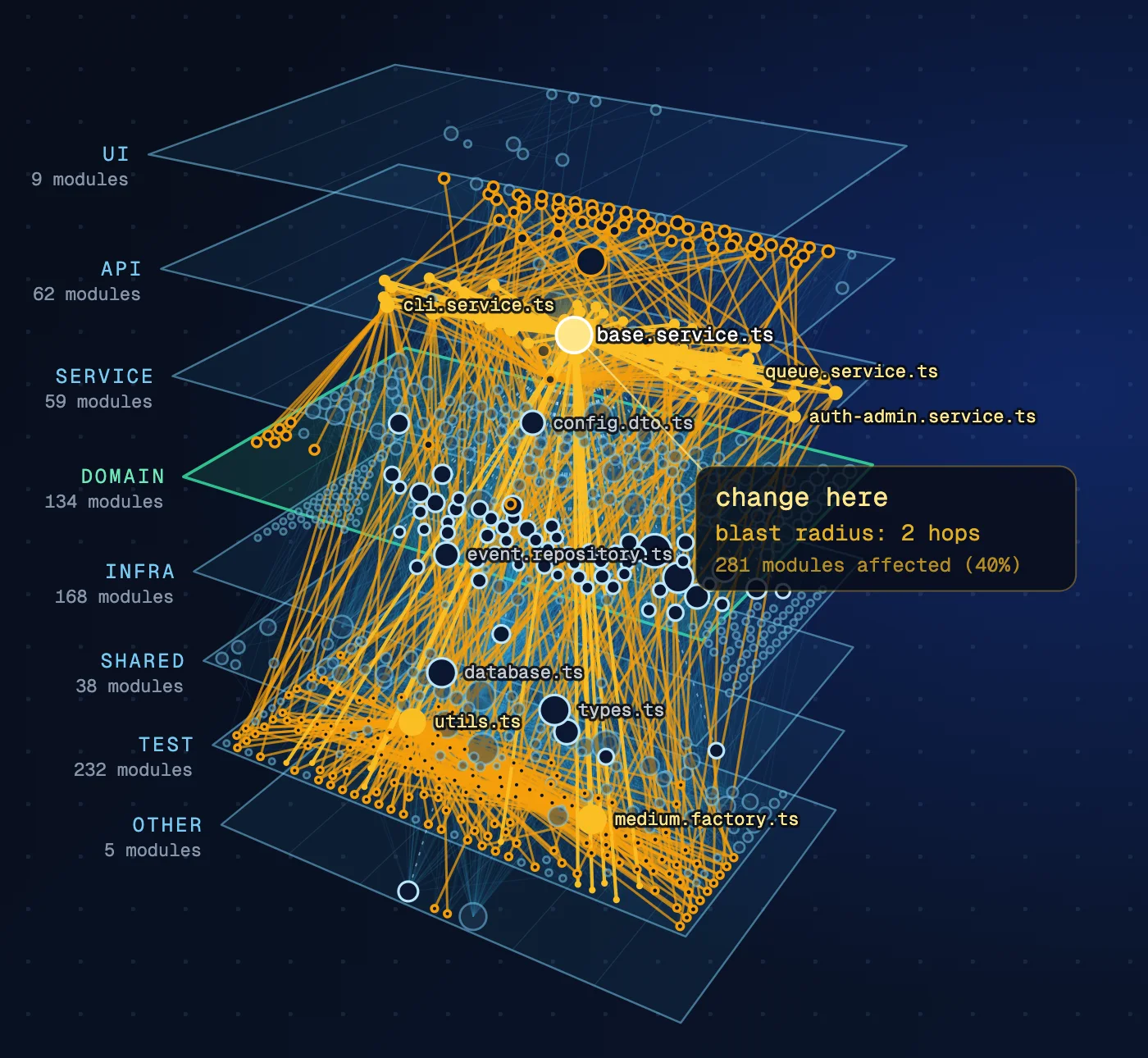
wingbox build also writes .wingbox/map.html (wingbox open shows it). Its layers view stacks the
architecture in 3D; click a file and its blast radius lights up across the
layers:
| One DTO changes: 30 files within two hops | The base service changes: 281 of 707 modules |
|---|---|
 |
 |
Benchmarks with charts, a sample report and the live map: wingbox.dev.
- Where is authentication, billing, upload, or another feature implemented?
- Which modules depend on this service, class, function, or type?
- Where exactly is this function, class or constant used, line by line?
- What could break if I change this file?
- Which two or three files should I read before fixing a bug?
- How does a request or data value move through the system?
- Does this dependency cross an architecture boundary?
- Which Rails models, services, jobs, mailers, concerns, and specs are affected?
- Can you draw a call-flow, data-flow, or sequence diagram from the code?
Instead of searching a repository one text match at a time, Wingbox turns code into a queryable code graph of modules, entities, imports, references, call relationships, architecture layers, and infrastructure connections.
A code graph describes a codebase as facts instead of text. Modules, classes,
functions and types are nodes; imports, references, data flows, calls and
architecture layers are edges. Wingbox writes the graph to .wingbox/index.sexp
as plain S-expression facts, so the bundled query tool and ordinary text search
can both read it.
The blast radius of a change is everything that depends, directly or
transitively, on the code you are about to edit. Wingbox computes it from the
reverse dependencies in the code graph. impact path/to/file prints the
dependents by depth and the files to read first; rdeps and boundary give
the same facts as a tree and as a change boundary.
$ wingbox impact scripts/lang/treesitter.py
(impact scripts/lang/treesitter.py :direct 13 :total 25
 (1 scripts/lang/csharp/parser.py
    scripts/lang/csharp/validation.py
    scripts/lang/dart/parser.py
    ...
    scripts/lang/typescript/validation.py)
 (2
  (:through scripts/lang/csharp/parser.py
   scripts/lang/csharp/__init__.py
   scripts/lang/csharp/imports.py)
  (:through scripts/lang/dart/parser.py
   scripts/lang/dart/__init__.py)
  ...)
 (read-first scripts/lang/treesitter.py scripts/lang/csharp/parser.py ...))

$ wingbox impact scripts/lang/treesitter.py --human
Impact of changing scripts/lang/treesitter.py
  direct dependents   13
  within 2 hops       25

Depth 1
  scripts/lang/csharp/parser.py           imports it
  scripts/lang/csharp/validation.py       imports it
  scripts/lang/dart/parser.py             imports it
...

Depth 2
  scripts/lang/csharp/__init__.py     through scripts/lang/csharp/parser.py: imports it
...
The default form is S-expressions, for agents: the asked file once, the rows
grouped by depth and by the file they are reached through, each with the
reason it is listed. --human prints the same answer as text for people and
--json as one JSON object for code.
One hundred "which files depend on this file" questions, drawn at random with a fixed seed in five public repositories (TypeScript, Rust, Python):
wingbox impact <file> 2 --allnames the complete list of dependent files, with nothing outside it, in 100 of 100 questions (95 % interval 96 to 100 %). The lists hold 1 to 503 files.- Claude Code answers 55 of the questions with its built-in search only, and
again with the
wingboxcommand added:
| Setup | Complete answers | Tokens per answer | Cost per answer |
|---|---|---|---|
| With Wingbox | 55 of 55 | 67,579 | 0.110 USD |
| Built-in search only | 48 of 55 | 98,800 | 0.179 USD |
Cost -38 % (95 % interval -49 % to -25 %), tokens -32 % (-47 % to -12 %),
on claude-opus-5-5 with Wingbox 0.10.0 (2026-11-18). Tokens fall on the
two Rust repositories (agent-browser -67 %, claudes-c-compiler -32 %) and
are higher on the other three (chrome-devtools-mcp +13 %, immich +26 %,
FastAPI +43 %).
- Checked against every import statement of seven corpora (3,795 dependencies in the largest), the graph has no wrong dependency and one missing: an import of a vendored bundle, which Wingbox leaves out of the graph.
The reference lists come from resolvers that share no code with Wingbox. The
scripts, the lists and every result file are in
benchmarks/impact, with what the benchmark does
not show. Dockerfile.benchmark runs the tests that need no model in a clean
container and compares every result with the committed one:
docker build -f Dockerfile.benchmark -t wingbox-benchmark .
docker run --rm wingbox-benchmarkGraphify builds a knowledge graph of a codebase, documents and images for coding agents; CodeGraph and OntoIndex index code for agents. Wingbox is narrower: a deterministic graph of the code alone, built without a model, and exact lists of what depends on a file. The four ran on the same public repositories, questions, reference lists and scoring (Wingbox 0.5.1, Graphify 0.9.110, CodeGraph 1.6.2, OntoIndex 3.1.9; no model inside any of the tools):
| Test | Wingbox | Graphify | CodeGraph | OntoIndex |
|---|---|---|---|---|
| Exact list of dependent files, five questions | 5 of 5 | 1 of 5 | 1 of 5 | 1 of 5 |
| File dependencies of FastAPI against its 1,802 import pairs, wrong / missing | 0 / 0 | 19 / 17 | 106 / 25 | 22 / 118 |
| Tokens a coding agent spends per answer (built-in search alone: 254,967) | 66,628 | 314,516 | 297,215 | 362,509 |
| Cost per answer in that test, USD (built-in search alone: 0.357) | 0.121 | 0.395 | 0.354 | 0.402 |
| Answer quality in that test, F1 (built-in search alone: 0.989) | 1.000 | 0.984 | 0.984 | 0.984 |
Building the graph of FastAPI on a hosted runner takes Wingbox 2.2 s and Graphify 17.9 s (measured with Wingbox 0.2.0; not measured for the other two).
What the others do better: CodeGraph's answers are the shortest where it
answers (1,000 tokens against 1,065 for Wingbox on the same three questions),
and per its documentation it covers more languages (Swift, Kotlin, C, C++, Lua
and others); per its documentation Graphify also maps documents, PDFs, images
and videos. graphify affected follows calls and references as well as
imports, so it answers a wider question than "who imports this file"; the
report gives its figures restricted to imports too. The scripts, the reference
lists, every result file and the token formula Graphify publishes are in
benchmarks/graphify.
"I will change exported symbol S of file X. Where is S used?" One hundred questions on five public repositories in TypeScript, Rust and Python. Every answer is checked against the language tooling (the TypeScript language service, pyright, rust-analyzer) and the use sites against a SCIP index (Wingbox 0.5.1, CodeGraph 1.6.2, Graphify 0.9.110):
| Tool | Exact list of files | Use sites found |
|---|---|---|
wingbox usages |
100 of 100 | 1,660 of 1,660 |
codegraph callers |
79 of 100 | 680 of 1,660 |
graphify affected --depth 1 |
76 of 100 (91 answered) | 604 of 1,660 |
CodeGraph keeps one entry per calling function and kind of use, which is why
it lists fewer sites; Graphify has no command that lists the uses of a symbol,
and affected is the nearest one. The questions, the reference lists and the
scripts are in benchmarks/usages.
Theory of Code Space (ToCS) generates Python codebases with a known architecture and scores a map of their dependencies by edge type, with its own metric. Its agents explore with a budget of 20 actions; Wingbox reads every file, with no model, which is closest to the paper's condition where a model is given every file at once. On the paper's three medium codebases:
| Map | Dep F1 | IMPORTS | CALLS_API | REGISTRY_WIRES | DATA_FLOWS_TO |
|---|---|---|---|---|---|
| Wingbox, this version | 0.953 | 150 of 150 | 19 of 39 | 19 of 19 | 16 of 16 |
| Wingbox 0.2.4 | 0.802 | 150 of 150 | 0 of 39 | 0 of 19 | 0 of 16 |
No edge outside the ground truth on these three. The CALLS_API left are calls between files that also import each other, where the ground truth counts a call of an API but not of a helper; Wingbox leaves that judgement to a model. The scripts, the maps sent to the metric, eight more generated codebases and the plan for a model that starts from the Wingbox map are in benchmarks/tocs.
Install the command and let it set up every coding assistant on the machine (see Install into your coding assistants):
pipx install wingbox
wingbox install
In the agent, /wingbox builds the graph and summarizes the report,
/wingbox path/to/file shows what a change to that file breaks. Or ask a
natural question:
Use the Wingbox skill before reading source.
Find where file uploads are handled, analyze that module, show its dependencies
and blast radius, then list only the boundary files needed for the change.
To install the skill alone, without the command's block and hook:
npx skills add aileron-tech/wingboxMCP clients use wingbox mcp: see Use from an MCP client.
This repository is also a plugin marketplace for Claude Code and Codex. The
plugin, in plugins/wingbox, bundles the wingbox skill
and the MCP server wingbox mcp, and in Claude Code the search hook that
wingbox install adds. Use either the plugin or wingbox install, not both
(wingbox uninstall removes what install added).
Claude Code:
/plugin marketplace add aileron-tech/wingbox
/plugin install wingbox@aileron-tech
From a shell, in one line: claude plugin install wingbox --marketplace aileron-tech/wingbox
(or claude plugin marketplace add aileron-tech/wingbox, then
claude plugin install wingbox@aileron-tech). The skill is /wingbox:wingbox.
The Claude Code plugin needs uv: its MCP server and hooks run
uvx --from git+https://github.com/aileron-tech/wingbox@<commit> wingbox, pinned to the commit of
the latest release tag, which uv fetches on first use. Claude Code starts uvx directly, with no
shell, so the plugin works the same on macOS, Linux and Windows, with or without Git for Windows.
The hooks run uvx --offline: they never download, and while uv is missing or has not fetched
Wingbox yet they fail without blocking the search or the edit ("onFailure": "continue").
Codex:
codex plugin marketplace add aileron-tech/wingbox
codex plugin add wingbox@aileron-tech
The Codex plugin runs wingbox from your PATH, so install the command first
with pipx install wingbox. Codex lists the skill as wingbox:wingbox.
The plugin folder holds a copy of SKILL.md and references/, and the
version of pyproject.toml; python3 tools/sync_plugin.py refreshes them and
the tests fail while they differ.
Wingbox is also a Claude Desktop extension. Download wingbox-<version>.mcpb
from the assets of the latest release
and install it: double-click the file, drag it into the Claude Desktop window,
or choose Settings > Extensions > Advanced settings > Install Extension...
and select it. In the extension settings, choose the repository Wingbox maps.
The first use builds the code graph of that repository (the .wingbox/
folder in it). A tool call waits up to 45 seconds for that first build; on a
large repository it answers that the build is still running, and the next call
a minute later answers from the graph. Later answers bring the graph up to date
with the files you change.
The extension holds no Python packages: it is an MCP Bundle of the server type
uv, which pins this release of wingbox from PyPI. The
MCPB specification
says the host installs Python and the dependencies with uv, so that nothing
needs to be installed first; Wingbox's parsers ship as binary wheels for
macOS, Windows and Linux, so no compiler is needed. If your Claude Desktop
reports that it cannot start the server, install
uv and restart it.
The first start downloads the package from PyPI; after that the server opens
no network connection. python3 tools/build_mcpb.py builds the file from a
checkout.
Install the wingbox command (Python 3.11 or newer, macOS, Linux or Windows):
pipx install wingboxOr with Homebrew, on macOS or Linux (upgrade with brew upgrade wingbox):
brew install aileron-tech/wingbox/wingboxOr run it without installing:
uvx wingbox --helpBuild the code graph of a project, then ask what a change will break:
cd /path/to/project
wingbox init                 # optional: state the architecture of each part
wingbox build .
wingbox impact path/to/file.py
wingbox usages path/to/file.py::create_order
wingbox quick "file upload"
Several files in one call, from a script: wingbox impact a.py b.py 2 --json
prints one object with the state of the graph and one answer per file.
answer = json.loads(subprocess.run(["wingbox", "impact", *files, "2", "--json"], capture_output=True, text=True).stdout)
if answer["graph"]["stale"] == 0:                      # the graph misses no changed file
    for item in answer["impact"]:                       # one per file, in the order asked
        print(item["file"], [row["file"] for row in item.get("rows", [])])
Without --json the same call prints (graph :built 2026-01-31T09:15:00Z :files 359 :stale 0) and then one (impact <file> ...) form per file; a name that
matches nothing gives (error no-match <file> ...) in its place, a file of the
repository that is not in the graph (error not-in-graph <file> :reason ...)
(What the graph does not cover), and the other
files are still answered.
Four options narrow or widen what impact answers:
-
wingbox impact <file> ... --only testskeeps the dependents that are test files: the tests to run for the change.:directand:totalcount them and the form says:only tests. In a repository whose CMake files state build targets and tests, two more facts follow:(affected-targets <file> <target> ...), the targets that compile the file or one of its listed dependents, and(affected-tests <file> <test> ...), the names to give toctest -R(targetsandtestsin JSON); see C and C++ dependency search. -
wingbox impact --diff [ref]answers for every file a diff changes (refdefaults toHEAD: the changes of the working tree) and adds one(changed <file>::<name> :line N :used-by (<file> ...))fact per changed function with the other files that use it. For a C or C++ function the files that use it through the declaration in its header are included. Both options go together:wingbox impact --diff --only tests, where each changed function also names the CMake targets and tests of the files that use it. -
wingbox impact <file> ... --summaryanswers in a few lines where the complete list has hundreds: the number of dependents at each depth and of each kind (made from the file or started by it, test files, entry points, which nothing else depends on, and the others), the eight folders with the most of them, twenty files to look at first, and the command that prints the complete list. It goes with--only tests,--diff,--jsonand--human:(impact-summary core/base.py :direct 39 :total 40 :depth 2 (depths 39 1) (kinds :generated 1 :tests 6 :entry-points 3 :other 30) (folders (services 30) (tests 6) (. 2) (core 1) (jobs 1)) (first core/table.py run_export.py run_report.py tests/test_part0.py ... :more 20) (full "wingbox impact core/base.py 2")) -
A C or C++ source file is answered through its header, see C and C++ dependency search.
wingbox usages lists every place that uses one symbol, through re-exports and
aliases, grouped by file, with the line, the column and the kind of use:
$ wingbox usages app/models.py::Invoice
(usages Invoice cls :at app/models.py:1 :uses 7 :files 2
 (app/__init__.py re-export 1:21)
 (app/billing.py import 1:17 2:24 extends 4:13 type 7:13 7:25 call 8:11))

$ wingbox usages app/models.py::Invoice --human
Usages of Invoice (class, app/models.py:1)
  7 uses in 2 files

app/__init__.py
  1:21   re-export
app/billing.py
  1:17   import
  2:24   import
  4:13   extends
  7:13   type
  7:25   type
  8:11   call
The symbol is Name, <file>::Name or <file>::Class.method; a name defined
in several files lists the candidates. Kinds: import, re-export, call,
type, extends (extends or implements), reference. For a method, calls
whose receiver type is not in sight are listed as unresolved-call, never
guessed. The answer is complete; the text of --human lists at most 200 uses
unless --all, and --json prints one row per use. The build records which files use each definition, without the positions.
In a repository of up to 300 files the first usages after a build reads the
positions of every file and keeps them. In a larger one it reads the positions
from the files that hold the name (a few seconds where the build takes a
minute) and answers; it also starts one process that reads the positions of
every file (about as long as a build) and keeps them, so the next calls answer
at once. WINGBOX_POSITIONS_FILL=0 leaves that process out: every usages
then reads the files that hold its name; =1 takes that way in a small
repository too. Python, TypeScript, JavaScript, Rust, C and C++
have use positions; in other languages usages names the files that
reference the symbol.
Version 0.6.0 judges the architecture of each part of a repository by a
style from a library of styles (or by the rules the project declares itself)
and keeps it through the coding agent. One example of each command, run on the
server folder of immich:
$ wingbox init                      # the style of each part, written to .wingbox/config.yaml
.  nestjs (NestJS)   1.00   container
  *.repository.ts 60  *.service.ts 57  *.dto.ts 53  *.controller.ts 48

$ wingbox align --human             # gaps against the style
.  nestjs: 371 of 475 files placed, 1132 of 1132 dependencies follow the rules

$ wingbox place "a client for the payment API" --human
src/repositories/  infra layer of nestjs
  because: placement: database access, client of another system

$ wingbox learn --agent             # the task for the coding agent: folders the style cannot place
Part .: closest style nestjs 1.00 (runner-up layered 1.00). Layers:

$ wingbox advice --human            # open recommendations; accept or reject them by id
f7c97b6d2342  missing-folder  src/<feature>

$ wingbox compare --human           # the parts of a monorepo side by side
.    typescript  nestjs  api domain infra service shared

$ wingbox boundaries all            # layer rules, then what each layer may do
(capability-violation src/services/shared-link.service.ts :capability db-client :layer service :allowed (infra module) :line 2 :evidence "import { PostgresError } from 'postgres';" ...)
(pattern-violation src/services/api.service.ts :pattern service-builds-http-response :line 99 ...)
(capability-summary :violations 15 :known 0 :candidates 0 :patterns 2 :checked 707)
On immich the capability rules find 15 files that do what their layer may
not (database client types in DTOs and services, query-builder helpers in
utils/) and 2 services that write the HTTP response themselves.
The layer rules need a style, and a repository that fits none (an engine, a
compiler, embedded code, a monorepo with its own folders) answers style none
and "not checked". wingbox cycles reads the import graph alone and needs no
style and no configuration:
(cycle 1 :files 3 shop/cart.py shop/order.py store/catalog.py)
(hub hub.py :dependents 12 :dependencies 12)
(folder-cycle shop store :forward 1 :back 1)
(folder-order (shop store) (core) (user) (.) (leaf))
(cycles-summary :cycles 1 :files-in-cycles 3 :hubs 1 :folder-cycles 1 :files 34)
cycle: a group of files that depend on each other through imports or includes (two files that import each other, or a longer ring), the largest first. An import the compiler erases (import type) is not counted.hub: a file that at least ten files depend on and that depends on at least ten: a change of it reaches far, and it is changed often because it knows much.folder-cycle: two top-level folders with dependencies in both directions, with the number of file pairs each way. The smaller number is usually the direction to remove.folder-order: the top-level folders from those that depend on others to those the others depend on; folders that depend on each other stand in one group. It is the order a layer rule would have to respect.
wingbox cycles <folder> answers for the files below a folder, with its
subfolders as the folders (wingbox cycles engine/src). --json prints the
same facts.
To have that order checked from now on, let Wingbox write it as the layers of the part:
$ wingbox init --from-folders .
Layers of . from its folders, lowest first: core, store, shop, app
  4 folders, 9 source files. A file may depend on its own layer and on the layers below it.
Imports that go upward under this order (1):
  store -> shop: 1
Written: .wingbox/config.yaml (part .: style declared, order). Reorder the entries by hand where the order is wrong.
Next: wingbox build .   then   wingbox boundaries   (the upward imports are its violations);
      wingbox align --learn   accepts the ones of today into .wingbox/baseline.sexp, so that only new ones are reported.
The argument is the part: . for the repository, or a folder
(wingbox init --from-folders engine/src), which becomes a part of its own.
Every folder of the part with source files is one layer; a folder stands
below the folders that depend on it, and folders that depend on each other
are ordered so that few imports go upward. Test files are in no layer. What
is written is plain to read and to change:
parts:
  .:
    level: container
    style: declared
    order:   # lowest first: a file may depend on its own layer and on the layers below it
      - core: [core]
      - store: [store]
      - shop: [shop]
      - app: [app]
Move a folder to another entry, put two folders into one layer
(- sales: [shop, app]) or reorder the entries, then build again. From then
on wingbox boundaries, the report, wingbox place and the pull request
check treat the part like any part with a style: an import of a higher layer
is a violation, and the ones accepted with wingbox align --learn are
counted as known. A part that has layer rules already is kept unless
--force. It needs a built graph, and works for every language of the
graph, C and C++ included.
wingbox init [PATH] [--force] [--sexp] [--details] splits the repository into parts and
judges the architecture style of each, then writes .wingbox/config.yaml and
adds /.wingbox/ to the project's .gitignore:
$ wingbox init
platform/backend   declared by platform/backend/layers.mjs (22 layers, read)   container
  also declared: platform/backend/.dependency-cruiser.mjs (not read: it states no layer order)
  known exceptions: platform/backend/layers.known-upward-imports.json (112 entries)
platform/frontend  route-tree (Vercel)   1.00   container
  app/ 828  components/ 574  page.tsx 135  ui/ 70
  target: 5 of 5 folders present
  advice: 2 to move, 59 to fix
  - move platform/frontend/src/app/llm/model-pools/_parts/pool-providers.tsx from the feature layer to ui ...
crates/engine      Rust crate, no layer style   -   component

wrote .wingbox/config.yaml
next: wingbox learn settles the open points (run by a coding agent it is the agent's task, asking you when the code does not tell; in a terminal it asks you), then wingbox build
-
Parts. A part starts at a folder that holds a manifest (
package.json,pyproject.toml,setup.py,Cargo.toml,go.mod,Gemfile,composer.json,*.sln,pom.xml,settings.gradle,mix.exs) and ends where a nested part starts; the repository root is always a part. Apom.xmlbelow another one is a module of the same application. A part with fewer than 12 source files (tests and generated folders left out) is listed but not judged. Each part gets its C4 level (system for a workspace, container for a unit that runs by itself, component otherwise). -
Styles. layered (Martin Fowler, "Patterns of Enterprise Application Architecture", 2002), onion / clean architecture (Jeffrey Palermo, 2008; Robert C. Martin, "Clean Architecture", 2017), hexagonal / ports and adapters (Alistair Cockburn, 2005), model-view-controller, NestJS, microkernel / plug-ins (Mark Richards, 2015), route-tree frontends (Next.js
app/andpages/, Remix, SvelteKit), Feature-Sliced Design, and CQRS (Greg Young; Martin Fowler) as an overlay. Each style is a TOML file inscripts/architecture/styles/with its sources, the folder words it is recognised by, its layers and its rules. -
Score. Each style scores the weight of its folder groups found in the part (a required group missing gives 0, a pattern of another style counts against it). A style is a candidate at score 0.6 and when its folders hold a quarter of the part's files; the part is determined when one candidate leads the next by 0.15. Otherwise the part is "not determined": no layers and no boundary violations are stated for it.
-
Own rules first. A part that states its architecture itself (dependency-cruiser layers, import-linter, tach, deptrac, packwerk, ESLint boundaries, ArchUnit, ...) is judged by those rules. A dependency-cruiser layer list in plain data is read (its order and path patterns); a file Wingbox cannot read is named and no violation is stated for that part.
-
Folder names. A folder matches a style word as a whole name after lowercasing and dropping
-and_; a spelling variant one edit away matches (controlers). Each label says which step matched. -
Target layout. For each part with a style,
initlists the full layout of that style: one folder per layer and the building blocks of the domain tier (entities, value objects, aggregates, domain events, domain services, repository interfaces, specifications; Eric Evans, "Domain-Driven Design", 2003; Vaughn Vernon, "Implementing Domain-Driven Design", 2013), each marked present (with the real folder) or proposed (where the style puts it). It is written to.wingbox/config.yaml; no folder is created. -
Recommendations. Each part ends with its advice: folders of the target layout to create when such code appears, files to move (their dependents import them against the rules; the advice names the layer and the counts) and violations with the fix the style prescribes ("introduce a port in the domain and implement it in infrastructure").
wingbox buildwrites the same advice into REPORT.md ("Recommendations") and the map;analyzeandimpactprint the advice that concerns the module. A part whose style is not determined gets no advice; a part with declared rules is advised by them. -
Decisions.
wingbox buildlogs the advice it gives and what became of it in.wingbox/decisions.sexp(append-only, meant to be committed): followed, done differently, ignored, or accepted and rejected withwingbox advice accept|reject <id> [--reason TEXT]. A file moved to another folder than the advised one teaches that folder's layer for the part, and later builds use it (:learned-from <id>); an item rejected or ignored for 3 builds is no longer shown. A rebuild of unchanged code is not counted as one of the 3, and a recommendation to fix a finding (fix-violation,fix-capability,fix-pattern) is never hidden by inaction: it stays until the finding is fixed, accepted in the baseline, or rejected withwingbox advice reject <id> --reason TEXT(the reason is required for these).wingbox advicelists the open items,wingbox advice --learnedwhat was learned. -
What a layer may do. Besides who imports whom, each style says what kind of work belongs where: SQL and the database client in the repository (DAO) layer, outbound HTTP in infrastructure, no web framework in the domain, the environment read in configuration (hexagonal: all I/O in the driven adapters). The build finds these capabilities by syntax in Python, TypeScript, PHP, Ruby, Java, C# and Go (a SQL string passed to
execute,queryorraw, query builders,session.query, Prisma model calls,DB::select, driver and ORM imports,requests/axios/HttpClient,os.environ/process.env, ...), each with its line, andwingbox boundariesreports a file outside the allowed layers:(capability-violation src/services/orders.py :capability sql :layer service :allowed (infra) :line 42 :evidence "cursor.execute(\"SELECT ...\")"). A query only kept in a variable is a candidate. A few pattern checks ride on the same data: a controller that imports a repository and skips the service, a service that builds an HTTP response, a domain file that imports the ORM.capabilities:of a part in.wingbox/config.yamlrestates a rule; REPORT.md ("What layers do") andwingbox advice(fix-capability,fix-pattern) name the fix;align --learnaccepts the current ones in the baseline. SQL assembled at run time or behind a helper of another package is not seen. -
Align.
wingbox align [PART] [--to STYLE] [--learn]measures the gaps of each part against its style: files placed, dependencies that follow the rules, layers present and missing, folders without a layer, broken rules with an example;--tomaps the layers onto another style (a migration view).--learnmatches the part against the style library and takes the closest style as the base (its folders keep that style's layers); a folder it does not place is derived from its file names (*.controller.ts), its name in another style, and last its imports, each with its evidence; it writes the learned folders into.wingbox/config.yamlwith a comment and what still breaks a rule into.wingbox/baseline.sexp; later builds report only new violations. For a part with declared rules nothing is guessed: the baseline comes from them. An entry of the baseline may say who accepted the break, why and until when; you add the three fields by hand to the entry, andalign --learnkeeps them when it writes the file again:(baseline "." src/models/order src/routes/orders :rule "domain -> api" :from align :owner "A. Reviewer" :reason "removed with the orders rewrite" :expires 2027-03-31)(one line in the file).
wingbox boundariesprints the owner, the reason and the date on theviolation-knownline.:expiresis the last day the entry holds: from the next day, or when the date is notYYYY-MM-DD, the break is aviolationagain (with:expired <date>),boundariesexits 1 andwingbox adviceasks for the fix again.baseline-capabilityentries take the same fields. -
A new project. In a folder without source files,
initasks the language and offers the styles that fit it, best first: the style of the other parts in the same language of the repository (monorepo siblings), then your favourite in$HOME/.wingbox/config.yaml(defaults: {typescript: onion-clean}), then the library. Without a terminal it prints the choices and the flags it needs (--language,--style,--yes); it writes the chosen style with its full target layout, and creates the empty folders only with--scaffold. Style files in$HOME/.wingbox/styles/replace the built-in ones of the same name. -
Learn with an agent.
wingbox learndecides who runs it:--agentor--humanfirst, then the variables a coding agent sets for its commands (Claude CodeCLAUDECODE=1, Gemini CLIGEMINI_CLI=1), then a command without a terminal counts as an agent. An agent gets a task: the closest style, its layers, and each folder the style cannot place with real files and imports; it reads the files and answers in a fixed S-expression format. When the code does not tell (a public API or an internal helper?), the task tells the agent to ask the operator in its chat and pass the answer on, never to guess.wingbox learn --applyvalidates the answer (the whole answer is rejected with every error when a line is wrong), writes into.wingbox/config.yamlwithlearned by agent: <because>(an entry you wrote is kept), records in.wingbox/learned.sexpand rebuilds. A person in a terminal (learn, oralign --learn) gets a questionnaire: the style of each part among its candidates, with scores and one-line descriptions, then one question per open folder with its files and imports; the answers are recorded the same way, and at the endlearnoffers to open.wingbox/config.yamlin$VISUALor$EDITOR(--yestakes the closest style and the guesses). Nobody needs to edit the file by hand; it starts with a header of instructions (what each key means, the rule that decides a file's layer, how to move a folder, what to run after a change), rewritten on every write, so that an agent asked to change it does so correctly. To shareconfig.yaml,learned.sexp,decisions.sexpandbaseline.sexpthrough Git, force-add those files explicitly.
If .wingbox/config.yaml exists, init keeps it and only prints the
candidates; --force rewrites it. wingbox build reads the file when it
exists and detects the styles itself when it does not. Every layer label and
every boundary violation names its style and rule: in the graph
((layer <module> api :style layered :rule "folder routes/ -> api")), in
wingbox boundaries, in REPORT.md and in the map.
wingbox build [PATH] accepts the builder options described below, and every
query command in Common code searches is available as
wingbox <command>. The command installs the parsers for all supported
languages and finds the project by its .wingbox/index.sexp, in the current
directory or a parent; without one it says so and names the paths it looked
at. wingbox open shows the map of the project in the browser.
wingbox install                            # every assistant whose configuration folder exists
wingbox install --dry-run                  # print the list and every file it would write, change nothing
wingbox install --assistant codex          # only the named assistants (repeatable)
wingbox install --without git-hook         # leave items out: ITEM or ASSISTANT:ITEM, comma separated
wingbox install --global-gitignore         # add .wingbox/ to Git's global excludes file
wingbox install --yes                      # ask nothing, even in a terminal
wingbox uninstall                          # remove installed assistant settings
wingbox uninstall --without skill          # ... except the named items
wingbox install writes your assistant settings in your home folder
(%USERPROFILE% on Windows). Select Global Git ignore in the terminal
checklist or pass --global-gitignore to append .wingbox/ to the file set
by Git's global core.excludesFile, or to
$XDG_CONFIG_HOME/git/ignore (default ~/.config/git/ignore). The rule
stays in place after uninstall. The checkbox starts unchecked unless you
pass the flag. Install shows what it is about to put in place, one
line with a checkbox per item, grouped by assistant:
Item (--without) |
What it is |
|---|---|
skill |
the wingbox skill, so /wingbox exists |
block |
a short always-on block in the instructions file the assistant reads in every session |
search-hook |
Claude Code: before each Grep, Glob and Read, context from the graph |
edit-hook |
Claude Code: after each Edit and Write, marks the edited file |
session-hook |
Claude Code: at session start, refreshes a graph older than the code, in the background |
git-hook |
Claude Code: after the agent ran git switch, checkout, pull, merge, rebase, reset or stash pop, refreshes the graph in the background |
In a terminal you toggle items with the arrow keys and space (or, where the
terminal gives no single keys, by typing their numbers) and press Enter;
Enter alone installs everything, q installs nothing. Started by an agent,
from a script, in CI or with --yes, it asks nothing and installs every item
except those named by --without (--without git-hook,codex:block;
--without none puts everything back). The choice is recorded in
~/.wingbox/installed.sexp: a later wingbox install and wingbox update
refresh only the items you kept and never add back one you left out.
Running it again changes nothing; after an upgrade it refreshes the skill.
Assistants are found by their folders in the home directory: ~/.claude,
~/.codex, ~/.gemini, ~/.cursor, ~/.copilot and ~/.agents.
Assistant (--assistant) |
Skill | Always-on block |
|---|---|---|
Claude Code (claude-code) |
~/.claude/skills/wingbox |
~/.claude/CLAUDE.md |
Codex (codex) |
~/.agents/skills/wingbox |
~/.codex/AGENTS.md |
Gemini CLI (gemini) |
~/.gemini/skills/wingbox |
~/.gemini/GEMINI.md |
Cursor (cursor) |
~/.cursor/skills/wingbox |
none (user rules live in the settings) |
GitHub Copilot, CLI and VS Code (copilot) |
~/.copilot/skills/wingbox |
~/.copilot/copilot-instructions.md |
Shared Agent Skills folder of npx skills (agents) |
~/.agents/skills/wingbox |
none |
For a whole team. wingbox init prints and saves in
.wingbox/assistant-setup.md the lines a team may add by hand to the repository's
own files so that every member's assistant uses Wingbox there: the always-on
block for AGENTS.md and CLAUDE.md, and the four hook entries for a
committed .claude/settings.json (they run wingbox from PATH).
Moving from wingbox install --project. It was removed in 0.9.0. In each
repository where you used it, run wingbox uninstall --project (it removes only
the marked blocks, the hook entries and the skill folders that install wrote),
then wingbox install once for your own assistants; wingbox update names
these repositories until then.
- The block sits between
<!-- wingbox:begin -->and<!-- wingbox:end -->. It tells the agent to runwingbox quickorwingbox analyzebefore reading code,wingbox impact <file>before changing a file, and/wingboxfor an overview. Text outside the markers is never touched; a file that links to another one (CLAUDE.mdtoAGENTS.md) gets one block. - The Claude Code hooks in
~/.claude/settings.jsonare aPreToolUseentry with the matcherGrep|Glob|Readthat runswingbox hook pre-search, aPostToolUseentry with the matcherEdit|Write|MultiEditthat runswingbox hook dirty, aSessionStartentry that runswingbox hook session-start, and aPostToolUseentry with the matcherBashthat runswingbox hook git(it reads the command and acts only on the git commands above; it prints nothing). All are written in exec form ("command"the program,"args"["hook", "pre-search"]) with"onFailure": "continue": Claude Code starts the program with no shell, so the hooks work on Windows with or without Git Bash, and a missing program never blocks a tool call. Install names the full path of thewingboxprogram (wingbox.exeon Windows). When the project has a graph, the search hook adds a few lines of context to the search: the modules and definitions that match the pattern with their direct dependents, or for a file its dependents and the hint to runwingbox impact. It answers in 0.4 to 0.7 s on a graph of 8,000 files, Python start included, never blocks the tool, opens no network connection. In a source repository without a graph it says so once per session, as(wingbox-no-graph :root <root> :hint ...)namingwingbox build(it never builds by itself; the "already told" mark is kept under~/.wingbox/hook-hints, not in the project); elsewhere it says nothing. A Grep pattern matches with smart case: without an upper-case letter it ignores case. The edit hook only marks the edited file (see "Keeping the graph fresh"). Other settings and hooks are kept; the file is backed up once tosettings.json.wingbox-bakbefore the first change. - A skill folder that another installer wrote (for example
npx skills add) is left as it is. Install records what it did in~/.wingbox/installed.sexp;wingbox updateandwingbox uninstallread it. /wingboxwith no argument builds the graph when it is missing or older than the code and summarizes.wingbox/REPORT.md;/wingbox <file>runswingbox impact <file> 2;/wingbox <command> ...runs that command. In Codex the skill is called as$wingbox.
Every result is a list of facts: --sexp prints them as S-expressions such as
(install-wrote ~/.claude/skills/wingbox :what skill :assistant (claude-code) :version 0.2.6),
and the default output is the same facts as aligned text.
wingbox update --check    # installed and latest version, nothing installed
wingbox update --dry-run  # the command it would run
wingbox update            # upgrade, then refresh what wingbox install put in place
wingbox update upgrades with the installer that installed Wingbox: pipx
(pipx upgrade wingbox), uv (uv tool upgrade wingbox) or pip of the Python
environment it runs in. A Homebrew install is upgraded by Homebrew
(brew upgrade wingbox), and a Docker image or an editable or local install
cannot update itself; the command says so and prints what to run instead. Wingbox
itself opens no network connection: only the installer reaches the package
index, and only when you run wingbox update.
On Windows the wingbox program is wingbox.exe, which runs for as long as
the command does, and Windows lets nobody overwrite a running program. For the
time of the upgrade wingbox update renames the wingbox.exe it was started
through, so the installer can write the new one in its place, and the old file
is removed when the command has ended.
It also looks for files that versions before 0.4.1 wrote outside .wingbox/
(.code_graph.sexp, .code_graph.uses.sexp, .code_graph.uses-cache.json,
.code_graph_cache.json, wingbox-out/), in the current folder and its
parents up to the project root and in every repository an earlier
install --project recorded, and prints one warning line per project (yellow
on a terminal); it deletes nothing. wingbox update refreshes only your own
settings: for each repository where a version before 0.9.0 installed with
--project it says once that those files are still there and that
wingbox uninstall --project in that folder removes them.
The package installs the parser of every supported language: one
pipx install wingbox, pip install wingbox or uvx wingbox covers them all,
and nothing is fetched afterwards. The Dart parser has no wheel for Windows on
arm64; there Wingbox installs without it.
A build that finds no parser for C#, Java, Go, Ruby, PHP, Dart, C or C++ files in the environment it runs in maps the other languages, says how many files it left out and names the command that installs the parser:
[code-graph] WARNING: Dart files are skipped (214 files): tree-sitter-dart==0.1.0 (missing). To include them: pip install "wingbox[dart]"
Hooks and the MCP server build in the background, where nobody reads that
line, so the same fact travels with the graph: the build records it in
.wingbox/graph-skipped.sexp, every query command prints it on stderr, every
MCP answer starts with it, the search hook adds it to the context it gives,
and REPORT.md lists it under the key findings:
(skipped-language dart :files 214 :add "pip install \"wingbox[dart]\"")
A build that parses every language removes the record. A project whose only source files are in a language without its parser publishes no graph; the build stops with the command.
The extras wingbox[csharp], [java], [go], [ruby], [php], [dart],
[cpp] and [all] stay valid and name parsers the package already installs.
wingbox add <language> is kept for scripts written for version 0.12: it adds
nothing and exits 0.
To install only the parsers of the languages a repository holds, install the
package without its dependencies and add them by hand, with the pins of
requirements/<language>.txt (Python needs no parser):
pip install --no-deps wingbox
pip install PyYAML==6.0.3 tree-sitter==0.25.2 tree-sitter-cpp==0.23.4   # a Python and C or C++ repository
A build then names every parser it lacks: files of C#, Java, Go, Ruby, PHP, Dart, C and C++ are skipped with the notice above, and for TypeScript, JavaScript or Rust files the build stops and names the package to add.
Some dependencies are stated by no import: a file that a generator writes from a schema, a script that another file starts as a process. Wingbox reads them from four places and says for each link what it rests on.
-
Declared, in
.wingbox/config.yaml:generators: - run: tools/make_layouts.py # the generator inputs: [schema/formats.yaml] # what it reads outputs: [depot/layouts.py, native/src/layouts.h] # what it writes
Paths are relative to the repository root;
inputsandoutputstake*and**. A path that names no file is reported by the build and kept in the graph as(generation-unresolved "<path>" :role output :declared ...). -
Inferred from the generated file: a line among its first ten that starts with
Generated by <path>(alsowith,using), andedit <path>orgenerated from <path>for the input, in a comment or a docstring of any parsed language. -
Inferred from CMake:
add_custom_command(OUTPUT ... COMMAND ... DEPENDS ...)whose output is a file of the repository. -
Inferred from Python: a script started by a literal path with
subprocess.run,call,check_call,check_output,Popenoros.system, also as the literal tail ofos.path.join(HERE, "tools", "report.py")orROOT / "tools" / "report.py".
A generated file depends on its generator and on the inputs; a launcher
depends on the script it starts. wingbox impact tools/make_layouts.py lists
the generated files at depth 1 and the files that import or include them at
depth 2:
(impact tools/make_layouts.py :direct 2 :total 4
 (1 depot/layouts.py :via generated :basis declared
    native/src/layouts.h :via generated :basis declared)
 (2
  (:through depot/layouts.py
   depot/reader.py)
  (:through native/src/layouts.h
   native/src/crate.cpp))
 (read-first tools/make_layouts.py depot/layouts.py native/src/layouts.h))
An input that is no source file (schema/formats.yaml) is not a module of
the graph and still answers wingbox impact: the generated files and the
generator (:via reads) at depth 1, their dependents below.
A row of impact says what its edge rests on when the code does not state
it: :basis declared for the config file, :basis inferred for a marker, a
CMake command, a launch call, and for a C or C++ include that was found
without a compilation database ("basis" in a JSON row; a row without the
key is stated by the code). A declared link stands for an inferred one of the same pair.
REPORT.md counts the links of each basis and the unresolved paths. Layer
rules do not read these links: a generated file is not judged by the layer of
its generator.
A repository usually holds more than the languages Wingbox parses: build files, shell scripts, shaders, a language without a parser. Those files are not in the graph, and Wingbox says so instead of answering around them:
-
The build counts them per language:
[code-graph] Not in the graph: 683 CMake files, 9 Shell files (no parser for these languages)and writes one
(not-parsed-language "CMake" :files 683)fact per language to.wingbox/graph-unparsed.sexp.REPORT.mdlists them under the key findings. -
An
impactanswer in such a repository starts with the graph fact,(graph :built ... :files 2281 :stale 0 :not-parsed ("CMake" 683 "Shell" 9))(graph.not_parsedwith--json): the list of dependents is complete for the files of the graph and cannot name a file of those languages. -
A question about a file that is in the repository and not in the graph (
impact,analyze,deps,rdeps,module) answers(error not-in-graph <file> :reason <reason> [:language "<name>"])with exit status 1, and suggests no other file. The reasons:not-parsed-language(Wingbox has no parser for it),skipped-language(its parser is not installed, see above),excluded(a source file the build left out: a skipped folder such asbuild/, a path Git ignores, a minified file) andnot-source(a document, a data file). For such a file search the text (wingbox grep,rg): the graph knows nothing about it.--sexpkeeps theno-matchline of version 0.13.
The count covers the programming, build and shader languages listed in
scripts/source_kinds.py; a document or a data file is not a language.
REPORT.md writes "not checked" for boundary violations when no part of the
repository has rules that were checked: "0 violations" is written only for
parts a rule looked at.
The graph follows the code without wingbox build. Before the search hook,
an MCP tool or a query command reads it, the files changed since it was built
are brought in:
- In Claude Code,
wingbox hook dirty(PostToolUse on Edit and Write) marks the edited file in.wingbox/graph-state.jsonand returns; it never builds. - At the start of a session (
wingbox hook session-start) and after the agent rangit switch,checkout,pull,merge,rebase,resetorstash pop(wingbox hook git, PostToolUse on Bash), the changed files are found at once and a refresh starts in the background; the hook prints nothing and returns, so the first search usually meets a graph that is fresh already. - Changes made elsewhere (an editor,
git checkout, a script, a shell command) are found by comparing the size and modification time of every source and resolution config, and the time of every folder, with the snapshot the last build wrote: onestatper entry, no hashing. - The changed files are patched in: only they are parsed again, and only the
modules that read them, that resolved a name a created or deleted file could
now answer, or that looked up a name the change added or removed are
resolved again. The result is the graph a build publishes, byte for byte.
A changed
package.json,tsconfig*.json,pyproject.toml,.gitignoreor other resolution config, a changed source in a language other than Python and TypeScript, or a change that reaches more than a quarter of the modules takes the incremental build instead. Several edits are brought in by one refresh, and never two run at once for one project. - A build and a refresh parse in as many worker processes as the machine has
processors.
WINGBOX_JOBS=2(any whole number from 1) sets the most they start, for a laptop that has other work to do or a shared build machine. - The search hook waits up to
WINGBOX_HOOK_WAITseconds (3) for the refresh; a longer one goes on in the background and publishes when it is done. While the graph misses known changes, after a failed refresh (not repeated until something changes again) or withWINGBOX_AUTO_REFRESH=0, the hook gives no context from it but(wingbox-graph-stale :reason ...); MCP answers start with that line and query commands print it on stderr.WINGBOX_REFRESH_WAIT(600 s) is the wait of MCP tools and query commands;WINGBOX_CHECK_INTERVAL(0) spaces out the file-system checks. WINGBOX_POSITIONS_FILL=0: the firstusagesafter a build starts no process to read the use positions of every file (seewingbox usages).
Measured on a shared machine under heavy load (load average 20 to 55), wall time, the version before this change and after it, runs interleaved:
| fastapi, 1,227 Python files | TypeScript monorepo, 6,834 files | |
|---|---|---|
| Search hook, nothing changed | 0.20 -> 0.24 s | 0.30 -> 0.38 to 0.52 s |
| of which the check for outside changes | 0.02 s (1,666 entries) | 0.17 s (9,748 entries) |
| Edit hook | 0.21 s | 0.26 s |
| One edited file patched in | 1.0 s (24 modules redone) | 9 to 13 s (12 modules redone) |
| Incremental build after one edit | 11.2 -> 4.4 s | 23.0 -> 25.9 s |
| Build without changes | 11.1 -> 3.3 s | 20 to 23 -> 20 s |
| Cold build | 24.1 -> 7.0 s | 44 -> 47 s |
A patch grows with the modules it redoes: on fastapi 0.6 s for 1 file, 1.1 s
for 10, 1.4 s for 50 and 3.3 s for 150 files (234 modules), against 3.5 to
5.6 s for the incremental build of the same changes. On the monorepo the
patch is dominated by reading and writing the build cache (35 MB) and the
fragment store (39 MB); it takes longer than the search hook waits, so the
first search after an edit there answers (wingbox-graph-stale :reason refresh-timeout ...) and the next ones, once the patch is published, use the
new graph.
wingbox build PATH creates PATH/.wingbox/ and writes everything there;
nothing else in the project is written. The folder also marks the project:
every command, the hooks and the MCP server look for the nearest
.wingbox/index.sexp at or above the current folder, and that folder is the
project root.
File in .wingbox/ |
For whom | What it is |
|---|---|---|
index.sexp |
AI coding agents | The code graph in a compact form that the query commands read |
index.uses.sexp |
AI coding agents | Module-level variables and the files that use each definition; usages adds every use position on its first call |
index.uses-cache.json |
Wingbox | The use walk of each file by content hash, so that usages after a change reads only the changed files |
cache.json |
Wingbox | The parse of each file by content hash, so that a build reads only changed files |
cache.layer-guess.json |
Wingbox | The layer that the role of a file suggests, worked out once per role when the graph is built, so that a query reads it instead of comparing words |
REPORT.md |
People | Key findings, the most depended-on files, architecture layers, boundary violations, where to start reading |
map.html |
People | An interactive map of the code graph: one file, opens in a browser (wingbox open), works without a network connection |
graph-*, refresh.* |
Wingbox | What keeps the graph fresh: the facts of each module and what they were read from, the sizes and times of the sources at the build, the folder it was built from, the files changed since (see "Keeping the graph fresh") |
.gitignore |
git | Ignores every file above and itself, so that a plain wingbox build leaves git status clean and a file you write into .wingbox/ later stays in the repository |
config.yaml, learned.sexp, baseline.sexp |
People and agents | The architecture of each part, what wingbox learn learned, and the known rule breaks (wingbox init, learn, align --learn) |
decisions.sexp |
People and Wingbox | The advice each build gave and what became of it; started once the project is set up (wingbox init, learn, align --learn or advice) |
On the map, click a file to see its blast radius: the files that depend on it
move onto rings, one ring per hop. The layers view stacks the architecture
layers as planes in 3D and can be turned with the mouse. A link such as
map.html#select=src/app.ts opens the map on that file.
The generated files are rewritten on every build and never committed thanks to
.wingbox/.gitignore. wingbox init ignores the whole folder at the project
level. Files already tracked by Git continue to be tracked. A .wingbox/
folder copied or moved to another place is read as it is but never refreshed
there: queries say rebuild. Wingbox deletes nothing outside .wingbox/;
wingbox update names files that versions before 0.4.1 left in a project
(.code_graph*, wingbox-out/) so that you can remove them.
git clone https://github.com/aileron-tech/wingbox
docker build -t wingbox wingbox

cd /path/to/project
docker run --rm --network none -v "$PWD":/repo wingbox
docker run --rm --network none -v "$PWD":/repo wingbox impact path/to/file.py
In PowerShell on Windows:
cd C:\path\to\project
docker run --rm --network none -v "${PWD}:/repo" wingbox
docker run --rm --network none -v "${PWD}:/repo" wingbox impact path/to/file.py
The first docker run builds the code graph, the report and the map of the
mounted project; any other Wingbox command goes after the image name. The
container needs no network, and --network none shows it: nothing leaves the
machine. On Linux add --user "$(id -u):$(id -g)" so that the written files
belong to you.
Clone the repository:
git clone https://github.com/aileron-tech/wingbox.git
cd wingbox
Build the code graph for an explicit project directory:
python3 scripts/build_code_graph.py --root /absolute/path/to/projectOn Windows the interpreter is python (or py), and paths may use either slash:
python scripts\build_code_graph.py --root C:\absolute\path\to\projectExclude tracked source snapshots or generated fixture trees by directory name. The option is repeatable and applies at any depth:
python3 scripts/build_code_graph.py \
  --root /absolute/path/to/project \
  --exclude-dir review-bundles \
  --exclude-dir generated-fixtures
When the target is inside a Git worktree, the builder also honors repository
ignore rules through Git itself. This applies to source files and language
configuration such as tsconfig.json, package.json, Cargo.toml, go.mod,
and LSP project discovery. Tracked snapshot paths that still match
.gitignore are excluded as well.
Parser packages are loaded only for languages found in that project. Python needs no extra parser package. If the parser of TypeScript or Rust is not installed, the builder stops before publishing and prints its exact install command; files of C#, Java, Go, Ruby, PHP, Dart, C or C++ without their parser are skipped with a warning that prints it (a project of such a language alone stops too). For example:
python3 -m pip install -r requirements/typescript.txt
python3 -m pip install -r requirements/csharp.txt
python3 -m pip install -r requirements/ruby.txt
python3 -m pip install -r requirements/php.txt
python3 -m pip install -r requirements/dart.txt
python3 -m pip install -r requirements/cpp.txt
Install only the files for languages you use, then run the same build command
again. Each file pins tree-sitter==0.25.2 and the grammar of its language
(requirements/php.txt: tree-sitter-php==0.24.1, requirements/dart.txt:
tree-sitter-dart==0.1.0, requirements/cpp.txt: tree-sitter-cpp==0.23.4). An installed wingbox needs none of these steps:
the package depends on the same pinned parsers
(Language parsers).
requirements.txt contains the separate infrastructure-topology dependency.
Run a relevant search and get the first matching module with its full context:
python3 scripts/code_graph_search.py \
  --map /absolute/path/to/project/.wingbox/index.sexp \
  --root /absolute/path/to/project \
  quick "file upload"
The code graph is written to .wingbox/index.sexp. Wingbox does not modify the
source files it analyzes.
The graph says what it was built from and where its facts come from. The line
after its header, (built-from :tree <digest> [:commit <sha>] [:wingbox <version>]), carries a digest of the paths and the text of the source files
in the graph (the same files give the same digest on any machine), the commit
when Git reported a clean working tree at build time, and the Wingbox version.
An imports or refs fact read from import statements carries the line where
each statement starts (:line 7, or :lines 3 9 for two statements), so a
fact can be opened at its file and line; a fact that no single statement
states carries no line. The query commands print what they printed before;
wingbox module <id> --lines shows the lines of one module's edges:
$ wingbox module src/orders/service --lines
(imports src/orders/service src/orders/repository :line 3)
(imports src/orders/service src/shared/money :lines 4 27)
wingbox mcp runs Wingbox as an MCP (Model Context Protocol) server: the
client starts the command, sends JSON-RPC requests on its standard input and
reads the answers on its standard output. This command uses stdio only: no
port, no network. To call the server from another machine, see
Over HTTP, from another machine. Logs go to standard error. Every tool carries MCP
annotations: a title, and read-only for every tool except build_graph, which
writes the graph; no tool is destructive or reaches outside the repository.
wingbox mcp                         # serve the current directory
wingbox mcp --root /path/to/project
The server speaks protocol revision 2026-07-28 (requests with per-request
_meta, server/discover) and the initialize handshake of revisions
2025-11-25, 2025-06-18, 2025-03-26 and 2024-11-05.
| Tool | What it answers | The wingbox command behind it |
|---|---|---|
build_graph |
Build or refresh the code graph (full, exclude_dirs) |
build |
list_files |
The source files of the graph, all or those whose path matches (pattern) |
files |
describe_module |
One module in full; a keyword instead of a module describes the best match (module) |
analyze, quick |
read_source |
The numbered lines of a source file of the graph, of a range of it, or of one definition (target, first, last) |
source |
search_source |
The lines of the source files of the graph that hold a text, with file and line; in all files or those whose path matches, 200 matches a call (pattern, path, first) |
grep |
find_definitions |
Where a function, type or constant is defined; name may be a pattern with .* (name, kind: any, function, type) |
find_function, find_type, entity |
find_usages |
Every use of one symbol by file, line:column and kind, as text (symbol, all) |
usages |
analyze_impact |
What a change to one file or to several reaches, as S-expressions (target or targets, depth, only tests for the test files alone, summary for counts and the first files in place of the list) |
impact |
list_dependencies |
What a module uses or who uses it, hop by hop (module, direction: out, in; depth) |
deps, rdeps |
trace_calls |
Who calls a function, what it calls, or a call path to another one (function, direction: in, out; to; depth) |
find_callers, find_calls, find_callchain |
list_layers |
The modules by architecture layer | layers |
check_boundaries |
Imports that cross a layer rule, and the parts not checked (scope) |
boundaries |
list_changes |
Functions changed in the working files since a git ref (ref) |
diff_functions |
query_graph |
A query that combines sets of modules, for what no other tool answers; (help) lists its functions, a malformed expression is an error (expression) |
query |
Fourteen tools, each named with a verb and a noun. Each description says what
comes back, when to use the tool, which neighbour to use instead and what its
parameters mean. The command line keeps its own command names; a tool returns
the output of the command behind it. A tool called before the graph exists
answers that build_graph must be called first. read_source returns at most
400 lines a call, search_source at most 200 matches a call with the total and the match to go on from, and both read source files of the graph only. Answers stop at 200 items; all: true lists everything. The graph is
read once and read again when .wingbox/index.sexp changes.
Claude Code, in the project directory:
claude mcp add wingbox -- wingbox mcp--scope project writes the server into .mcp.json for everyone working on
the project; --scope user makes it available in all your projects.
Codex, in ~/.codex/config.toml (or codex mcp add wingbox -- wingbox mcp):
[mcp_servers.wingbox]
command = "wingbox"
args = ["mcp"]
cwd = "/path/to/project"
Cursor, in .cursor/mcp.json of the project (or ~/.cursor/mcp.json):
{
  "mcpServers": {
    "wingbox": {
      "command": "wingbox",
      "args": ["mcp", "--root", "${workspaceFolder}"]
    }
  }
}
OpenCode, in opencode.jsonc of the project (run with OpenCode 1.2.10:
opencode mcp list answers "wingbox connected"; a later version of its
documentation puts the same entry under mcp.servers):
{
  "$schema": "https://opencode.ai/config.json",
  "mcp": {
    "wingbox": {
      "type": "local",
      "command": ["wingbox", "mcp", "--build-missing"]
    }
  }
}
OpenCode reads the AGENTS.md of the project: say there when to ask the graph
(SAMPLE_AGENTS.md of this repository is a text to start from).
Claude Desktop, in
~/Library/Application Support/Claude/claude_desktop_config.json on macOS.
Claude Desktop starts servers in an undefined directory and with a reduced
PATH, so give absolute paths for the command and the project (which wingbox
prints the first):
{
  "mcpServers": {
    "wingbox": {
      "command": "/absolute/path/to/wingbox",
      "args": ["mcp", "--root", "/absolute/path/to/project"]
    }
  }
}
Without installing, uvx wingbox mcp works in place of wingbox mcp
("command": "uvx", "args": ["wingbox", "mcp", ...]).
When the repository and its graph live on a build server, a dev container or a remote workstation and the agent runs somewhere else, serve the same tools over the Streamable HTTP transport of MCP:
pip install "wingbox[http]"          # or: pipx inject wingbox wingbox-http

export WINGBOX_HTTP_TOKEN="$(openssl rand -hex 32)"
wingbox mcp --http --root /path/to/project --host 0.0.0.0 --port 8765 \
  --tls-cert fullchain.pem --tls-key privkey.pem
Then, where the agent runs:
# Claude Code
claude mcp add --transport http wingbox https://host.example:8765/mcp \
  --header "Authorization: Bearer $WINGBOX_HTTP_TOKEN"

# Codex
codex mcp add wingbox --url https://host.example:8765/mcp --bearer-token-env-var WINGBOX_HTTP_TOKEN
The transport is a package of its own,
wingbox-http:
wingbox itself holds no listening code, and wingbox mcp --http without the
package only says how to install it. The package uses the Python standard
library, listens and answers, and opens no connection of its own.
- Without
--hostthe server listens on127.0.0.1only and asks for no token: use that with an SSH tunnel or a reverse proxy that checks who calls. - Any other address is refused without a token of at least 32 characters, from
WINGBOX_HTTP_TOKENor--token-file FILE. Clients send it asAuthorization: Bearer <token>; it is never read from the command line and never logged. --tls-certand--tls-keyserve HTTPS. Without them the token travels unencrypted: keep the port inside a private network or behind a TLS proxy.- A browser request from a foreign origin is answered 403 (
--allow-originadds one).GETandDELETEare answered 405: the server keeps no session and opens no stream of its own. - A call that runs longer than a second, such as
build_graphon a large repository, is answered as an event stream with a keep-alive line every ten seconds, so an idle timeout on the way does not cut it.
Whoever holds the token can read the code graph of the repository and the
source files that are in it (the tool read_source), and rebuild the graph
(the tool build_graph), which writes .wingbox/ there; no tool runs a
command, reads a file that is not a source file of the graph, or deletes
anything.
| Goal | Command |
|---|---|
| Find and analyze a feature | quick "payments" |
| Search for a module | search "payment.*service" |
| See which line each import of a module comes from | module src/orders/service --lines |
| See full module context | analyze path/to/module |
| Find files needed for a change | boundary path/to/module --files-only |
| Trace dependencies | deps path/to/module 2 |
| See what a change will break | impact path/to/file.py |
| The same for several files in one call | impact path/to/a.py path/to/b.py 2 |
| The tests to run for a change, with the CMake targets and tests it reaches | impact path/to/file.cpp --only tests |
| A few lines in place of a list of hundreds of dependents | impact path/to/file.h --summary |
| What the changes of the working tree or of a branch reach | impact --diff, impact --diff main --only tests |
| Find every use of one symbol | usages path/to/file.py::create_order |
| Measure blast radius as a tree | rdeps path/to/module 2 |
| Find a class, module, interface, enum, or type | find_type OrderService |
| Find a function or method | find_function createOrder |
| Find callers | find_callers createOrder 2 |
| Trace a call path | find_callchain handleRequest createOrder 5 |
| Search inside function bodies | grep_functions "validate.*input" |
| List the source files of the graph | files, files "tests/.*pricing" |
| Find a text in the source files of the graph: a string, a message, a comment | grep "Basket is empty", grep "total(items)" "tests/.*", grep TODO --first 201 |
| Print a file of the graph or one definition, numbered | source src/billing/invoice.ts, source createOrder, source src/billing/invoice.ts 40 80 |
| State the architecture of each part | wingbox init (--sexp for agents) |
| See or decide the open recommendations | wingbox advice, wingbox advice reject <id> --reason "..." |
| Measure architecture gaps, learn the current architecture | wingbox align, wingbox align --to hexagonal, wingbox align --learn |
| Ask where new code goes | wingbox place "a client for the payment API" |
| Let the coding agent decide the folders a style cannot place | wingbox learn --agent, then wingbox learn --apply < answer.sexp |
| Compare the architectures of the parts of a monorepo | wingbox compare |
| Check architecture boundaries and what each layer may do (SQL, HTTP, framework; each line names part, style and rule) | boundaries all |
| Gate on the layer rules: one result line, exit 0 pass, 1 violation, 2 not fully checked, 3 no readable graph | boundaries all --strict |
| Show the layer of every module with its style and rule | layers |
| Files that depend on each other, hubs and the order of the folders, with no layer style | cycles, cycles src |
| Layer rules for a repository that fits no style, from the order of its folders | wingbox init --from-folders . |
| Check naming conventions | invariants all |
| Inspect changed functions | diff_functions HEAD~1 |
Every command of this table prints S-expressions by default, complete: no
list is cut. --human prints the text for people (readable text for impact,
usages, advice, align, place and compare; the fact lines of the
others), where analyze, impact and usages list at most 200 dependent
files or uses, nearest first, unless --all; the counts are always complete.
--json prints the same answer as one JSON object. --sexp is still taken
where versions up to 0.13 took it and prints what they printed with it (for
impact and usages one flat fact per line), so a script written for them
keeps reading the same lines. boundaries reports
an import of TypeScript types only apart from the violations: the compiler
erases it, but a change of the type still reaches the importing file.
boundaries prints boundaries-ok only when every part with files was
checked. A part whose own rule files were not read (or without a determined
style) comes first as (boundaries-not-checked :part . :reason declared-rules-not-read :files (.dependency-cruiser.js) :files-in-part 1177),
and (boundaries-partial :checked N :not-checked M) replaces ok. Exit
status: 2 when a part's declared rules were not read, 1 when a violation was
found, 0 otherwise; REPORT.md, wingbox advice and the MCP boundaries tool
say the same.
For a gate (CI, a pre-merge check) add --strict: wingbox boundaries all --strict prints the same lines, then one (boundaries-checked :part P :style S :modules N) fact for each part that was checked and, as the last line of
standard output, the result:
(boundaries-result :status pass :checked 14 :not-checked 0 :violations 0 :known 0)
:status |
Exit status | Meaning |
|---|---|---|
pass |
0 | Every part with files was checked, at least one file was checked, and nothing breaks a rule |
fail |
1 | A violation: a broken layer rule, a capability violation or a pattern break (whatever else was not checked) |
incomplete |
2 | No violation, but a part was not checked, for any reason (:reason part-not-checked), or no file was checked at all (:reason no-files-checked) |
error |
3 | The check could not run: :reason no-graph (no .wingbox/), invalid-graph (the graph cannot be read) or invalid-argument |
:checked and :not-checked count files, :violations the breaks that are
not accepted, :known the breaks accepted in a baseline (they do not fail the
gate; read the number to fail on them). In strict mode a part without a
determined style, without a layer style or with too few files to judge, and
files that belong to no part, are never a pass. Without --strict the output
and the exit status are as described above.
Pass --map and --root (see Running the scripts from a clone)
when the graph is outside the current directory and its parents.
| Language | What is indexed |
|---|---|
| Python | Modules, imports, modules loaded through importlib (literal names, and names read from a JSON, YAML or TOML file beside the loader), classes, functions, methods, inheritance, and references |
| TypeScript, TSX and JavaScript | Imports, re-exports, classes, interfaces, functions, types, decorators, aliases, and references |
| Rust | Cargo crates and targets (libraries, binaries, tests, examples, build.rs), modules (#[path], inline modules), use dependencies (through module facades to the file that defines the item, and from Type::member to the file of the impl block that defines the member), structs, traits, enums, functions, implementations, and methods |
| C# | Namespaces, types, interfaces, records, enums, methods, attributes, inheritance, and local type dependencies |
| Java | Packages, imports, classes, interfaces, records, enums, methods, annotations, inheritance, and local type dependencies |
| Go | Modules, packages, imports, structs, interfaces, functions, constants, variables, receiver methods, and local package dependencies |
| Ruby and Rails | Ruby classes, modules, instance and singleton methods, inheritance, requires, Zeitwerk constants, concerns, associations, callbacks, jobs, mailers, and impacted specs |
| PHP and Laravel | PHP 8 classes, interfaces, traits, enums, methods, attributes, use aliases, inheritance, Composer PSR-4 classes, Blade views and components, Livewire components, Eloquent associations, events, and jobs |
| Dart and Flutter | Dart classes, mixins, enums, extension types, extensions, type aliases, functions, inheritance, import/export/part/part of directives, the project's own package: libraries and relative files |
| C and C++ | #include dependencies between the files of the repository (found through compile_commands.json, else through the include folders the CMake files name, else in the tree), classes, structs, unions, enums, type aliases, functions, methods, macros with a value, base classes, and the uses of a name in the files that include its header |
| Free Pascal and Lazarus | Units, programs, uses/includes, classes, records, interfaces, inheritance, methods, and routines |
Wingbox is designed for single repositories and monorepos. It understands
Python project roots, TypeScript configuration and package aliases, Cargo package
names and local Rust crate dependencies, .NET solutions and projects, Maven and
Gradle projects, Go modules and workspaces, Rails application/autoload
roots with project acronyms, Composer PSR-4 roots, including nested module
manifests and autoload-dev, and Dart pubspec.yaml package names, including
the packages of a monorepo.
Pascal dependencies resolve by case-insensitive unit identity and explicit
UnitName in 'path.pas' paths, then by a unique same-directory unit. Other
ambiguous unit names remain unlinked, compiler conditionals are indexed
conservatively, and Pascal does not use LSP enrichment. Automatic Pascal copies
under Lazarus backup/ directories are excluded without excluding other
supported languages stored under the same path.
It can also map infrastructure relationships from Kustomize, Helm, and Terraform.
Rails code often depends on constants without an explicit require. Wingbox
builds a project-local constant index and follows conservative Zeitwerk naming
rules, so changing a shared model, concern, service, job, or mailer can reveal
its likely callers and affected specs.
The default Ruby map does not boot Rails. Ambiguous reopened constants remain unlinked, polymorphic associations stay open, and external or dynamic Ruby calls are not guessed. This keeps blast-radius results useful without executing application code.
PHP and Laravel code names classes through Composer instead of relative paths,
and one feature can span PHP classes, Blade templates and Livewire components.
Wingbox reads every composer.json (the root manifest and a module's nested
one) and merges autoload.psr-4 with autoload-dev.psr-4, the longest matching
prefix first, as Composer does. A .php file is indexed as PHP, a .blade.php
file as Blade: classes, interfaces, traits, enums, methods, attributes, use
aliases and grouped uses, extends, implements and trait use.
Laravel conventions become edges. view('users.show'), View::make(...) and
view()->make(...) name the template; a namespaced admin::nav uses the
directories registered by loadViewsFrom(...) or View::addNamespace(...), or
a module's resources/views directory. Blade @extends, the @include*
family, @component and @each, anonymous <x-*> components, and
<livewire:counter> or @livewire('counter') are followed. A Livewire
component resolves through Livewire::component(...) registrations, its flat
or dotted alias under App\Livewire or a module's Livewire folder, or its
livewire.<alias> template; a component class that extends
Livewire\Component also links to the template named after it
(App\Livewire\Chat\FileUpload to livewire.chat.file-upload).
Eloquent associations create edges when the first argument is X::class
(belongsTo, hasOne, hasMany, the through and morph variants);
event(new X(...)), dispatch(new X(...)), X::dispatch(...) and
X::dispatchSync(...) link events and queued jobs. Models are domain,
controllers, middleware and requests under app/Http are api, app/Livewire
and resources/views are ui, app/Jobs, app/Listeners and app/Policies
are service, app/Events is domain, and tests are test.
The map is conservative: a class name that no file declares, or that several
files declare without a single PSR-4 owner, creates no edge, and so do an alias
with several targets and a view in several view directories. IDE-helper stubs
such as _ide_helper_models.php do not shadow the real class: the file the
PSR-4 map autoloads wins. A Livewire alias that the application registers
dynamically, in a loop over a directory for example, is left unlinked unless it
also follows one of the conventions above. Nothing boots Laravel, runs Composer
or opens a network connection; the graph comes from source text and
composer.json.
A C or C++ file depends on the files it includes. Wingbox reads the files
.c, .cc, .cpp, .cxx, .h, .hh, .hpp, .hxx, .inl and .ipp
with one tree-sitter grammar (a .h file is read as C++: its name does not
say which of the two languages it is written in) and looks for the file of
every #include the way a compiler does: a quoted name beside the including
file first, then in the include folders. The include folders come from, in
this order:
compile_commands.json, at the root of the repository, in a folder of the root or one level below (build/,build/release/): the-I,-isystem,-iquote,-idirafterand/Ifolders of the entry of the file, in their order. A header has no entry of its own and takes the folders of the entries of the nearest folder. CMake writes the file with-DCMAKE_EXPORT_COMPILE_COMMANDS=ON.- Without that file, the folders the CMake files of the repository name
literally in
target_include_directoriesandinclude_directories(${CMAKE_CURRENT_SOURCE_DIR},${CMAKE_CURRENT_LIST_DIR},${PROJECT_SOURCE_DIR},${CMAKE_SOURCE_DIR}or a relative path). - Last, for a quoted name, the one file of the repository whose path ends with the written name.
A name that none of these finds is no dependency: a system header, a library
outside the repository, a path that two files end with. A name in angle
brackets and the name of a standard header are found in an include folder or
not at all, so <time.h> is never the time.h that lies somewhere in the
repository.
A header and the source file beside it are two modules, and a module ID keeps
its extension (studio/src/scene/stage.h, studio/src/scene/stage.cpp).
wingbox impact studio/src/scene/stage.h lists the files that include the header,
directly and through one other file, tests included. A source file is
included by nothing, so wingbox impact studio/src/scene/stage.cpp lists the
files that include its header (a header of the same stem that it includes, or
one of the same stem in its folder), each marked :basis paired-header, and
names the header in an (impact-paired-header ...) note. A source file with
no such header and no includers answers with an (impact-no-includers ...)
note instead of an empty list that reads as "safe to change": ask wingbox usages <file>::<name> for a function it defines.
A row of wingbox impact <header> names what the file uses of the header,
as the rows of other languages name what they import:
native/tests/test_stage.cpp (:use build_stage), at most three names and
:of N when there are more. A file that includes the header and has no name
list uses nothing of it that the graph resolved: a candidate for an include
that is not needed, or a use through a macro or an object, which is not
resolved.
wingbox usages <header>::<name> lists the uses of a function, a type, a
macro or an enum in the files that include the header directly or through
other headers, with their lines; Type::member and Enum::Value are uses of
that member. Comments and strings are not uses. A prototype that starts with
an export or visibility macro (DEPOT_API int crate_start(crate_t*, int);)
is a declaration like any other. wingbox usages <name> answers for a
function as a whole: the uses of its prototype in a header and of its
definition in a source file that includes that header, each place once;
functions of one name in files that share no declaring header (static helpers
of two files) are listed as candidates.
Methods: wingbox usages Crate.Add lists the calls of the method. A call
inside the class, or inside Crate::method, without an object (Grow()) and
a call through this are uses of the method; so is Crate::Default() and
&Crate::Add. A call on an object, crate.Add(1), is listed as an
unresolved-call: the type of crate is not derived, so the call is shown
under every class that has an Add, in C and C++ files only. wingbox usages Add, the bare name, answers for the one class that declares it, or lists the
classes (and a function of that name) as candidates.
Read as written in real code: a class with an export macro between the
keyword and its name (class CRATE_API Crate { ... };), a function declared
or defined inside a macro call (DEPOT_EXPORT(void heap_put(...)) { ... }),
a body after a test macro (TEST_F(Fixture, Name) { ... } is a method of
the fixture), a class defined inside a function, and the functions of a file
in which the grammar loses track of the blocks (two preprocessor branches
that open the same one): those are found by their heading at the margin. In
such a file the classes and the headings of their methods are read from the
text too, and a class keeps what stands between its braces.
What usages still cannot see: which class the object of object.method()
belongs to (the call is listed as unresolved under every class with that
method), and a name that only the file which includes this one declares (a
source file that a test includes after declaring mocks for it).
Build targets and tests. A build also reads what the CMake files state
literally: add_executable and add_library with their source files,
target_sources, and add_test in both forms. The graph holds one
(target <name> :kind executable|library :in "<CMake file>" <module> ...)
fact per target and one (ctest <name> :target <target> ...) or
(ctest <name> :runs ... <module> ...) fact per test: the target the test
runs (its command, or a $<TARGET_FILE:<target>> among its words) and the
files of the repository its command names, a Python script for one.
wingbox impact <file> --only tests then answers which of them a change
reaches:
(impact native/src/scene/stage.cpp :direct 1 :total 1 :only tests
 (1 native/tests/test_stage.cpp :basis paired-header)
 (read-first native/src/scene/stage.cpp native/src/scene/stage.h native/tests/test_stage.cpp))
(affected-targets native/src/scene/stage.cpp round_app stage stage_tests)
(affected-tests native/src/scene/stage.cpp round_smoke stage_run)
A target is affected when the file or one of the dependents of the whole list
(every row within the depth asked, not the test files alone) is among its
sources; a test, when it runs such a target or names such a file. Linking is
not followed: a test of an executable that links a library and includes none
of its headers is not named for a change inside that library. With --diff --only tests each (changed ...) fact carries :targets (...) :tests (...)
as well: those of the file and of the files that use the changed function,
usually far fewer than those of every dependent of the file. Not read: a
target or a test whose name is written with a variable, what a function or a
macro of the project adds, a command kept in a variable, an alias and an
imported target.
What is not read: the preprocessor is not run, so every branch of an #if is
read and an include whose name is a macro is skipped; a header that a build
step generates and that is not in the repository is no dependency; namespaces
are not followed (render::blend is looked up as blend); a C++20 import
of a module is not an include and gives no edge; the type of an
object is not derived, so a method called on an object (painter.paint()) is
listed by usages Painter.paint as an unresolved call, never as a use of a
guessed class; overloads share one name. build/ is skipped as in every
language, so a compilation database there is read and the sources there are
not.
Dart names its dependencies by library URI, not by file path. Wingbox reads
every pubspec.yaml and its top-level name:, then resolves import and
export directives of three shapes. A package:<name>/path.dart URI whose
package is declared in the repository resolves to lib/path.dart of that
package, the nearest owning pubspec first, so the files of a Dart monorepo
depend on each other across package boundaries. A relative URI resolves to the
file next to the importing one. A dart: URI is the SDK and a package: name
that no local pubspec declares is a third-party pub package: neither is a
project module, so neither creates an edge.
A file is indexed from its own text: classes, mixins, enums, extension types,
extensions, type aliases and functions, with the members of each class, its
extends, with, implements and on types, and class A = B with M. A
part/part of pair links the library and its parts in both directions. The
generated parts that build_runner writes (*.g.dart, *.freezed.dart) are
never required to exist: an import or a part directive whose file is missing
adds nothing, so a fresh clone builds before code generation has run, and a
part file that is on disk is indexed like any other.
Flutter needs nothing special in the graph: widgets are ordinary Dart classes,
so a StatefulWidget and its State, a repository, a model and a service
have the same classes, members and imports as anywhere else in Dart. Dart
files under .dart_tool/, where dart pub get keeps the package config and
generated sources, and under a build/ folder, where Flutter writes its
compiled output (Wingbox skips build in every language), are not indexed.
What a running Flutter application composes escapes static analysis: the
routes and pages a go_router configuration builds, the objects a get_it
locator registers under a type, and the client implementations that
retrofit generates into a .g.dart file are bound at runtime or in code
that does not exist as source, so the graph cannot see them. The interface
file itself is indexed: select it, or the screen or repository that names a
service, and a blast radius starts from there.
- Build the map for the exact repository you want to understand.
- Search for a feature, type, function, or module instead of guessing a path.
- Analyze the returned module to see dependencies, reverse dependencies, layers, references, and the minimal boundary files.
- Read only those files and make the change.
- Rebuild the map after structural changes and check boundaries again.
This keeps code exploration focused and gives AI coding agents less irrelevant context, clearer ownership, and better evidence for implementation decisions.
The default static analysis builds import, reference, data-flow, and architecture
edges. Add --lsp when supported language servers are installed to enrich the map
with precise call-site information:
wingbox build /path/to/project --lspYou can then ask an agent to render Mermaid diagrams from the graph:
Use Wingbox to trace the file upload flow and render a Mermaid sequence diagram.
Base every participant and edge on the code-graph facts.
Wingbox answers questions about the dependencies between files and names. For these, another tool answers better, and an agent or a person should take it without asking the graph first:
- A change inside one function that alters nothing other files see (no
signature, no exported name, no file moved): read the file and run its
tests.
wingbox impact <file> --only testsstill names those tests. - A text that is not a name of the code: a message, an error code, a
translation key, a key of a configuration file, a URL. Use a text search
(
rg -F). - A file the graph does not hold: build scripts, shell, SQL, templates of
a language without a parser. The answer is
(error not-in-graph ...)with the reason; search the text. - Exact C and C++ semantics: which overload a call takes, what a macro
expands to, which branch of an
#ifis compiled, a template instantiated for a type. Wingbox does not run the preprocessor and does not derive types; a compiler-based tool (clangd, the compiler itself) does. - A rename or a signature change that must be complete: let the language
server or the compiler do it and prove it; use
wingbox usagesto see the size of the change beforehand. - What is decided at run time: reflection, dependency injection by a name built at run time, plugins loaded from a path that is computed. Run the application.
- A repository of a few dozen files: reading them is as fast as asking.
What it is for: a file that many others depend on, a change that crosses folders or packages, the tests a change reaches, a codebase the reader does not know, and keeping the dependencies between layers or folders in order.
What is measured with an agent: single questions on public repositories in
TypeScript, Rust and Python, in the section "Measured: 100 questions, with and
without Wingbox" above. No measurement is published for the time and the
tokens of an agent on whole multi-step tasks, or for an agent on a C or C++
repository; the numbers of benchmarks/cpp are about the accuracy of the
graph alone.
Wingbox is an architecture and impact-analysis tool, not a compiler replacement. The default map comes from deterministic static parsing. Optional LSP enrichment adds call hierarchy and reference detail when the relevant language server is available.
For generated imports, runtime dependency injection, reflection, or framework
behavior that is not explicit in source, verify the result against the running
application or the owning framework. One run-time form is followed in Python: a
module loaded by a name read from a JSON, YAML or TOML file beside the loader
(registry-wires), and the calls made through such a registry.
No. The code graph is built and queried locally by deterministic static parsing. Building and querying need no LLM, no vector database and no network access.
Yes. It is open source under the MIT license, with no paid tier, no account and no usage limit.
Yes. Building and querying never use the network; wingbox update runs your
package installer (pipx, uv or pip) when you ask it to. On a machine with no internet,
install from wheels fetched once elsewhere (pip download wingbox -d wheels,
then pip install --no-index --find-links wheels wingbox), or run the Docker
image with --network none.
Wingbox does not embed your code, and it has no vector database. The graph is built by parsers that read the source; a question is answered by following recorded import, reference and inheritance edges, not by retrieving text that looks similar.
RAG splits code into chunks, embeds them and returns the chunks that look
closest to a question. Wingbox resolves each import to the file it names and
answers from those edges, so impact returns the complete list of
dependent files with nothing guessed (the text of --human names at most 200,
nearest first, unless --all, and always gives the complete counts). The benchmark checks every list against resolvers
that share no code with Wingbox: benchmarks/impact.
The editor answers one symbol at a time, inside an open, resolved project.
wingbox usages gives the same kind of list without a language server or
installed dependencies (on 100 refactoring questions it names exactly the
files of the language tooling's find usages in all 100). The graph also answers for a whole file or module at once (what depends on it within
two hops, which layer boundary a dependency crosses, which files to read
first), for a coding agent on the command line, with no language server and
no installed dependencies.
ctags lists where names are defined; it does not resolve imports or say who depends on a file. Sourcegraph is a code search server; its precise navigation needs an indexer per language run on a resolved project. Wingbox is one local command that builds a dependency graph of the repository in seconds and keeps it as a file next to the code.
Yes: the search hook, the MCP tools and the query commands bring in the files
changed since the last build before they read the graph, and in Claude Code an
edit hook marks each edited file (see "Keeping the graph fresh"). A graph that
may miss changes says so. wingbox build rebuilds by hand; files whose
content did not change are taken from the cache. diff_functions <ref> lists
the functions changed since a git ref.
A branch switch changes many files at once, so the next search hook starts a
rebuild of the graph in the background. The hook waits up to 3 seconds; a
rebuild that takes longer (7 to 17 seconds on a 670-file repository on
Windows) is not waited for: the hook answers (wingbox-graph-stale :reason refresh-timeout ...) so that the agent knows the graph does not yet match the
branch, instead of holding the search or answering from the old branch. The
searches after the rebuild get context again. A partial update would not make
this much faster: switching FastAPI from 0.115.0 to 0.118.0 changes 402 of
1,142 Python files, and through their importers 1,006 of 1,152 modules have to
be resolved again (4.6 s against 5.5 s for the whole build on an Intel Core i9
laptop), so a large switch takes a build.
Since 0.9.0 the rebuild starts when the agent runs the git command (the
git-hook item of wingbox install) or when a session starts on a graph
older than the code (session-hook), not at the first search. On
angular/components, switching from 20.1.0 to 20.2.0 (256 changed sources), the
graph was fresh 8.8 to 9.5 s after the switch instead of 13.6 to 13.7 s, with
the first search 5 s after the switch; that search still answered
wingbox-graph-stale, since the rebuild takes about 8.5 s.
Codex, Claude Code, Gemini CLI, Cursor, GitHub Copilot, and other clients
that support Agent Skills; wingbox install sets up the ones it finds on the
machine. Any MCP client (Claude Code, Codex, Cursor, Claude Desktop) can also
use it through wingbox mcp; see Use from an MCP client.
The scripts can also be run directly from the command line.
Text search finds lines that match a pattern. A code graph answers structural questions: which modules depend on this one, what a change can break, which architecture boundary a dependency crosses, and which few files are worth reading first.
No. It is an architecture and impact-analysis tool. Optional LSP enrichment adds call hierarchy and reference detail; behavior that is not explicit in source, such as generated imports, runtime dependency injection or reflection, must be verified against the running application.
Python, TypeScript, TSX and JavaScript, Rust, C and C++, C#, Java, Go, Ruby and Ruby on Rails, PHP and Laravel (Blade and Livewire), Dart and Flutter, Free Pascal and Lazarus, plus infrastructure relationships from Kustomize, Helm and Terraform.
macOS, Linux and Windows, with Python 3.11 or newer. On Windows it runs natively: the command, the hooks and the plugin start the program directly, so they work from PowerShell, cmd or Git Bash, with no WSL. The test suite runs on the three systems with Python 3.11, 3.12 and 3.13.
Wingbox grew out of the paper Theory of Code Space: Do Code Agents Understand Software Architecture? by Grigory Sapunov (arXiv:2603.00601, February 2026; code, the author's write-up). It asks whether a coding agent that explores a repository under a budget of files can build and keep a correct "belief map" of its architecture, and finds that this depends on the model and that the map can collapse. The paper itself carries over the framework of Theory of Space (arXiv:2602.07055), which measured the same failures in physical space.
Wingbox takes the opposite route: the agent does not build the map, a parser does, from every file, without a model, and again after every change.
- March 2026: a script that writes the belief map from the syntax tree, first as JSON, then as S-expressions, one fact per line, to save agent tokens.
- June 2026: published as the
codespacesskill. - November 2026: renamed Wingbox; the belief map became the code graph.
The papers do not evaluate Wingbox; the link between them and this tool is ours. The full story: wingbox.dev/story.
- Website: wingbox.dev
- Skill workflow and complete command reference
- S-expression map format
- Composable query language
- Benchmarks: impact, find usages, comparison with other tools, C and C++ includes, colliding Python names, with charts on wingbox.dev/benchmarks
- Assurance material: the requirements with the test that verifies each, the verification plan, the known limits per language, and which wrong answer could hide a defect
- Changelog
- Roadmap
- Completion log
- tolyod wrote the support for two languages: PHP and Laravel, with Blade templates, Livewire components and Eloquent models, and the benchmark on three public Laravel repositories (pull request #42); and Dart, for Flutter apps (pull request #47).
- just4just2 asked for native Windows support
and has tested each release since on Windows 11, in live Claude Code sessions
(issue #48): the hooks
without Git Bash, the console window of the background refresh, a
wingbox updatethat replaces its ownwingbox.exe. Every Windows fix from 0.7.0 to 0.9.2 started with one of those reports. Two more reports followed: Python files that start with a UTF-8 byte order mark were left out of the graph (issue #105, fixed in 0.10.1), and a profile of wherewingbox impactspent its time in a large project (issue #106), which made it faster in 0.10.2 and again in 0.12.1. - X7Becka evaluated Wingbox on a large
repository of C++ and Python and wrote down everything that stood in the way
of using it every day, twice. The first report
(issue #177) found a
Python import that was resolved to the wrong file (fixed in 0.16.1) and is
the reason Wingbox reads C and C++, follows generated files to their
generators and says which files a graph does not cover (0.17.0). The second
(issue #188) is behind
0.18.0:
impactof a.cppfile through its header,impact --only testsandimpact --diffwith the CMake targets and CTest tests a change reaches, a firstusagesthat answers in seconds, andwingbox cycles.
MIT