
This library aims to simplify writing .NET/CLR Automation scripts for Autodesk Inventor with Python.
It talks to Inventor through the official .NET Interop assembly
(Autodesk.Inventor.Interop.dll) using pythonnet,
so you get the full, typed Inventor API from Python.
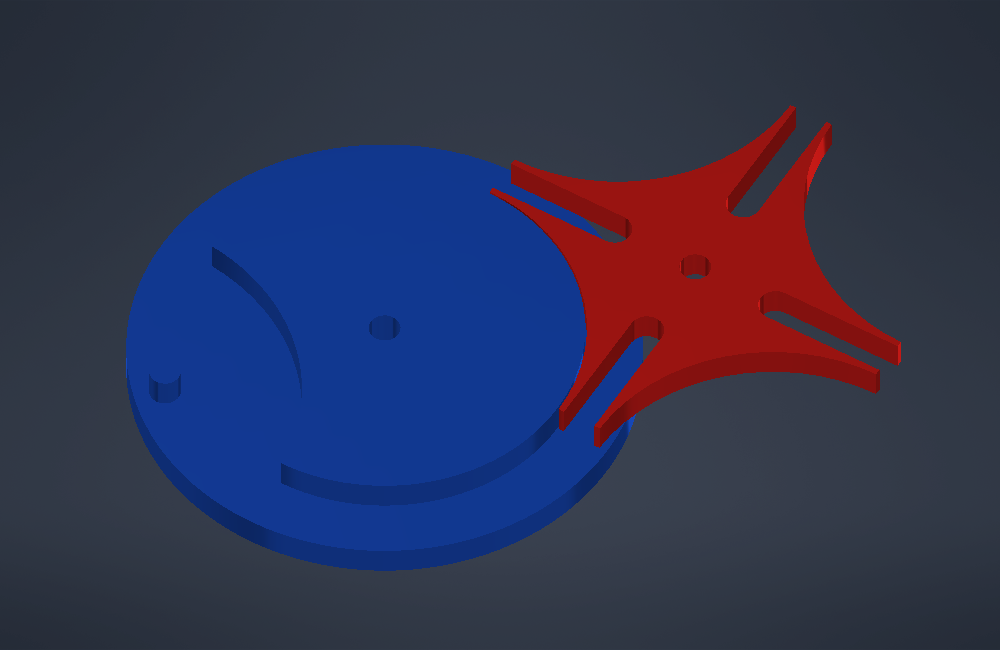
A Geneva drive generated by examples/geneva_mechanism.py.
Most Python examples for Inventor use win32com, which talks to Inventor through
late-bound COM dispatch. PySharpInventor uses Autodesk's official .NET Interop assembly
instead:
- The same API as C# and VB.NET add-ins. Types, enums and method signatures match Autodesk's .NET samples and API help, so they translate to Python almost line by line.
- Real interface casting.
InventorInterop.Circle(edge.Geometry)gives you a typedCircle; withwin32comyou need generated makepy wrappers andCastTo. - Enums without code generation.
InventorInterop.CurveTypeEnum.kCircleCurveworks directly; nogencache.EnsureDispatchstep to getconstants. - Inspectable objects.
dir()on an object lists the members of its interface.
from pysharpinventor import Inventor, InventorInterop

inv = Inventor()
part = InventorInterop.PartDocument(inv.doc)
edge = part.ComponentDefinition.SurfaceBodies[1].Edges[1]

curve_type, curve = edge.cast_edge_geometry()
if curve_type == InventorInterop.CurveTypeEnum.kCircleCurve:
print(curve.Radius)- Windows
- Python 3
- pythonnet>=3.0.0
- Autodesk Inventor (2020+)
- Dynamic Inventor version detection (picks the newest installed version)
- Lazy loading of the Interop assembly, so modules can be imported in any order
- .NET/CLR interface to Inventor API
- Document type casting (Part, Assembly, Drawing, Presentation)
- Geometry casting for edges and faces (
LineSegment,Circle,Plane,Cylinder, ...) - Extension methods on Inventor objects, e.g.
edge.cast_edge_geometry() - CadQuery-style string selectors, e.g.
body.select_faces(">Z"),face.select_edges("%CIRCLE") - Custom error handling with specific exceptions
- Support for connecting to active Inventor instances or creating new ones
pip install pysharpinventorFor development, install from a clone in editable mode:
git clone https://github.com/Nandhakumarpro/PySharpInventor.git
cd pysharpinventor
pip install -e .from pysharpinventor import Inventor, InventorInterop
# Connect to active Inventor instance
inv = Inventor()
# Or create new instance if Inventor is not running
inv = Inventor(create_if_not_exists=True)
# Or point at a specific Inventor Interop DLL
inv = Inventor(inventor_path=r"C:\Program Files\Autodesk\Inventor 2025\Bin\Public Assemblies\Autodesk.Inventor.Interop.dll")
# Access active document
doc = inv.doc
# Cast document to specific type
part_doc = inv.cast_document(doc, InventorInterop.PartDocument)
# Or auto-detect document type
casted_doc = inv.cast_document(doc)Inventor(create_if_not_exists=False, visible=True, inventor_path=None)
create_if_not_exists- start a new Inventor if none is running.visible- whether a newly started Inventor window is visible.inventor_path- path toAutodesk.Inventor.Interop.dll. When omitted, the newest installation underC:\Program Files\Autodesk\Inventor *is used.
Properties and methods:
inv.app(aliasinv.Application) - theInventor.Application. Connects on first use.inv.doc(aliasinv.ActiveDocument) - the active document.inv.cast_document(document, target_type=None)- cast a document toPartDocument,AssemblyDocument,DrawingDocumentorPresentationDocument. Withouttarget_typethe type is detected fromdocument.DocumentType.
InventorInterop is the Inventor .NET namespace (Inventor.* in C#). Use it for
classes and enums:
from pysharpinventor import InventorInterop

InventorInterop.PartDocument
InventorInterop.SurfaceTypeEnum.kPlaneSurface
It is safe to import anywhere, at any time. The Interop assembly is loaded the first
time an attribute is accessed. If you need a custom DLL path, create
Inventor(inventor_path=...) before touching InventorInterop; once loaded, the
assembly cannot be swapped for another version in the same process.
Edge.Geometry and Face.Geometry are returned by the API as a bare
System.__ComObject. The helpers in pysharpinventor.geometry read the
geometry type and cast it to the matching Inventor class:
from pysharpinventor.geometry import cast_edge_geometry, cast_face_geometry

body = part_doc.ComponentDefinition.SurfaceBodies[1]

curve_type, curve = cast_edge_geometry(body.Edges[1])
if curve_type == InventorInterop.CurveTypeEnum.kCircleCurve:
    print(curve.Radius)

surface_type, surface = cast_face_geometry(body.Faces[1])
if surface_type == InventorInterop.SurfaceTypeEnum.kCylinderSurface:
print(surface.Radius, surface.AxisVector.X, surface.AxisVector.Y, surface.AxisVector.Z)| Edge curve type | Geometry class |
|---|---|
kLineCurve |
Line |
kLineSegmentCurve |
LineSegment |
kCircleCurve |
Circle |
kCircularArcCurve |
Arc3d |
kEllipseFullCurve |
EllipseFull |
kEllipticalArcCurve |
EllipticalArc |
kBSplineCurve |
BSplineCurve |
kPolylineCurve |
Polyline3d |
| Face surface type | Geometry class |
|---|---|
kPlaneSurface |
Plane |
kCylinderSurface |
Cylinder |
kEllipticalCylinderSurface |
EllipticalCylinder |
kConeSurface |
Cone |
kEllipticalConeSurface |
EllipticalCone |
kTorusSurface |
Torus |
kSphereSurface |
Sphere |
kBSplineSurface |
BSplineSurface |
For unknown types (kUnknownCurve / kUnknownSurface) Inventor usually cannot
provide the geometry; the helpers then return None as the geometry. Use
edge.Evaluator / face.Evaluator for such entities.
get_edge_curve_type(edge) and get_face_surface_type(face) return only the type.
After import pysharpinventor, the geometry helpers are also available as methods on
Edge, EdgeProxy, Face and FaceProxy objects, similar to C# extension
methods:
curve_type, curve = body.Edges[1].cast_edge_geometry()
surface_type, surface = body.Faces[1].cast_face_geometry()
You can attach your own functions the same way:
from pysharpinventor._interop import register_extension

def area(face):
    return InventorInterop.Face(face).Evaluator.Area

register_extension('Face', 'area', area)
body.Faces[1].area()Faces, edges and vertices can be selected with CadQuery-style selector strings:
body = part_doc.ComponentDefinition.SurfaceBodies[1]

top = body.select_faces(">Z")[0]          # highest face
holes = top.select_edges("%CIRCLE")        # circular edges of that face
vertical = body.select_edges("|Z and >X")  # vertical edges at max X
sides = body.select_faces("#Z exc (>X or <X)")  # side faces except the X ends
The same functions are available as select_faces, select_edges and
select_vertices in pysharpinventor.selectors; they also accept a list of
entities, so selections can be refined. Results are typed (Face, Edge,
Vertex) and returned in collection order.
| Selector | Selects |
|---|---|
>Z / <Z |
farthest / nearest along the direction, by bounding-box centre |
>Z[1] |
second-farthest group; >Z[-1] is the nearest group |
|Z |
planar faces with normal parallel to Z, straight edges along Z |
#Z |
planar faces with normal perpendicular to Z, straight edges perpendicular to Z |
+Z / -Z |
planar faces whose outward normal points along / against Z |
%PLANE |
face types: PLANE, CYLINDER, CONE, SPHERE, TORUS, BSPLINE |
%CIRCLE |
edge types: LINE, CIRCLE, ELLIPSE, BSPLINE, POLYLINE |
>(1, 1, 0) |
any direction vector in place of X, Y, Z |
Combine selectors with and, or, not, exc and parentheses (precedence
not > and > or > exc). Each part of and is evaluated on the full set, so
>X and >Z is empty unless one entity is both the farthest in X and the highest.
Entities whose centres lie within 1e-4 cm along the direction count as one group, and
>Z returns all of them. A tall vertical face can rank above a lower horizontal one,
because its centre is higher.
- Units. The Inventor API works in internal units: centimetres for length and radians for angles, regardless of the document's display units.
- Indexing is 1-based.
body.Faces[1]is the first face. - Iterating collections returns untyped objects.
for e in body.EdgesyieldsSystem.__ComObjectvalues, which do not have the typed properties or extension methods. Cast them first:InventorInterop.Edge(e). Indexing (body.Edges[1]) returns typed objects. - Plane normals may point into the solid.
Plane.Normalis not guaranteed to be the outward direction of a face. Flip it whenface.IsParamReversedisTrue. - .NET API names differ from VBA in places. For example, use
ExtrudeFeatures.Add(definition)rather thanAddByDefinition.
InventorVersionNotFoundError- the Interop DLL could not be found. Passinventor_path.InventorConnectionError- pythonnet is missing, the DLL failed to load, or Inventor is not running (andcreate_if_not_existsisFalse).
Both can be imported from pysharpinventor.
Run the examples from the repository root.
examples/hello_world.py creates a new part containing a 5 cm cube and prints each
face's type, area and outward normal:
python -m examples.hello_worldexamples/selectors_demo.py creates a stepped block with a hole, prints what various
string selectors pick, and then uses selectors to place a fillet, a chamfer and a sketch:
python -m examples.selectors_demoexamples/geneva_mechanism.py creates a 4-slot external Geneva drive as a multi-body
part: a drive wheel with pin and locking disc, and a slotted Geneva wheel, placed in the
locked position. All dimensions are derived from the slot count, centre distance and pin
size, and can be changed through GenevaDesign:
python -m examples.geneva_mechanismfrom pysharpinventor import Inventor
from examples.geneva_mechanism import GenevaDesign, create_geneva_mechanism
design = GenevaDesign(slots=6, center_distance=12.0, pin_radius=0.4)
part_doc, drive, geneva = create_geneva_mechanism(Inventor(), design)- Source code at GitHub