

ILNumerics.Drawing.TestApp is a visual test tool used at ILNumerics to validate and compare essential features of the ILNumerics.Drawing Visualization Engine.
The application is designed to test rendering behavior on both low-level and high-level feature layers. It can be used to demonstrate and compare the software renderer and the OpenGL renderer side by side across WinForms and WPF — all within the same user interface.
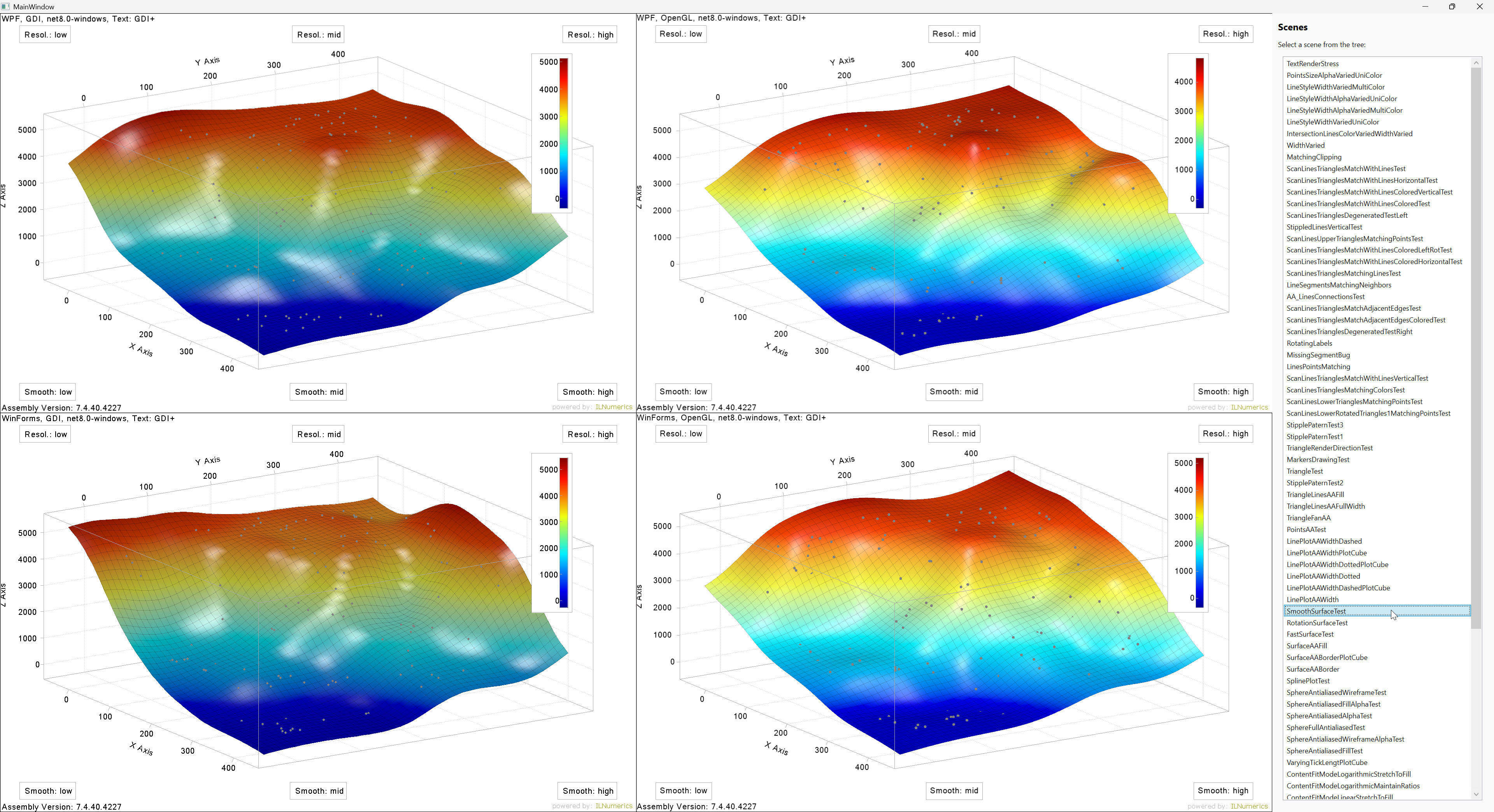
This project helps ILNumerics developers identify differences between renderer implementations and UI platforms and to ensure correctness of the rendering results - down to edge cases. A subset of available test scenes is published for demonstration purposes.
The app allows interactive inspection of rendering output across four combinations:
- WinForms + Software Renderer
- WinForms + OpenGL Renderer
- WPF + Software Renderer
- WPF + OpenGL Renderer
All test scenes can be selected interactively by the user. Each scene is rendered across all supported renderer/platform combinations, making visual differences, regressions, or platform-specific behavior easy to detect.
- Internal test application for ILNumerics.Drawing
- Visual comparison of software and OpenGL rendering
- Simultaneous testing on WinForms and WPF
- Low-level render engine feature tests
- High-level scene and object rendering tests
- Interactive scene selection
- Interactive inspection of all renderer/platform combinations in one UI
- Useful for detecting renderer inconsistencies and visual regressions
The button OpenGL Multi-Panel Stress in the right sidebar opens a separate window with several OpenGL panels (plots, legends, labels): WPF panels, WinForms panels (hosted in WindowsFormsHost) or both mixed. It covers multi-panel scenarios which are not visible in the main window: every OpenGL panel owns its own OpenGL context, while mouse picking, scene changes, resizing and closing a panel happen outside of the panel's own render callback, i.e. possibly while another panel's context is current.
- Move the mouse alternately over the panels (the label center turns red on hover, the hovered node is shown on top).
- Use the buttons to open/close panels, replace scenes, resize and run a picking round. Neue Panels selects the kind of panels created (mixed, WPF only, WinForms only).
- Auto-Stress does all of this randomly and calls
PickAt()directly.
Pass criteria: no crash (e.g. access violation in the GL driver), center falsch = 0, Exceptions = 0.
git clone https://github.com/ILNumerics/ILNumerics.Drawing.TestApp.git
cd ILNumerics.Drawing.TestApp\srcdotnet runBy default, the app uses the ILNumerics NuGet packages. To build and run it against local ILNumerics module projects instead, provide the root folder of the local modules tree (the folder containing ILNumerics.Core, ILNumerics.Drawing, ILNumerics.Drawing.Platforms, ILNumerics.Toolboxes, ...):
dotnet run -c Debug /p:ModulesBasePath='C:\path_to\Version6'The module projects are built as part of the app build, in the same configuration. /p:UseLocalModules=true|false overrides the selection explicitly.
MIT
A runtime license of ILNumerics Visualization Engine is included with the repository and maintained up to-date by ILNumerics. Learn more: ILNumerics free license plans