
A multi-user operating system for the OpenComputers Minecraft mod. Logins, per-user permissions, a capability sandbox, signed packages and an encrypted mesh network.
You need:
- OpenComputers 1.7.5 or newer on Minecraft 1.12.2. TOS is developed against 1.8.10, the current release.
- A CPU set to the Lua 5.3 or 5.4 architecture.
- 1 MB of memory, or 1.25 MB with a network card. The full interface needs 1.5 MB.
- A hard drive with about 1.9 MB free.
The details are under Requirements.
Current release: v1.5.0 "Aletheia" — see CHANGELOG.md for what changed.

Contents: Install it · Your first ten minutes · What's in it · Why not just use OpenOS? · Requirements · Add-ons · Known limitations · Where to go next · License
On an OpenOS machine with an Internet Card, type one line:
wget -f https://raw.githubusercontent.com/Evan450/TOS-Terminal-Operating-System-/main/bootstrap.lua /bootstrap.lua && /bootstrap.lua
Important
Keep the leading slash in /bootstrap.lua. wget saves the file at the root of the drive, and the root is not on OpenOS's search path, so plain bootstrap.lua answers "command not found".
The installer asks which drive TOS goes on when the machine has more than one (/bootstrap.lua --help explains it in the game), then a few questions — what kind of machine this is, how strict logins should be, whether to encrypt network traffic — and then offers to write the TOS BIOS: type flash to accept. No Internet Card, or want to know what each question does? MANUAL §1.2 covers installing from a disk and every question.
- Set root's password. The first boot asks for it before anything else.
- Take the tour, or press Ctrl+Q to skip it.
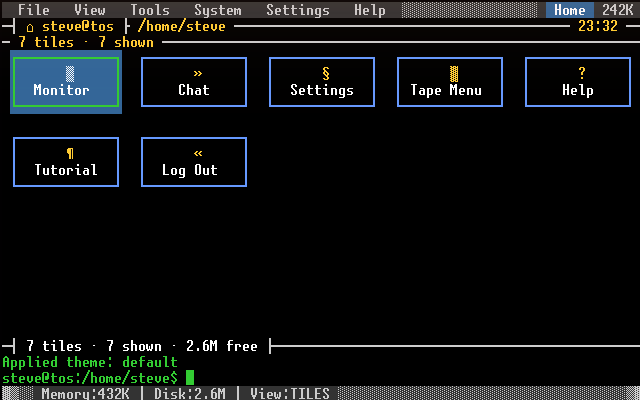
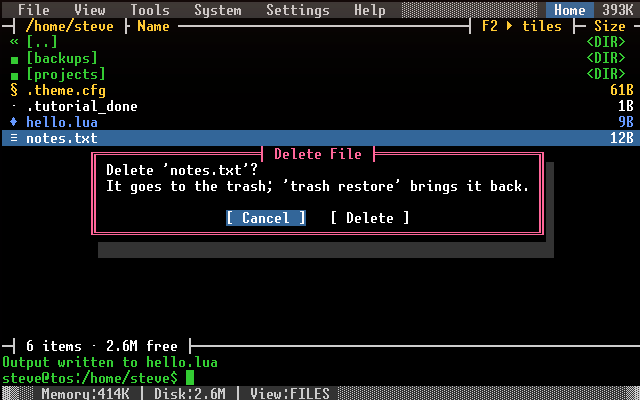
tutorialbrings it back. - Look around. The Home tab shows your files, or tiles of everything this machine can do; F2 flips between the two. The prompt sits at the bottom of both.
- Ask for help.
helplists every command you can use,help <name>explains one, andwhyexplains the last thing that refused you. - Make an everyday account.
useradd aliceasks for her password twice; the account starts as a USER, andusermod alice adminraises it.logout, then log in as her: root is for administration, not for living in. - Pick a look.
theme list, thentheme set midnight. - Install an add-on. As an admin, see Add-ons.
- Accounts and permissions — real logins, four tiers (guest, user, admin, root), per-user home directories and access lists,
sudo, session timeouts, lockout with backoff. - A capability sandbox — programs receive only what they declare and are granted: no ambient
_G, no rawcomponent, no back door into the kernel. - Signed packages —
pkginstalls from a floppy, a folder or over the network, checking an Ed25519 signature and a hash for every file on arrival. - A zero-trust mesh — peers are unknown until paired; trusted traffic is encrypted and authenticated, with replay protection.
- A tile Desktop and a file browser, nine colour themes, and a full reference manual —
MANUAL.md, The Book of TOS. - OpenOS compatibility — 15 of OpenOS's libraries, so OPPM packages install and much of what already exists runs. 30 of the 31 Lua files on OpenComputers' 11 loot disks find every library they ask for (
python build/compat_scan.pycounts them). That says a program loads, not that it works: its capabilities, paths and terminal handling can still differ.
OpenOS gives you a shell. TOS gives you accounts and logins, per-user file permissions, a capability-based sandbox that user programs cannot escape, package signing, and an authenticated encrypted mesh between machines.
It is keyboard-first and built to run infrastructure: a base that has to keep working. It runs on a Tier 1 monochrome screen, gives every GPU and screen pair its own independent session, survives power loss without corrupting its own files, and ships a cluster scheduler and an RBMK reactor supervisor for bases that need one. If you want a graphical desktop on a maxed-out machine, MineOS is the better answer, and this is not trying to be it.
| Memory | What you get | |
|---|---|---|
| Minimum | 1 MB (one Tier 3.5 stick) | The command line, which loads each command as you use it. TOS starts there by itself on a machine this size. About 65 KB stays free: too little to count on the package manager, which needs 1.25 MB (add a Tier 1.5 stick) and says so. |
| Recommended | 1.5 MB (two Tier 3 sticks) | The full panels interface, with about 330 KB free after you log in. |
| Comfortable | 2 MB (two Tier 3.5 sticks) | Room for add-ons, themes and the OpenOS compatibility layer: about 800 KB free after you log in. |
A network card needs another 256 KB. A network card or linked card brings up the network stack and its services: about 170 KB that a machine without one never loads. With one, 1 MB starts the command line but none of its commands load, so the minimum is 1.25 MB, which also runs the package manager. The panels still run at 1.5 MB, with about 175 KB free.
Below 1 MB TOS does not reach a usable shell. At 768 KB the command line starts, but its commands do not load; at 384 KB or less the kernel itself does not fit. (Measured on a fresh install with a T1 CPU, logged in, after one command. python tos.py floorcheck re-measures every figure in this section.)
- Drive: about 1.9 MB free. A Tier 2 drive (2 MB) holds TOS on its own, with about 150 KB left after first boot: enough to run, not to grow, so add-ons and
srm baseline --full(about 220 KB) want a Tier 3 drive (4 MB). Installing from OpenOS onto the same drive needs a Tier 3 drive (4 MB), since OpenOS is still there while TOS copies. TOS does not fit on a floppy. - CPU: any tier, on the Lua 5.3 or 5.4 architecture — sneak-click the CPU to switch it. OpenComputers added Lua 5.4 in 1.8.0, so on an older version use 5.3. On a 5.2 CPU the BIOS stops and says so.
- GPU: any tier, detected automatically. Tier 1 is monochrome, so themes are off there; Tier 2 snaps themes to its 16 colours; Tier 3 shows them exactly.
- Several screens: each GPU and screen pair is its own seat, with its own login. One computer has one CPU, so it works best when people take turns — see MANUAL Chapter 1.
Games, a spreadsheet, mail, a printer driver, tape tools, a filesystem for raw drives, the cluster control plane and more ship separately from the OS as the Optional Utilities. With an Internet Card, as an admin:
pkg repo add utils https://raw.githubusercontent.com/Evan450/TOS-Terminal-Operating-System-/optional-utilities
pkg search
pkg fetch calc
Or insert an Optional Utilities disk and run pkg install to pick from a menu. Every package is signed and its files hash-checked; the add-on catalogue lists them all.
- OpenOS programs run on a best-effort basis. A program that reaches for raw components or the global environment runs into the sandbox. Programs that use OpenOS's documented libraries generally work, but OpenOS's own
bin/does not: it needsttyandloadfile, which TOS does not provide, and TOS has its own commands in their place. - One theme for every seat. The last person to log in, or to change the theme, sets the colours everyone sees.
- The remote shell is off by default.
rshdis registered but not started;service start 20-rshdturns it on, and even then only TRUSTED peers can use it. - An unverified package needs a deliberate yes.
pkg installrefuses a package that does not list a SHA-256 for every file, unless you add--allow-unverified. A service package's setup runs with the authority it declares, so installing one trusts its author with the machine. - Seats are bound at boot. Swapping or renaming screens while TOS runs can leave a seat without input until the next reboot.
- TOS cannot stop a runaway program. OpenComputers keeps the hook that preemption would need, so a program that never yields runs until OpenComputers restarts the computer.
- The boot files are not signed. The BIOS checks that
/init.luaparses, not what it contains, so anyone who can write the boot files (an admin) can run code before login. - Without a data card, network encryption is weak. TOS falls back to XOR with a hashed key. Every packet is still authenticated and protected against replay, but its contents are poorly hidden. A machine with a data card refuses XOR packets.
MANUAL Chapter 15 has the whole security model, including these.
MANUAL.md |
The Book of TOS: installing, every command, the security model, configuration, recovery |
docs/API.md |
The kernel's functions, for writing add-ons |
CONTRIBUTING.md |
Working on TOS: setup, tests, house rules. Work on dev, never main |
ROADMAP.md |
What is still open, including what was deliberately not done |
CHANGELOG.md |
What each release changed |
SECURITY.md |
Reporting a security problem |
TOS is licensed under the GNU General Public License, version 3 or (at your option) any later version (GPL-3.0-or-later) — see LICENSE.txt for the full text.
Copyright © 2026 Discover! Interactive. This program is free software: you may redistribute it and/or modify it under the terms of the GPLv3. It comes with ABSOLUTELY NO WARRANTY (see sections 15–16 of the license).
The name "Strata Systems LLC" that TOS shows on its splash screen, about and installer is in-world branding for a fictional vendor, like the vendor in a game. It is not a company, it holds no copyright, and it is not the licensor.