
An LSPosed module for Nothing and CMF phones that adds to Nothing Launcher and Nothing OS: custom app drawer folders with animated dot-matrix covers, a landscape home screen and lock screen, game controller support, live wallpaper sounds and more.
Heavily experimental alpha. Expect bugs, and expect things to change from build to build. Tested on one phone so far (CMF Phone 1, Nothing OS 4.1, Android 16).
An unofficial community module, not affiliated with or endorsed by Nothing. Formerly Nothing Launcher+; it grew beyond the launcher, hence the name: from Nothing, to something.
What it adds
- App drawer: your own folders beside Nothing's Smart categories, image and emoji covers.
- Dot-matrix look: animated emoji covers, glowing dot-matrix app icons, an Ndot status bar, and live icons (CMF Stereo's speaker pulses, like Nothing's clock).
- Landscape: home screen, app drawer, recents, widget cards, lock screen and always-on display.
- Controllers: navigate the launcher and type in HeliBoard with a gamepad; a gaming launcher.
- System extras: memory in recents, a Running services task manager, system fonts, full refresh rate in battery saver, sounds and music.
- Live wallpapers: sounds and smooth turning for Living Worlds and Palette Cycle.
The look
The module's look is Nothing's own design language (the dot matrix, the NDot font, the frosted glass of Nothing OS 5) mixed with retro-futurism, above all the digital dashboards of 80s and 90s cars: lit segments and dot screens in green and amber behind dark glass, glowing into it. As the module grows, its whole look moves towards that mix: Nothing's language, with the feel of a retro-futuristic 80s-90s car dashboard.
The look is a demo for now. We are not satisfied with it yet: almost every part of the design will be reworked before the first stable public release. Think of what you see today as a preview of roughly where the final look is going, not the final look itself.
Nothing Gaming Space above all: its look will change drastically. What it looks like now is not even close to the look we want: it is a demo, there to test its features (the cross menu, the artwork, the trailers, the controller), not its design.
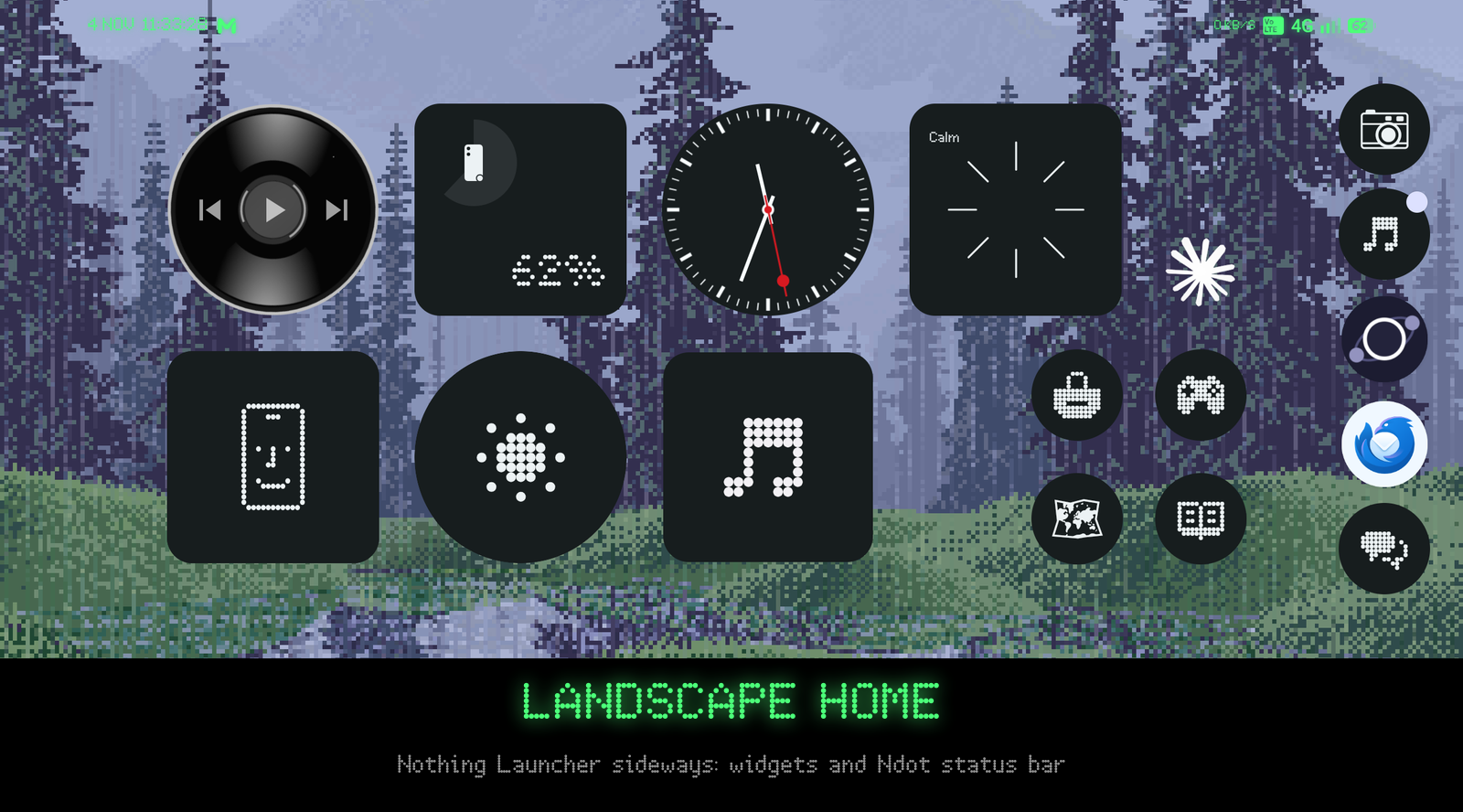
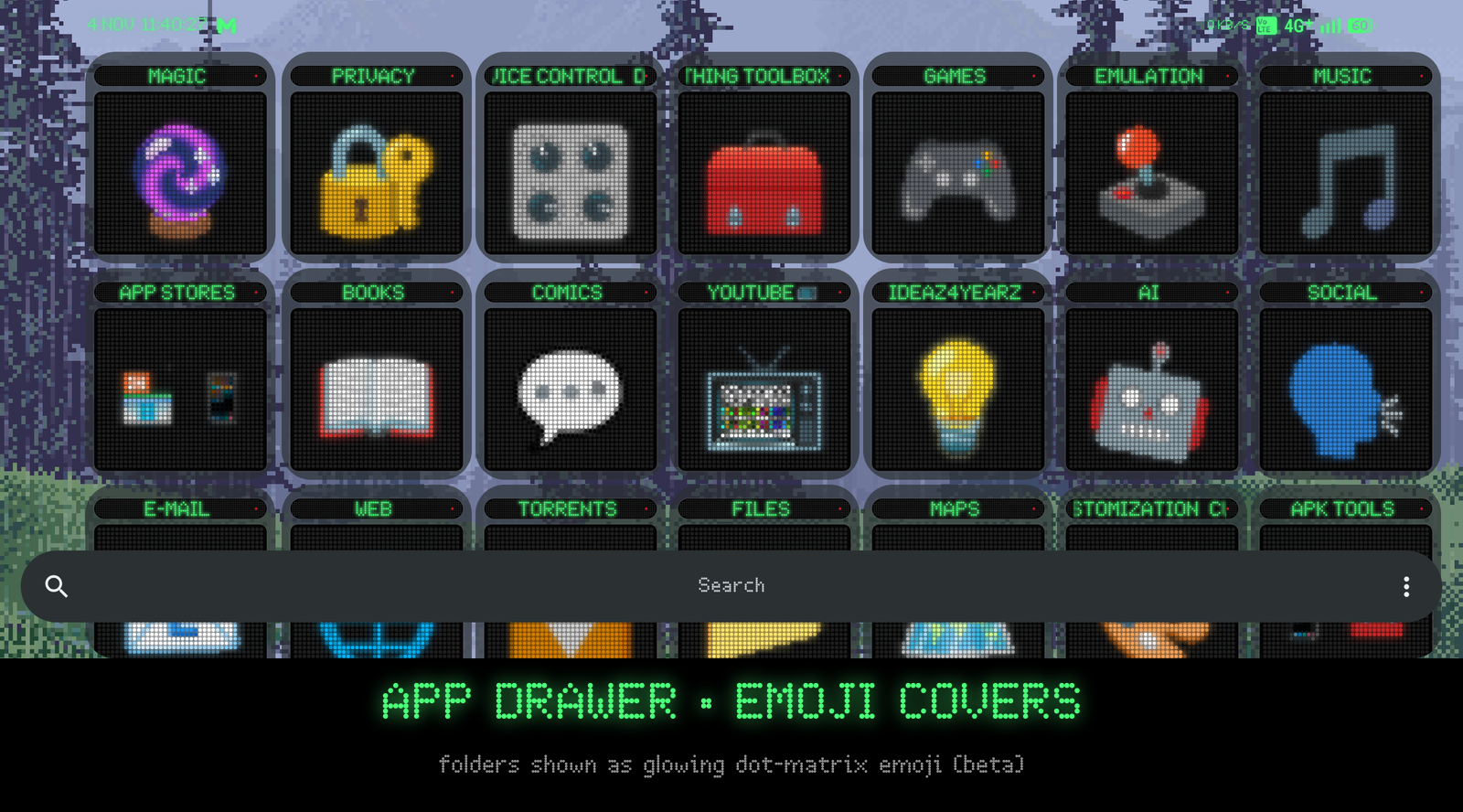
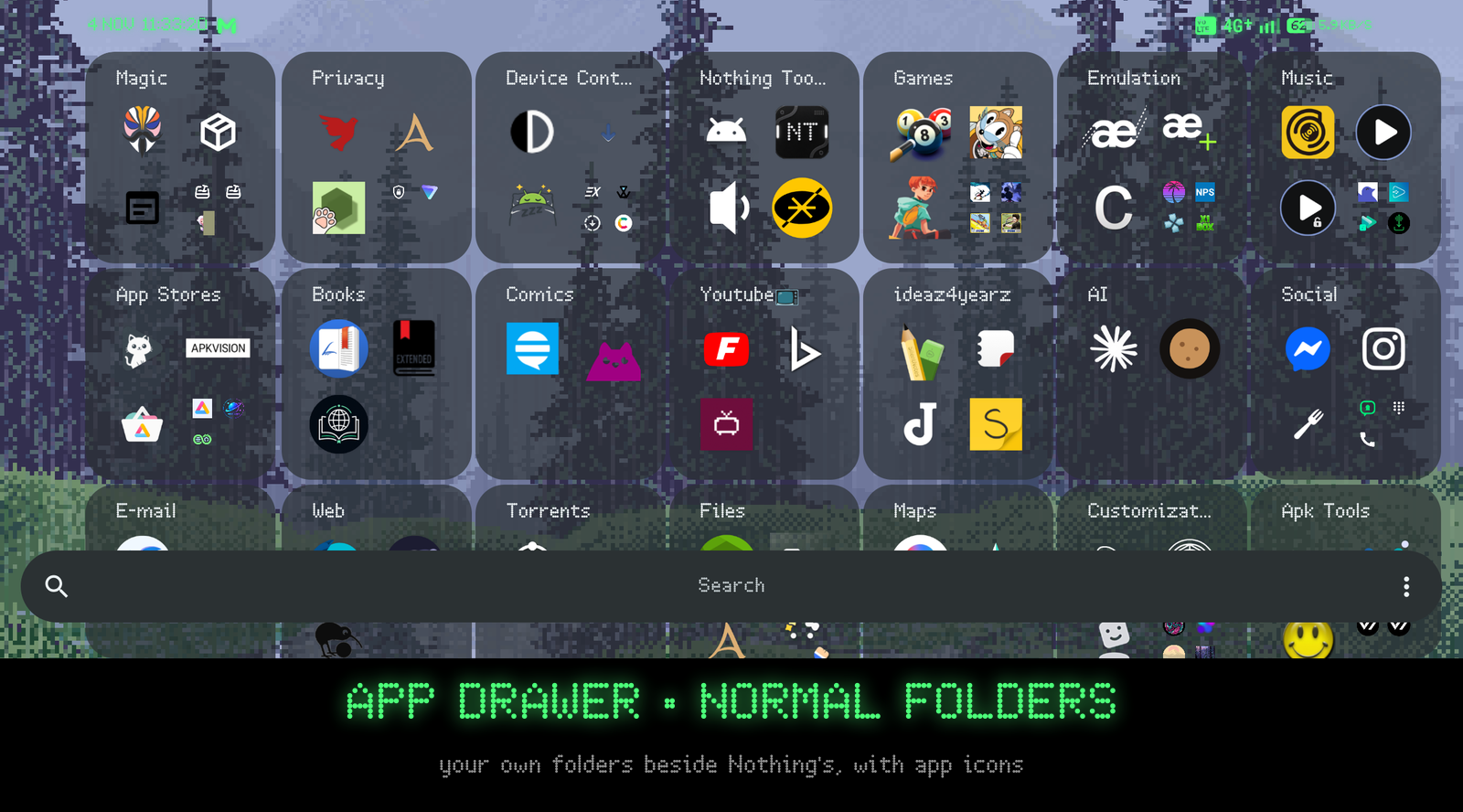
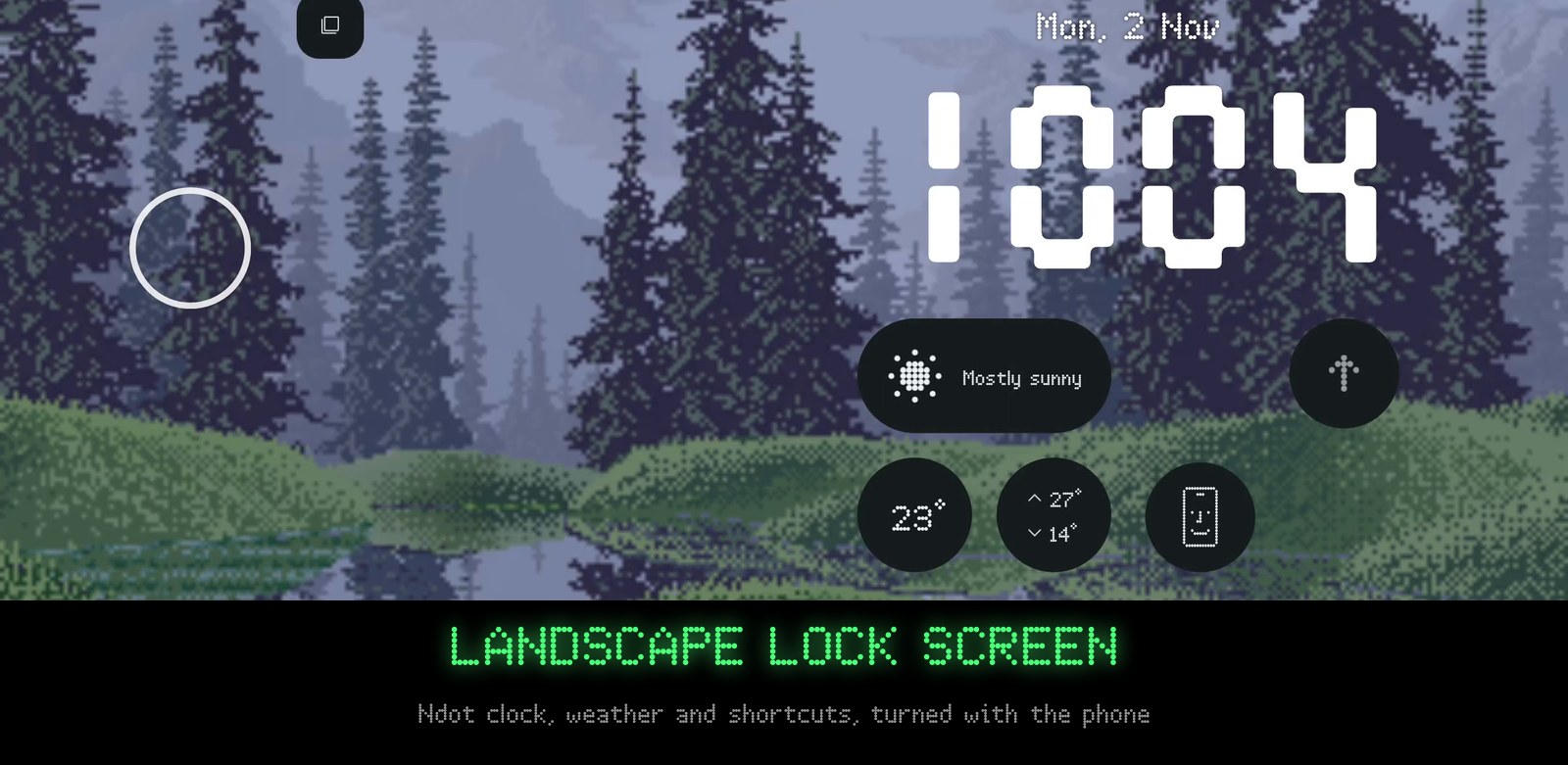
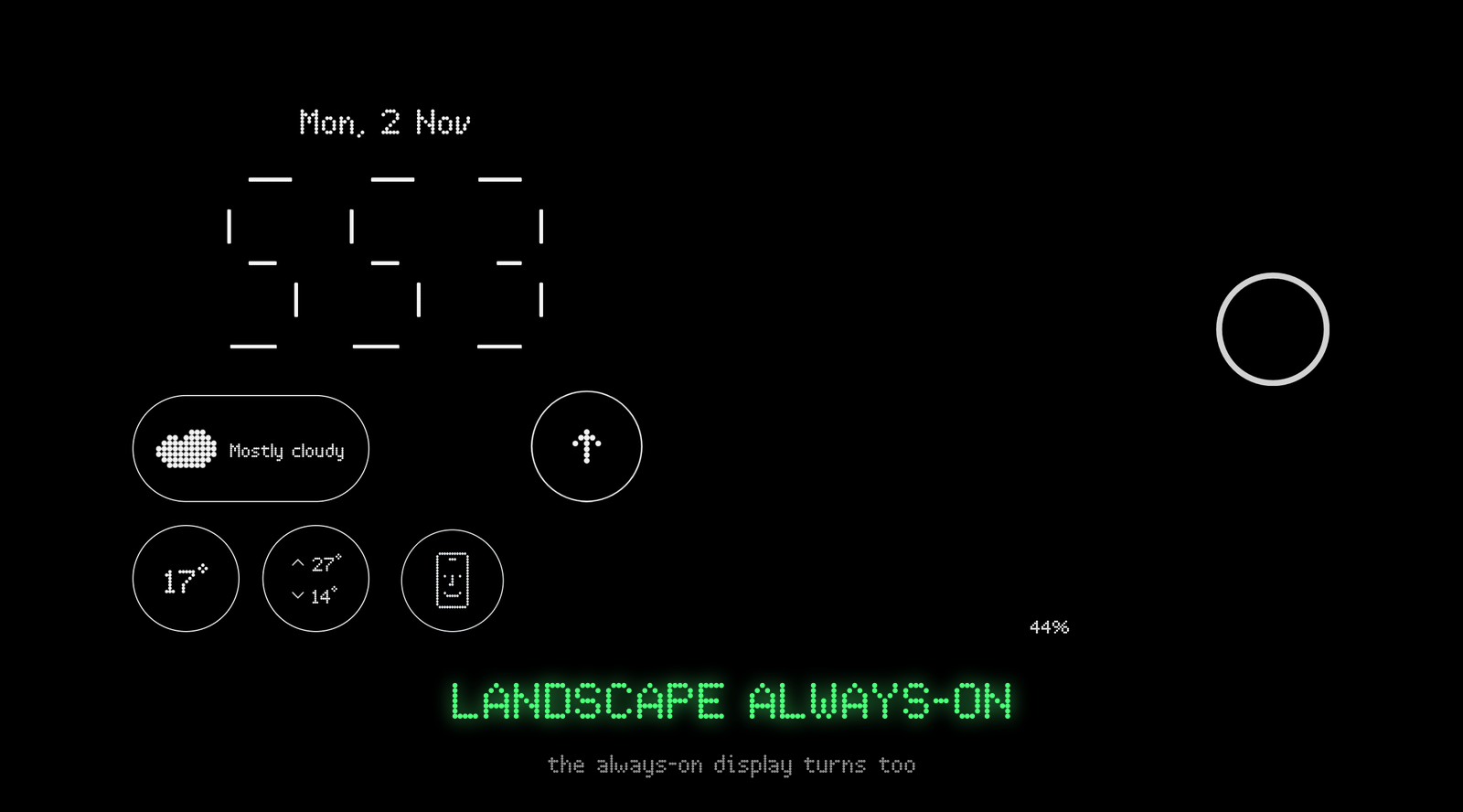
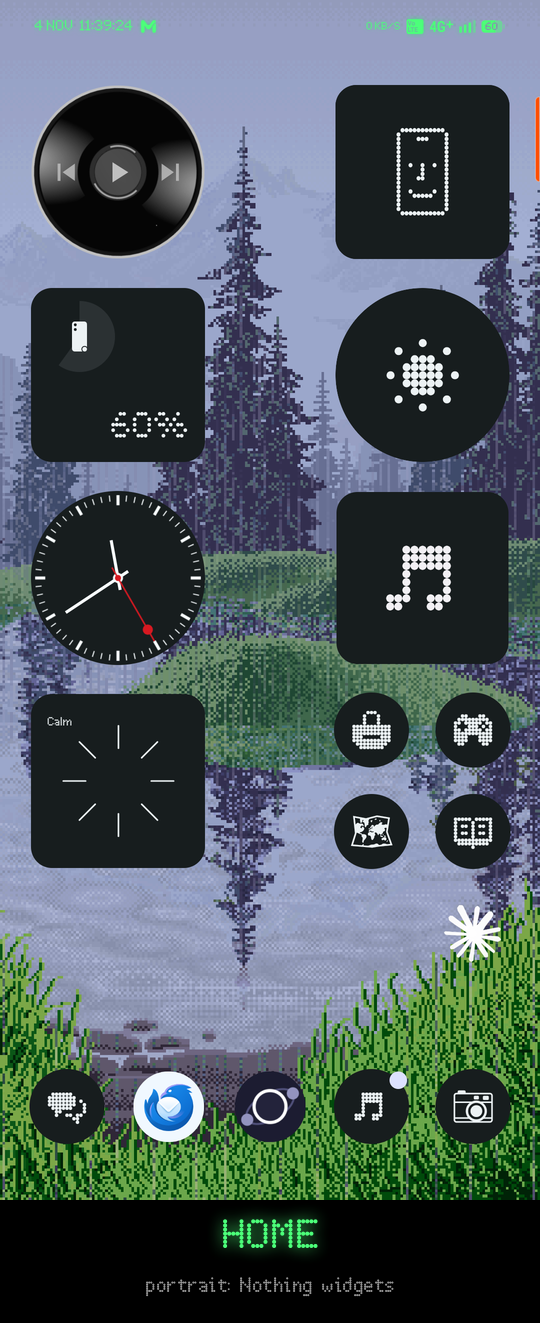
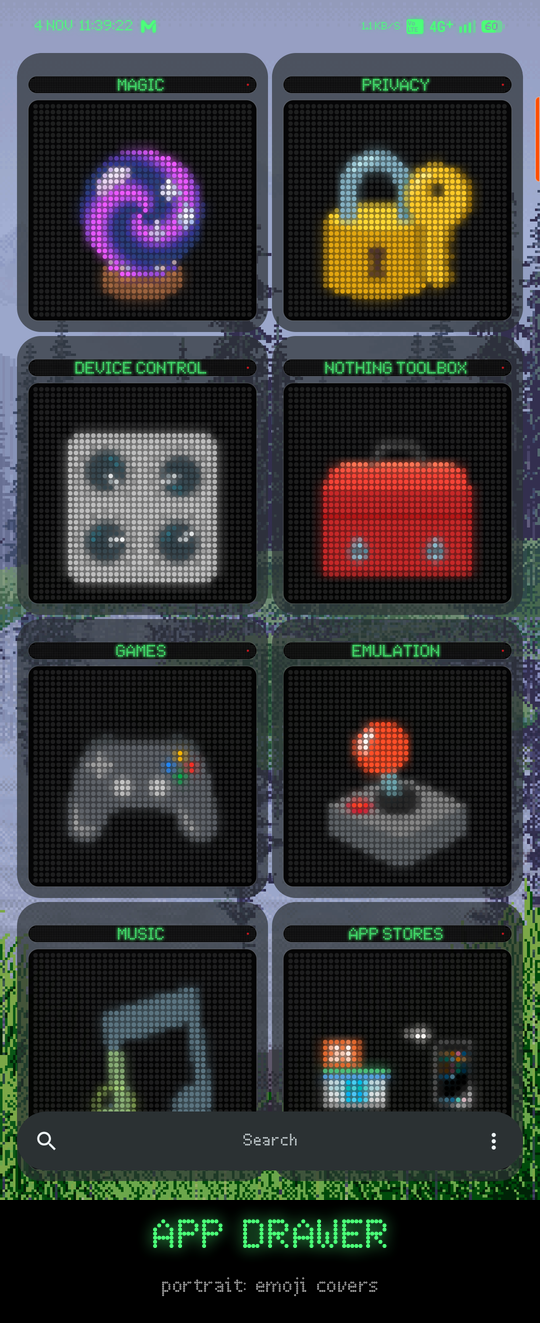
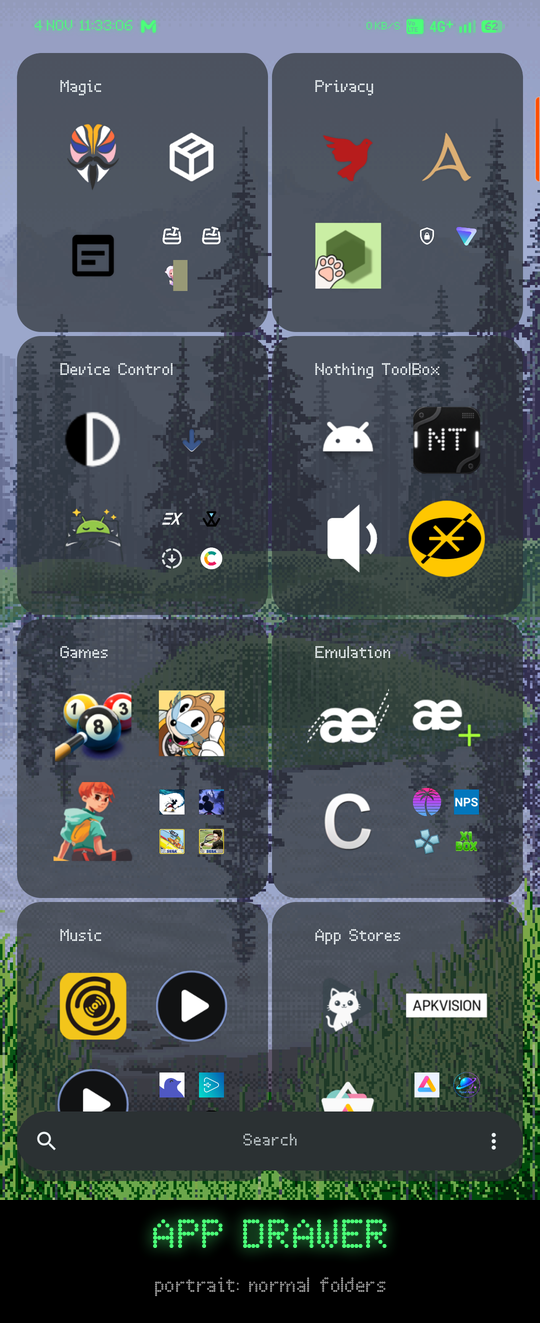
Screenshots from the test phone, alpha builds. Captions use Nothing's NDot 77 JP Extended as drawn on the phone; the font itself is not part of this repository.
Each section below opens when tapped.
Warning
Updating to 0.70.35 or later from 0.70.34 or earlier: back up your settings first. Before installing, open Nothing2Something → Backup → Export, and save the file somewhere safe (it holds your folders, options and covers). 0.70.35 moves where the settings are kept: on LSPosed 2 and Vector it moves them once, with root, the first time you open the app. If root is refused or the move fails, the settings page says so, and Backup → Import puts everything back from your file.
Note
Experimental phase 1: done. Testing and stabilization phase 1: begins.
- Most features are experimental. They were built and tested on one phone (a CMF Phone 1 on Nothing OS 4.1) and may not work, or may behave differently, on yours.
- No new features for now. Every existing feature is being tested, and every problem found is fixed, before anything new is added. Builds in this phase contain fixes only.
- How to help: the test list is in docs/TEST_PLAN.md (see How to help test under Testing).
Current state · version 0.70.61, what is pending, what still needs testing
Current build: 0.70.61 (CMF Phone 1, Nothing OS 4.1, Android 16). New marks what came in the last builds.
App drawer
- Custom folders beside Nothing's Smart categories, with image and animated emoji covers.
- Dot screen style: five ways for the folders' dots to light, to compare. New
- Green dot screen: the covers in shades of green only. New
- Glass app drawer: Nothing OS 5's frosted glass or a live blur like the quick settings panel. New
- Glass open drawer folders. New
Home screen and icons
- Dot matrix icon pack in Nothing's picker: 34 dots across, on dark glass, clean in every shape. New
- Dot icon style: the same five looks for the app icons. New
- Nothing OS 5's frosted glass on still and live wallpapers: open and closed folders, the dock's search bar and Nothing's widgets, each with a switch and a tint slider. New
- CMF Stereo's live icon with white waves, left alone by Nothing's icon style.
- Landscape: the dock turns with the screen; the widget picker turned works on Nothing OS 4.0 too. New
Gaming
Nothing Gaming Space is a demo for testing its features: its look will change drastically, and what you see now is not even close to the look we want.
- Nothing Gaming Space (alpha, demo): the module's own gaming launcher in dot-matrix style, one dot screen on top, a cross menu below, turning 3D dot boxes and an animation per category.
- Game artwork from Google Play (no key) or SteamGridDB, and Steam trailers as game clips. New
- Games' cut-out icons as solid dot shapes; the lower half laid out like the XMB. New
Status bar, lock screen and system
- Dual status bar with its options and tighter rows; its date hides with the clock.
- OLED saver, also when a swipe brings the bar back over a full-screen app.
- Full-screen apps: picked apps hide the status bar and use its space. New
- Lock screen in landscape, laid out in the frame it turns in; Check orientation on wake and unlock. New
- HeliBoard across the whole width in landscape, beside the camera too (verified). New
- Restart System UI from the module.
The module app
- Settings sorted by what they change; glass tint sliders folded under their switch. New
- Glass settings screens: the app's own screens in frosted glass over the wallpaper. New
- A search field for its settings, and every setting in Android's Settings search. New
- A Nothing2Something row in Settings, a Show app icon switch, a dot-matrix app icon. New
- Launcher only mode. New
- Diagnostics: Your data (nothing is collected), Hook health, debug report. New
Under the hood
- Both Xposed APIs in one module; LSPosed 2 and Vector keep the settings themselves. New
- The crash-loop guard counts only crashes, not System UI restarts by other modules or LSPosed.
Builds, newest first, one row each (each build's full notes are under Full notes of every build below; Verified means checked on the phone).
| Build | What changed | On a phone |
|---|---|---|
| 0.70.61 | Two Nothing OS 5 names found; the rest mapped | Not tested yet |
| 0.70.60 | The landscape widget picker on Nothing OS 4.0 | Not tested yet |
| 0.70.59 | Diagnostics says what is collected (nothing) and how to report | Not tested yet |
| 0.70.58 | Audit pass 3: scenarios | Not tested yet |
| 0.70.57 | Audit pass 4: the audit's own fixes reviewed | Not tested yet |
| 0.70.56 | Audit pass 1 (System UI and system): the system font and saves | Not tested yet |
| 0.70.55 | Audit passes 1 and 2 (first part): settings never lost, less drawing | Not tested yet |
| 0.70.54 | The frosted drawer no longer solid black | Not tested yet |
| 0.70.53 | The drawer in Nothing OS 5's frosted glass again, the live blur as a second look | Not tested yet |
| 0.70.52 | Glass settings screens in Nothing OS 5's frosted glass | Not tested yet |
| 0.70.51 | Glass settings screens blur, and switch without a force stop | Not tested yet |
| 0.70.50 | Glass settings screens (new) | Not tested yet |
| 0.70.49 | Glass tints folded away; builds with the real Xposed API | Not tested yet |
| 0.70.48 | The App drawer page as it was; Launcher only on top again | Not tested yet |
| 0.70.47 | The settings sorted by what they change | Not tested yet |
| 0.70.46 | The drawer's glass is a live blur, as the quick settings panel; clearer VFD details; no green blobs in the… | Not tested yet |
| 0.70.45 | The drawer's glass covers the whole screen; Restart System UI touches only System UI | Not tested yet |
| 0.70.44 | The drawer's glass follows the drawer and covers it; tiles keep other modules' transparency | Not tested yet |
| 0.70.43 | The drawer's glass installs; saves reach the system at once | Not tested yet |
| 0.70.42 | The glass follows its surface everywhere | Not tested yet |
| 0.70.41 | Dot icon style: the five looks for the dot-matrix app icons too | Not tested yet |
| 0.70.40 | Dot screen style: five ways for the dots to light, to compare on the phone | Not tested yet |
| 0.70.39 | Green dot screen keeps the normal glow | Not tested yet |
| 0.70.38 | Glass app drawer and open drawer folders; a stronger glow on the green screen | Not tested yet |
| 0.70.37 | Green dot screen | Not tested yet |
| 0.70.36 | Dot screens dark in light mode, the folder card stays white | Not tested yet |
| 0.70.35 | Both Xposed APIs in one module, no shared settings file on LSPosed 2 | Not tested yet |
| 0.70.34 | Nothing OS 5: fix for the launcher crash on "add to home screen" from a drawer folder | Not confirmed on a phone: the Nothing OS 5 tester no longer runs Nothing OS |
| 0.70.33 | Nothing OS 5: dot-matrix icons and live icons | Not tested yet |
| 0.70.32 | Nothing OS 5 (Android 17): every broken hook found and fixed or left out cleanly | Not tested yet |
| 0.70.31 | The glass is visible on live wallpapers: the capture copied exactly from Nothing OS 5 | Not tested yet |
| 0.70.30 | Glass widgets: Nothing's own widgets frosted as in Nothing OS 5 (new, a switch and a tint slider) | Not tested yet |
| 0.70.29 | Glass on live wallpapers, glass closed folders and glass search bar (new, switches with a tint slider each) | Not tested yet |
| 0.70.28 | Glass folders made exactly as Nothing OS 5 makes them, with a tint slider | Not tested yet |
| 0.70.27 | Glass folders: Nothing OS 5's frosted folders on Nothing OS 4 (new, a switch, off by default) | Not tested yet |
| 0.70.26 | DexKit: renamed launcher methods found again | Not tested yet |
| 0.70.25 | Hook health in detail | Not tested yet |
| 0.70.24 | Folders never empty the drawer | Not tested yet |
| 0.70.23 | Obfuscated names checked before use | Not tested yet |
| 0.70.22 | More from the dependency maps | Not tested yet |
| 0.70.21 | Ready for updates: no half-applied features | Not tested yet |
| 0.70.20 | From the phone's own system_server code | Not tested yet |
| 0.70.19 | Hook health (new, Diagnostics) | Not tested yet |
| 0.70.18 | Open audit items that needed no phone evidence | Not tested yet |
| 0.70.17 | Full audit, passes 3 and 4 | Not tested yet |
| 0.70.16 | Full audit, part 3 | Not tested yet |
| 0.70.15 | Full audit, part 2 | Not tested yet |
| 0.70.14 | Full audit, part 1: bugs found by reading every file, fixed | Not tested yet |
| 0.70.13 | Cleanup step 4, part 3: LockScreenTurn split | Not tested yet |
| 0.70.12 | Cleanup step 4, part 2: DotEffect split | Not tested yet |
| 0.70.11 | Cleanup step 4, part 1: SettingsActivity split | Not tested yet |
| 0.70.10 | Cleanup step 3: Nothing Gaming Space in a package of its own | Not tested yet |
| 0.70.9 | Cleanup step 2, part 3: one controller test, one place for class names | Not tested yet |
| 0.70.8 | Cleanup step 2, part 2: one way to download | Not tested yet |
| 0.70.7 | Cleanup step 2 (shared helpers), part 1: one way to run root commands | Not tested yet |
| 0.70.6 | Gaming Space: games' icons turn as solid dot shapes | Not tested yet |
| 0.70.5 | Gaming Space: Android games get their Google Play banner | Not tested yet |
| 0.70.4 | Gaming Space: a trailer no longer shows its artwork through it | Not tested yet |
| 0.70.3 | The settings no longer crash with the app icon hidden | Not tested yet |
| 0.70.2 | Gaming Space: artwork shows again, no ghost on trailers, searches say why they fail | Not tested yet |
| 0.70.1 | Gaming Space's dot screen lit like the folders' covers; finer banner dots; the category animations removed | Not tested yet |
| 0.70.0 | Gaming Space: Steam's microtrailers, and your own clip | Not tested yet |
| 0.69.1 | The dot balls of 0.69.0 removed | Not tested yet |
| 0.69.0 | Gaming Space: round icons are dot balls | Not tested yet |
| 0.68.1 | Gaming Space: renaming really saves, and the boxes stay whole | Not tested yet |
| 0.68.0 | Gaming Space: the lower half as on the XMB, and typing that saves by touch | Not tested yet |
| 0.67.0 | Show app icon (Module section) | Not tested yet |
| 0.66.0 | Search inside the module | Not tested yet |
| 0.65.3 | First cleanup from the code audit (four bugs) | Not tested yet |
| 0.65.2 | No squeezed home screen on a turn | Not tested yet |
| 0.65.0 | A "Nothing Gaming Space" folder for the artwork and trailers | Not tested yet |
| 0.64.1 | The whole top a dot screen; games and trailers chosen by hand | Not tested yet |
| 0.64.0 | Steam trailers as a saved clip | Not tested yet |
| 0.63.1 | SteamGridDB artwork on the big dot screen; Gaming Space no longer crashes on saved artwork | Verified |
| 0.63.0 | Gaming Space: Steam trailers, a bigger banner, adjusting the artwork | Not tested yet |
| 0.62.0 | Gaming Space: its own menus, choosing artwork, animated banners, touch | Not tested yet |
| 0.61.2 | The artwork shows | Not tested yet |
| 0.61.1 | Nothing Gaming Space: renaming, and the artwork's lookups shown | Not tested yet |
| 0.61.0 | Nothing Gaming Space, third part: game artwork; marked (alpha) (demo) | Not tested yet |
| 0.60.0 | Nothing Gaming Space, second part: 3D boxes and category animations | Not tested yet |
| 0.59.1 | Nothing Gaming Space: one dot screen and the cross menu | Not tested yet |
| 0.59.0 | Nothing Gaming Space opens, plays the intro and lists the categories and apps; Nothing Gaming Space (first part of three) | Verified |
| 0.58.1 | HeliBoard across the whole width (switch in Landscape & controllers) | Verified |
| 0.58.0 | Full-screen apps | Verified |
| 0.56.1 | The Launcher only switch's description, and the README, present it as the way to keep the launcher's… | Fixed |
| 0.56.0 | The module's settings in Settings search | Verified |
| 0.55.11 | At 34 dots across, a rounded-square icon's left edge ended in a dark strip before the bezel while its… | Fixed |
| 0.55.10 | Finer dot icons | Not tested yet |
| 0.55.9 | CMF Stereo's live icon stayed still at times | Fixed |
| 0.55.8 | With 0.55.7 every dot icon was an empty dark screen, no dot lit (seen on the phone, screenshot) | Fixed |
| 0.55.7 | Dot icons end in the bezel's outline, every shape | Not tested yet |
| 0.55.6 | No green edge on dot icons | Not tested yet |
| 0.55.4 | "Dot matrix" in Nothing's Icon Pack picker | Not tested yet |
| 0.55.3 | CMF Stereo's live icon | Not tested yet |
| 0.55.2 | App icon | Verified |
| 0.55.1 | Nothing2Something in Settings | Verified |
| 0.55.0 | Launcher only | Not tested yet |
| 0.54.12 | The crash-loop guard counts crashes only | Not tested yet |
| 0.54.11 | The dual status bar's date hides with the clock | Not tested yet |
| 0.54.10 | The dock turning with the home screen | Verified |
| 0.54.9 | Check orientation on wake and unlock | Verified |
| 0.54.8 | The lock screen turns straight into its layout | Not tested yet |
| 0.54.7 | OLED saver over full-screen apps | Not tested yet |
| 0.54.5 | Restart System UI put LSPosed into safe mode when pressed three times within 30 s; With Notifications at the end, the notification row reached the bar's end (no overflow dot in portrait any… | Fixed |
| 0.54.3 | Dual status bar: Notifications at the end and Date at the end | Not tested yet |
| 0.54.1 | OLED saver; Restart System UI; The dual status bar's year showed as "26" (android.text.format.DateFormat writes a lone "y" as two digits); The OLED saver's hidden bar came back every 2 s on the home screen (seen on the phone) | Not tested yet |
| 0.54.0 | Dual status bar | Verified |
| 0.53.1 | Dual status bar; The dual status bar did nothing but take the date off the clock | Verified |
| 0.52.5 | Dot-matrix icons powering on in step again; Live icons | Not tested yet |
| 0.52.4 | Controller; Controller menus are Nothing's own, as on a long-press | Not tested yet |
| 0.52.3 | Controller; Rings on widgets no longer treat them as containers or squash them | Not tested yet |
| 0.52.2 | Drawer folder tiles lift inside the drawer again, and their emoji reacts on focus | Fixed |
| 0.52.1 | The landscape home menu keeps its portrait width | Fixed |
| 0.52.0 | One focus ring in each item's own shape | Fixed |
Pending
- Reported (0.70.61): another folder showed a new folder's emoji. After a new folder was created and given an emoji, the existing folder "Files" showed the same emoji until its own emoji was picked again. Not reproduced yet; the settings store each emoji under the folder's own id, so the cause is not known. Test B10 in docs/TEST_PLAN.md checks it.
- Stability phase: no new features until every test in docs/TEST_PLAN.md has been run on the phone and every failure found is fixed. Testers can follow the same plan.
- Signing key move (0.52.5): the release key is private now; CI builds only once its three secrets are added to the repository. Updating from 0.52.4 needs one switch: Backup → Export, uninstall, install, re-enable in LSPosed if asked, Backup → Import.
- Landscape lock screen and the Customisation page layout: in progress.
- PS2-style interface sounds: waiting for recordings of the cursor, confirm, back, error and memory-card sounds.
- Nothing Dot Matrix Display Engine: a new engine for the emoji covers, planned and built privately; it replaces the emoji-cover beta (see Roadmap).
- README pictures: all views are in (home, app drawer with emoji covers and with normal folders, both orientations; landscape lock screen and AOD). They come from alpha builds and will be retaken for the public release.
- Fingerprint on the turned lock screen and always-on display: fails at times, cause not
found. Failing (DebuG24 and the module log, 04:15 to 04:22): in landscape the touch panel's
firmware reported no finger on the sensor (
KEY_GESTURE_FOD), and each session ended cancelled; every unlock then came in portrait. Working (LSPosed log at 04:49 to 04:50): every finger the panel reported unlocked, in both landscape sides, on the always-on display and the lock screen (one took 1.1 s instead of about 0.25 s). Ruled out: Nothing's edge mode (NtWindowManagerService.updateRotation,sys.touch.edge_mode.enable): it was turned on at every landscape turn in the working period too. Needs: a debug report (or LSPosed log) started within a minute or two of a failure, so the system log still covers it, and what the failure looked like (no reaction, "not recognised", or slow).
Full notes of every build · newest first
-
0.70.61, two Nothing OS 5 names found; the rest mapped. Every name the module misses on Nothing OS 5.0 was matched by role in the 5.0 launcher and System UI (dexdump; the mapping is in docs/reverse-engineering/nos5_port.md). Fixed where the evidence leaves no doubt and the change completes the feature:
- Dot matrix icon pack entry: the launcher's pack entity is
ea.bin 5.0,l7.bin 4.0.15 (the CMF Phone 1's 4.1) andk7.bin 4.0.20/21; each is tried, taken only with the entity's shape (a (String, String) constructor, String fields a and b). Mistake recorded: onlyk7.bwas tried, an unrelated class in 4.0.15, so the empty-map fallback failed on the CMF Phone 1 too (logged; the usual path takes the class of an entry already there). - Long-press menu in landscape: its width field is
containerWidthin 5.0 (wasmContainerWidth); the one that exists is used. Mapped but not changed, as each needs a rework rather than a new name: the landscape home screen (5.0 builds DeviceProfile from immutable sub-profiles through factories), the landscape grid's write check, the widget picker (a new view; 5.0 already places its page indicator over the navigation bar), green quick settings tiles (Compose colours). Already covered by the module's fallbacks: dot and live icons' bitmapInfo and setStandardIcon, widget resize spans, the folder menu's add task, the loader's idle wait. README Testing updated. Checked: builds with the real Xposed API; names read from each build. Not checked: on a phone (5.0 or the CMF Phone 1's empty-map case). To test (5.0 testers): pick the Dot matrix icon pack; a long-press menu with the home screen turned.
- Dot matrix icon pack entry: the launcher's pack entity is
-
0.70.60, the landscape widget picker on Nothing OS 4.0. The hook check on every build found one hook missing on Nothing OS 4.0 (and early 4.1 builds of Frogger, FroggerPro and SuperContra): the widget picker's profile class,
za.a0in the 4.1 launcher. Read from the CMF Phone 1's own 4.0 build (Tetris_B4.0-260225-1904, launcher 4.0.10, unpacked in GitHub Actions by tools/firmware-inspect.sh, which now finds a class by its shape): there it isya.a0, with every field (A-K, a-z, the static N, L, M) and every method (a, b, c, d, e, and$a.a/b/c) under the same name and type, and NtWidgetsFullSheet reaches it the same way ($a.c(Context)). The module now takes the first ofza.a0,ya.a0that exists and passes its shape check (each field's name and type), so the turned widget picker works on 4.0 too. README: the Testing section open by default, and its 4.0 row updated. Checked: builds with the real Xposed API; the 4.0 class read from the 4.0 build. Not checked: on a 4.0 phone. To test (4.0 testers): Home screen rotation on, open the widget picker turned. -
0.70.59, Diagnostics says what is collected (nothing) and how to report. Dr.Essence: users should be told that no data is collected unless they send it themselves, how to send it, and to keep diagnostic logging off while everything works. The Diagnostics page opens with a Your data section: the module collects and sends nothing (no analytics, no crash reports, no account), everything there stays on the phone until the user sends it, and the only internet use is what the user turns on (Gaming Space's artwork and trailers, looked up by a game's name on Google Play, Steam or SteamGridDB, and Palette Cycle's sounds; checked: these are the module's only network calls); then how to report a problem (Hook health screenshot, phone and Nothing OS version, a recording or debug report) and that an LSPosed log or debug report can hold account details, so it goes privately to the developer, never in a public issue. Diagnostic logging (off by default) says to stay off unless something does not work, and to go off again after. The menu's Diagnostics row names Your data and Hook health. Checked: builds with the real Xposed API. Not checked: on the phone. To test: Module → Diagnostics: the two notes, then Hook health.
-
0.70.58, audit pass 3: scenarios. The third pass tried each feature through scenarios (each setting on then off at runtime, first install, old settings, processes killed mid-action, rotation, old search pages, an update while the launcher runs). Fixed, each checked in the code first:
- Import cut short: the backup's cover images were written over the ones in use before the imported settings were saved; an import ended by the app being killed (or a write failing) left the current folders showing the backup's images. They are written beside them now and put in place with the save.
- Launcher only with the Ndot performance overlay on: the overlay's root polling went on with nothing shown, and its page (where it is turned off) hidden; turning Launcher only on ends it.
- Glass closed folders switched on: only folder icons already drawn with glass were redrawn at a change, none while it was off, so the icons kept their fill until something else redrew them; the ones drawn while off are noted (only the object) and redrawn.
- Restore missing home items: its receiver in the launcher is exported and took the request from any app; it takes it only from the module app now (nothing is ever removed by a restore, but it should not be anyone's to start). Already fixed by pass 4 (0.70.57): the live blur after the launcher's surface comes back, an unknown drawer look. Found, left for later (behaviour or a phone needed): the glass's per-frame follower stays after every glass switch is off (until the launcher restarts); a still wallpaper changed during a picture build keeps the old picture; glass widgets and the search bar lose the original background's outline (rounded clip, shadow) and pressed state; the live blur and the settings screens' blur do not follow battery saver until the next move; Full-screen apps keep a stale "bar faded" after the mode or list changes; battery saver's refresh-rate setting changed while the saver is on applies half until the saver is toggled; Home restore has no transaction. Checked: builds with the real Xposed API. Not checked: on the phone. To test: Glass closed folders on (the icons frost at once); import a backup; Launcher only with the overlay on (the overlay ends).
-
0.70.57, audit pass 4: the audit's own fixes reviewed. The fourth pass reviewed every change of 0.70.46 to 0.70.56 adversarially. Mistakes recorded and fixed:
- 0.70.55's old-settings move skipped the old file at the first save of any kind, so a user who changed one switch while root was refused lost the old folders for good once root was allowed. Now only a setup made again with its own folders is kept; otherwise the old file (the user's real setup) still replaces the defaults once root is allowed.
- 0.70.56's font guard: a font settled once was never guarded again, even after a system update that could make it crash the system at boot; and a font chosen while another was still being watched was never watched, the old one recorded as settled. Settled now means this font on this system build (Build.FINGERPRINT), and the watch follows the newest font.
- Live blur look (0.70.46): with the drawer open, screen off and on or an app opened and closed, the launcher's window gets a new layer in the same SurfaceControl object, and the blur was not applied to it again (only the tint showed until the drawer moved). The blurred surface is forgotten when the launcher has none.
- An unknown Glass drawer look (a backup from another version) reads as the default. Checked sound by the same pass: the frosted scrim's opacity, look switches with the drawer open, the bar icons' colour, the search colours coming back with the glass off, the settings reorganisation (no row lost, every row saves), the picker screens' background, the dot icons' 30 fps booking, the label scroll stop, the save time only going up. Found, left as they are: under glass the header behind the drawer's search bar is clear too (apps scroll under the bar with no backing), the same clearing that removed the black strip; the frosted look's opaque colour shows flat (not glass) during Nothing's hidden-page app launch, as Nothing's own drawer colour did. Checked: builds with the real Xposed API. Not checked: on the phone. To test: live blur look, drawer open, screen off and on (blur still there); a system font, then another within 90 s.
-
0.70.56, audit pass 1 (System UI and system): the system font and saves. Each checked in the code first:
- System font, a reboot risk: the thread that has the font manager write its map again read Android's lock field outside its try, in system_server, where an uncaught error restarts the phone (the field exists on 4.1; a release without it would have rebooted the phone at a font change). The whole thread is guarded now.
- System font turned off after a quick reboot: the crash guard was armed at every boot, and any reboot (or unrelated system_server crash) within 90 s of a boot counted as the font crashing the system, which turned it off. It is armed only for a font that has not yet run a whole settle time once (/data/system/nlplus_font_settled).
- Saves dropped after the clock went back: every hooked app keeps only settings at least as new as its own, by the save's wall-clock time; after a date change or a network time correction backwards, every save was dropped until a restart. A save's time is now never lower than the last one's. Found, not changed (rare or behaviour to discuss): turning Lock screen rotation off leaves the fingerprint dim layer in the module's container until System UI restarts; with lock rotation on, the bouncer's inflate guard swallows any error of Nothing's own there. Checked: builds with the real Xposed API. Not checked: on the phone. To test: System font: pick one, reboot twice quickly (it stays); settings still apply after a save.
-
0.70.55, audit passes 1 and 2 (first part): settings never lost, less drawing. A new four-pass audit (correctness, then threads and resource use, scenarios, and the fixes themselves), each finding checked in the code before fixing. Fixed:
- Old settings over new ones: the move of the settings kept by versions before 0.70.35 was tried again at every start while root was refused, and once root was allowed the old file replaced every setting saved since. It now moves only into an app with no settings of its own, and otherwise counts as done.
- App picker: Save dropped a folder's apps that were not installed or launchable at that moment (a reinstall, disabled), though folders keep such apps; only the apps the page listed can be unticked now. Full-screen apps likewise keep packages not listed.
- A save from elsewhere: an import (or a cover, a font) finishing on the screen a turn replaced was written back over by the new screen's older settings; the settings screens now read a save made elsewhere while they show.
- Light mode, frosted drawer: the drawer's opaque scrim colour was black, and the launcher's ScrimView picks the bars' icons by it (updateSysUiColors, isScrimDark), so they turned white over the white-tinted glass; it is the tint's own colour now.
- Drawer glass: each look counts as installed only with its own hooks (one flag for both could leave the frosted look's opaque scrim with no glass: black); no throw on every depth step when no blur resource exists; the setting is checked before the per-frame reflection. Dead constant CLS_THEME_COLOURS removed.
- Search: a result inside a folded glass tint unfolds it; a folder named like a section no longer matches the section label.
- Battery: a long app name on a home page swiped past kept scrolling (the home screen keeps every page visible), redrawing the launcher about 11 times a second; it stops while no part is on screen. The dot icons' scan line asked for every frame (with 20 dot icons one is nearly always scanning: the home screen drew at up to 120 Hz); it is 30 frames a second now.
- Backup: folder ids from a backup are checked as the cover provider accepts them, so a foreign or edited backup cannot write outside the covers folder. Checked and rejected: "the live wallpaper capture always fails" (the phone's logs show it captured 25 times). Found, not changed yet: System UI's green text and icon hooks stay installed with both options off (to discuss: changing it needs a System UI restart), closed-folder glass offset while an icon is dragged over a folder, rare races in the landscape grid's write check, Home restore duplicating an app since put in a folder. Checked: builds with the real Xposed API. Not checked: on the phone. To test: light mode with the frosted drawer (dark status bar icons); a search for a glass tint; Add or remove apps on a folder with an uninstalled app; the home screen idles (no constant redraws) with dot icons and long names.
-
0.70.54, the frosted drawer no longer solid black. Dr.Essence: the Nothing OS 5 look stayed black, with no transparency. Mistake recorded, 0.70.53: the drawer's frosted glass set its paint's opacity to the launcher's fade (255 when open) instead of scaling it; while Frosted has no wallpaper picture it gives Nothing's tint alone (40 % black), and at 255 that is solid black. The fade now scales the glass's own opacity, as the other glass surfaces never touch it. Why there was no picture is not known yet: the drawer now logs, once each, whether it shows the wallpaper's frosted picture, the tint alone, or an opaque scrim outside the drawer state; Frosted already logs a picture it cannot make. Checked: builds with the real Xposed API. Not checked: on the phone. To test: Glass drawer look Nothing OS 5 frosted: open the drawer (the frosted wallpaper, or at worst a 40 % tint, never black); then an LSPosed log, for the "drawer frosted glass" and "frosted glass" lines.
-
0.70.53, the drawer in Nothing OS 5's frosted glass again, the live blur as a second look. Dr.Essence: the drawer's glass should be Nothing OS 5's frosted glass, as first asked. New row Glass drawer look under Glass drawer background: Nothing OS 5 frosted (the default) or Live blur, as the quick settings panel (0.70.46's). Frosted: Nothing's frosted picture of the wallpaper (FrostedRecipe; a live wallpaper captured as Nothing OS 5 does, again each minute, so it does not move) drawn as the launcher's ScrimView over the whole screen, with Nothing's own tint (white in light mode, black in dark, at the slider, 40 % by default) and the launcher's fade (the scrim colour is opaque while frosted, so its fade runs the glass from clear to full). Unlike 0.70.38 to 0.70.45, the glass is no longer as faint as the Drawer background opacity, and every colour the drawer paints from its scrim colour (the search's band under its bar, its page, its header) stays cleared, so no black strip lies over it. Live blur: as 0.70.46 (Android's blur behind the launcher's window, at the drawer's depth). Checked: builds with the real Xposed API; the frosted path is 0.70.45's, checked then against the 4.1 launcher (ScrimView.setBackgroundColor, the state manager). Not checked: on the phone. To test: Glass drawer background on, each look in turn: open and close the drawer, its search (no black strip), the tint slider, a still and a live wallpaper.
-
0.70.52, Glass settings screens in Nothing OS 5's frosted glass. Dr.Essence: the module's screens should use Nothing's own translucent look. Nothing OS 5's recipe (FrostedBackdropProvider and FrostedBackdropDrawable, read from the Phone (2a)'s launcher, as for the launcher's glass since 0.70.28) is now its own file, FrostedRecipe (the wallpaper at a third of the screen's size, box blur radius 3 along rows then columns, saturation x 1.15, then the tint), shared by the launcher's glass (launcher/Frosted.kt, which keeps following each surface and capturing live wallpapers) and the module's screens (ui/FrostedScreen.kt). With a still wallpaper, each screen's background is that frosted picture, made once per wallpaper off the main thread; reading the wallpaper needs All files access on Android 13 and later. A live wallpaper has no picture an app may read (Nothing's launcher captures its layer with a system permission): it is shown behind the screen and blurred live by Android at Nothing's strength (its 7-pixel box on a picture 3 times smaller: 21 px), under the same tint; so is a still one without All files access. The tint is Lucent's black (the screens are dark, with light texts), 40 % by default as in Nothing OS 5 (a tint already saved stays). Checked: builds with the real Xposed API; the launcher's glass code only moved (the same steps, now in FrostedRecipe). Not checked: on the phone. To test: Glass settings screens with a still wallpaper (with All files access: Gaming → Save in a "Nothing Gaming Space" folder grants it) and with a live one; the launcher's glass widgets and folders unchanged.
-
0.70.51, Glass settings screens blur, and switch without a force stop. Dr.Essence on 0.70.50: the screens were see-through but not blurred, and turning the setting on or off only took effect after force-stopping the app. Read in the CMF Phone 1's Nothing OS 4.1 framework and services (dexdump): Window.setBackgroundBlurRadius, which 0.70.50 used, is drawn by DecorView only when the window is translucent by its theme (updateBackgroundBlurRadius checks PhoneWindow.isTranslucent), and the module's screens are not; FLAG_BLUR_BEHIND with setBlurBehindRadius is drawn by the system under any window that asks, whenever blurs are on (WindowState.shouldDrawBlurBehind: the flag and BlurController.getBlurEnabled only). The screens now use it, 40 dp. The force stop: 0.70.50 changed the open window's flags in place, and showing the wallpaper did not follow; a screen whose window does not match the setting is now made again (Activity.recreate), with the setting in place before its window is shown. Checked: builds with the real Xposed API; both paths read in the phone's own framework and services. Not checked: on the phone. To test: Module → Glass settings screens on and off on the menu, with no force stop; the wallpaper (still and live) blurred behind the screens; the tint slider.
-
0.70.50, Glass settings screens (new). Dr.Essence: the module's own screens see-through, over the wallpaper or the live wallpaper, with an on/off setting. Module → Glass settings screens, off by default, with its tint folded under it as on every glass setting (60 % black by default). On, every screen of the app (the menu and its pages, a folder's page, the app and emoji pickers, Hook health) shows the wallpaper behind it, a live one as it moves: Android's own FLAG_SHOW_WALLPAPER, what launchers use, so nothing is captured or copied; Android blurs it live (Window.setBackgroundBlurRadius, 40 dp), the same kind of blur as the drawer's glass and the quick settings panel. The tint is black in both light and dark mode, as the app's texts are light. While Android has blurs off (battery saver, heat) the tint lies over the plain wallpaper. The switch applies at once on the menu; the tint changes the window as the slider is let go. Kept with the other settings (backup included); the hooked apps do not read it. Checked: builds with the real Xposed API. Not checked: on the phone. To test: Module → Glass settings screens on, with a still and a live wallpaper: the menu, a page, a folder and the app picker over the blurred wallpaper; the tint slider; battery saver on (no blur, tint only); off again.
-
0.70.49, glass tints folded away; builds with the real Xposed API. Dr.Essence: with a tint slider under every glass switch, the glass settings looked cluttered. Each glass row now shows only its switch; a tap on the row (not the switch) unfolds its tint slider, and another folds it. The six glass settings (App drawer: drawer background, open drawer folders; Glass: open folders, closed folders, search bar, widgets) work this way; the tint rows are still found by search. Mistake recorded, 0.70.46 to 0.70.48 as sent from the session: those APKs were local builds, debug-signed and compiled against a hand-made stub of the Xposed API whose findAndHookMethod and hookMethod returned Object instead of XC_MethodHook.Unhook; on the phone every hook made through them failed with NoSuchMethodError (188 in Dr.Essence's log), so the launcher ran without the module (no custom folders) and only the few features hooked otherwise (status bar hide, Ndot status bar, the date) worked. The CI builds were never affected. The environment now reaches api.xposed.info, local builds use the real library (checked with dexdump: every Xposed call ends in XC_MethodHook$Unhook), and only the CI build is handed out (n2s-release). Checked: builds with the real Xposed API. Not checked: on the phone. To test: App drawer and Glass pages: each glass switch turns its glass on and off; a tap on its row shows and hides its tint slider.
-
0.70.48, the App drawer page as it was; Launcher only on top again. Dr.Essence, trying 0.70.47's menu: the App drawer page stays as it was for now (its drawer options, opacity and glass, covers and folders), and Launcher only stays at the top on its own (Mode). So Dot matrix holds the dot-matrix app icons and their style, Glass the home screen's glass (folders, closed folders, search bar, widgets), and Restart Nothing Launcher and Restore missing home items are rows of the menu's Nothing Launcher section. The rest is 0.70.47's (Gaming, Status bar & quick settings, Rotation & landscape, Sound, System with Keyboard, CMF Phone 1, Module). Checked: builds; the App drawer page's code is the same as 0.70.46's line for line, and every row of 0.70.46's screen is on the new one (compared by script). Not checked: on the phone. To test: each page with Launcher only off and on; a search for a setting, opened.
-
0.70.47, the settings sorted by what they change. Dr.Essence: with this many settings the pages confused users, the Home screen page above all (HeliBoard, Gaming Space, recents, wallpaper sounds and the home glass were all there). The menu now has: Nothing Launcher (Drawer & folders: sorting, the folder list, restart the launcher, restore home items; Dot matrix: dot icons and their style, the emoji covers and their dot screen; Glass & transparency: the drawer's opacity and all six glass surfaces, which were split between two pages; Gaming: the gaming launcher, Nothing Gaming Space, artwork, trailers, the key, the controller), Phone (Status bar & quick settings; Rotation & landscape: home screen, system screens, lock screen, always-on display, the live wallpapers in landscape, with Restart System UI; Sound: interface sounds, music and the live wallpapers' sounds; System: font, battery saver's refresh rate, Keyboard with both HeliBoard rows, recents and the task manager), CMF Phone 1, and Module (Launcher only moved here, show app icon, backup, diagnostics). Nothing else changed: every row is the same code, the same setting and the same saved value (backups import as before); Launcher only still hides the system's rows. A Settings search result saved by an older version for a page that is gone ("home", "lock") opens the menu; the index is built again with the new pages. The README's guide names the new places. Checked: builds; every row title of the old screen is on the new one (compared by script), only the menu's entries renamed. Not checked: on the phone. To test: go through each page, with Launcher only off and on; search for a setting (in the module and in Settings) and open it.
-
0.70.46, the drawer's glass is a live blur, as the quick settings panel; clearer VFD details; no green blobs in the tile editor. Mistake recorded, 0.70.45 (Dr.Essence, with an LSPosed log): the drawer's glass was the module's frosted picture (a still, small blur of the wallpaper, as on the widgets) drawn as the scrim at the Drawer background opacity: it did not look like the panel's live see-through, and at a strong opacity the search's band under its bar (painted by Nothing in the drawer's scrim colour) showed again as a black strip. Read in the 4.1 launcher: Launcher3's BaseDepthController (the "depth" that goes 0 on the home screen to AllAppsState's 2 with the drawer open, animated between) is kept by Nothing with its surface and blur fields, but its applyDepthAndBlur only zooms the wallpaper; Android's blur behind the launcher's window was left out. The module puts it back after Nothing's step, on the same depth: SurfaceControl.Transaction setBackgroundBlurRadius on the launcher window's surface, up to System UI's own max_window_blur_radius (the shade's strength; Launcher3's 23 if it cannot be read), so it fades with the drawer and blurs live and moving wallpapers as they are. Over it lies one tint, the scrim (Glass drawer background's slider, black in dark mode, white in light); every other colour the drawer paints from its scrim colour (the search's sheet, its band, its page, its header) is cleared while the glass is on, so nothing doubles the tint (all their readers checked: only the drawer, its search and its first-run guide). Off while Android has blurs off (battery saver, heat): the tint alone. The open drawer folder keeps the frosted glass, which must hide the apps under it. Dead code removed: GlassScrim and the ScrimView hook. Quick settings editor (Dr.Essence's recording): each app's tile has its app icon in a corner (Nothing's NTCustomizeTileView.ivApp); Ndot quick settings lit it as a tile icon, which turned its whole shape into a solid green circle (a pentagon for Select to Speak); it is left in its own colours now. VFD (Dr.Essence's screenshot): the parts of an emoji ran together under the VFD's wide glow (the toolbox's latches, the gamepad's buttons, the crystal ball's swirl); its darkest dots now 8 % (was 18 %) and its mid-tones on a 1.6 curve, folders and icons, chosen from a preview of six covers. The log had no errors from the module. Checked: builds; the depth, state and blur methods against the 4.1 launcher's code; the editor's badge field against the 4.1 System UI. Not checked: on the phone. To test: Glass drawer background on: open and close the drawer slowly (the blur grows and goes with it, over the whole screen, a live wallpaper moving under it), the slider (tint), type in the drawer search (no black strip under the bar); battery saver on (tint only); edit quick settings (app tiles keep their icons' colours); VFD folders and icons; an LSPosed log (not posted publicly).
-
0.70.45, the drawer's glass covers the whole screen; Restart System UI touches only System UI. Mistake recorded, 0.70.38 to 0.70.44 (Dr.Essence's two screenshots, one just after opening the drawer, one a second later): the drawer's glass was drawn inside the drawer's view (ActivityAllAppsContainerView), which only covers the folders' area, and 0.70.44 faded the launcher's scrim out behind it, so once the opening ended the bare wallpaper showed around the folders, above them and at the sides. Now the glass is the scrim's: the launcher's full-screen ScrimView takes a GlassScrim background (a ColorDrawable, so the launcher's own setBackgroundColor keeps changing its colour, its animation included) that draws the glass at the scrim colour's opacity while the drawer shows (the launcher state ALL_APPS, or still the last settled one while it closes) and the plain colour otherwise (other screens use the scrim too). So it covers the screen, fades as Nothing's colour does, and Drawer background sets its strength. Checked in the 4.1 launcher: ScrimView.setBackgroundColor, Launcher.getStateManager, StateManager.getState and getCurrentStableState, LauncherState.ALL_APPS. Dead code removed: the drawer's dispatchDraw hook and the scrim fade-out of 0.70.44. Restart System UI:
pkill -f com.android.systemuialso killed System UI's separate screenshot process (com.android.systemui:screenshot, seen dying with it in the log); now only the main process, by its exact name (pidof). Nothing Glass after a restart: the shade's blur stays a moment and goes; after the restart System UI warned "Multiple blur values emitted in the same frame" each time the shade opened, which it did not before the restart. Not yet known whether any System UI restart does this, or only ours: to test with Nothing Glass's own restart button now that it has root. Checked: builds. Not checked: on the phone. To test: Glass drawer background on: open the drawer, wait 5 s (glass over the whole screen, status bar strip included); Drawer background slider as its strength; then Nothing Glass's own Restart System UI button once and ours once, the shade's blur after each, and an LSPosed log. -
0.70.44, the drawer's glass follows the drawer and covers it; tiles keep other modules' transparency. Mistake recorded, 0.70.38 to 0.70.43 (Dr.Essence's recording, frame by frame): the drawer's glass was drawn for where the drawer rests, not followed, so it was off the wallpaper whenever the drawer moved; and the drawer's own colour (its scrim and header paint, at the Drawer background opacity) stayed over the glass in the strip under the status bar, seen once the status bar hid itself, so the glass looked smaller. Now the drawer's glass follows it each frame like every other glass surface (Frosted.follow), and with Glass drawer background on the drawer's own colours are faded out (DrawerBackground.opacity: 0), so the glass is the whole background. Quick settings: our lit tile colour now keeps the opacity the tile already has, so another module's see-through tiles stay see-through (Nothing Glass changes tile colours through Resources.getColor, read in its source). Nothing Glass itself: LSPosed has not loaded it into System UI since 00:42 that day (its log shows it only at the 00:33 and 00:42 starts; LSPosed's own list of what it loads into System UI holds Nothing Tweaks and this module, not Nothing Glass, though Nothing Glass is still scoped there), so its restart button restarts a System UI without it; that is LSPosed's choice (its switch, or a reboot after an update), not something a module can change. Its restart is a plain root kill -9 of System UI, which this module does not touch. Dead code removed: placing glass by a given position (Frosted.paint's explicit form is private; the drawer's resting-place lookup). CLAUDE.md: the module must never cause problems for other modules. Checked: builds. Not checked: on the phone. To test: Glass drawer background on: open, close and scroll the drawer (glass lined up while it moves, nothing solid under the status bar); in LSPosed, check Nothing Glass is switched on and reboot, then its restart button; with our lit quick settings and Nothing Glass both on, the tiles.
-
0.70.43, the drawer's glass installs; saves reach the system at once. Two faults from Dr.Essence's LSPosed log. Mistake recorded, 0.70.38: Glass drawer background never installed ("failed to install drawer glass: NoSuchMethodError ... NTLauncherAllAppsContainerView#dispatchDraw" at every launcher start): Nothing's drawer does not declare dispatchDraw, Launcher3's ActivityAllAppsContainerView does (the 4.1 launcher, dexdump), and the hook asked Nothing's class; the hooks were not checked against the launcher before that build. Now that class is hooked, for Nothing's drawer only. Mistake recorded, 0.70.35: on the modern API, LSPosed 2.2.1 never sent a settings change to system_server ("the save did not arrive within 2000 ms", 79 times, all in system_server; LSPosed's records show the module loaded through ModernEntry; the launcher got every change), so the system acted on the old settings until a reboot (rotation, the controller's Home, the font, battery saver's refresh rate). Each save now carries the saved settings in its broadcast (ACTION_RELOAD, ACTION_FONT: Config.EXTRA_SETTINGS), sent with the app's identity; a receiver takes them only from the module app (Broadcasts.fromModule) and only if newer than what it has, and the store never goes back to older settings. Dead code removed: the 2 s wait for a save (pending saves, their timeout) and EXTRA_SAVED. Checked: builds; every hook these touch against the 4.1 launcher (ActivityAllAppsContainerView.dispatchDraw declared there; SmartFullSheet's constructors; AbstractSlideInView.mColorScrim). Not checked: on the phone. To test: App drawer → Glass drawer background on, open the drawer; change Home screen rotation or Full refresh rate in battery saver and check it applies without a reboot; an LSPosed log afterwards (no "did not arrive" lines, no "failed to install drawer glass").
-
0.70.42, the glass follows its surface everywhere. Mistake recorded (Dr.Essence's recording, frame by frame): coming back to the home screen from an app, the widgets' glass showed the wallpaper from another place (big dark trees in the battery widget, where light mountains belong) and stayed so until a swipe; moved widgets were slow to follow. Only a page scroll redrew the glass; the launcher animates the home screen in by scaling it, which moves the widgets without drawing them again, so their glass stayed as drawn mid-animation. Now every glass surface (widgets, the dock's search bar, closed and open folders) is checked each frame its window draws: one that moved or changed scale on the screen since the last frame is drawn again in that frame (a pre-draw listener, Frosted.follow), and its glass is placed from its full transform on the screen, parents' scale included (View.transformMatrixToGlobal), not its own position and scale alone. Nothing OS 5 keeps its glass in place by events (Workspace.syncFrostedBackdropOffsets on scroll, FrostedCardWidgetHostView.setTranslationX/Y and onLayoutChange, FrostedBackdropHelper .onLayoutChanged, a drop; read in its launcher with dexdump); this catches every move, the launcher's own animations included. A new wallpaper picture redraws every glass surface (also a live wallpaper's refresh). Dead code removed: the two page-scroll hooks and the surfaces' own location lookups. The drawer's glass keeps its resting place (0.70.38). Live wallpapers: the glass shows a still, blurred picture of the wallpaper, refreshed every minute, as Nothing OS 5's is (its backdrop is one picture with offsets, not a live view), so the wallpaper's own animation is not in the glass. Checked: builds; Nothing OS 5's own glass updates read in its launcher. Not checked: on the phone. To test: glass widgets on: open an app and come back home (glass lined up at once), move and resize a widget, swipe pages, open the drawer and close it; a screen recording.
-
0.70.41, Dot icon style: the five looks for the dot-matrix app icons too. A new choice on the Home screen page under Dot-matrix app icons, separate from the folders' Dot screen style so each can be compared on its own: Classic (the look until now), LED dots soft glow, LED dots strong glow, LED dots strong glow with smaller dots, and VFD like an 80s car dashboard. An icon's screen is made once per icon (launcher/IconScreen), not every frame, so the emulated styles use the fuller light model of the previews: each lit dot's own halo as bright as the dot (radial, 1.25 to 1.5 dots), halos, bloom and dots added as light (PorterDuff ADD), a brighter, slightly whiter core in each LED dot, and smooth brightness (from 12 % coverage, no steps). VFD: every dot in the blue-green phosphor by its brightness within the icon's own range, flat dots, and the control mesh in front of the glass. A new style remakes every icon in it and redraws them; one made in a style changed meanwhile is not kept. Nothing's icon pack picker shows the module's preview in the chosen style. Checked: builds. Not checked: on the phone (each style's look on real icons, the power-on animation with the emulated styles). To test: Home screen → Dot icon style, each option, with the Dot matrix icon pack on; screenshots of home and drawer for each.
-
0.70.40, Dot screen style: five ways for the dots to light, to compare on the phone. A new choice under Dot-matrix emoji (App drawer page), for Dr.Essence to try each before one is kept: Classic (the look until now: 4 brightness steps, faint parts off, a smoothed copy of the picture as glow), LED dots, soft glow, LED dots, strong glow, LED dots, strong glow, smaller dots, and VFD, like an 80s car dashboard. Why: in Classic the glow is one blurred copy of the whole picture, which fills a dark detail between bright parts, and 4 steps lose fine shading (0.70.38's stronger glow made both worse). The LED styles emulate a panel where each dot is its own light: smooth brightness (from 4 % coverage, no steps), the glow centred on each dot (the frame stretched as a tent one dot each way, plus the frame spread by a 5 x 5 Gaussian of 1.2 dots), light added to light (PorterDuff ADD) so busy areas turn white-hot, not hazy, and a brighter core in each dot. The VFD style follows how 80s-90s dashboards' vacuum fluorescent displays work: one blue-green zinc oxide phosphor (about 505 nm) whatever the emoji's colours, flat evenly lit dots and the fine control mesh faintly in front. Chosen from previews rendered beforehand on six of Dr.Essence's covers (a linear-light model of each), then a second simulation of exactly these phone steps to tune their strengths against those previews. Research: the Phone (3)'s Glyph Matrix is a monochrome 25 x 25 grid of square micro-LEDs (about 489); the module keeps round dots, full colour or green, and 32 x 32. Checked: builds; the steps simulated against the previews. Not checked: on the phone (each style's look, smoothness with many animated covers). To test: App drawer → Dot screen style, each option in turn, in colour and with Green dot screen; screenshots of the drawer for each, and say which to keep.
-
0.70.39, Green dot screen keeps the normal glow. Mistake recorded, 0.70.38: the stronger glow on the green screen (near light 70 to 115, wide light 120 to 200), meant as a dashboard display's bleed, hid many of the emoji's details in green and broke the feel of a real dot screen (Dr.Essence, on the phone). Taken back: the green screen glows exactly as the coloured one again. Checked: builds; the glow values are the ones from before 0.70.38. To test: Green dot screen on: the emoji's details back, as in 0.70.37.
-
0.70.38, glass app drawer and open drawer folders; a stronger glow on the green screen. Two new switches with tint sliders on the App drawer page, under Drawer background: Glass drawer background and Glass open drawer folders, in Nothing OS 5's frosted recipe (Frosted.kt), which Nothing OS 5 itself does not apply to the drawer. Found in the CMF Phone 1's launcher (Tetris_B4.1-260928-1140, dexdump): an open drawer folder (
SmartFullSheet) has no background in its layout (smart_folder_full_sheet); its colour is the slide-in view's colour scrim, one full-screen view made byAbstractSlideInView(createColorScrim,color_all_apps_content_background_color) and faded with the sheet, so that view's background becomes the glass and the fade stays Nothing's. The drawer's own background is the launcher scrim shared with other screens, so the glass is drawn at the bottom of the drawer (NTLauncherAllAppsContainerView.dispatchDraw, before its apps) for where it rests, so it slides in with the drawer and lines up with the wallpaper once open; the Drawer background slider stays for when it is off. Both left out on Nothing OS 5.GlassBackgroundmoved to its own file, shared with the search bar and widgets. Green dot screen now glows stronger (near light 70 to 115, wide light 120 to 200), for the feel of a retro-futuristic dashboard display; colours keep the glow as it was. README: the module's look, Nothing's language mixed with retro-futurism and 80s-90s car dashboards. Checked: builds; the sheet's scrim and its layout in the 4.1 launcher; a sheet is glazed once although its constructors call each other. Not checked: on the phone (the look, the slide, scrolling a long folder, whether the folder's title band keeps Nothing's solid colour when scrolled). To test: App drawer → Glass drawer background on, open the drawer (blurred wallpaper behind the folders, slides in with it); Glass open drawer folders on, open a folder (blurred wallpaper behind its apps), scroll it; the tint sliders; Green dot screen on: the stronger glow; a screen recording. -
0.70.37, Green dot screen. A new switch under Dot-matrix emoji (App drawer page): the folders' dot-matrix emoji in shades of green only, like a one-colour LED screen, in the green of the lit folder name (
Palette.LED_GREEN). Each dot takes its brightness within the emoji's own range, from a deep green to full: measured once on the emoji at rest (3rd to 97th percentile), so a moving emoji keeps its shades. Mistake recorded before the build: plain brightness, tried first in a preview of six covers, turned most emoji into one green blob (a toolbox lost its latches, a gamepad its buttons, a crystal ball its swirl), because their colours are about as bright as each other; the range keeps them apart. The module's previews and the emoji picker follow the switch, so they show the covers as they will look. Effects and the screen's quirks play as before and turn green with the rest. Checked: builds; the colour mapping in a rendered preview of six emoji (same formula, a 32 x 32 approximation of the screen, not the phone). Not checked: on the phone, with motion and effects. To test: App drawer → Green dot screen on; the drawer's covers in green shades with their parts still readable, animations playing; off brings the colours back; a screenshot. -
0.70.36, dot screens dark in light mode, the folder card stays white. In light mode the drawer folders' dot screens had a look of their own (black unlit dots on a faint smoked glass) that was never seen on the phone until now (Dr.Essence's screenshot): the green lit name was hard to read on the pale bar, the light the lit dots throw into the glass blurred the emoji on white, and the unlit dots washed out. Dr.Essence chose a dark screen over a light style: the dot screen (the cover and the name bar) is now the same dark display in both modes, inside Nothing's own white card, which is left as it is. The same for the module's previews and Gaming Space. Dead code removed: the light variant (
DotMatrix'sdarkBackground,UNLIT_LIGHT, the night-mode check). Checked: builds; the light variant was the only place light mode changed the screen. Not checked: how it looks on the phone. To test: light mode, open the drawer: each folder's screen and name bar dark with the green name, the card around it white; a screenshot back. -
0.70.35, both Xposed APIs in one module, no shared settings file on LSPosed 2. LSPosed 2.2.1 marked the module with "This module uses a deprecated feature that will be removed soon" (Dr.Essence's screenshot): the settings app saved its settings world-readable for the hooks to read (
MODE_WORLD_READABLE+xposedsharedprefs), which another module's author traced in LSPosed's own code as the trigger (SwiftKeyWhisper v1.3.0). Iconify and Nothing Tweaks, old-API modules too, carry no such mark. Now the APK has two entries:ModernEntry(modern libxposed API,META-INF/xposed/, target API 101) for LSPosed 2 and Vector, andLegacyEntry(assets/xposed_init) for older frameworks; a framework with the modern API loads only the modern one (Vector'sFileSystem.loadModule). Both callHookLoader(ModuleEntry until now), so every hook is unchanged: at target 101 the old hook calls stay allowed (Vector'sblockLegacyApi = targetApiVersion >= 102; LSPosed 2.0.3's notes say the same). On the modern API the settings app keeps a private file and copies each save into the framework's own store (remote preferences), which sends it to the hooked apps; nothing is world-readable any more. The first time the app opens after the update it moves the old settings file (folders included) into its own, with root, copies it to the framework, then deletes the old file; until then the hooks keep reading the old file, so the update never starts without your settings. A save now carries its time, and the launcher and the system apply it only once that save has reached them (the settings and the "settings changed" broadcast travel separately on the modern API). Dead code removed:ModuleEntry,SettingsActivity.isModuleActive,ConfigStore.reloadAndNotify; the settings-file time as the crash-loop guards' mark (now the save time). Checked: builds; the APK holds both entries,module.prop(target 101) andscope.list, the service library's provider (<package>.XposedService, the authority Vector's daemon sends its service to) and none of the modern API's own classes (Vector refuses a module that packs them); read against Vector's source: how it picks the entry, makes the entry class, keeps the old API usable at 101, sends settings changes and where the old file lives. Not checked: LSPosed 2.2.1's own code (not public), and nothing has run on a phone. To test: first export a backup (Backup → Export), then install over 0.70.34, open Nothing2Something once (allow root if asked), check your folders and settings are all still there, reboot; the "deprecated feature" mark in LSPosed should be gone and the module should show "API 101"; change a few settings (drawer, rotation, dual status bar) and check each applies; Hook health as before. On Vector (the Nothing OS 5 tester): the same, plus Hook health. If anything is missing, a debug report (never a public LSPosed log). -
0.70.34, Nothing OS 5: fix for the launcher crash on "add to home screen" from a drawer folder (not confirmed on a phone). Mistake recorded, 0.70.32 (the Nothing OS 5 tester: long-press a folder in the app drawer, "add to home screen", the launcher crashed): 0.70.32 replaced the addAndBindAddedWorkspaceItems that Nothing OS 5 removed with Nothing's own AddWorkspaceItemsTask, but passed it Android 16's items (android.util.Pair); Nothing OS 5's task takes java.util.function.Supplier items (its execute does check-cast Supplier, then get()). The task runs later on the launcher's model thread, outside the module's guards, so the failed cast crashed the launcher. The items are Suppliers of the folder now; a folder then takes the task's CollectionInfo branch (read in the tester's Launcher with dexdump: its item type skips the app-only package check). The 4.1 path is unchanged. Checked: compiles; the task's bytecode (cast, branches). Not checked: on the Nothing OS 5 phone. To test (Nothing OS 5 tester): long-press a drawer folder, "add to home screen": the folder appears on the home screen with its apps; also on the CMF Phone 1, the same.
-
0.70.33, Nothing OS 5: dot-matrix icons and live icons. The Nothing OS 5 tester's Hook health (Phone (3a), Launcher 5.0.6, sent before 0.70.32) matched 0.70.32's findings for the system, Settings, System UI and the landscape parts, and showed two it had missed: the dot-matrix icons and live icons ("no field mBitmapInfo in FastBitmapDrawable") and the landscape grid (ModelWriter.updateItemInfoProps gone, so it is left out and the home screen keeps Nothing's layout, safe and with the rest of landscape on Nothing OS 5). Android 17's Launcher3 rewrote FastBitmapDrawable in Kotlin, so its fields lost the "m": mBitmapInfo is bitmapInfo, mPaint paint, mBadge badge, mScale scale, with the same types (draw, drawInternal, BitmapInfo.icon and LOW_RES_ICON unchanged); the two features try that name second. Mistake recorded: tools/hookcheck.py read only the Xposed calls, not the module's own field(...) helpers nor hooks on a class held in a variable; it reads both now, and finds exactly these. Checked: compiles; the fields' 5.0 names and types and the drawing methods in the tester's Launcher (dexdump). Not checked: the icons drawing on a Nothing OS 5 phone. To test (Nothing OS 5 tester, with 0.70.33): Hook health for Nothing Launcher should show dot-matrix icons and live icons installed; the dot-matrix icons and the live clock icon.
-
0.70.32, Nothing OS 5 (Android 17): every broken hook found and fixed or left out cleanly. Checked with the new tools/hookcheck.py, which lists every class, method (with its parameters) and field of a build and every name the module asks for, against the Nothing OS 5 tester's own files (Phone (3a), C5.0-261023-2146) and the firmware archive, with the CMF Phone 1's 4.1 as the working reference; the tester's Hook health (Launcher 6 not installed and 1 left out, System UI 8 left out, android 1, Settings 1) is explained by it. Fixed, so they work on both 4.1 and 5.0: the controller Home key (Android 17's interceptKeyBeforeDispatching(IBinder, KeyEvent) answers a boolean), the performance overlay's start in System UI (its application class was renamed: hooked through Instrumentation now), the task manager (Settings' renamed classes found by their shape), live icons (setNonPendingIcon is setStandardIcon), the dot icon pack's entry, creating a folder from the module's menu (addAndBindAddedWorkspaceItems is gone: its steps done directly), the drawer opacity (getWorkspaceScrimColor returns ScrimColors), the landscape widget resize fields. Left out on Nothing OS 5 with the reason in Hook health, never half applied: the landscape layout parts written for the old DeviceProfile (split into immutable profiles in Android 17), the landscape widget picker (now a Compose screen), the loader idle wait (no longer needed), and the module's glass (Nothing OS 5 draws its own). The 8 System UI features stay left out there (Compose tiles, new status bar, scene container). Full table: docs/reverse-engineering/nos5_port.md. Checked: compiles; hookcheck after the fixes lists only names behind a probe or in a left-out part (each read); the 5.0 bytecode of each new path (RunningProcessesView.a still sets up the list, LauncherModel.spaceFinderFactory, KeyGestureController's use of the boolean); DexKit's three queries each find exactly one method in the 5.0 Launcher. Not checked (needs a Nothing OS 5 phone): each fixed feature running, and on the CMF Phone 1 that nothing changed. To test (CMF Phone 1): controller Select/Start home button, performance overlay, Running services task manager, live icons (clock, calendar), dot icon pack, a folder made from the module's folder menu, drawer opacity, landscape. To test (Nothing OS 5 tester): Hook health copy for Nothing Launcher, System UI, android and Settings, and the same features.
-
0.70.31, The glass is visible on live wallpapers: the capture copied exactly from Nothing OS 5. Mistake recorded, 0.70.29 to 0.70.30 (Dr.Essence's screenshots on Living Worlds: open folders, closed folders and widgets fully clear at a 40 % tint): the live wallpaper's mirror was moved under the module's layer with Transaction.apply(), which does not wait, and captured at once, before the mirror was there, so the picture was empty and transparent; Nothing's colour filter keeps the picture's alpha, so the glass was invisible at any tint. Read again in Nothing OS 5 (setup.d0.b/c): setLayer(0), apply(true) (synchronous), 150 ms to settle, the capture at full size, then createScaledBitmap to a third; now the same (apply(true) through reflection, the hidden API Nothing calls). A capture that is still empty now counts as a failure: the glass is the tint alone and Hook health lists "frosted glass picture: the live wallpaper capture was empty", and a good one logs "frosted glass: live wallpaper captured". Nothing OS 5 also waits up to 3 s for the wallpaper to be visible; the module only captures while a home screen surface draws, when it is. Checked: compiles. Not checked (needs the phone): that the capture now holds the wallpaper. Noticed in the LSPosed log: another module, "Nothing Glass" (com.nothing.glass), hooks System UI's notifications, volume, lock screen and blur; it does not touch the Launcher, but System UI glass from this module would meet it. To test: restart the launcher, open a folder on Living Worlds: blurred and 40 % darker in dark mode; closed folders and widgets the same; move the tint sliders. If it is still clear, send the Hook health copy for Nothing Launcher and a new LSPosed log.
-
0.70.30, Glass widgets: Nothing's own widgets frosted as in Nothing OS 5 (new, a switch and a tint slider). Settings → Launcher → Glass widgets. Found with the new firmware-inspect workflow (it compares firmware on GitHub's runner and prints the result in its log, so nothing large is downloaded): in Nothing OS 5's card apps (Card Lab and the others) almost every widget's root container is an NTFrostedFrameLayout/RelativeLayout (battery, clocks, date, weather, pedometer, media player, compass, news, AI widget), and FrostedCardWidgetHostView.onParseFinished gives each one the frosted backdrop: the whole card's background is glass, its contents drawn on it as before. The 4.1 card apps have none. launcher/FrostedSurfaces.kt gives the card's root background the glass at the same point (CardWidgetHostView.onParseFinished, empty in 4.1 and called after every card is built), in the background's own rounded shape or Android's widget corner, redrawn while the home screen scrolls; switched off, the card's own background comes back. Other apps' widgets are not cards and stay as they are, as on Nothing OS 5. Checked: compiles; CardWidgetHostView .onParseFinished(View, View, int) is in the firmware's 4.1 Launcher. Not checked (needs the phone): which view of each 4.1 card holds its background (the root, else its first child, is taken), how each widget looks. To test: switch Glass widgets on, restart the launcher, look at each Nothing widget on the home screen, scroll the pages, move the tint slider; send a screenshot, especially of any widget that looks wrong (glass behind only part of it, or a square glass behind a round widget).
-
0.70.29, Glass on live wallpapers, glass closed folders and glass search bar (new, switches with a tint slider each). Settings → Launcher: Glass open folders, Glass closed folders, Glass search bar, each with its tint (40 % is Nothing OS 5's). Mistake recorded, 0.70.28: on a live wallpaper the glass showed a blurred grey ringed picture (Dr.Essence's screenshot, a pixel-art live wallpaper): WallpaperManager.getDrawable has no picture of a live wallpaper and gives the phone's default one. Nothing OS 5 captures the wallpaper layer instead (setup.d0: mirrorWallpaperSurface, captureLayers, with the Launcher's READ_FRAME_BUFFER); launcher/Frosted.kt now does the same on Android 16 (WindowManagerGlobal.mirrorWallpaperSurface, android.window.ScreenCapture.captureLayers at a third of the size, both checked in the CMF Phone 1's framework.jar), again after a minute so a moving wallpaper's glass follows it, and falls back to the tint alone, never the default picture. Closed folders (launcher/FrostedSurfaces.kt) copy Nothing OS 5's PreviewBackground.drawBackground: the icon's shape filled with glass instead of its colour, its shadow as before, redrawn while the home screen scrolls (Nothing OS 5's invalidateFolderIconBackdrops). The dock's search bar (Hotseat.mQsb, the nt_universal_search_bar_in_hotseat bar) gets the glass as its background in the original's rounded shape, as Nothing OS 5's NTFrostedRelativeLayout does, and its own back when switched off. Pop-up menus, the drawer and Recents stay as they are: Nothing OS 5 does not frost them. Still to come: the dock, Nothing's widgets, and System UI. Checked: compiles; every Launcher name used is in the firmware's 4.0.15 (dexdump); the Android 16 capture methods exist with these signatures. Not checked (needs the phone): that the capture is allowed from the module (else Hook health lists "frosted glass picture" and the glass is the tint alone), how the glass looks on your live wallpaper, closed folders while scrolling and while dragging an icon onto one, the search bar (only the style in the dock is frosted). To test: switch on all three, restart the launcher, open and close a folder, scroll the home pages, drag an icon onto a folder, look at the search bar, move each tint slider, switch dark mode; send screenshots, and the Hook health copy for Nothing Launcher if the glass is a flat tint.
-
0.70.28, Glass folders made exactly as Nothing OS 5 makes them, with a tint slider. Settings → Launcher → Glass folders and Folder glass tint (0-100 %, 40 % is Nothing OS 5's). An open folder is Nothing OS 5's frosted glass: the wallpaper, blurred, 15 % more saturated and mixed with Lucent's frosted tint (white in light mode, black in dark), lined up with where the folder is on the screen. Mistake recorded, 0.70.27: it copied Android's Launcher3 folder blur (a blurred recording of the home screen over Android's window blur), found in Nothing OS 5's Launcher but never run there: Flags.blurOnMoreSurfaces is compiled to false. Read further (docs/reverse-engineering/nos5_lucent_blur.md, Correction), Nothing's glass is its own frosted backdrop: one picture of the wallpaper, 3 times smaller, box-blurred at radius 3, drawn by each surface through saturation 1.15 and the tint. launcher/Frosted.kt makes that picture the same way (on a background thread, again when the wallpaper changes) and launcher/FolderGlass.kt fills Nothing's own folder shape with it (a layer and SRC_IN), so the shape, its animation and its fade stay Nothing's and only the colour is replaced, as on Nothing OS 5. Lighter than 0.70.27 (one small picture, no live blur) and it needs no window blur, so battery saver does not change it (as on Nothing OS 5). Not copied: the wallpaper's parallax and zoom (the picture is the wallpaper as the home screen shows it, centre-cropped). Checked: compiles; the colour filter's order and values match Nothing's bytecode; the blur, translated line for line, gives the same pixels as a plain box blur (rows, then columns, edges clamped) on random images; Folder.mBackground, dispatchDraw and onFinishInflate are in the firmware's Launcher 4.0.15. Not checked (needs the phone): the look against a Nothing OS 5 phone, that the glass lines up with the wallpaper behind the folder, the Launcher reading the wallpaper (if it cannot, the folder shows the tint alone and Hook health lists "frosted glass picture"), and 4.0.20 having the same names. To test: switch Glass folders on, restart the launcher, open a folder on a busy wallpaper: the colours behind should match the wallpaper around the folder; move the tint slider (0 %: wallpaper only, 100 %: solid white or black) and open the folder again; change the wallpaper and open it again; switch dark mode. Send a screenshot of an open folder and, if you can, one of the same wallpaper on a Nothing OS 5 phone.
-
0.70.27, Glass folders: Nothing OS 5's frosted folders on Nothing OS 4 (new, a switch, off by default). Settings → Launcher → Glass folders. An open folder shows the wallpaper and the home screen behind it, blurred, under Nothing's own folder colour at 40 %. Found in the Phone (2a)'s Nothing OS 5.0 firmware (Launcher3's QuickstepBackgroundBlurHelper: a recording of the home screen taken as the folder opens, blurred at folder_blur_radius 20 dp, over Android's window blur, inside the folder's shape; docs/reverse-engineering/ nos5_lucent_blur.md). Nothing OS 4.1's Launcher has none of it, so nothing of Nothing's is switched off: launcher/FolderGlass.kt adds the two layers just before Nothing's background in Folder.dispatchDraw and draws that background into a 40 % layer (Nothing OS 5's frosted backdrop alpha), so its colour and fade-in stay its own. It uses only AOSP names (Folder, mBackground, mClipPath, animateOpen, closeComplete) and the launcher's own blur check (BlurUtils.supportsBlursOnWindows); with battery saver, or blur switched off, the folder is exactly Nothing's. The CMF Phone 1 can blur: supports_background_blur 1, blur on in system_server (mBlurEnabled=true), not low-RAM, persist.sysui.disableBlur false; ro.sf.blurs_are_expensive 1 is read only by SurfaceFlinger. Checked: compiles; every name it uses is in the firmware's Launcher 4.0.15 (dexdump), and Folder.animateOpen and mActivityContext in the phone's 4.0.20; the others (dispatchDraw, closeComplete, mBackground, mClipPath) are AOSP names not yet checked in 4.0.20: if one is missing, Hook health shows "folder glass" not installed. Not checked (needs the phone): how it looks, that the blur sits exactly inside the folder while it opens and closes, smoothness, and that Android allows the launcher's window blur from the module (else Hook health lists "folder glass window blur" and only the home-screen layer shows). To test: switch Glass folders on, restart the launcher, open a folder on a busy home screen (light and dark wallpaper), open and close it fast, open one while dragging an icon, then turn battery saver on and open it again (it should look like Nothing's normal folder). If something looks wrong, send a screen recording and the Hook health copy for Nothing Launcher.
-
0.70.26, DexKit: renamed launcher methods found again. Nothing Launcher is shrunk by R8, so three methods the module hooks have short names (4.0.20: d7.h.i, an icon pack's icon; h7.d.a, the list of icon packs; p7.e.e, the drawer's scrim colour) that an update can give to other methods. Each is now looked for in three steps (xposed/Symbols.kt): its known name with its exact types (all that runs on 4.0.20: no scan); else what was found for this build before (a cache in the launcher's own folder); else DexKit (LuckyPray, LGPL-3.0 / Apache-2.0), which reads the launcher's code once and finds the method by what does not change: AOSP Launcher3 class names in its signature, the AOSP method that calls it. If nothing fits, the feature is left out and Hook health says why. DexKit is a native library (arm64 only, 395 KB in the APK); it runs only when a known name stopped fitting, once per launcher build. Checked: DexKit 2.3.0 was built for this computer from its source and every query run against the phone's Nothing Launcher 4.0.20 APK: each finds exactly the 4.0.20 name and nothing else (opening the APK 1.9 s, the queries 0.4 s, here); the module compiles with it, and its library is stored uncompressed and page-aligned in the APK, as Android needs to load it from there. Not checked (needs the phone): that LSPosed loads the module's native library in the launcher. To test: Diagnostics → Hook health → com.nothing.launcher: "dexkit library" under Installed (if it is under Left out, tell me what it says).
-
0.70.25, Hook health in detail. Diagnostics → Hook health lists each hooked app on one row (its package or process name, and "All N installed", or how many did not install or were left out); a tap opens that app's own page: its version and when it reported, then "Not installed" (each with why), "Left out" (the parts a feature skipped because something is missing in that build, with why) and "Installed" (every feature by name), and "Copy this report" to paste into a message. The reports now carry every feature's name, not only the failures (a report from 0.70.24 shows the counts until the app restarts). Checked: the build compiles; not run on a phone. To test: restart the phone, open Hook health, tap each app.
-
0.70.24, folders never empty the drawer. Apps are moved into a custom folder's category only once the drawer's category order is hooked too (it is what lists the folders' categories): the order is found when Nothing makes its drawer list, and in another launcher build with two candidates it would not be, and the folder apps would have been shown nowhere. Now they stay in Nothing's own categories in that case (dependency map, F2). Checked: the build compiles; not run on a phone. To test: custom folders in the drawer right after a launcher restart, with their apps.
-
0.70.23, obfuscated names checked before use. Settings' Running services page is shrunk by R8 (its names are letters like G, d, n, p, q, r), and the widget picker's profile in Nothing Launcher (za.a0, 17 fields) is too: the next update can give those letters to other fields. Each name is now checked at start for the type it must have (a ListView, a TextView, the process record holding Android's RunningAppProcessInfo, ints, floats, Rects, Insets): if one changed, that feature is not installed and Hook health names the field, instead of reading or writing the wrong one. How the module meets an update, and what is still open (a resolver that finds renamed names again): docs/reverse-engineering/README.md. Checked: the build compiles, and every name and type against the decompiled Settings and launcher 4.0.20; not run on a phone. To test: Running services' task manager and the widget picker in landscape as before; Hook health shows both installed.
-
0.70.22, more from the dependency maps.
- Bluetooth tile: Nothing's Bluetooth tile (and the ringer tile when not 1x1) gives its background colour itself, without asking the base class the module colours, so an active Bluetooth tile stayed white in the green and amber styles; its own method is coloured now.
- Battery widgets: the green battery filter matched any view whose class name has "Battery", Nothing's battery card widgets in System UI too; they are left alone now.
- All or nothing: the dual status bar turns on only once all its hooks are in (a failure on the way left Nothing's date hidden with nothing in its place); the OLED saver hides the bar only if a tap, a new notification and a pull of the shade can all bring it back (else it only moves it); the Game Bar's extra buttons are added only if their handler exists.
- Dead code: the battery's attach hook (BatteryMeterView declares no onAttachedToWindow) and Areas' "SystemIcons" check (no such class). Checked: the build compiles; not run on a phone. To test: an active Bluetooth tile in the green style; Nothing's battery widget keeps its colours with the Ndot status bar on.
-
0.70.21, ready for updates: no half-applied features. Every dependency on Nothing Launcher 4.0.20 (about 300) and on System UI, Settings, HeliBoard and Android's hidden APIs was mapped against their decompiled code (docs/reverse-engineering): nothing mismatches today. The map showed what an update that renames something would do; the worst cases are fixed:
- Landscape grid: its safety parts (the veto on Launcher3 deleting "colliding" items while binding, the occupied cells, the guards keeping landscape places out of the portrait database) now install first, and the grid only with all of them in; before, a renamed method could have left the grid on without them, and items deleted.
- Lock screen rotation: the fingerprint parts install first and the lock screen turns only with them in; before, a failure on the way left it turning with the fingerprint failing in landscape (the finger pulling the shade down). Its other parts install one by one, each in Hook health.
- Loading the home screen: the loader's shortened idle wait finds everything at install, and falls back to Nothing's own wait if anything fails, never failing the load.
- Icon pack, folder menu: the dot icon pack's entry takes the class of Nothing's own entries (not a name an update can give another class); "Add to home screen" checks the database method before adding the folder (not an empty folder left behind).
- System UI's newer designs: Android's scene container, new status bar, Compose bouncer and new quick settings are flags in System UI (compile-time constants, all off today); they are read at start, and when Nothing turns one on, the features built for the older design are left out cleanly (listed in Hook health) instead of half working. Checked: the build compiles; not run on a phone. To test: everything in landscape (home, lock screen with fingerprint, PIN) as before; Hook health shows each part.
-
0.70.20, from the phone's own system_server code. The phone's services.jar (in an earlier debug report) was decompiled and every system_server hook of the module checked against it (docs/reverse-engineering/system_server_hooks.md): all targets exist with the signatures used. Fixed from it: the system font listened twice (Android's font manager has two constructors, one calling the other, both hooked), so every font change was done twice; and its map rewrite ran on system_server's main thread without the lock Android holds for it (now on its own thread, under that lock). Corrected: the system font's description (where the updatable font folder exists, system_server also loads the chosen font for itself, which is why its boot guard matters) and two comments naming the wrong thread. The debug report now records the launcher's frame count over the capture: Nothing's drawer tile sets a new background on every draw, which may keep the drawer redrawing every frame (to be settled before any fix: capture with the drawer open and still, then gfxinfo_end.txt, "Total frames rendered"). Research for the Dot Matrix Display engine: docs/reverse-engineering/ dot_matrix_engine.md. Checked: the build compiles; not run on a phone. To test: choose a system font (it applies once, apps opened after use it), and one debug report as above.
-
0.70.19, Hook health (new, Diagnostics). The first step to a module that is ready for updates of Nothing OS: each app the module hooks (Nothing Launcher, System UI, the system, Settings, HeliBoard...) now tells the module app at its start which of its features installed and which did not, with why; Diagnostics → Hook health lists each app with its version, "N of M installed", and a tap shows what failed. Parts that a feature leaves out because something is missing in that build (16 places: lock screen, saver, dual status bar, landscape padding, drawer scrim, system font map) are listed too. Until now a renamed method after an update only left a line in the LSPosed log. Built from: Hooks.install, which every feature already goes through (99 places), a report sent once the app has started (from Instrumentation.callApplicationOnCreate; system_server at systemReady), carrying who sent it, and a receiver in the module app that keeps a report only from the app it is about. Checked: the build compiles; not run on a phone. To test: restart the phone, open Diagnostics → Hook health: every hooked app listed, its version, and what (if anything) did not install; send a screenshot.
-
0.70.18, open audit items that needed no phone evidence.
- Who may ask the system: the module's receivers in system_server were open to every app, so any installed app could make the system open the playing media app from the background with the system's own rights, pull the notification shade down, open Settings screens or reset the system font's crash guard. Senders now share who they are (Android's sender identity, as the performance panel already did) and these receivers act only for the module app and Nothing Launcher (Broadcasts.kt).
- Controller home with several users: the home to put back was one record for every user; a switch to another user overwrote it. Now one per user (user 0 keeps the old record).
- Image covers after a turn kept the other orientation's box; they follow the preview grid's box at every bind now.
- Drawer opacity changed live now reaches the drawer search at once, through Nothing's own updateCustomColor (what a theme or icon pack change calls).
- Full-screen apps after a System UI restart: the new System UI tells the picked apps once that the bar is back; they went on hiding it. Checked: the build compiles; not run on a phone. To test (besides 0.70.17's list): Running services from recents' memory button and the tile; the controller's Select (shade) and Start on a music widget; choosing a system font; an image cover in the drawer, turned; the drawer opacity changed with the drawer open.
-
0.70.17, full audit, passes 3 and 4. The third pass tried each feature through scenarios (switched on and off live, first install, no root, "Launcher only", a process killed, other languages, light mode); the fourth reviewed this audit's own fixes and the contracts between the app and its hooks. Fixed:
- Mistakes in the audit's own fixes, found by its fourth pass: from 0.70.15 the rotation hooks in the system read settings that, in "Launcher only", nothing reloaded (SettingsReload now keeps them current in every mode, off the window manager's lock, and the widget card hook reads them the same way); the overlay's pause at screen off started a new root shell at every wake (a superuser toast over the lock screen each time; one shell now, paused by a file it checks); Gaming Space's "only files the module made" was fooled by the user's own file put over one of the module's (the size and time are checked too); a hidden scrolling label still kept the old launcher; the Running services page added a listener for every page made; the split cache kept memory after an effect ended; Home restore matched folders by kind alone (now by title or place) and apps without their profile (work, cloned apps).
- Back did nothing in Gaming Space: apps built for Android 16 get predictive back, which delivers neither the Back key nor onBackPressed; Gaming Space opts out, so Back closes sheets, cancels adjusting, skips the intro and leaves the apps again.
- Crashes: the overlay switched on and off quickly ended the app (stopped before it had started its notification); it now stops through the service itself.
- Home kept the gaming launcher: with "Launcher only" turned on (or the module off) while the gaming launcher was home, it stayed home with no controller; the controller home is now kept in that mode to give the user's home back.
- "Launcher only": the Home screen page showed rows whose hooks are left out in that mode (gaming launcher, HeliBoard, task manager, wallpapers), which did nothing; hidden there now.
- Gaming Space: a search or pictures arriving after the sheet was closed popped up anyway; a banner could land over the categories after Back; Restart System UI without root started its cooldown all the same.
- Smaller: Hide automatic categories did nothing until a folder existed; one damaged folder in the settings dropped every folder after it; a second debug capture could run beside the first; the debug report's pill stayed on screen if the app died mid-capture; a backup restored PerfMTK's old state; the task manager header was white on Nothing's light Settings; the Ndot icons were looked up on every draw with the option off; the lock screen rotation switch now says the PIN screen's layout follows after a System UI restart. Dead code: the font's "res:" branch, which no choice reaches. Checked: the build compiles; nothing of this was run on a phone. Found and not changed yet (needs evidence from the phone or a decision): image covers after a rotation, the drawer opacity reaching the drawer search live, right-to-left names on dot labels, the controller home with several users, full-screen apps after a System UI restart, the system receivers anyone can send to, music in silent mode, the landscape grid's model lock, the landscape hooks running with rotation off, and the diagnostics kept from earlier tests.
-
0.70.16, full audit, part 3. More confirmed findings fixed:
- Settings app: the search index was laid out again (all eight pages, on the main thread) on every return to a page, now only when the settings changed; the app pickers never showed apps installed since the app's process started (now rebuilt after an install, update or removal, by Android's change count); turning the app picker lost its unsaved ticks; a dragged folder row lost its tap ripple; the Restart System UI cooldown (which keeps LSPosed out of safe mode) was forgotten when the app was swiped away, now kept in the app's prefs; test notifications asked for across a turn were never posted; a memory-card move was asked for again on every render of the menu.
- Battery: emoji covers woke four times a second while every cover on screen was still (now only while some cover is off screen and may come into view); Gaming Space's animated banners went on decoding hidden under a trailer or behind a game; moving through games queued a network lookup for each one passed (each lookup now checks the game is still selected first); Living Worlds made a reflective call every frame before its throttle; Palette Cycle looked its four cycle fields up by name for every cycle on every frame. Checked: the build compiles; nothing of this was run on a phone.
-
0.70.15, full audit, part 2. More of the audit's findings, each checked in the code first:
- Home restore: items were matched by database id alone, but items added after a grid change can take the id of one the change dropped, which was then skipped as "already there" (and could have been written over that id). Now an id counts only if it is the same item (its app, or for a folder its kind), and a taken id gets a new one.
- Battery and CPU: Gaming Space turned every app's box at the display's rate, about a hundred in "Apps", including the hidden and off-screen ones (now only the shown ones), and its trailer view redrew 120 times a second besides each video frame; the background music wrote silence at audio priority while another app played (now paused), and a dead audio track spun its loop; Nothing's Running services page read its figures every 2 s while Settings sat in recents; the status bar saver kept moving the bar with the screen off; the dot icons' once-a-second check went on in other apps and after the pack was left; the lock screen fingerprint layer was placed again on every screen on and off; System UI's texts were each looked up on every draw with the Ndot options off; the rotation hook re-read the settings file inside the window manager's lock; each scanning dot icon made a new gradient every frame (one shared now, the same pixels).
- Stuck states: the OLED saver stopped while faded left full-screen apps using the bar's space; a Palette Cycle sound that failed to download stayed silent until another was chosen; after "Hide" or "Move" on a category's last game the selection pointed past the end.
- Crashes of the module app: a backup file over 64 MB (a wrong file picked) or any download over its limit could run it out of memory; the font chooser after a turn mid-load; the debug report's indicator started from the background.
- Smaller: a cancelled controller key typed in HeliBoard; Gaming Space's keyboard stayed up after SAVE; the drawer's list changed before a check that could stop it (RecyclerView inconsistency); the lock screen listener answered null for hashCode; a backup with a damaged cover left some covers replaced. The Ndot status bar and Green quick settings switches now say that turned off, the green texts stay until System UI restarts.
- Dead code removed: Scene.mapped, MusicEffects.knobs (two), DotEffectParts.hearts, ObjectEffects.rotate and pips, and the compass needle's unused mask and face. Checked: the build compiles; nothing of this was run on a phone.
-
0.70.14, full audit, part 1: bugs found by reading every file, fixed. The whole module (46,000 lines) was read by area, once for hidden bugs and crashes and once for threads, leaks and wasted work; each finding was checked against the code (and Nothing's decompiled code where it touches it) before it was fixed. Fixed here:
- Could crash the launcher: the Smart folder menu's "Add to home screen" and "Edit" ran unguarded when tapped. Now guarded.
- Lost the user's things: a settings dialog left open over a screen-off (rename, animation, delete folder) changed a copy of the settings that was no longer saved; delete folder that way removed the cover image and kept the folder. Settings are now read again only when they really changed, and delete works by the folder's id. Renaming a game in Gaming Space deleted the user's own clip (Videos/.mp4, where "Use my own clip" says to put it) and their own artwork; only files the module made are deleted now, and choosing another trailer keeps the old clip until the new one is complete.
- System server: the controller home's settle cleared every message on the handler that also delivers its broadcasts, so it could drop a BOOT_COMPLETED or settings delivery; now it takes back only its own task.
- Emoji covers: the resting box was measured on the previous emoji, so for a view's first emoji keepInside never held a pose inside the panel (hops and swells cut at the edge); a kicked ball ended up to 43 degrees off upright, then snapped back; three effects (popcorn, bubbles, look) could index past the grid or divide by zero on unusual emojis and stop; five or more covers lifting pieces at once recomputed their split every frame on the main thread (each cover keeps its own now); the globe made a new array for every pixel of every frame.
- Performance overlay: with a thermal zone missing its script waited forever on a bare
cat; it read the battery temperature for every line (15 binder calls a second, one is used); with root refused or the shell dead it stayed "on" showing nothing, and System UI's panel stayed frozen on screen (now gone after 5 s without a sample); it ran on with the screen off (now paused until the screen is on). - Debug report: "Stop capture" with no capture running left "Saving the report..." and a root call every 2 s forever; the script now marks itself running, and the indicator ends if the script is gone.
- Gaming Space: a wrong SteamGridDB key stopped Google Play banners too; a download ending after Gaming Space closed could crash it.
- Drawer: with the drawer see-through, its search sheet and scrim were faded twice (50% showed as 25%).
- Leaks: each status bar System UI rebuilt (theme, font size) was kept whole with "notifications at the end"; a scrolling dot-icon label kept the old launcher after it was recreated; recents' memory button added a settings listener on every inflation. Checked: the build compiles; nothing of this was run on a phone. Visible change to look for: emoji covers whose motion grows past the panel are now eased back inside it, as designed. Found and not changed yet, with why: the landscape grid waits on the launcher's model lock on the main thread when the phone is turned during a load (moving it changes the order of binding and arranging, which needs a phone test); the system font guard arms on every boot (kept: it is the boot-loop guard). More fixes follow in the next builds.
-
0.70.13, cleanup step 4, part 3: LockScreenTurn split. No change in what the module does. Two parts of the turned lock screen move, as they were, into their own files in
systemui: LandscapeBouncer (the landscape PIN / pattern / password screen: the flag answered yes only inside the bouncer's code, its fingerprint icon, lock glyph and message margin) and LockScreenLayoutLog (the landscape layouts written to the LSPosed log with Diagnostic logging on). LockScreenTurn goes from 1,316 to about 1,020 lines and installs them at the same point as before. Checked: the build compiles, and comparing the old file with the three new ones line by line, the only changes are the two calls into the new classes and the three names the bouncer reads from LockScreenTurn (the fingerprint's turned spot, the layout rotation and Nothing's device-entry section class), no longer private. To test on the phone: with Lock screen rotation on, the PIN pad in landscape as before. -
0.70.12, cleanup step 4, part 2: DotEffect split. No change in what the module does. The emoji effects' shared pieces (timing, finding eyes, drops, balls and feet, and the blink, glow, water and glint drawing several effects reuse; 58 functions, about 1,600 lines) move from DotEffect into DotEffectParts. DotEffect keeps the effects themselves and imports the pieces statically, so every effect calls them as before. Checked: the build compiles, and the moved code is the old code line for line, apart from
privatedropped (DotEffect calls them from the other file now) and three calls to RAIN and SHINE now written DotEffect.RAIN and DotEffect.SHINE. To test on the phone: emoji covers animate as before. -
0.70.11, cleanup step 4, part 1: SettingsActivity split. No change in what the module does. Three parts of the settings screen move, as they were, into classes of their own in
ui: FontSettings (the System font chooser), ReportSettings (Capture debug report and Stop capture) and PerformancePage (the Performance page: overlay, PerfMTK, 120 fps unlock). SettingsActivity goes from 1,520 to about 1,200 lines. Checked: the build compiles, and every text the old file showed is still in the new files, unchanged. To test on the phone: those three rows still open and work as before. -
0.70.10, cleanup step 3: Nothing Gaming Space in a package of its own. No change in what the module does. Its 13 files (GamingSpaceActivity, GamingLibrary, GamingStorage, SteamGridArt, SteamTrailers, PlayStore, DotScreen, DotArtworkView, DotVideoView, DotCubeView with DotFace, DotSlabView, NothingSheet, Framing) move from
uitogaming(git keeps their history);uiholds the settings screens again. Checked first: Android knows the gaming launcher by package (the home role holds a package; ControllerHome sets it again on every connection), so the activity's new class name loses nothing; the built APK's manifest has it with its HOME filter. The fewuimembers Gaming Space uses became public (SettingsStore.reload, EmojiCatalog with get/effectFor/motionFor, SystemFont with find/typeface/Choice.title). Compiled. -
0.70.9, cleanup step 2, part 3: one controller test, one place for class names.
Controllers(Kotlin) holds what counts as a game controller:isController(sources)(a gamepad's or joystick's bits all set), used where a key's origin is judged (launcher.Gamepad by the key's own source, keyboard.HeliBoardGamepad by its device's: each keeps its choice), andconnected(context), used by ControllerHome and Gaming Space. One change in behaviour, a consistency fix: Gaming Space now also asks for an external device, as ControllerHome does, so the two always agree on "a controller is connected" (Gaming Space leaves when ControllerHome hands home back; no change on the CMF Phone 1, which has no built-in controller). Nothing Launcher's class names (Config.CLS_LAUNCHER,CLS_NT_LAUNCHER, written out 12 times in 10 files) and System UI's package (Config.SYSTEMUI_PKG, 4 private copies) are now each written once. Compiled. -
0.70.8, cleanup step 2, part 2: one way to download. No change in what the module does. SteamGridArt, SteamTrailers (twice) and PlayStore each had their own copy of the same steps (open, timeouts, User-Agent, check the answer, read). Now
Http.get(address, headers, timeout)(Kotlin): an answer other than 2xx throwsHttp.Error(code), still an IOException, so every existing catch works as before (SteamGridArt's ownHttpErroris gone; its key goes in as a header; PlayStore keeps its browser User-Agent, its 10 s and its "not on Google Play" for a 404). Compiled. -
0.70.7, cleanup step 2 (shared helpers), part 1: one way to run root commands. No change in what the module does. There were five copies of "run this as root" (perf.Device, ui.DebugReport, ui.SystemFont, two in UpdateReceiver), each a little different: some threw, some never did, one sent a script, the others a single command, two never read the command's output. Now there is
Root.run(script)(Kotlin): the script goes tosuon its input, the output is always read to the end (a chatty command can no longer block on a full pipe), it never throws, and it answers null on success or the reason. The try/catch blocks that only guarded the old helpers are gone. The one visible difference: when root gives no output at all the message is "Root access was refused (exit N)" everywhere (perf showed "failed (N)"). perf.OverlayService keeps its own long-lived root shell (it reads from it all the time, a different job). Compiled. -
0.70.6, Gaming Space: games' icons turn as solid dot shapes. Asked by Dr.Essence: 3D icons for games, animated where possible, automatic and by hand. Shown first as a preview drawn with the same steps (GTA V's "V" and Hollow Knight's icon at six angles) and approved before it was built.
- What SteamGridDB has, from its real API with Dr.Essence's key (saved as a network secret for this session, never seen): Hollow Knight and GTA V have 49 and 50 icons, none animated; animated art there is in grids and logos (Hollow Knight: one animated square cover, 51 frames, moving too little to read at 28 dots). PNG icons: 14 and 32, some of them cut-out shapes (GTA V's official "V" 53% clear, Hollow Knight's 30%). The phone game 8 Ball Pool is not on SteamGridDB at all.
DotSlabView: a cut-out icon becomes a slab of dots (40 cells across, 5 layers thick: the front and back in the icon's colours, the back mirrored so it reads from behind, the layers between only at the shape's edges, darker), turned and leant as the boxes are, layers drawn far to near (no sorting), lit from the front.- Automatic: with "Game artwork" on and a SteamGridDB key, a game or emulator uses the best-voted PNG icon that is a cut-out (at least 15% clear), among the first four; none found is remembered for a week. Its box shows at once and is replaced when the icon arrives. Apps without one, and phone games not on SteamGridDB, stay boxes.
- By hand: "Choose icon" in a game's menu lists its PNG icons with "Box" first (square previews); the pick is kept, and "Box" keeps the box. A rename looks the icon up again.
- The box and the slab share a small
TurningIconinterface (lit = selected). Compiled; checked against SteamGridDB's real answers as above. Not run on the phone yet. To test: Games with GTA V (or any Steam game): its "V" turning; Y, Choose icon, another icon or Box.
-
0.70.5, Gaming Space: Android games get their Google Play banner. Asked by Dr.Essence: sources for phone games too, not only ROMs.
PlayStorereads a game's banner (the 1024 x 500 "feature graphic") from its Google Play page, found by package name, so it is always the right game and needs no key.- How it was found, in the real pages of 8 Ball Pool, GTA San Andreas and Among Us: the
page's data sits in script blocks (
AF_initDataCallback({key: 'ds:N'})), images written with their size; blockds:5(the app's own details) held exactly one 500/1024 image in each, the game's own banner (looked at for 8 Ball Pool and GTA San Andreas). Other blocks' wide images are the "similar games". The page's one wide<img>was a Play event card, not the banner. The store's video is YouTube: not used. The same pattern was run on the three pages with Java's regex engine, as the app's Kotlin uses it. - Artwork order: SteamGridDB's animated banner (with a key and "Animated artwork first"), then the Play banner, then SteamGridDB's still banner or cover. "Game artwork" works without a SteamGridDB key now (the switch no longer asks for one).
- A game's menu has "Use Play Store banner"; "Choose artwork" (SteamGridDB) shows only with a key. The settings line says where artwork comes from. Compiled. Not run on the phone yet. To test: a phone game (8 Ball Pool) with "Game artwork" on and no key: its Play banner on the big screen; "Use Play Store banner" on a game with other artwork. Pending (asked by Dr.Essence): SteamGridDB animated icons on the boxes (needs the key on this side to check SteamGridDB's answers), the game's case (front, back, spine) on the boxes from ScreenScraper, and listing ROMs in Gaming Space at all.
- How it was found, in the real pages of 8 Ball Pool, GTA San Andreas and Among Us: the
page's data sits in script blocks (
-
0.70.4, Gaming Space: a trailer no longer shows its artwork through it. Dr.Essence on 0.70.3 (screenshot, GTA V): while the video plays, the cover art is faintly visible under it. The big screen stacks the icon, the artwork and the trailer; the trailer's glass is 94% opaque, and when it started only the icon under it was hidden, not the artwork (which could also arrive after the trailer had started and show again). Now a playing trailer hides both, artwork that arrives later stays hidden, and if the trailer fails the artwork (or the icon) comes back. Compiled; not run on the phone yet.
-
0.70.3, the settings no longer crash with the app icon hidden. Dr.Essence on 0.70.2: after switching "Show app icon" off, Nothing2Something crashed at once when opened from Settings. The crash report in his LSPosed zip (dropbox, data_app_crash):
IllegalStateException: Launcher activity not foundinShortcutManager.setDynamicShortcuts, fromRunningServices.setShortcuts, fromSettingsActivity.onCreate. The settings screen re-publishes the Running services long-press shortcut each time it opens; Android attaches such a shortcut to the app's launcher activity and throws when there is none, which is the case with the icon hidden. So every way in crashed (Settings row, LSPosed, search). A mistake of 0.67.0: what else depends on the launcher icon was not checked when the icon became hideable.- With the icon hidden the shortcut is now only removed (Android allows nothing else), and
every shortcut call is guarded: a refusal is logged, never a crash. Showing the icon
again publishes the shortcut again (
AppIcon.setShown). "Running services" placed from the launcher's shortcut list (CreateShortcut) is guarded the same way. - Checked: these are the only shortcut calls in the code (searched for every
ShortcutManager use).
Compiled. Not run on the phone yet. To get the icon back on 0.70.2 without the app:
su -c pm enable com.dressence.nothinglauncherplus/com.dressence.nothinglauncherplus.ui.MainActivity.
- With the icon hidden the shortcut is now only removed (Android allows nothing else), and
every shortcut call is guarded: a refusal is logged, never a crash. Showing the icon
again publishes the shortcut again (
-
0.70.2, Gaming Space: artwork shows again, no ghost on trailers, searches say why they fail. Dr.Essence on 0.70.1 (five screenshots, an LSPosed zip): games without a video showed a black screen, searching for a video was broken, and videos had "weird duplicated artifacts".
- Black artwork, a mistake in 0.70.1. Gaming Space sets the banner's dot spacing before
the view is measured;
DotScreen.layoutrefused it at size 0 without keeping it, so when the size came there was no spacing to lay out with, the screen was never laid out and every artwork stayed black, with the icon hidden under it (KartPad's screenshot). The view now keeps the spacing itself and lays out once it has a size, as the trailer view already did. - The ghost on trailers was the glow. Zoomed in, each bright road marking in the GTA V
screenshots shows twice, the second copy shifted and blurred: the glow made from a second,
small copy of the video (
TextureView.getBitmap, 15 times a second) did not line up with the video and lagged behind it. Removed; a trailer is now its lit dots added over the unlit dots, no glow. - Searching: the log has nothing from it, because every failure was dropped: a failed search looked like an empty one (only "Search another name" offered), a failed download said only "Could not download it." Checked from here, Steam answers each step for GTA V (the search finds "Grand Theft Auto V Enhanced", 10 trailers, each with a stream), also with the app's own User-Agent; KartPad and Liberty Recompiled are not on Steam, so they have no trailer there. Every step now shows the reason on screen ("search failed: IOException: HTTP 403", "no match for ...", "Could not load the trailers: ..."). Pending: Dr.Essence's next try, with that message. Compiled. Not run on the phone yet.
- Black artwork, a mistake in 0.70.1. Gaming Space sets the banner's dot spacing before
the view is measured;
-
0.70.1, Gaming Space's dot screen lit like the folders' covers; finer banner dots; the category animations removed. Dr.Essence on 0.70.0: the banner, the boxes and the categories should act as a screen like the drawer folders, glowing, because "black colour makes the pixel illusion disappear"; the banner's dots finer; the category animations cheap.
- The cause: the folder engine (anim.DotMatrix) draws faint unlit dots everywhere and a dark part of its emoji is simply a dot left unlit. Gaming Space's banner and trailer views painted the picture over the unlit dots instead, so a black part painted opaque black dots that hid them: the screen became a flat hole. They also had none of the folder glow.
- The fix, one renderer for both (
DotScreen): glass, unlit dots, glow, then the lit dots in a layer added as light (PorterDuff ADD): black adds nothing and the unlit dots stay. Animated banners are now one colour per dot too (drawn each frame into a picture of one pixel per dot,DotArtworkView), as still ones were. The trailer's glow comes from a small copy of its picture (TextureView.getBitmap, at most 15 a second; if a phone refuses it, the video plays on without glow). - The glow under a full picture is weaker than the folders' (30 and 50 out of 255, not 70 and 120): picked from renders of a microtrailer frame at four strengths; the folders' strength filled the gaps between dots and blurred the picture.
- The boxes get the same glow baked into each side (
DotFace); their dark cells were already unlit dots. - Finer banner dots: the artwork and trailer use half the emoji screen's dot spacing
(
BANNER_PITCH), twice the dots each way; the category's emoji keeps 32 across. - Category animations removed (Pong, invaders, globe, equaliser, film, TV, wave): a
category now shows its animated emoji from the folder engine.
DotAnimationViewbecameDotArtworkView, the artwork only;CATEGORY_SHOW_MSandshowSelection's parameter are gone. - Versions: from now on a build raises only the last number (CLAUDE.md). Compiled; the screen checked by rendering the old and new drawing of a Steam microtrailer frame. Not seen on the phone yet: the glow strength and the dot size need Dr.Essence's eyes.
-
0.70.0, Gaming Space: Steam's microtrailers, and your own clip. Asked by Dr.Essence: more video sources, ideally short animated clips.
- Microtrailers. Steam keeps one beside every trailer, in the same folder as its
playlists (
.../store_trailers/<app>/<movie>/<hash>/<time>/microtrailer.mp4): the few seconds of highlights its store plays when a game is hovered. Not listed in the store's data, found by name in that folder. Checked: Portal 2's is one plain MP4, H.264, 854 x 480, 7.2 s, no sound, 2.4 MB, frames looked at (gameplay, not logos); Hades, Stardew Valley, Baldur's Gate 3, Hollow Knight and Terraria have one for every trailer tried (1.9 to 3.3 MB). A trailer's clip is now its microtrailer, in one download; the clip made from the first 15 s of the stream (often logos and black) is the fallback. Clips saved before stay until the trailer is chosen again. - "Use my own clip…" at the end of the trailer list says where to put a video of your own (Videos/.mp4): for games not on Steam, a screen recording of the game.
- Not done, pending network access: Play Store pictures as an artwork source, and other sources (Steam's animated Points Shop items, RAWG's clips). This session's network does not reach play.google.com, api.steampowered.com or api.rawg.io, and they are not built without seeing their real answers. Compiled; the microtrailers checked on Steam's servers as above. Not run on the phone yet. To test: "Choose trailer" on a Steam game, pick one, and see the clip on the big screen.
- Microtrailers. Steam keeps one beside every trailer, in the same folder as its
playlists (
-
0.69.1, the dot balls of 0.69.0 removed. On the phone the dot spheres did not look right. Round icons are boxes again, as every other icon; the code is back as it was in 0.68.1 (
DotBallViewand theTurningIconinterface deleted,IconScreen.isCircleprivate again). The lesson kept for the course: a render of the idea, shown before building it into the app, would have settled this sooner. -
0.69.0, Gaming Space: round icons are dot balls. Asked by Dr.Essence: an icon that is only a circle leaves a box side's corners empty, so it turns as a ball instead (
DotBallView); every other icon stays a box.- Which icons: only one that is not adaptive and whose outline is a circle
(
IconScreen.isCircle, now public). On this phone the launcher's mask is a circle, so every adaptive icon is drawn round too; the test is on the icon's kind first. - How it is drawn, without OpenGL: about 1,300 dots fixed on the ball in rows of latitude, each row with as many as fit round it (64 round the equator, 32 rows). Each takes its colour once from the icon laid straight on onto the front (a circle seen straight on is exactly the ball's outline) and mirrored onto the back, so it reads the right way round from both sides. Each frame they are turned and leant as the boxes are and projected; only the half facing the viewer is drawn (a point of the ball faces the eye when 1 + EYE * z < 0), smaller and darker towards the outline. Sized to its outline seen in perspective, so it never leaves its view.
- The box and the ball share a small
TurningIconinterface (lit = selected); the app's place below holds whichever its icon gets, chosen off the main thread. Compiled; checked by drawing the same dot layout and projection on a round icon at five angles (40 by 20 dots, the first try, was too coarse to read). Not seen on the phone yet.
- Which icons: only one that is not adaptive and whose outline is a circle
(
-
0.68.1, Gaming Space: renaming really saves, and the boxes stay whole. Dr.Essence on 0.68.0: SAVE did nothing to a tap, a box was cut off at some points of its turn, and its top was still empty.
- Renaming never saved, by touch or controller, since it was added. The name sheet set its field and what to do with the name, then opened its card; opening starts by closing any sheet before, which cleared both. SAVE, Enter and A then found nothing to save (the 0.68.0 button called the same cleared step). They are now set after the card opens. This also fixes "Search another name" for artwork and trailers.
- The box went past its view and was cut off. It was sized for a reach of 1.55 half sides every way; turned and leant with perspective it reaches 1.60 across and 1.81 up and down (measured over every degree of the turn). The reach is now measured once and the box sized and centred to fit it at every angle.
- The top is a dot screen too, a little darker as lit from the front (it was a plain dark lid). Compiled; the turning box checked by drawing the same projection at six angles in a frame the view's size (no corner leaves it, the top shows the dots). Not seen on the phone yet.
-
0.68.0, Gaming Space: the lower half as on the XMB, and typing that saves by touch. Asked by Dr.Essence: the categories much bigger; going down into a category, the categories go away and the selected app is a big box; the whole box a dot screen (the round dot icon on a black plate left most of it empty); and with touch, Rename and the artwork and trailer searches never took effect, because the keyboard's key did nothing.
- Two levels. The categories: dot cards 78% of the lower half's height (they were 92 dp), the selected one in a fixed place, the next ones smaller beside it. The apps: the cards fade out, the category's name stays small at the top (a tap goes back), the selected app's box is half the lower half's height with its name in large green NDot, the next apps follow below at half that size. The big screen shows the category on the first level and the app on the second.
- Controls: on the categories, left and right move, A or down opens; in the apps, up and down move, A plays, B (or up from the first app) goes back, left and right or L1 and R1 change the category, Y opens the menu. Touch: a swipe up opens the category, a swipe down past the first app goes back. Hidden cards and apps take no taps (the apps above the selected one reach into the big screen).
- Every side of a box is now a dot screen edge to edge (
DotFace): the icon without the launcher's mask (an adaptive icon's two layers drawn as Android draws them before masking, 25% beyond the bounds on each side), 28 dots across, each the mean colour of its cell (by hand: a filteredcreateScaledBitmapsamples only a few pixels per cell at 384 to 28), unlit grey dots where it is dark.plate()is removed. - The name field (Rename, "Search another name") has a SAVE or SEARCH button beside it, and takes the keyboard's key whatever it sends: until now only the "Done" action was taken, while a keyboard may send a plain Enter (it reaches the field as IME_NULL) or another action. It also asks the keyboard for no full-screen field in landscape, which hid the card. Which of these the phone's keyboard did is not known (no log); the button works in every case. Compiled; the dot face checked by rendering the same steps on a real icon from a screenshot. Not seen on the phone yet: the sizes and the motion need Dr.Essence's eyes. To test: open Gaming Space, move through the categories, go down into Games and back; rename a game by touch and tap SAVE; "Choose artwork" › "Search another name" › SEARCH.
-
0.67.0, Show app icon (Module section). Off hides the module's icon from the drawer and home screen; the settings stay reachable from the Nothing2Something row in Settings, Settings search and LSPosed. How it was found:
- Android 10+ replaces a hidden icon with a stand-in that opens the app's info page. In the
phone's services.jar,
LauncherAppsImpl.shouldShowSyntheticActivityshows it for any app that asks for permissions and has a launcher entry enabled in its manifest (it readsActivityInfo.enabledwith MATCH_DISABLED_COMPONENTS, so switching the entry off at runtime does not count). The module now answers false there for its own package only (HiddenAppIcon, system scope, so it works after a reboot; before that the stand-in shows). - The icon is now its own entry, an alias, so switching it off leaves the settings activity
(renamed
SettingsActivity) enabled for LSPosed and Settings. The alias keeps the old nameui.MainActivity: Nothing Launcher removes a home-screen icon whose component no longer exists (PackageUpdatedTask, "Removing shortcut that no longer points to valid component"), so a home-screen icon from before stays. - The choice is Android's own component state (
AppIcon), not a setting of the module. Compiled, manifest checked in the built APK. To test: after updating, the home-screen icon is still there; switch off, reboot, and the icon is gone with no app info icon in its place; the Settings row and LSPosed still open the module; switch on brings it back.
- Android 10+ replaces a hidden icon with a stand-in that opens the app's info page. In the
phone's services.jar,
-
0.66.0, search inside the module. A "Search settings" field at the top of the main menu lists, while typing, every setting whose title, summary, page or section holds all the typed words (title matches first, at most 40). It reads the same list Settings search uses (
search_index.json, rebuilt each time the app opens), and a result opens the same way a Settings search result does (page, scrolled to the row, flashed), so the field, Settings search and the launcher's search bar always agree. Compiled; not run on the phone yet. To test: type "saver" and tap a result. Also pending: whether the launcher's search bar already lists the module's settings (Nothing Search asks Settings Intelligence for its top three settings of the whole index): type "OLED saver" there. -
0.65.3, first cleanup from the code audit (four bugs). A review of the whole code (four parts read in parallel, each claim checked against the code) found these, fixed here:
- The font restarted System UI without the safety limit. Choosing a system font ran its
own
pkillof System UI, without the 90-second limit and the crash guard's "planned restart" note ofSystemUiRestart, so a few fonts in a row could put LSPosed into safe mode (the 0.54.1 mistake). The font now goes throughSystemUiRestart(the one way System UI is restarted) and restarts the launcher as before; within the 90 s, the toast says when the status bar will follow. - System UI broadcast the saver's state to every app, on every fade and tap, even with
no app picked in Full-screen apps; Android logged "Sending non-protected broadcast
STATUS_BAR_FADED from system" each time. Now it goes by name to the picked apps only, in
the "while the saver hides it" mode, only when the state changes, and a starting app's
query is answered only if it is picked. Android's check (
checkBroadcastFromSystem, phone's services.jar) is silent for a broadcast to one package whose receiver requires a permission, as the apps' does: the log line should be gone. SteamGridArt.options(), left unused by the game chooser of 0.64.1, removed.- The trailer switch said "streams over the internet"; it downloads a short clip once.
- Also: the LSPosed description (still "custom folders for the app drawer") describes the
module now, and
.kotlin/(Kotlin's build cache) is ignored by git. Compiled; needs a font change, and Full-screen apps in the saver mode, on the phone.
- The font restarted System UI without the safety limit. Choosing a system font ran its
own
-
0.65.2, no squeezed home screen on a turn. Dr.Essence's log (9 Nov, 10:28): swiping home from Nothing Gaming Space (landscape) with the phone upright, Android had already given the launcher a portrait window for the gesture (
Relayout ... requestedWidth = 2400 requestedHeight = 1080 outFrames = frame=[0,0][1080,2400]), but the launcher drew its landscape layout into it at once (25.279) and got its portrait profile only 1.6 s later (26.856, after a stale landscape one at 26.112): the squeezed icons and widgets. Now, before every frame, the launcher's profile (wide or tall) is compared with its window, and a frame of the wrong shape is not drawn: Android keeps the previous frame until the right layout is ready (two seconds at most, so drawing never stops for good). This covers every way the shapes can disagree (home gesture, a turn, an app turning the screen), not one case. The log showsrotation shape hold: profile … in a … window, not drawnand… drawn after N ms. 0.65.1 (home rotation only with auto-rotate on) was a wrong reading of the same log, made before theRelayoutline was read, and is undone: the window had already been turned, so asking for portrait would not have helped, and it took the rotate button away. Compiled; needs the same swipe home from Gaming Space, and a few turns on the home screen. -
0.65.0, a "Nothing Gaming Space" folder for the artwork and trailers. A new row in the gaming settings asks for All files access; with it, pictures go to
Nothing Gaming Space/SteamGridDBand trailers toNothing Gaming Space/Videosat the top of the phone's storage, and what was saved inside the app before is moved there (copied, then deleted: the two are different file systems). Why the permission: since Android 11 an app may write by path only to its own folders and the standard ones (Pictures, Movies, Download); a folder of its own at the top needsMANAGE_EXTERNAL_STORAGE. Without it, everything stays inside the app as before. Files are named by package with their real extension (.png,.jpg,.webp,.gif, from the picture's first bytes;.mp4), so a picture or video put there under an app's package name is used for it; a.nomediakeeps them out of the gallery. Compiled; the folder, the move and a dropped-in file not tried on the phone yet. -
0.64.1, the whole top a dot screen; games and trailers chosen by hand. The top half is now one dot screen from edge to edge: no title over it, no bezel or glass around it (the name strip of the folders' engine is switched off with an empty label, and the panel's bezel is pushed outside the view), and while a picture or trailer shows, the dot screen behind it is hidden. Choose artwork now first lists the games SteamGridDB finds for the app's name (up to 12, best match first) with "Search another name…" to type one, then that game's pictures; the new Choose trailer (with trailers on) does the same with Steam's store, then lists that game's trailers, highlighted first, and makes a clip of the one picked. Compiled; the look and both choosers not seen on the phone yet.
-
0.64.0, Steam trailers as a saved clip. With Steam's store now reachable from here, its live answer was read (Portal 2): each trailer has
hls_h264(HLS master playlist),dash_h264anddash_av1, no mp4; the HLS is version 7 with fragmented-MP4 segments (EXT-X-MAPinit, 3 s.m4schunks) and the sound separate. Whether Android's own player streams every such HLS is not certain, so the trailer is now made into a short clip once: the smallest variant's init segment and first five chunks joined, a plain fragmented MP4 (checked here on the real trailer: 640 x 360, 15 s, 1.8 MB, valid H.264, a frame of the trailer), saved in the app's files and played from there, looping and muted; at most a few MB per game. Steam's search can pick another game of a similar name (Crazy Taxi gave "Crazy Taxi: World Tour"): Rename fixes it. Checked here: it compiles; the clip-making was done by hand on the live playlists. Needs: a trailer playing on the phone. -
0.63.1, SteamGridDB artwork on the big dot screen: shown, without the crash of 0.62.0 and 0.63.0 (screenshot: Sonic Forces' banner through the dots). Asked next, in 0.64.1: the screen bigger, matching by hand, choosing the trailer.
-
0.63.1, Gaming Space no longer crashes on saved artwork. Reported on the phone: the gaming launcher crashed. Found in the LSPosed log (FATAL EXCEPTION in com.dressence.nothinglauncherplus): "Software rendering doesn't support hardware bitmaps" at
DotAnimationView.fitPicture. Since 0.62.0 saved artwork is read withImageDecoder, whose default puts a still picture in a GPU (hardware) bitmap, and fitting it to the dots draws it into an ordinary bitmap, which cannot draw one; so Gaming Space crashed as soon as a game had saved artwork, every time. Now read into ordinary memory, a hardware bitmap is copied before fitting, and a picture that still fails leaves the icon instead of crashing. Checked here: it compiles. Needs: Gaming Space opening with a game that has saved artwork. -
0.63.0, Gaming Space: Steam trailers, a bigger banner, adjusting the artwork. Asked by Dr.Essence. Trailers: "Game trailers from Steam (video)" (off by default; no key): for a game or emulator, Steam's store search finds it and its store data gives its trailers (
SteamTrailers); the highlighted one plays muted and looping on the big dot screen while the game is selected (DotVideoView: Android's own player into a TextureView, drawn through the round dots' mask), and stops when a game is opened. Since 2025 Steam lists trailers as streams (HLS, DASH) and short microtrailer mp4s, not plain files (LaunchBox's report, SteamDB's records); the trailer's entry is searched for an HLS link first, then an mp4. Steam's store could not be reached from here (the session's network), so this is unread against Steam's live answer; a trailer that fails to play leaves the artwork. The banner is bigger (half the page; slimmer name strip; cards 92 x 96 dp, app rows 52 dp, to keep room for the column). "Adjust artwork" (in the app's menu when artwork or a trailer shows): the D-pad moves the picture, L1/R1 (or L2/R2) zoom, A saves, B cancels; by touch, drag and pinch, a tap saves; kept per game ("x;y;zoom",Framing) and used for still and animated artwork and the trailer. For ROMs (asked: a source of real animations): ScreenScraper's video snaps, which need a user account and developer credentials it grants to apps on request; Gaming Space lists apps, not ROM files, so that would be its own feature (reading ROM folders). Checked here: it compiles. Needs: a trailer playing on the phone, adjusting artwork. -
0.62.0, Gaming Space: its own menus, choosing artwork, animated banners, touch. Asked by Dr.Essence on 0.61.1. Menus in Gaming Space's look instead of Android's dialogs (
NothingSheet: a black card with a grey rim over the dimmed screen, the title glowing green in NDot, choices in NDot, the selected one green with a dot; controller: up/down or left/right, A, B; touch: tap, tap outside to close). The app menu (Y, X, menu button, a long press, or a long press on the big screen): Play, Move to another category, Rename (typed in the same look), Choose artwork, Hide. Choose artwork lists what SteamGridDB has for the game (up to 4 animated banners first, then 8 still banners, then wide covers, each with its preview); the pick is saved and shown. "Animated artwork first" (on by default): when a game has an animated banner it is taken first and plays on the big screen (an animated picture is drawn under the dots' mask each frame; a still one keeps one colour per dot). Asked for with SteamGridDB'stypes=animated/types=static(not tried with a key from here). Touch: swipe left/right for categories, up/down for apps, tap the big screen to play. Checked here: it compiles. Needs: each menu with the controller and by touch, choosing artwork, an animated banner playing, the swipes. Next asked: real game footage (Steam's trailers) as a further source. -
0.61.2, the artwork shows. "Check the key" said the key was correct, yet no artwork. Cause, found in the code: the artwork's view started hidden (GONE), and Android never measures a hidden view; the picture could only be fitted to the dots once the view had a size, and the view was shown only once the picture was fitted, so it never was. It is now shown as soon as there is a picture and fits it once laid out. Checked here: it compiles. Needs: artwork on the phone.
-
0.61.1, Nothing Gaming Space: renaming, and the artwork's lookups shown. On 0.61.0 Dr.Essence set a key and saw no artwork, with no way to tell why (failed lookups were silent). Now: "Check the key" tries one search and says in words what happened (the key works, refused with HTTP 401/403, or the network error); the key's row shows the last lookup ("Found …", "No match for …", "… has no artwork yet", or the error). Asked by Dr.Essence: renaming, so SteamGridDB finds everything: Y (or a long press) on an app, then Rename; the name is shown in Gaming Space and searched on SteamGridDB, and the app's saved artwork and any "no match" are forgotten so it is looked up again (stored URL-encoded, as a name can hold commas; empty goes back to the app's own). SteamGridDB itself now answers from here: without a key
{"success":false,"errors":["Authentication Required"]}, HTTP 401, as the code expects. Checked here: it compiles. Needs: "Check the key" on the phone, and the last lookup shown after selecting a game. -
0.61.0, Nothing Gaming Space, third part: game artwork; marked (alpha) (demo). Dr.Essence tried 0.60.0: "many things need fixing", to be discussed; the option now says "(alpha) (demo)" (its settings row and the name in the gaming launcher picker). Artwork: a switch "Game artwork (SteamGridDB)" (off by default) and "SteamGridDB API key" (the user's own key, typed in on the phone, kept in this app's private storage only, not in the shared settings). For an app in Games or Emulators,
SteamGridArtsearches SteamGridDB by the app's name (also without a subtitle after a colon or dash, and without the trademark sign), takes the first match's wide banner (hero), or else a landscape cover, asked with nsfw, humor and epilepsy off; the thumbnail is saved in this app's files, so each game is looked up once; an app with no match is not asked again for a week. The API as SteamGridDB's own client uses it (/api/v2/search/autocomplete,/heroes/game/<id>,/grids/game/<id>, the key as a Bearer header; read from github.com/SteamGridDB/node-steamgriddb, as their site cannot be reached from here). The artwork goes on the big screen's dots under the name's strip (the category animations' view, with a still picture: cropped from the middle to the screen's shape, one pixel per dot). The app now asks for the internet permission, used only for this. Checked here: it compiles; the lookups could not be tried from here. Needs: a key set and artwork on a few games; what a game without artwork and the phone offline do. -
0.60.0, Nothing Gaming Space, second part: 3D boxes and category animations. Each app in the column is a small box turning slowly, its dot icon (the launcher's dot icons) on a dark plate on each of its four sides; the selected one turns faster and is fully lit (
DotCubeView: the corners turned in 3D and projected with perspective, each side facing the viewer drawn withMatrix.setPolyToPoly, far sides first, darker as they turn away). When a category is selected, a short animation plays over the whole big screen, at the screen's own dot size (DotAnimationView: one pixel per dot, shown through a mask of round dots over the unlit dots, as the folders' engine does): a Pong rally (Games), marching invaders (Emulators), a turning globe (Browser), equaliser bars (Music), a running film strip with a play sign (Video), static rolling into colour bars (TV), a wave of lit squares (Apps); then the category's emoji and name, then the selected app. Checked here: it compiles, and the cube's projection and every animation were rendered off the phone from the same formulas: the cube's sides turn the right way round with their pictures upright; the first renders showed the lean the wrong way (the box's bottom, fixed: 24 degrees, top showing), an oval globe (its width doubled on square dots, fixed) and too few meridians, and a tiny Pong ball and paddles (made bigger). Needs: how both look and run on the phone. -
0.59.1, Nothing Gaming Space: one dot screen and the cross menu. The top part is one dot screen edge to edge (the drawer folders' dot engine,
AnimatedEmojiViewwith a panel the page's width): the selected category's emoji or the selected app's icon on the left, its name lit in NDot on the right. App icons go onto the dots the way the emoji do (newDotMatrix.setImage). Below, the categories are dot cards like the drawer's folders (emoji and NDot name on one dot card, the folders' 0.86 emoji share and corner), across, the selected one held in place and the bar moving under it; its apps go down beneath it (dot icon and name), the selected one first and brightest. Left/right (or L1/R1) change category, up/down move through its apps, A plays, Y moves or hides; on a new category its emoji plays on the screen for 1.4 s, then the selected app comes up. 0.59.2: found by reading the folders' engine before testing (DotMatrix.layout): a card's name always gets a strip at the top and the picture's screen is fitted below it, so 0.59.1's names (under the cards, beside the picture on the big screen) would have left the cards empty and squeezed the big screen. The names are now on top, as on the drawer's folders, the picture centred below. Checked here: it compiles. Needs: screenshots of a category and of an app selected, and how moving feels. -
0.59.0, Nothing Gaming Space opens, plays the intro and lists the categories and apps (screenshots: Games with 25 apps, 8 Ball Pool selected). Dr.Essence's changes, in 0.59.1: the whole top half one dot screen (it was a small display box), the categories like the drawer's folders (one dot card, the name lit in NDot), and apps moved through as on the PlayStation's cross menu. The turning 3D dot boxes for the apps come in the next part.
-
0.59.0, Nothing Gaming Space (first part of three). Asked by Dr.Essence: with a controller connected and Nothing Launcher as home, a gaming launcher in Nothing's style. It is a home screen in the module app (
ui/GamingSpaceActivity), so it can be picked as the gaming launcher that "Gaming launcher with a controller" makes Android's home while a controller is connected; Nothing Launcher comes back when it disconnects (the screen hands over once Android's home is no longer it). On start: black, "NOTHING GAMING SPACE" glowing in green NDot (NDot 77 from the phone if found), and the first time only a photosensitivity warning that goes on after 8 s (A skips). Then, in landscape: a big dot screen on top (a category's animated emoji, or the selected app's icon as a dot screen, with its name), and below a row of categories with animated NDot emoji covers (the folder covers' engine): Games, Emulators, Browser, Music, Video, TV, Apps. Sorting (GamingLibrary): the user's choice, then a list of known emulators, Android's app category (game, audio, video, or the old "is a game" flag), apps that open web links, apps made for TV (leanback), the rest under Apps. Y, X or the menu button (or a long press) moves an app or hides it; "Show hidden apps again" in the settings. Controller: left/right, A or down opens, B or up goes back, L1/R1 change category; the stick moves through Android's own stick-to-D-pad for apps that do not read it. Checked here: it compiles. Needs: opened from its row in the settings, then as the gaming launcher with a controller (intro, warning once, both halves, every control, an app opened and back, moving and hiding an app, the controller disconnected). Next parts: turning 3D boxes for the tiles and animations matching each category on the big screen; then game artwork from SteamGridDB (Dr.Essence's own API key, typed in on the phone; off by default). -
Found while checking HeliBoard (not the module): HeliBoard 4.2 never splits the keyboard (its split flag is never passed to the keyboard builder); fixed in HeliBoard 4.3-beta1 (commit e1a981b). Taking HeliBoard out of the scope did not change it, and 4.3-beta1 splits.
-
0.58.1, HeliBoard across the whole width (switch in Landscape & controllers): the keyboard runs edge to edge in landscape (confirmed on the phone). How it was found: Android keeps a window out of the camera's strip unless it asks for cutout mode ALWAYS (
WindowLayout.computeFrames; the keyboard window asked for nothing, dumpframe=[106,103][2400,1080]); HeliBoard sized its keys to the screen minus the cutout (getDefaultKeyboardWidth, moved by R8 intoKtxKtin the 4.3-beta1 APK); and in 0.57.0, with both changed, the keys were still 106 px in and cut off on the right, because the phone'sInsetsStatecounts the cutout in the views' legacy system window insets. The keyboard window now asks for ALWAYS, HeliBoard's width leaves out only the bars, and the window root hands its views the insets without the cutout. The diagnostic line of 0.58.1 is removed. -
0.58.0, Full-screen apps: a picked app goes full screen once it is also ticked in the module's LSPosed scope (confirmed on the phone); before ticking, nothing happened, as expected. Asked next: no ticking. Checked and left out: LSPosed hands its "request scope" service only to modules on the modern API (
LSPModuleService:!module.file.legacy, also in the Vector fork), and the phone's LSPosed 2.2.1lspctlsays it is not to be used by apps; so the scope stays ticked by hand. Which modes and the swipe were tried is not reported yet. -
0.56.1: the Launcher only switch's description, and the README, present it as the way to keep the launcher's features if the others are buggy on a phone, not as a mode for other phones (Dr.Essence).
-
0.56.0, the module's settings in Settings search: searching in Nothing's Settings lists the module's settings, its folders too (they are rows of the App drawer page, which the list is made from); folders confirmed searchable on the phone. Opening a result at its row not reported separately.
-
0.55.11: at 34 dots across, a rounded-square icon's left edge ended in a dark strip before the bezel while its right edge ran under it (seen in the render of 0.55.10). The grid started at the bitmap's corner, so the columns met the bezel differently on each side, and a dot was kept by the depth at the pixel its centre fell in, with a margin. The grid is now laid out from the screen's centre (a dot on the centre), a dot is kept if any of it touches the glass, and the depth is read at its exact centre. Checked by running the real
IconScreen.gridon a circle and a rounded square: every dot mirrored left-right and top-bottom, the widest dark gap at the circle's edge 0.49 px on both sides (under the 1.13 px between dots), and the rounded square's dots under the bezel on both sides. -
0.55.10, finer dot icons. Asked by Dr.Essence: more and smaller dots. The grid is 34 dots across instead of 22 (about 2.4 times the dots, each two thirds the size); the bezel's reach over the grid, the glow and the power-on all follow the dot spacing. Checked here: renders at 22, 28, 34 and 40 (34 keeps the artwork's shapes crisp and still reads as a dot screen at icon size); the class compiles. Needs on the phone: the icons at 34, and whether the drawer or the home screen stutters while icons power on (each draws 2.4 times the dots during the 0.56 s power-on; if it does, the density or the power-on is the place to look).
-
0.55.9: CMF Stereo's live icon stayed still at times: the LSPosed log (16:08) showed "live icons analyse failed: … pixel access is not supported on Config#HARDWARE bitmaps" 9 times. The launcher keeps some icon bitmaps on the GPU; the analysis now reads a copy, as the dot icons already did (
IconScreen.of). -
0.55.8: with 0.55.7 every dot icon was an empty dark screen, no dot lit (seen on the phone, screenshot). Mistake recorded: when the dot colour started counting only the glass under a dot (0.55.7), the new count was added but the old
n++was left in the same loop, so each cell counted its area twice, coverage never passed 50% and every dot stayed under the 55% that lights it. The 0.55.7 check drew the rules again in Python instead of running the Java, so it could not see this. Now checked by running the realIconScreen.colourAton the computer (reflection, Android 36 library): a covered dot lit in the art's colour, a dot half under the bezel lit as fully, an empty one dark; the 0.55.7 code gave all three dark. -
0.55.7, dot icons end in the bezel's outline, every shape (0.55.5 put round icons' dots in rings; Dr.Essence preferred the square grid as before with a bigger bezel, for all shapes). Seen on the phone: the dots stopped at the last whole dot that fit the glass, and a square grid ends in steps that did not follow the bezel. The bezel is now 0.35 of a dot spacing wider (
EDGE_COVER), the grid runs out to the glass's edge (every dot any of which shows), and the dots are cut to the glass: the bezel covers the edge ones, so they end in its outline, round or any shape of its own. A half-covered dot is lit as fully as the artwork beside it (coverage counts only the glass). The cut also applies while icons power on (the dots drawn in a layer, cut with the glass's mask). Picked from three renders (square grid, thicker bezel only, bezel covering the edge dots). Checked here: both classes compile against Android 36; a round and a rounded-square icon drawn with the same numbers and rules. Needs on the phone: round and other shapes with clean edges, the power-on cut the same, no slower. -
0.55.6, no green edge on dot icons. Seen on the phone: icons in a shape of their own showed a green outline, which Dr.Essence found did not look good. Their glass was lit green (
GLASS_GREEN) with green unlit dots, and the glass between the outermost dots and the bezel read as a green edge. Every shape now has the round icons' dark glass and unlit dots (the green colours and the per-shape choice removed). The faint green scan line that now and then rolls down an icon stays. Checked here: the class compiles against Android 36. Needs on the phone: icons of every shape with no green, the rim and bezel as before. -
0.55.4, "Dot matrix" in Nothing's Icon Pack picker. Asked by Dr.Essence: the dot icons as a choice next to Nothing's own packs, not something that takes over every icon. The module's "Dot-matrix app icons" switch is gone (a row on the Home screen page opens Nothing's picker instead,
com.nothing.launcher.icon_pack_picker); the icons are dot screens only while "Dot matrix" is the picked pack. Found in the launcher's code (this build's short names): the picker lists every entry of the launcher's map of packs besides Default and Nothing (la.e.w), filled from apps answering the ADW icon-pack intent (h7.d.a); the module adds its own entry there (k7.b("com.dressence.nothinglauncherplus", "Dot matrix")), so no other launcher sees a pack. Its preview circle is the module's icon as a dot screen (d7.h.i, after). A tap is Nothing's own:Settings.System nothing_icon_packis written and the launcher reloads its icons; for this id it finds no appfilter in the module and loads the Default icons, which the module draws as screens. The module reads and watches that setting. After updating, anyone who had the switch on picks "Dot matrix" once. Checked here: the new Kotlin class and the changed Java compile against Android 36 with stand-ins for the Xposed calls; the hooked methods and the picker's activity checked in the decompiled launcher. Needs on the phone: "Dot matrix" in the picker with a dot preview; picking it turns every icon into a screen at once, picking Default or Nothing turns them back; long names scroll only with it; LSPosed log "dot matrix icon pack: picked / left". -
0.55.3, CMF Stereo's live icon. Seen on the phone (screenshots, both CMF Stereo editions): with the Default icon style the two sound waves rested grey (at 0.28 of white) and only lit up as the pulse passed, so the icon looked grey; Dr.Essence asked for white waves. They now rest at full white, like the app's own icon, and the pulse is a dip to 0.3 passing the inner wave, then the outer. With Nothing's "Nothing" icon style, the module drew its waves, found in the coloured bitmap, over the launcher's themed drawing of the app's monochrome layer, which is smaller: bigger dots beside the real ones. A themed drawable (
FastBitmapDrawable.isThemed(), true forThemedIconDrawable) is now drawn as the launcher draws it. Checked here: the class compiles against Android 36 with stand-ins for the Xposed calls. Needs on the phone: the waves white with a dip passing through, in Default; in the Nothing style, the icon as the launcher draws it (no extra dots). -
0.55.2, app icon: the dot-matrix face in the launcher (confirmed on the phone).
-
0.55.1, Nothing2Something in Settings: the row shows and opens the app (confirmed on the phone; the icon's tint in light mode and the LSPosed log line not checked yet).
-
0.55.0, Launcher only (main page, Mode; off by default). With it on, the module changes only Nothing Launcher and Nothing's widget apps (Nothing Widgets, NothingCardService), and in the system only home screen rotation's part (
CardOrientation: the home screen and widget cards opening in the screen's orientation; the rotation sensor fix; Check orientation on wake and unlock; the orientation log, which only reads). Left out: System UI (status bar, lock screen, quick settings), the system font, controller home, system shortcuts, battery saver refresh rate and sync, Settings' task manager, the wallpapers, HeliBoard, the game bar and the 120 fps unlock; "System screens in landscape" then covers the launcher's own screens only. The main page hides the System and CMF Phone 1 sections while it is on. Read as each process starts: the launcher's part with a launcher restart, the system's after a reboot. Needs on the phone: on, after a reboot, home screen rotation as before (turns, the home screen opening turned, widget cards) and System UI stock (one-row status bar, portrait lock screen); the LSPosed log's "launcher only: the system's other changes left out"; off again, everything back after a reboot. -
0.54.12, the crash-loop guard counts crashes only. Seen on the phone: setting Nothing Tweaks' LSPosed scope put the dual status bar back to one row. The LSPosed log (05:03 to 05:07) showed no conflict between the modules: System UI was restarted from outside three times within three minutes (Nothing Tweaks' and the module's own restarts;
am_proc_died, no exception, no tombstone), and the guard, which counted every start, took that for a crash loop and left the dual status bar and the OLED saver off ("left off: System UI kept restarting"). At each start the guard now reads why the previous System UI ended, as Android recorded it (ApplicationExitInfothroughIActivityManager.getHistoricalProcessExitReasons, System UI asking about its own package), and counts the start only after a crash, native crash, ANR or failed start (or when that cannot be read). Needs on the phone: a few restarts in a row (Nothing Tweaks, LSPosed scope, Restart System UI) keeping both rows; once, after updating, save any setting so the off state from before clears. -
0.54.11, the dual status bar's date hides with the clock. DebuG24 (recording, frame by frame): on the landscape lock screen a line of green text, the date ("SUNDAY, 8 NOVEMBER 2026"), showed cut in half along the screen's top edge (15.0, 23.8 and 26.0 s). System UI takes the status bar clock out of the layout (
GONE) on the lock screen, while dozing and with the shade closed (CollapsedStatusBarFragment.clockHiddenMode); the date, drawn on the second row, stayed, and with the clock's row gone that row rose to the top. The date is the clock's and is now drawn only while the clock is shown (TextView'sonVisibilityChangedon the clock redraws it). Needs on the phone: the landscape and portrait lock screen with nothing at the top edge; the date back with the clock once unlocked. The debug report also copies the module's settings again (LSPosed keeps them in its own folder; the copy came out empty in DebuG23 and DebuG24). -
0.54.10, the dock turning with the home screen: the squeezed dock not seen again in use (not yet recorded after a reboot or on battery saving).
-
0.54.9, Check orientation on wake and unlock: the screen came on and unlocked in the way the phone was held (confirmed on the phone; the LSPosed log not checked yet).
-
0.54.8, the lock screen turns straight into its layout. DebuG23 (a recording on perfmtk battery saving, with the log beside it, looked at frame by frame): after each turn the landscape lock screen was first drawn with the portrait layout (weather pills across the middle, no notifications, no fingerprint ring, the clock on the wrong side) and jumped into its halves 0.35 to 0.8 s later (59.65 to 60.3 s and 66.3 to 66.7 s in the recording), in the pass the log shows as "lock screen halves". That pass is System UI's own and reaches the lock screen through a coroutine, a handler post and a flow, each waiting on the main thread, while Android draws the turned frame first. The module now runs that same pass of System UI's (
KeyguardBlueprint.applyConstraints, as its view binder does) as the new configuration reaches the lock screen's window, before that frame is laid out; System UI's own pass follows and finds it as it would set it. Turning straight from one side to the other does the same pass at once instead of asking System UI for one. Not seen in DebuG23: the home screen turns went straight to their layout (only about two frames of the dock with four icons at the end of a turn to portrait, the launcher's own rebuild), and waking from the always-on display was Nothing's own fade. Needs on the phone: a recording of the lock screen turning both ways and from side to side, on battery saving, with diagnostic logging ("lock screen turn: laid out with the turn to rotation …"); the notifications may still arrive a moment later (their container is placed by its own System UI flow). -
0.54.7, OLED saver over full-screen apps: with Hide the status bar on, a swipe from the top over a full-screen app (a game, a video) brought back an empty strip, and a tap was needed on top. The saver now shows the bar for as long as Android shows it after that swipe (System UI's
showTransient, untilabortTransient/clearTransient), then starts the set time again. Apps that keep their status bar keep the set time as before. Needs on the phone: a swipe over a full-screen app with the bar hidden (the bar shows at once, LSPosed log "status bar saver: shown again (full-screen swipe)"), and the start-up line "full-screen swipes watched (4 hooks)". -
0.54.5: Restart System UI put LSPosed into safe mode when pressed three times within 30 s (seen on the phone: three System UI deaths with no crash report, then LSPosed's safe-mode notification: LSPosed cannot tell a restart from a crash). It now restarts at most once every 90 s and says how long to wait. The module itself did not crash.
-
0.54.5: with Notifications at the end, the notification row reached the bar's end (no overflow dot in portrait any more) but its icons stayed at its start (seen on the phone). System UI puts the icon container into the row after the bar is built, where the module set it at the end, so it was not there yet; it is now set at the end at each measure of the row, before that pass lays it out.
-
Renamed Nothing2Something (was Nothing Launcher+): the app's name, its pages and notifications, the LSPosed log's tag (
Nothing2Something: …) and the build's artifact. The package stayscom.dressence.nothinglauncherplus, so it installs as an update: settings, LSPosed scope and signing key carry over. -
0.54.3, dual status bar: Notifications at the end and Date at the end, two switches that work in every combination. Notifications at the end puts the notification icons at the bar's right end, under the Wi-Fi/signal/battery icons, in both orientations: the notification area (still in the left half, nothing moves) measures as wide as the whole bar's content, and since every container on its path has clipChildren off in Nothing's layout, it draws past the left half into the empty second row of the right half; Nothing's split of the bar is untouched. (0.54.2 put them at the end of the left half: in landscape they stopped well short of the end, in portrait the half ends at the camera and only the overflow dot fit; seen on the phone.) Date at the end draws the date at the right end of the second row (on the end side's overlay); with both on, the icons stop just before it. Month as a number and Year in the date as before (the year now in full, see Fixed). Needs on the phone: both orientations with each of the four combinations, with notifications; still from 0.53: the bar over a light app (dark text and date), during a call or screen recording (its chip sits between the rows), and the lock screen's status bar and clock.
-
0.54.1, OLED saver (Status bar & quick settings → OLED saver;
StatusBarSaver.kt): Move the status bar (never, every 30 s … 30 min), How far it moves (1-6 dp) and Hide the status bar (never, instantly with 5 s shown, after 1-30 min). It moves and fades onlystatus_bar_contents, which neither System UI nor Nothing moves or fades themselves; before each move it measures the room the visible content has inside the bar and stays within it. Back on screen for a notification not seen before (or an update that alerts again, like a new message), a shade pull starting, or the screen turning on; a tap on the bar (0.54.6) shows it for 10 s whatever the set time (PhoneStatusBarView's onInterceptTouchEvent, which sees every finger down on the bar, watched only); each such wake is logged ("status bar saver: shown again (…)", at most every 10 s, until confirmed). Needs on the phone: hiding that stays hidden while a download runs, coming back on each trigger including a tap, for 10 s after a tap (LSPosed log), the moves over a few intervals (a recording), nothing cut at the edges. -
0.54.1, Restart System UI (top of Status bar & quick settings and of Lock screen): applies the options marked "restart System UI" at once (root). It first leaves a "planned restart" note in System UI's folder, so the crash-loop guards do not count that start. Needs on the phone: the options applying after it; pressing it three times within three minutes leaves the dual status bar and the saver on.
-
0.54.1: the dual status bar's year showed as "26" (android.text.format.DateFormat writes a lone "y" as two digits); the date is made with ICU's formatter, which writes it in full.
-
0.54.1: the OLED saver's hidden bar came back every 2 s on the home screen (seen on the phone): every notification update counted as a new notification, and a download posts its progress every second or two. Only new notifications, or updates that alert again, wake it now, and the shade only when a pull starts.
-
0.54.0, dual status bar: the tighter gap (the second row just under the clock, the top row where it was), the year option, and in landscape the notifications at the end of the left half under the right icons (screenshots). The OLED saver hid the bar (instantly) and moved it (log: "move every 60 s by 2 dp").
-
0.53.1, dual status bar: two rows in portrait and landscape, the clock alone on top with the other icons, the date in full ("SUNDAY, 8 NOVEMBER") and the notifications under it, apps under the taller bar (screenshots). The gap between the rows was too large; see 0.54.0.
-
0.53.1: the dual status bar did nothing but take the date off the clock (seen on the phone: one row, no date). Its layout step stored what it changes on System UI's views under an Android-owned tag id, which Android refuses ("The key must be an application-specific resource id", in the LSPosed log on every layout), so it stopped before changing anything; the guard kept System UI running. What it keeps per view is now held in the module's own weak maps, never in System UI's view tags.
-
0.52.5, dot-matrix icons powering on in step again: icons drawn while their view was still hidden (the first frames of the drawer or a folder opening, when Android fades and slides the page without redrawing icons) waited for a 1 s recheck, so they lit up late and one by one. They are now checked every frame for 1.2 s after (a visibility check, nothing drawn) and power on in the frame they come into view, together, in step with the opening, as the first dot icons did; after that, one check a second, so a closed drawer leaves the launcher idle. Converted icons are shown together (when the queue empties, or within 150 ms), and the converter no longer runs at the lowest priority. Needs on the phone: opening the drawer and a folder with dot icons on, all icons powering on together with the opening; the widget list and apps loading as before.
-
0.52.5, live icons: CMF Stereo's dot-matrix speaker icon animates its two sound waves while it is on screen (home, drawer, search), the way Nothing Launcher animates its clock (which it gives to one package only). Checked here: the class compiles against Android 36 with stand-ins for the Xposed calls; its dot analysis, ported to Python, finds the icon's dots at 128-252 px and falls back to the still icon below that; the animation was rendered frame by frame. Needs on the phone: the icon pulsing on home and in the drawer, stopping when an app is open or the screen is off (
dumpsys gfxinfo com.nothing.launcherframe counts idle), and the launcher's frame time unchanged. -
0.52.4, controller: an item's menu (A held, or the menu button) opens Nothing's own long-press menu instead of the module's. Needs a debug report with a controller.
-
0.52.4: controller menus are Nothing's own, as on a long-press.
-
0.52.3, controller: focus rings on widgets in their true shape, drawer tiles staying in place when focused, focus returning to the item after a menu closes. Built from the DebuG22 report; needs a new report to confirm.
-
0.52.3: rings on widgets no longer treat them as containers or squash them; the ring's shape ignores the dot badge; focused tiles no longer push their neighbours; focus comes back to the item after a menu.
-
0.52.2: drawer folder tiles lift inside the drawer again, and their emoji reacts on focus.
-
0.52.1: the landscape home menu keeps its portrait width; Nothing's settings pages rotate.
-
0.52.0: one focus ring in each item's own shape; widgets act on A (clock opens the clock app, L1/R1/X/Start drive the music widget).
What to expect on each phone and Nothing OS version, for now. Updated with every change that affects a phone or version (a fix for another version, a feature that newly works or stops working somewhere); the last update says which version it describes.
Which phones and versions · checked against every Nothing OS build, without a phone
As of 0.70.61. Only one phone is tested for real: a CMF Phone 1 on Nothing OS 4.1. For the others, every build of every Nothing and CMF phone in nothing_archive (232 builds, 13 phones, Nothing OS 1.5 to 5.0) was checked automatically: each build's Nothing Launcher, System UI, Settings and Android framework were unpacked, and every class, method, field and resource the module hooks by name was looked up in them (Hook check on every Nothing OS build in GitHub Actions; full report in docs/reverse-engineering/hookcheck_all_builds.md). A "missing hook" is one the CMF Phone 1 has and that build does not; that feature is then left out on its own (the module never crashes for it), and the module's Diagnostics → Hook health page names it.
| Nothing OS | Phones | Missing hooks | What to expect |
|---|---|---|---|
| 4.1 (Android 16) | Phone (2), (2a), (2a) Plus, (3), (3a), (3a) Pro, CMF Phone 1, CMF Phone 2 Pro, and the newer Galaxian, Frogger, FroggerPro and SuperContra | 0 | Every feature should install. What can still differ is how a screen looks or behaves on another screen size or model: that needs your report. Early 4.1 builds of Frogger, FroggerPro and SuperContra missed the same one as 4.0, found the same way since 0.70.60. |
| 4.0 (Android 16) | the same phones before their 4.1 update | 0 since 0.70.60 | Every feature should install: the one missing hook (the landscape widget picker's profile class, renamed in 4.0's launcher) is found under its 4.0 name since 0.70.60, read from the CMF Phone 1's own 4.0 build. Not yet tried on a 4.0 phone. |
| 5.0 (Android 16) | Phone (2a), (2a) Plus, (3), (3a), (3a) Pro, Frogger, FroggerPro | 41-42 | Many features left out: landscape home screen and widget picker, dot-matrix and live icons, the folder menu's extras, the drawer's live blur, green quick settings tiles, the tile editor fix. Nothing OS 5 frosts its own glass, so the module's glass stays off there. Since 0.70.61 the Dot matrix icon pack's entry and the long-press menu's width in landscape find their 5.0 names. No active Nothing OS 5 tester (the first one has moved to a custom ROM), so no Nothing OS 5 fix is confirmed on a phone. Try Launcher only mode and expect gaps; the rest is mapped (docs/reverse-engineering/nos5_port.md) and needs a rework: a Nothing OS 5 port is planned. |
| 3.x and older (Android 15 and earlier) | Phone (1) and the others before Nothing OS 4 | 38-150 | Not supported: the module is made for Nothing OS 4 (Android 16). |
What this check cannot see: hooks found by their shape rather than their name (searched on the phone itself), and behaviour that changed under the same names. That is what testers find.
How to help test · what to send, and keeping your account private
- What to test: the full list is in docs/TEST_PLAN.md, each test with what should happen. On Nothing OS 5, only the short list in For Nothing OS 5 users is needed.
- Open the module's Diagnostics → Hook health first: a screenshot of it shows what installed on your phone, without any personal data.
- Say your phone, Nothing OS version (Settings → About phone) and the module's version.
- For something that looks wrong, a screen recording; for a screen that turns wrong, a debug report (Diagnostics and debug report under Features).
- An LSPosed log holds account details (account names and app data in other modules' lines): share it privately with the developer, never in a public issue or chat.
- Test one feature at a time, with a backup made (Before you install), so a problem is easy to place.
Who this is for · Nothing / CMF phones, tested devices, feedback
- Nothing and CMF phones only. The module hooks Nothing's own apps (Nothing Launcher, Nothing's System UI, Nothing Widgets, NothingCardService). It does nothing useful on other phones and is not meant for them.
- Tested on one phone so far: a CMF Phone 1 on Nothing OS 4.1 (Android 16). Other Nothing devices are untested on a phone; see Testing above for what every Nothing OS build is expected to support.
- Launcher only mode is there if the other features are buggy on your Nothing phone (the main page's first switch): the module then changes only Nothing Launcher and Nothing's widget apps, with home screen rotation, and leaves System UI, the lock screen, the system font, Settings and every other app as Nothing made them. In LSPosed, Nothing Launcher (with System framework for rotation, and Nothing Widgets / NothingCardService for their cards) is then all the scope it needs.
- Why it exists: it started as a project for my own CMF Phone 1, which I don't use as my main phone but as an Android "iPod" (an Andropod): music, games with a controller, the home screen in landscape. Much of what it does comes from that.
- Feedback from other Nothing devices is very welcome, and a huge help. If you try it on
another phone, please open an issue with:
-
your device and Nothing OS version;
-
what works and what doesn't;
-
a screenshot of Diagnostics → Hook health, and a screen recording if something looks wrong;
-
an LSPosed log (LSPosed → Logs → save) only privately, never attached to a public issue: it holds account details;
-
for a screen that looks or turns wrong, a debug report (see Diagnostics and debug report under Features).
-
Before you install: protect your phone · safe mode, backups, one feature at a time
-
Don't use it on a phone you depend on. It is alpha software that hooks System UI and the system framework; a phone you can afford to have misbehave for a while is the right place for it.
-
Have a way out before you need one. Know how to start your phone with all modules disabled (Magisk and KernelSU have a safe mode started by pressing volume down during boot; check your root manager's documentation), and how to turn the module off in LSPosed. If System UI keeps crashing, Android may offer a factory reset ("Rescue Party"); don't accept it, boot into your root manager's safe mode instead.
-
Back up first. Use the module's Export to save your folders and options. Keep a backup of your own data as well, as you would before any system modification.
-
Scope only what you use. In LSPosed, tick only the apps for the features you want (see Install). System UI and System framework hooks only load after restarting System UI or rebooting.
-
Turn on one feature at a time, and use it for a while before the next, so you know what caused a problem if one appears.
-
Leave the test switches off unless you are testing them: Lock screen rotation (test) changes the lock screen, PIN screen, fingerprint overlay and always-on display.
-
Keep the module on internal storage (it moves itself there; see Install).
-
Turning a feature off, or uninstalling the module, puts Nothing's behaviour back. If something stays wrong after that, restart System UI or reboot. Check other LSPosed modules too: a burn-in protection module once moved the status bar in a way that looked like this module's doing.
-
Defaults: features that depend on one phone's hardware or one build's internals start off (task manager, lock screen rotation, landscape system screens, performance tools, status bar and quick settings Ndot, diagnostic logging); the ones that only act on apps you add to the scope, or find their place by name and stand aside when it is missing, start on.
Requirements and install · LSPosed, scope, updates and signing
- Nothing Launcher 4.0.20. Later versions will probably work too, because the hooks avoid obfuscated names (see below).
- LSPosed or Vector. The module carries both Xposed APIs: a framework with the modern API
(LSPosed 2, Vector) loads its modern entry and keeps the settings itself; an older one (API
93+ with
xposedsharedprefs) loads the old entry and reads a shared settings file.
[!WARNING] Updating to 0.70.35 or later from 0.70.34 or earlier: back up your settings first. Before installing, open Nothing2Something → Backup → Export, and save the file somewhere safe (it holds your folders, options and covers). 0.70.35 moves where the settings are kept: on LSPosed 2 and Vector it moves them once, with root, the first time you open the app. If root is refused or the move fails, the settings page says so, and Backup → Import puts everything back from your file.
- Build the APK (
./gradlew assembleRelease) or download it from the Build module GitHub Actions run. - Install it, enable it in LSPosed and select Nothing Launcher as the scope, plus only
what you use:
- System UI: the lit status bar, quick settings and Lock screen rotation (test);
- System Framework (
android, needs a reboot): system font and widget cards in landscape; - Nothing Widgets and NothingCardService: widget cards in landscape;
- HeliBoard: typing with a controller.
The module installs on internal storage only: LSPosed reads it at boot, before a memory
card used as internal storage (adopted storage,
/mnt/expand/…) is mounted, and a module there was not loaded after a reboot ("Failed to open APK … No such file"), and Android, checking its apps before the card is mounted, deleted the module's data (its settings and folders) as belonging to a missing app. An install can still land there whatever the APK asks for (the "Force allow apps on external" developer option, or an installer that picks the card), so after an update, and whenever its page is opened, the module moves itself back to the phone's storage (root;pm move-package com.dressence.nothinglauncherplus internal), and its page says so.
- Force-stop Nothing Launcher, or use "Restart Nothing Launcher" (root) in the app's menu.
- In Nothing Launcher settings, set Drawer layout to Smart (Beta) and tap Custom folders.
Every release build is signed with one private key, kept in this repository's GitHub secrets
(SIGNING_KEYSTORE_B64, SIGNING_PASSWORD, SIGNING_KEY_ALIAS), so a new APK installs
straight over the old one and keeps your folders. After an update the module restarts Nothing
Launcher by itself (root), and LSPosed loads the new code right away: no uninstall, no reboot.
A local or fork build without the key is debug-signed and cannot update an installed release.
Builds up to v0.52.4 were signed with a key committed to this repository. A public key lets anyone build an APK that installs as an update and inherits the module's LSPosed scope, so from v0.52.5 the key is private. Switch once, without losing anything: open the module, Backup → Export (folders, options and covers to a file), uninstall the old version, install the new one, enable it in LSPosed again if asked, then Backup → Import.
Builds from before v0.5.0 were signed with throwaway keys: switch the same way.
Recommended companion projects · PerfMTK, HeliBoard, NothingTweaks
These are separate projects, not part of this module. Each has its own risks, so read its instructions first.
-
PerfMTK (Magisk / KernelSU module; only for Nothing phones with a MediaTek chip, such as the CMF Phone 1 and CMF Phone 2 Pro, not for Snapdragon ones): Powersave / Balanced / Performance profiles, CPU and GPU frequency tuning and thermal limits. The module's planned game options will set CPU speeds through PerfMTK rather than on their own.
-
PerfMTK Manager (same phones): PerfMTK's app, for picking a profile, the thermal limits and per-app profiles. PerfMTK's README also describes its optional PerfMTK-Hook LSPosed module, for switching profiles automatically per app.
-
Shout-out: HeliBoard, the best Android keyboard there is: open source, private (no internet access), and endlessly customisable. With it in the module's LSPosed scope, you can type with a game controller (see Typing with a controller (HeliBoard)).
-
Shout-out: NothingTweaks (LSPosed module, root): system tweaks for Nothing OS, such as status bar and clock options, a network speed indicator, navigation bar options, lock screen extras (double tap to sleep, scrambled PIN), screenshot and screen recording options, in-display fingerprint colours and a charging limit. It goes well with this module.
Everything new is opt-in: with the defaults the drawer looks exactly like stock Smart (Beta) plus your folders. Changes apply right away; the launcher does not need a restart.
App drawer: custom folders · folders, covers, ordering, opacity, search, export
Nothing Launcher's Smart (Beta) drawer layout sorts apps into folders by category ("Games", "Tools", …). The categories come from Nothing's server, and you can't change them. This module adds your own folders next to them. Apps you put in a custom folder leave their automatic one.
-
Create, rename and delete drawer folders and pick the apps in each, on a page in the module's Nothing look: every app with its icon, a search, and a dot that fills in for the apps chosen (apps in another folder say which, and move here when chosen).
-
Reorder the folders by dragging them in the module's folder list. The drawer fills its rows two folders at a time in that order, so you choose which folders share a row and which row comes first.
-
Reorder apps inside a folder by dragging them in the folder editor. The drawer tile and the opened folder follow that order.
-
Folder covers: give a folder an image (centre-cropped to a square, stored at 1024 px) or an emoji. The cover replaces the app previews on the drawer tile. It stays square and never stretches.
-
Animated emoji covers: every emoji (1,906, Unicode 16) can be a cover, picked from a searchable picker, and plays a motion that suits it — see Emoji animations below.
-
Apps without a folder as icons: instead of an "Others" folder, the remaining apps are listed as normal app icons below the folders.
-
Drawer background opacity slider, so the wallpaper shows through behind the folders.
-
Show custom folders before or after Nothing's categories, or hide the automatic categories.
-
A Custom folders row in Nothing Launcher settings → App drawer & Search → Drawer layout opens the module's App drawer page. A Nothing2Something row at the end of Nothing Launcher settings opens the module's main menu.
-
Long-press a drawer folder for the launcher's own popup: Add to home screen creates a real home-screen folder with the same name and apps; Edit (custom folders) opens the folder editor.
-
Export / Import saves folders, options and cover images to one file, so the setup survives a reinstall.
-
Changes apply right away through a reload broadcast. You don't need to restart the launcher.
-
Drawer search follows the drawer's opacity: Nothing paints its search's sheet, scrim, header and results' background itself (
updateCustomColor), so it rose as a solid black panel over a see-through drawer. Its Compose search bar paints a band in the drawer's scrim colour from the bar's middle down, which rises with the keyboard, and its search page uses that colour as its background: the colour is faded where Nothing reads it, so they follow the opacity too.
Emoji covers (beta) · animated dot-matrix emoji on folder tiles
Beta. Emoji covers are a beta. They will be replaced by the Nothing Dot Matrix Display engine (see Roadmap).
-
Emoji covers (beta) (on by default; App drawer page): off, every folder shows its apps as Nothing draws them, and the emoji chosen for each folder stays saved for when it is switched back on (image covers stay). No emoji covers in battery saver (off by default) does the same only while battery saver is on: the tiles change as it turns on and back off. Hidden covers do not animate. Most of the current emoji and their animations were made by AI, as a concept, to see the idea working. They will be replaced by hand-drawn ones (drawn by Dr.Essence) on the new engine (see Roadmap).
-
Dot matrix (on by default, switch in the module): the whole folder tile becomes a Nothing dot screen. The dots fill the card the launcher actually draws (read from the tile's own outline, so they follow its shape and rounded corners and never spill past it), as many whole dots as fit with equal margins on every side, and the emoji is lit in colour as a 32 x 32 dot image snapped onto the same grid. Motion is rendered into the grid each frame (3 x 3 supersampled, four solid brightness steps per dot), so an emoji moves across the dots like an image on an LED panel, with edge dots dimming in between for smooth motion. Frames whose dots don't change aren't redrawn, and a frame is two draws of one shared dot mask. The module's folder list and the emoji picker show the dot versions too.
-
Living dots: on top of its motion, every emoji plays an effect inside its own dots, chosen for what it is. A TV fills with static (and now and then colour bars), a crystal ball swirls with magic, faces blink (a real blink: half-closed, shut into a "‿" lash line, open), a bead of sweat or a tear swells, hangs and runs down whole, fire flickers, clouds rain, coffee steams, buildings light their windows one by one, speakers pulse, notes rise, stars twinkle, clocks tick, sirens flash, fish blow bubbles into the open water, beer fizzes inside the glass, and so on, mapped to every keyboard emoji by the same generator as the motions.
-
Glowing screens: the lit dots on the emoji screen throw a soft halo of their own colour into the glass (the frame stretched with smooth filtering, plus a half-resolution copy for the wider falloff), redone every frame so the glow moves with the animation.
-
Folders open and shut: 📁's front panel tips open on its bottom hinge, showing the shadowed inside and the papers in it, then closes again (📂 closes up and reopens). It is drawn from the emoji's own dots, so it never changes size; tap it and it opens at once.
-
Objects do what the real thing does: 🎮 buttons are pressed in combos and the d-pad clicks; 🕹️'s stick and ball, lifted by their own shapes, tilt in and out of the boot with spring physics and the fire button flashes; 📷 📸 press the shutter, close iris blades over the glass only and fire a flash bloom; 📹 🎥 pulse their red REC lamp; 📽️'s reels turn under their arms; 🎬 snaps shut; 🔒 opens like a real padlock, the free leg popping out while the long leg stays in the body, then snaps shut; 🎯 has a dart thrown into the bull, quivering as it lands with its shadow, then pulled out; ⚽ 🏀 ⚾ 🏐 roll with their shading held still and 🏈 🏉 tumble end over end; 🎾's ball is bounced on the racket; 🎲 tumbles; 🌍 🌎 🌏 turn as globes and 🌐 is drawn afresh as a see-through wire globe whose meridians go right round, bright in front and dim behind; ⌛ ⏳ drain and are turned over; 🎠's horse rides its pole; 🎡 turns behind its legs; ☯️ ☸️ 🔁 turn on their tiles, as do 🔃 🔄; 🚓 🚑 🚒 flash their roof lights; 🚘 🚖 🚍 flash their headlights; 🛸's rim lights chase; 🚲's spoked wheels turn; 🚦 🚥 cycle with a glow; ☎️ rattles its handset, 📞 ⏰ ring, 🛎️'s plunger is struck; 🧰's clasps flip down, its lid swings open on its hinge showing the shadowed inside, drops shut and the clasps snap back with a glint; 🎛️'s knobs are turned by hand one after another; 🔌 sparks between its pins; ⚛️'s electrons orbit; ⚡ 🌩️ 💥 flash; 📶 🛜 fill bar by bar; buttons and keycaps are tapped; 👾 marches; 🎚️'s fader slides; 🕰️ ⌚ and the clocks tick their second hand; 💬 types; 📖 📝 📅 📈 📊 turn, write, flip, draw and grow; 🏭 🚂 smoke from the chimney,
✈️ trails; 🚀 throws sparks; ☂️ ☔ catch the rain; 🔥 🕯️ 🪔 ❤️🔥 and the birthday candles burn, the flame itself licking and swaying up from its root; 🎆 sends up a shell that bursts, blooms, droops and burns out, 🎇 🧨 crackle; 🌍 🌎 🌏 turn as the whole Earth, put together from all three globes, so the far side is really there; 🚿's jets rush and spray drops; 🏏 🏑 🏒 🏸 swing and knock the ball away, 🏓 🥍 keep it up, ⛹️ dribbles, 🏌️ drives; ⚽ 🏀 ⚾ spin as they are kicked up and 🏈 🏉 are tossed end over end; 💿 📀 hold still while their rainbow shimmers; 🚶 🏃 stride, legs scissoring about the hip; arrows nudge the way they point; 🍿 pops; 🌫️ 🌁 roll; 🚬's smoke wavers; 🍳 sizzles; 🌡️ 🔋 💈 🧭 🎰 🖨️ ⌨️ 🖱️ do theirs. -
Faces and feelings: 😍 😻 🥰 😘 💌's own hearts beat lub-dub; 😵 😵💫 have stars circling the head; 😴's drawn Zs light one after another, 😪's bubble breathes, sleepers without drawn Zs give off real Z letters; 😤's clouds burst out with each snort; 😅 😰 😓 😥 🥵's sweat and 😢 🥲 😿's tears are lifted off whole and slide down, the skin under them patched and the outline redrawn; 🥹's tears well and shimmer; 😗 😚 😙 😽 blow a little heart; 😇 👼's halo hovers; 😈 👿 🧐 flash a glint; 😎 catches the light on its lenses; 👀 glance about within their whites; 💔 cracks apart and mends; 🤖's antenna lamp blinks; 🤹 juggles, the balls passing behind the head; only round open eyes blink, never ^ ^ or brows; angry faces flush from the chin up.
-
Animation test: in the module's settings, play any emoji's animation on a big dot screen without making a folder for it: step through emoji one by one, replay its reaction, slow it to half or a quarter speed, and compare the dots with the plain emoji.
-
Nothing is cut off: a hop, lean or swell that would carry an emoji past the edge of the panel is eased back so it comes up to the edge smoothly.
-
Particles are smooth: steam, smoke, snow, rain, bubbles, confetti, sparks, hearts, glints and musical notes are drawn soft and anti-aliased between the dots, so they glide rather than jump; glows are a halo of the emoji's own light and never wash it out.
-
Moving parts are drawn, not shuffled dot by dot: a stick, needle, dart, shackle, reel or ball is cut out of the emoji (what it covered filled in from the drawing itself) and moved before the emoji becomes dots, in the same supersampled frame, so it moves with smooth anti-aliased edges. While something moves the cover renders at the display's full rate (up to 120 Hz) and drops back to the panel's 24 fps once it rests.
-
Music plays by its own logic, all to one shared 96 BPM beat, so the music folders in the drawer groove together: 🔊 lights its own drawn sound waves inner to outer like a volume meter, 🎵 🎶 light each note head as it sounds, 🎼 runs a playhead along the staff, 🎹 plays a melody on its keys (split where the black keys sit), 🥁 🪘 are hit and ripple from the head, 🎸 🎻 🪕 strings vibrate after each strum, 🎷 🎺 📯 blow notes out of the bell, 🎧 shows an equaliser between the cups and 📻 in its display, 🎤 🎙️ glint with a voice, 🔔 rings ding-ding from the clapper, 📢 speaks syllables through the horn, 🔇 🔕 flare their red sign, 🪇 rattle, 🎛️ turn their knobs. Effects find their parts of the emoji by analysing its resting dots (screens, glass balls, eyes, water, window panes), so they work on any emoji with no hand-drawn assets, follow the emoji as it moves, and play at 24 fps like a real LED panel.
-
Reactions: touch a folder and its emoji reacts at once (its motion plus a flare of its effect, a double blink for faces); opening the drawer makes the covers on screen greet you, one after another.
-
Each folder is a little device: the tile is the bezel, and inside sit two screens of black glass with a hairline rim. The emoji has the main screen; the name has its own pill-shaped display of finer dots (right out to its round ends) with a red status dot, lit as a green LED panel, each letter dot glowing softly into the glass, in Nothing's own NDot 57 letters at the launcher's own name size (NDot puts its dots on an exact grid, one every tenth of the font size, so every letter dot is one of the display's dots). The font is not shipped with the module: it is loaded from the phone (the system fonts, or Nothing's widgets app, which bundles it). Without it, the name is lit on the panel's dots in a compact 3 x 5 dot font. A name too long for the tile scrolls through it a dot at a time.
-
98 hand-tuned motions (wave, heartbeat, hop, laugh, ring, launch, coin flip, flag wave, swim, flicker, …) built on spring physics: anticipation, squash and stretch, overshoot and settle. Each starts and ends at rest;
MotionQa-style checks during development verify there are no jumps at 240 fps and no out-of-range poses. -
Every emoji is mapped by
tools/gen_emoji_motions.pyto a motion and an effect: exact CLDR-name overrides, then name keywords, then its Unicode subgroup. The folder editor shows the chosen motion and lets you pick any other, or none. -
Unique per folder: speed, strength, pause length and phase come from the folder id, so two folders with the same motion never move in sync.
-
Cheap: one shared vsync callback drives all covers, and only GPU-composited transform properties change (no redraw, no layout). Nothing runs while a cover is off-screen, the drawer is closed or the launcher is in the background, and plays are separated by pauses during which no frames are requested.
-
Frame rate: while moving, a cover asks the panel for its highest refresh rate at the current resolution, capped at 120 Hz (Android 15+), and releases the request when it comes to rest. Motions are time-based, so they look the same at 60, 90 or 120 Hz. The system animation-scale setting is honoured (0 turns animations off).
Emoji names and groups come from emojibase-data (MIT), based on Unicode CLDR.
Dot-matrix app icons · every launcher icon as a little dot screen
- Dot-matrix app icons, an icon pack in Nothing's own picker (Customisation → Icon Pack →
Dot matrix, beside Default, Nothing and any installed packs; the module's Home screen
page opens that picker). While it is the picked pack, every app icon the launcher draws, on
the home screen, in
the drawer, in folders and in search, is a little dot-matrix screen of its own: a bezel
round a pane of glass with a hairline rim, and on it round dots lit in the icon's own
colours, each casting a dim halo on the glass. An icon in the launcher's circle is a round
screen of dark glass; the dot grid runs out to the glass's edge and the bezel covers the edge
dots, so the dots end in the bezel's own outline, round or any other shape; an icon with a shape of its own keeps it, on the same
dark glass, the bezel following its outline. Nothing is cut to a circle, and an
old icon the launcher put on a white plate is shown off the plate, in its own shape. Now and
then, each icon on its own timing, a faint green scan line rolls down its dots. When icons
come into view each powers on like a little screen: dots light from the centre outwards on
a spring with a brief white LED flash, icons a few milliseconds apart. App names too long
for their icon scroll like the folder names, a dot at a time. One hook on the launcher's
icon drawable covers every surface; each icon is made into a screen once and cached. The
pack is the module's own entry in the launcher's list of packs (
DotIconPack.kt): picking it is Nothing's own (its setting, its icon reload), the launcher loads the Default icons for it, and the module draws those as screens; any other pack draws as it always does.
Home screen in landscape · grid, folders, menus, recents, restoring items
Nothing's DeviceProfile replaces AOSP's sizing with portrait-only math: cell width is derived from the screen height, everything is scaled against a 1080×2392 portrait reference and the hotseat is always assumed at the bottom. Nothing also made ten of AOSP's layout methods abstract, deleting their landscape branches. Forcing rotation therefore squashes everything.
With Home screen rotation on, the launcher follows auto-rotate (through its own
RotationHelper, which Android 16 otherwise keeps off on phones). In phone landscape, and only
there, the module answers Nothing's sizing methods with AOSP's vertical-bar layout:
- hotseat as a bar on the side (left in seascape), workspace padding to match;
- cells filling the workspace, icon and label sizes from the grid, scaled to fit, labels hidden by AOSP's own logic when rows get tight;
- the 1080×2392 reference transposed, so icons keep their size;
- the Smart drawer gets 3–6 tile columns (4 on most phones) instead of two giant tiles.
Around the home screen:
- Recents rotates for real. Nothing emptied
RecentsOrientedState.updateHomeRotationSetting, so recents drew its portrait layout turned sideways (thin cards, sideways menus); the module restores AOSP's flag and tells SystemUI. - Folders open whole and centred between the system bars: the header is just the name's line and the folder has as many rows as fit under it (more apps go to further pages, as in portrait). Nothing places them 346 px down under a 399 px header, which left room for about one row of apps on a landscape screen and cut the rest off.
- The launcher's own screens (home and drawer settings, customization, icon packs) keep Nothing's portrait lock: the home screen layout preview there is only drawn right in portrait.
Nothing's manifest declares the home screen portrait, and Nothing's own RotationHelper lifts
that (setRequestedOrientation(-1), auto-rotate respected) only once the home screen runs.
So each time the launcher started (a reboot, a restart) with the phone on its side, Android
opened it in portrait and the launcher filled its pages for portrait; the screen then turned,
and the launcher threw that away, loaded everything again and laid it out for landscape
(DebuG16, a forced restart: opened at rotation 0, loading restarted four times, pages filled
for portrait at +3.0 s, shown at +3.5 s, landscape ready at +4.1 s). With Home screen rotation
on, the home screen's activity record is given, in system_server as it is made, the value
Nothing's helper asks for: Android opens it in the orientation it ends in, and it is loaded and
laid out once.
The landscape page is the portrait page turned: a C×R portrait grid becomes R columns by as
many of the C rows as the landscape page holds at the portrait cell size (5×9 → 9×4 on a
1080 px tall phone, the portrait cells exactly), so every page fits on any grid, screen size or
density.
Each item sits at its portrait place turned (its portrait row is its landscape column, its
portrait column its landscape row) with its own spans: icons, folders and square widgets turned
that way never meet; a widget of another shape whose spot is taken goes to the nearest free
spot that holds it whole; items of a portrait column that does not fit on the landscape page
go to the nearest free spot. The cells are the portrait cells turned (a portrait row's height
is a landscape column's width, a portrait column's width a landscape row's height), at their
portrait size unless the portrait rows do not fit across (then scaled the same both ways), so
the page keeps Nothing's sizes and spacing; the grid is centred on the page. Icons, folders and widget contents keep their portrait shape
and are as large as their landscape cells hold them, never larger than in portrait: a widget
keeps the least margin Nothing gives it in portrait, and where a landscape row is too low for
an icon and its name at near portrait size (5-column grids) icons and folders show at their
portrait size without names, as Nothing's own landscape profile does. A widget as wide as the portrait page (a
calendar) fills the landscape page's width and is as tall as in portrait, as far as the page
allows; it is placed after the other items, in the room they leave. The grid in use is logged
(landscape grid 9x5 cells … gap … in … px).
Crowded pages. A landscape page with portrait-size cells holds fewer cells than the portrait page (36 against 45 on 5×9). If any home page holds more than that (a page full of apps), the landscape grid gets a row for every portrait column instead, with cells as much smaller as that needs (9×5 cells of 167 px on 5×9), so every item keeps a cell of its own and nothing overlaps. This is decided from the launcher's items as the landscape pages are built (and by the arrangement, should a page still not fit), and goes back to portrait-size cells on the next turn once no page is crowded. Icons are refitted to the cells either way.
Arranging landscape on its own. Icons, folders and widgets can be moved and resized on the landscape home screen like in portrait. Each keeps that landscape place and size (remembered per item and per grid, in the launcher's own data), while the launcher's database, and so the portrait home screen, keeps its portrait place and size. Items never arranged in landscape are placed by turning the portrait page, around the ones that were. Only a move or resize of an item already shown counts: the launcher builds new views whenever it binds its pages again (a rotation, a grid or label change), and their first places are not edits. Places are kept per portrait grid, so they stay when the landscape page's rows change; a place that no longer fits the landscape page is left for the item's turned place.
Portrait is guarded at the database itself: every item write ends in one call
(ModelDbController.update), whichever launcher method made it (the small methods that set an
item's cells are inlined by ART into the drop, reorder and resize code, past hooks on them; a
landscape drop with a reorder wrote landscape cells into portrait this way). In landscape, a
write that keeps an item on its page keeps its portrait cells and spans in the row, and its
landscape place is remembered; a move to another page or into a folder is written as it is.
Back in portrait, items the launcher changed in memory while in landscape get their portrait
cells back before the pages are built.
The landscape grid only acts on the launcher's own home pages: Nothing draws its home screen previews (the layout preview in its settings) with the same page classes, and those are left exactly as Nothing lays them out. The portrait page is folded onto it: cut into bands as tall as the landscape page and laid side by side, each item where it is in its band (a 5×9 page on a 4-row landscape page: portrait rows 0–3 on the left, rows 4–7 next to them). Larger items are placed first; an item whose spot is taken or off the page goes to the nearest free spot that holds it whole, so nothing overlaps, and is only shown smaller if no spot on the page holds it. A widget as wide as the portrait page (a calendar) is as wide as the landscape page.
Nothing insets each widget in its cells by a padding its profile works out per span
(Rect o(spanX, spanY) on its DeviceProfile subclass, found by signature); app widgets, its
card widgets and the sizes widgets are told all use it. It works that out from its own idea of
the cell, which in landscape is not the cell in use, and came out negative, so widgets grew
past their cells into their neighbours. Landscape takes the portrait profile's padding, as its
cells are the portrait ones.
Pages mark a widget's cells from its item (its model cell and portrait spans; a Nothing card even its portrait cell), not from where it is shown, so on a landscape page the cells it was shown on read free while its portrait ones read taken: drags and resizes met phantom widgets and went over real ones. On the launcher's landscape pages every view marks the cells it is shown at, as Nothing already does for icons and folders. Nothing's resize frame also set a widget up from its item, putting it back to its portrait spans (the calendar shrank to five columns the moment it was touched) and freeing only those cells; while it sets up a widget on a landscape page the item reads as shown there, and a widget that may be as wide (or tall) as the portrait page may be resized as wide (or tall) as the landscape one.
The launcher makes its profiles one after another and keeps a copy of each, which it copies its own from and Nothing sizes its widgets with. A landscape profile made before the portrait one had none to take its cell from (stock 396×92 cells, 85 px icons), so the portrait cell is remembered as the launcher measures it, and the landscape profiles are made again once all are there. Each page's items are laid out on it in their portrait reading order, left to right and top to bottom: widgets first, then apps and folders in the room left. A widget taller than the landscape page is shown as tall as the page.
The arrangement is done on each page's own views once the launcher has put its items there, never by reading the launcher's model while it loads (which held the model lock on the main thread and froze rotation for seconds). Each item is first put in its turned portrait cell, which is always on the page, so the launcher never drops one for being off the grid.
The launcher deletes any item it binds onto a cell that is already taken ("Collision while
binding workspace item"). Turned cells can overlap until the page is arranged, so in landscape
this deleted widgets for good, in portrait too. While a landscape page is bound no cell counts
as taken, and a collision delete in landscape is refused and logged
(Nothing2Something: landscape grid: kept …).
A rotation relays the launcher out and rebinds its pages, which are filled a moment later: the first frames on the turned screen were the old pages stretched to it, then empty pages. Android keeps showing the last frame while it turns the screen until the app draws, so drawing is held from the rebind until the pages are filled and arranged (as the launcher does at startup), for one second at most, and only while the launcher has focus: an app opening over it in landscape turns it too, and the app's opening animation must keep drawing.
The launcher's loader waits for an idle main thread between its steps (home screen, then apps, shortcuts and widgets), with no time limit. A view redrawn every frame keeps the main thread from ever going idle, and the widget list then stayed empty ("Widgets and shortcuts aren't available") until the launcher went to the background. Dot-matrix icons animate only while they are in view (the closed drawer and other pages get one still frame, rechecked once a second), and the loader waits for idle at most three seconds per step.
- The launcher database keeps the portrait layout: moving or resizing an item within its page in landscape is remembered for landscape only and leaves its portrait place as it is.
- An item added in landscape, or moved onto another page there, goes to a free spot of the portrait page: the launcher deletes items that overlap or leave the grid when it next loads, so every landscape write is checked against the portrait page. The page is then arranged again in place, without reloading the launcher. The launcher reads an item's cells for its database row later, on its own thread, so the row itself is kept inside the portrait page where it is written (moves and new items): a landscape cell past the portrait grid never reaches the database, whichever thread runs first.
Nothing makes each row of its long-press menus (an app icon's App info / Remove / Hide icon, a
folder's Customise / Rename: NTPopupContainer) as wide as the screen less its margins, a
phone-wide list in portrait. Turned, that is the long side, and the rows ran past the screen's
edge (DebuG18). Nothing hands that width to its own row builders; in landscape they get the
width the screen's short side gives, as in portrait, and the menu itself is that wide (its
layout made it, and its shortcut grid's background, as wide as the screen). Nothing places the
menu at the screen's left inset, right for a full-width list; in landscape its placement puts
it centred on the item held, inside the screen, above or below as Nothing decides. The held
icon's highlighted copy is placed less the drag layer's top inset only, though the layer adds
its left inset too; turned, that inset is the camera cutout's side and the copy showed beside
the icon as a second one: the left inset is taken back the same way (no change in portrait).
- Widget picker in landscape: Nothing sizes its cards and previews as fractions of the
screen's width and height (a card is 45% of the width), so on the turned screen a profile made
for it drew every card and preview about 1090 px wide on a 1080 px high screen, cut off at the
sheet's edges; the profile was also made once and kept, so one orientation's sizes reached the
other. Each orientation keeps its own profile. Turned, Nothing's constructor works on the
portrait screen, so cards, previews and preview cells are their portrait size, and only what
places them is worked out for the turned screen: its size, the options sheet (the height under
the status bar), the heights' positions and the side margins that center the content. The
list's page indicator sits 16 px above the screen's bottom, as in portrait. Turned while
open, the sheet is rebuilt for the new orientation by Launcher3's own rebuild
(
WidgetsFullSheet.onDeviceProfileChanged, which on its own rebuilds only between one and two panels), so it takes the new orientation's sizes. On a widget's options the list's page dots go away, as in portrait: Nothing hides them there by sliding the whole sheet down so its bottom leaves the screen, which the turned options page (the screen's height) barely does, so turned they are hidden with Nothing's own dots animation and shown again by its own reset when the list comes back. - Drawer search after a turn: turned in place, Launcher3 saves its state
(
onSaveInstanceStateinonHandleConfigurationChanged) and androidx drops the launcher's lifecycle to "created" while it stays on screen; Nothing's Compose search only updates while "started", so it took typing but showed no results until the launcher was left. The lifecycle is put back where it was after the turn. - Drawer folders open in landscape as in portrait, name over apps: the folder sheet gets as many columns as the drawer has tiles and only as many rows as leave its name room (Nothing's sheet gives the list at least four rows, which squeezed the name off a landscape screen).
- Hidden navigation bar. With Nothing's "hide navigation bar" on, the taskbar window
(which draws the gesture pill on phones) is made 0 px tall when it is created; when the
home screen turned, the taskbar's
onRotationChangedsized it again to the pill's height without that check, so the pill came back in landscape. That one resize is skipped while the bar is hidden. - A live wallpaper that turns with the home screen draws its first frames after a turn itself: one that rebuilds its renderer for the new size shows black, or a white frame, until it has drawn. That is the wallpaper's own redraw (Living Worlds' is replaced by the module's framing, see Living Worlds smooth turning).
- Smart drawer tiles are sized for about one and a half rows, with icons scaled to the tile.
Nothing also blocks landscape outright: NTLauncher.handleConfigurationChanged ignores every
change to landscape ("Skip to handle the config change for the landscape orientation"), and the
landscape profiles are filtered out of the list the launcher picks from. With rotation on, the
module handles the change the way AOSP does and lets the home screen activity, and only it,
pick from the full list. Nothing's list is left as it is: the taskbar, which draws the gesture
handle and hides it when "Hide navigation bar" is on, and the settings previews keep the
profiles Nothing made them for (given landscape ones, the hidden handle came back in
landscape).
Each landscape profile is logged (Nothing2Something: landscape profile …) with its geometry, so
LSPosed logs show exactly what was laid out. Portrait is untouched.
Launcher → Restore missing home items. Nothing Launcher keeps one database per grid size
(launcher_5_by_8.db, launcher_5_by_9.db, …); when the grid changes it moves the items into
the new grid's database and drops the ones it cannot place, while the old grid's database keeps
them (DebuG16: two folders, two icons and four widgets, all from row 4 down, were only in the
5×8 database). Inside the launcher, on its own model thread, the most recently changed other
grid database of the same width (and no more rows) is read, read-only; its home screen icons,
shortcuts and folders (with their contents) that the grid in use lacks are added through
Nothing's own database insert at their own page and cells where those are free, and the launcher
reloads. Nothing is removed or moved and no app is added twice. Widgets are not brought back
(their ids belong to the widget service, which released them); the launcher names the ones to
add again.
Widget cards and system screens in landscape · Calm, battery and other cards, Settings pages
- Nothing's widget cards (Calm / breathing, battery, photos, …) and their settings open in
landscape. Nothing Widgets (
com.nothing.hearthstone) and NothingCardService declare every screen portrait-only, and Android applies that as a card launches, so cards opened from a landscape home screen showed on their side. The lock is lifted in system_server as the card's activity is created (System Framework in scope), on that activity's own copy of its info, and again in the apps themselves (tick both apps in the module's LSPosed scope). Cards also turn without being restarted, so a breathing session keeps going. Nothing lays its cards out for a portrait screen only (it ships no landscape layout for any of them), so in landscape each card (any translucent, portrait-only screen of those apps, Calm and Relax included, and any Nothing adds later) is laid out on a canvas the size of the portrait screen, exactly as in portrait, and what it shows there (its views that draw, close button included) is centred in the room the system bars leave, scaled down evenly only if it does not fit. The card's layout and code see a portrait screen, so it looks and works as in portrait on any screen size, aspect ratio or density. The canvas is put in place as the turn is told to the card, before it is laid out for the turned screen, and is exactly the size the card has in portrait, so turning never lays the card out again: it only moves and scales, settled before the first turned frame is drawn (it used to show small for a moment, or for seconds when its views settled late). A card darkens the screen behind it with the system's dim layer, which the system takes away for a turn and fades back in after it (the home screen flashed grey behind the card); from its first turn on, the card draws the same darkening itself as its window's background, which turns with it, while its opening stays as Nothing made it. (Stretched across the landscape screen, the breathing card was taller than the screen: opened in landscape it showed as a full-screen gradient with no corners or close button, and after a turn it filled the height with its close button cut off.) - Nothing's system screens built for any orientation follow auto-rotate (switch: Status
bar & quick settings → System screens in landscape; it starts as Home screen rotation was
set), where Nothing declares them portrait-only: SystemUI's quick settings widget picker
(
QSWidgetActivity, a scrolling list) and the Settings app's pages (lists; the orientation log showedSettingsHomepageActivityandSubSettingsasking for portrait), except PIN / password / lock confirmation, fingerprint and face set-up, first set-up and the start-up home, which stay portrait. Each portrait-only screen of a system app you open is written to the LSPosed log once (portrait-only screen: …, with diagnostic logging on), so others (Settings pages and the like) can be checked in Nothing's code and added. Screens that are only a notice (the overheating warning, the AI screenshot tip) stay as they are. System framework scope and a reboot are needed for this. - The lock screen and Nothing's Customisation page stay portrait by default, as Nothing made them: neither has a landscape design (the lock screen left its clock in a corner and its notifications in a narrow column, the Customisation page fell back to its foldable layout, tiny on a phone).
Lock screen and always-on display in landscape (test) · off by default; fingerprint, notifications, shade
- Lock screen rotation (test), off by default. When it is on, the lock screen follows
auto-rotate: SystemUI's own switch for that,
KeyguardStateController .isKeyguardScreenRotationAllowed()(also set by thelockscreen.rot_overrideproperty andconfig_enableLockScreenRotation), answers yes. In landscape, SystemUI's resources (values-land) turn split shade on, and the lock screen would swap Nothing's own layout (thedefaultkeyguard blueprint) for AOSP'ssplit-shadeone. Nothing added its pieces (date, widgets, depth-effect wallpaper) to its default layout only, so the logged landscape layout showed just the clock across the top with the notifications over it. That swap (KeyguardBlueprintRepository.applyBlueprint) is switched off, so Nothing's layout stays. SystemUI still puts the notifications on the right half in landscape, so turned, Nothing's clock, date and widgets end at the middle in the same layout pass (split_shade_guidelineat 50%, as AOSP's split layout does with its clock) and center on one half, with or without notifications (Nothing's centered layout spread its widgets across the middle, where the charging line under them ran into them). Each landscape layout is still logged (lock screen layout: …). The fingerprint sensor under the screen stays where it is however the screen turns. SystemUI's sensor overlay (UdfpsControllerOverlay, which lights the sensor and reads the finger) turns the sensor's spot with the screen (RotationUtils.rotateBounds) everywhere except on the lock screen (shouldRotate()), which AOSP assumes never turns, so in landscape it stayed at the portrait spot, off the screen. That one exception is lifted while the lock screen turns (not while going to sleep). The lock icon over the sensor (DefaultDeviceEntrySection) is placed from the sensor's unturned spot; it is given the spot turned the same way, in the lock screen's own coordinates (logged aslock screen fingerprint: icon at …). The overlay turns itssensorBoundsRect in place on every layout (twice when it shows), and afterupdateOverlayParamsthat Rect is the overlay parameters' own, so the spot was turned again and again and the scanning animation landed near the top left; while the lock screen turns, each layout starts from a fresh copy of the unturned spot, so it is turned exactly once. The PIN / pattern / password screen (bouncer) is blacked out in screen recordings (a secure window), so its layout is logged too: in landscape Nothing's portrait-only PIN layout was squeezed under its lock icon. SystemUI carries AOSP's own landscape bouncer (keyguard_*_motion_layout, which jumps tosplit_constraintsin landscape: entry beside the keys), switched on by the unreleased flaglockscreen.enable_landscape(update_bouncer_constraintsis already on for phones). That flag is answered yes only inside the bouncer's own code (choosing and setting up its layout, and its turn listener), not for the shade or quick settings; so while the test switch is on, the bouncer uses that layout in portrait too. Should that code ever fail, the error is kept from System UI and the bouncer goes back to Nothing's layouts. The bouncer's fingerprint icon is placed over the sensor as on the lock screen. Restart System UI after turning the switch on, so the bouncer is built again. In the landscape bouncer, Nothing's bouncer lock glyph (placed 348 px from the top, for portrait) is left out, and the message above the PIN starts at the top of its half instead of 448 px down (nt_message_area_margin_top), which had pushed the PIN entry below the bouncer; both come back as Nothing made them in portrait. Nothing's clock, measured as wide as the screen, gets the half's width, also in the pass where SystemUI lays out the clock alone (kept at full width it stuck out past the screen's edge and vanished). With the fingerprint sensor on the left (the screen turned 270°), Nothing's clock, date and widgets go to the right half (Nothing's own layout put its clock on the left over the sensor's icon), and the lock screen's notifications to the left half (only while the lock screen itself shows; pulled down, the shade is laid out as SystemUI makes it). Turning straight from one landscape side to the other keeps the screen's size and orientation, so Android tells System UI of no configuration change and Nothing never laid its lock screen out again: the lock icon stayed over the sensor's old side and the clock and notifications kept their old halves. On that turn System UI is asked for the relayout it does on a configuration change (KeyguardBlueprintInteractor.refreshBlueprint) and the notifications are placed again (logged aslock screen flip: …). The always-on display follows the screen's turn like the lock screen (its landscape layout is logged for fitting it). Fingerprint events in landscape are logged (fingerprint: …: finger down / up, the overlay window's place, what the fingerprint service answers). Fingerprint in landscape: the Goodix driver reads only with the panel's high-brightness mode (HBM) on, and MediaTek's display composer (hwcomposer.mtk_common.so) switches HBM on for a frame only when it holds a buffer namedNTFingerprintDimLayer(HWCLayer::setupPrivateHandlefinds the name). Nothing's SurfaceFlinger leaves the layer namedNTFingerprintDimLayerout of composition whenever the display's transform hint is ROT_90 or ROT_270: its Layer constructor tags the layer by name, and the per-layer step that builds the composition list returns early for the tag whenmActiveDisplayTransformHintis 4 or 7. (Found with kernel uprobes on CompositionEngine's checks: in landscape the layer never reached them, while other layers did.) So in landscape HBM never came on and every touch timed out (GF_ERROR_UI_READY_TIMEOUT). Nothing's two sensor layers, the dim and the illumination dot, are also drawn in the panel's portrait coordinates, so the dot fell off screen when turned. With the lock screen turning, the module keeps Nothing's mechanism and makes it work turned (logged aslandscape fingerprint: …): the dim layer's layer name leaves out the tag (its buffer, which the composer reads, keeps Nothing's name), and both layers are placed in the panel's portrait coordinates in every rotation (AOSP'srotateBounds; identity in portrait) through a parent container layer they move into in Nothing's own show transactions, turned again after each turn: their own matrix cannot place them, as Nothing'sBLASTBufferQueuegives them a destination frame, and SurfaceFlinger then takes their geometry from that frame alone. With colour inversion on, the dim keeps Nothing's name, as SurfaceFlinger exempts the tagged layer from colour transforms. Notifications, turned: the module keeps Nothing's lock screen layout ("default" blueprint) where landscape would switch to AOSP's "split-shade" one, but the default layout's notification section is the portrait one: it starts the notifications below the clock's column (loggednssl_placeholdertop 1026 of a 1080 high lock screen), so in landscape they were laid out off the screen and only their icons showed. Turned with split shade, that placeholder's top is where AOSP's split-shade section puts it (the screen's top,keyguard_split_shade_top_margindown). Their column then ran over the fingerprint icon (column from x 85, icon at 198..384): on the lock screen itself SystemUI's own margin on the sensor's side (SharedNotificationContainer.updateConstraints) is widened to end the column 16dp short of the turned icon, so no notification, however many or however tall, reaches the circle; placed again whenever the icon's spot changes. PIN page, turned: Nothing draws the PIN page's backdrop on the scrim that covers the screen. In portrait that is the notifications scrim, see-through (0.54) in Nothing's bouncer colour with the blur behind it; turned (split shade) the behind scrim covers the screen and the notifications scrim only the notification column, so the backdrop was the behind scrim's opaque black, and with an opaque scrim System UI drew no blur. While the lock screen turns, the PIN page's backdrop goes on the behind scrim with the portrait values, and the blur comes back. Widgets, turned: Nothing stacks its date, clock and widgets down from the top, sized for portrait; with the clock set to its normal size the widgets ran off the bottom of the turned lock screen and always-on display (to y 1114 of 1080). Whatever the clock's size and the widgets, the widget container is drawn as large as fits above the bottom edge (scaled on its top, its place and Nothing's layout unchanged), full size when it fits; the always-on display's burn-in movement counts the widgets as drawn. Charging line, turned: Nothing centers the lock screen's charging / status line across the screen; turned, it ran over the bottom of Nothing's widgets (charging text at y 952, the widgets to 999), on the lock screen and the always-on display. With the halves, it is centered in the other half, under the notifications and the fingerprint icon. Rotation sensor (MediaTekdev_orient): it reports only changes, and the window manager started it again at each wake clearing the rotation it knew, so a phone held as it was gave nothing to report and the screen kept its old rotation until it was turned; for such a sensor it now starts again keeping what it knew (Android's ownenable(false)). The always-on display turns with the phone too (setting, on by default): the window manager keeps the sensor on while dreaming whenshouldStayEnabledWhileDreaming()says so, which Android answers only for a sensor that can wake the phone; with the setting it answers yes, and the screen's turning off still stops it. Pull down from anywhere, turned: System UI's drag-down helper sees a pull only through the shade window's intercept, which Android asks about a gesture's moves only while a view in the window has its touch. In portrait the notification stack covers the lock screen's middle and takes it; turned it is one half, the middle has no view that takes a touch, and pulls from there never reached the helper (only pulls from the status bar's clock worked). While the lock screen turns, a move of a gesture the window holds itself goes to the same intercept; when the helper takes it, the pull goes on as an intercepted one and the panel is told it ended. Shade over the turned lock screen: System UI's falsing check (BrightLine) keeps the screen's size and dpi from when it started (portrait: 1080 x 2400) and its distance check sets its thresholds from them once, so turned, vertical swipes were measured against the wrong axis (a swipe of 530 or 606 px rejected against 617 px; the turned screen's own threshold is 496). The pull down on the lock screen was aborted as a false touch, System UI opened quick settings over the lock screen instead, and they were hard to leave: Nothing'scloseQsIfPossibleleaves them open in split shade, so a swipe up opened the bouncer and, once it was put away, the lock screen came back with them still open. While the lock screen turns, the falsing check's size and dpi follow the rotation (its thresholds worked out from them with System UI's own settings and sums). Its distance check works in inches (1.5"), which turned is almost half the screen's height (496 of 1080 px, against 617 of 2400 in portrait), so a pull down from the middle of the lock screen was rejected; turned, the vertical thresholds take the share of the height they take in portrait (278 px). Its proximity check took the hand holding the turned phone (over the sensor at the top edge in portrait) for a pocket and threw away every swipe shorter than 80% of the screen (percentInProximity=1.0on full swipes down and up to the PIN page); while turned that check passes. Quick settings over the lock screen close on back or when the panel closes, as Nothing closes them when split shade returns to the lock screen. Always-on display, turned: its burn-in movement (AodBurnInViewModel, applied as translationY to the clock, date, AOD notification icons and Nothing's widget container) moves them within Nothing'sburn_in_prevention_offset_y(100dp), sized for portrait; turned, the lock screen's content already fills the height, so they went about 416 px down and the widgets were cut off. In landscape the movement's vertical offset is kept, where itsBurnInModelis made, within the room those views leave on the lock screen (logged asalways-on display: …); they keep drifting against burn-in. Portrait is unchanged. A finger on the sensor also pulled the shade down: Nothing's touch handling asksUdfpsUtils.isWithinSensorAreawith the touch as it is on screen against the sensor's unturned bounds ("rotate to portrait" off), so in landscape the sensor window never took the touch. While turned, the touch is turned to portrait first with UdfpsUtils' owngetPortraitTouch, as AOSP does by default. Not from this module: "Remove anything covering this area" is Nothing's accidental-touch protection, shown when its proximity sensor (top edge in portrait, a side in landscape) is covered, e.g. by a hand holding the phone sideways.
On the lock screen the module places the notifications on one half, clear of the fingerprint icon. SystemUI places them again only when its own values change, and turned they often do not when the shade's state changes, so that placement stayed in the pulled-down shade (DebuG19: the stack 419 px short of the edge on the lock screen, over quick settings above an app). At each state change SystemUI's placement is done again with its own latest values: the module's on the lock screen, SystemUI's own everywhere else.
Status bar and quick settings · Ndot clock, green icons, dashboard tiles
-
Ndot status bar (option): System UI is in the module's scope; the status bar is lit like the drawer's folder screens on any wallpaper: the clock and date in Nothing's NDot in the green of the folder name panels with a soft glow, and every icon (network type, signal, Wi-Fi, airplane mode, headphones, alarm...), the battery and the network speed in the same green, their own shapes untouched. Another option puts the date before the time. In battery saver the battery shows Nothing's own yellow saver fill (its outline and percentage stay green), and turns all green again when saver goes off.
-
Green quick settings (option): the tiles' icons and labels glow green, and a tile that is on lights deep retro-display green where it was white, or, with Amber dashboard tiles, the warm amber of a retro car dashboard. The icons' own animations still play.
-
Status bar. The clock pressed against the screen's edge, investigated in 0.29.8–0.30.0, came from another LSPosed module (OLED burn-in protection shifting the status bar), not from this one; the guard and the diagnostic hooks added for it are removed again.
Recents and Running services · memory in recents, tile, shortcut, task manager
System → Memory in recents (on by default): recents shows how much memory is free of the
phone's total (rounded up to the size it is sold as, 8 GB not 7.4), and below it the swap
(zram) free of its size when the phone has swap, as crDroid's and Infinity X's recents do. It
is one more button in recents' row of action buttons (OverviewActionsView's
action_buttons, beside Screenshot), made with Nothing's own OverviewActionButton style and
taking the Screenshot button's background, colours, padding and focus, so it looks like it and
fades, hides and moves with the row by Nothing's own animation. The figures are read off the
main thread every 3 s, only while the button is on screen.
A tap opens Running services. In Nothing's Settings it is only a fragment
(com.android.settings.applications.RunningServices) that Developer options opens in
SubSettings: there is no Settings$DevRunningServicesActivity (crDroid's way in, START
result -92), and Settings$RunningServicesActivity shows the app list. SubSettings needs
LAUNCH_SUBSETTINGS (preinstalled|signature), which Nothing Launcher does not ask for, so the
launcher asks system_server (SystemShortcuts), which is not held to it, to open the fragment
there as Developer options does. With no answer from the system (it loads its part at a reboot
after updating), developer options opens instead.
Running services also opens from a quick settings tile (Running services, in the tile
editor) and from a shortcut: the module is listed where launchers offer shortcuts (Launcher3's
widget list), as Settings offers its own Settings shortcut, and placing it puts a Running
services icon on the home screen; the module icon's long-press has it too. System →
Running services shortcut turns the shortcuts off (the shortcut entry is disabled, the
long-press shortcut removed, placed icons greyed). Each opens an invisible activity
(ui.RunningServices) that asks system_server for the page, as recents' memory button does,
or opens developer options when the system does not answer.
System → Task manager in Running services (off by default: it hooks Nothing Settings' internal classes, whose names change from build to build; Settings in the module's LSPosed scope). Nothing's own Developer options → Running services page becomes a task manager; nothing of it is replaced:
- Under Nothing's memory bar, a header in Nothing's dot-matrix look (NDot 57, dot meters lit red past 80%): CPU load and the two clusters' clocks, memory and swap in use, network speed down and up, temperatures (battery; CPU and GPU where the thermal HAL answers Settings) and the five processes using the most CPU, system processes included.
- On each row, under Nothing's summary: the process's CPU share and its app's network use today.
- A long-press on a row: package, process, PID/UID, memory, CPU, network today, and Stop background or Force stop. Stopping is rated: Android's own processes (UID under 10000), persistent apps, the home screen, the keyboard, telephony, Bluetooth and Google Play services are dangerous to stop and ask again; other system apps warn that a feature may stop until they start again. Android itself and Settings cannot be force stopped from here.
What Settings' process may read decided the sources (a probe on the phone): it runs as the
system user and holds FORCE_STOP_PACKAGES, KILL_BACKGROUND_PROCESSES, DUMP and
READ_NETWORK_USAGE_HISTORY, and reads /proc/stat, /proc/meminfo and cpufreq; GPU load, the
thermal zones, /proc/net and other processes' /proc files are closed to it. So per-process CPU
comes from Android's CPU tracker (the cpuinfo service's dump, allowed by DUMP), network use
from NetworkStatsManager, speeds from the traffic counters. Figures refresh every 2 s off the
main thread while the page is open. The hooks use Settings 16.0.0's obfuscated names
(RunningProcessesView.a, row holder A1); a Settings update that renames them turns the
task manager off and leaves Nothing's page as it is.
Game controllers · launcher navigation, gaming launcher, HeliBoard typing
Android already maps the D-pad and left stick to arrow keys, A to select and B to back, and Launcher3 moves its keyboard focus with them. The module adds:
| Button | Home screen | App drawer |
|---|---|---|
| Start | Open drawer | Close drawer |
| PS / Xbox / Guide | Open drawer (in an app that does not use it: home) | Close drawer |
| Y (triangle) / X (square) | Shortcuts / menu of the focused item | same |
| L1 / R1 | Previous / next page | Scroll up / down |
| L2 / R2 | First / last page | Top / bottom |
| L3 / R3 (stick click) | Home options (wallpaper, widgets, settings) | Close drawer |
| Select | Notifications | Notifications |
On a focused widget, A (cross) taps it, so a clock opens Clock and a Calm widget starts a breath (Launcher3's own keyboard path ended in the widget's long-press menu). On a music widget, A plays or pauses, L1 / R1 skip back / forward and Start opens the app playing (found by the system, which may list media sessions; the launcher may not).
The focused item shows one thin ring in its own shape: the module reads the item's outline from
what it draws (an icon's shape, a folder's disc, a widget's card or circle, a menu row's pill),
leaving out small marks such as notification dots, and rings it just outside. A widget that
draws no solid card (a calendar's text, a clock's digits) is ringed round its whole cell, with
Android's widget corners. A folder's or menu's whole sheet, when it takes focus, gets no ring:
the next press moves into its items. Closing a menu with B gives focus back to the item it was
opened from (Android would otherwise give it to the first thing in the window: a folder's name,
opening the keyboard, or the drawer's Private Space). Launcher3's own
keyboard-focus rectangle (drawn round the item's whole box) and Android's default highlight are
off while controller navigation is on, so there is only ever one indicator. Home screen icons
and folders, and the drawer's folder tiles, also lift on a spring (scale + elevation), each
growing away from the drawer's edges so nothing is cut off; a folder tile's emoji cover reacts as
the ring reaches it, as it does to a press. All settle back the moment the screen is touched. Select opens the
notifications through the system (the launcher may not expand the panel itself). The PS / Xbox /
Guide button in an app that does not use it goes home: Android asks the system about a key the
app left unhandled (interceptUnhandledKey), and a game that uses the button keeps it.
Gaming → Gaming launcher with a controller (off by default) and Gaming launcher (any
installed home app). While a game controller is connected, by USB or Bluetooth, Android's home
app is the gaming launcher: the module changes the home choice itself (the HOME role, from
system_server), as picking a home app in Android's settings does, so the home button, the home
gesture (Launcher3's Quickstep follows the default home and hands over to it) and everything
else that opens home go there. The controller's own home button (PS, Xbox, Guide:
KEYCODE_BUTTON_MODE, which Android passes to the app in front) opens home too.
When the last controller disconnects, or the switch is turned off, the home app it replaced
comes back, only if the gaming launcher is still home (a home app picked meanwhile stays). The
replaced app is kept in a global setting (nlplus_home_before_controller), so a restart with
no controller connected puts it back as well. A controller counts when it is an external,
non-virtual input device with a gamepad or joystick source; changes wait 1.5 s to settle, so a
Bluetooth controller dropping and coming back does not switch home twice.
For the best experience use HeliBoard
(helium314.keyboard, open source; tick it in the module's LSPosed scope; switch: Home
screen → Controller typing in HeliBoard, on by default). With the keyboard up, the controller types on it the way a PlayStation's on-screen keyboard works:
| Button | Keyboard |
|---|---|
| D-pad / left stick | Move the highlight over everything HeliBoard shows: keys, suggestions, the toolbar (open or closed) and pinned keys, the emoji pages with their categories and bottom row, the clipboard and its buttons, the one-handed mode buttons, and the panels that open over the keys. Rows wrap left and right; lists and the toolbar scroll as it moves |
| Cross (A) | Touch what is highlighted, for as long as it is held: a tap types or picks; held, it does what a held finger does (backspace and arrows repeat; a key opens its accents / long-press keys, a suggestion opens more suggestions, an emoji its skin tones, a toolbar key pins). While held with a panel open, the d-pad slides over the panel and letting go picks |
| Square (X) | Backspace (held, it repeats) |
| Triangle (Y) | Space |
| L1 / R1 | Move the text cursor left / right |
| L2 | Shift (twice quickly: caps lock) |
| R2 | Done (the keyboard's enter / action key) |
| Circle (B) | Back: close an open panel, else from emoji / clipboard back to the letters, else close the keyboard |
Cross is a finger: a touch is given to HeliBoard's window at the highlight (down when Cross
goes down, up when it comes up), so HeliBoard's own code handles every press, repeat,
long-press, popup and pick exactly as with touch. The highlight is drawn in that window's
overlay, above all of HeliBoard's views, and stays on what it is on when the keys change
(shift, symbols, emoji), or moves to what is now nearest. Only controller buttons are taken,
and only while the keyboard is up: a hardware keyboard's arrows stay HeliBoard's, and with the
keyboard closed every button goes to the app. The hooks use HeliBoard's own names, kept in its
release builds (-dontobfuscate), and were checked against HeliBoard 4.2's release APK.
Sound · Nothing's breathing sounds as background music, interface sounds
Both off by default; switch them on in the module's Sound page.
- Background music built on Nothing's own meditation widgets: each style plays that widget's
breathing loop, read from Nothing Widgets on the phone, and layers sound on it that breathes
with it (following the loop's own loudness), in the loop's key (A minor pentatonic,
A = 440 Hz) so nothing clashes. The layers follow measurements of the PS4 and PS2 menu music:
open chord swells under a filter that opens on the in-breath, a low sub, single ringing bells
near the top of each breath (some gliding down), air that opens and closes, a deep rumble, a
small fluttering cluster that flares every 15 to 30 s, and rare glints, all in a soft hall.
Almost nothing above 2 kHz.
- Calm (the default): Calm's loop under PS4-style chord swells and bells.
- Focus: Focus's box breathing under PS2-style air, rumble and flutter.
- Relax: Relax's long, slow breaths under one deep chord per breath and rare chimes.
- Without Nothing Widgets the layers still play, breathing at the style's pace.
- Tapping an app lets the music recede at once: over 1.6 s it fades and closes its filter, like a console dimming its menu as a game starts. A new style fades the old one out first.
- It plays only while the home screen or drawer is in front, fades in and out, never takes audio focus (so it can't pause your music), and goes quiet while another app plays media or a call is active. It runs on one audio thread at 24 kHz; the loop is decoded once, off that thread.
- Interface sounds: console-style chimes for opening and closing the drawer and folders, launching apps, turning pages, menus and controller focus, in tune with the music. Silent on silent or vibrate.
- Preview the selected style in the module; music volume has its own slider.
Live wallpapers · Living Worlds and Palette Cycle: sounds, turning, framing
Sound → Living Worlds sounds (on by default; Living Worlds in the module's LSPosed
scope). Living Worlds 2.12.74 plays each of its 12 worlds' ambient sounds in the app only: its
live wallpaper's JavaScript runs with fixed settings that have no Ambient Sounds
(Storage.wallpaperItems), so it asks for none, and the wallpaper's message handler
(MyLWPService$JSInterface.postMessage) only handles setSceneKey. The module turns Ambient
Sounds on in the wallpaper's JavaScript (as the app's switch does, again every few seconds since
a world change reloads it) and hands its playSound messages to a SoundManager of the app's
own. The sounds therefore come from the app's own sound code for the world and time the
wallpaper draws, with its fades and volumes, as in the app.
They play only while the wallpaper is seen on the home screen or in the app drawer: they stop when an app covers it, on the lock screen until the phone is unlocked, with the screen off, and when the wallpaper is replaced; the wallpaper picker's preview is silent. With another wallpaper set no Living Worlds engine runs, so nothing plays. Should two engines run at once, only the last shown is heard.
Rotation & landscape → Living Worlds smooth turning (on by default). Living Worlds' default wallpaper
drawing ("Alt wallpaper tech", from Android 8) shows its page in a WebView on a virtual display
the size of the wallpaper's surface, and at every surface change (each turn)
createPresentation tore both down and built them again: the page reloaded and started over.
Even resized in place, the page lays itself out again a few frames after its display changed
size, so each turn first showed the old layout in the new shape (DebuG15's video: a black side
going to landscape, the bottom half black for about half a second coming back).
So the page no longer changes size at all. It is given a display of exactly its scene's size
(345×455 at density 160: one page pixel per display pixel, so Living Worlds' own App.resize
fits the scene at scale 1), and the module draws its frames on the wallpaper's surface with
App.resize's own framing worked out for the surface: zoomed to fill ("Zoom to fill screen",
Living Worlds' switch) or fitted, the same sideways anchor it gives February, July and
December, and pixels kept sharp as its image-rendering: pixelated keeps them (bitmap
filtering off: a new Paint filters by default since Android 9). A turn draws
the last frame again at once for the new size, before Android shows the wallpaper: the first
frame in landscape is already the landscape picture, filling the screen, with no black and no
reload. The page draws about 16× fewer pixels than at screen size; scaling it up is one GPU
draw. Should a phone be unable to draw the page's frames, the log says so and Living Worlds'
own drawing is used. With the switch off, Living Worlds draws as it always has.
Rotation & landscape → Living Worlds in landscape (with smooth turning on): a slider from the top of
the scene (sky) to the bottom (water, ground), 50 by default, which is Living Worlds' own
centring. Every world ships only as a 345×455 crop of the desktop program's 640×480 art (the
*.LBM.cropped.json scenes; the full pictures are not in the app), so filling a landscape
screen's width takes about 7× the scene, which shows a third of its height; showing more would
leave bars at the sides, as the art is no wider.
Palette Cycle (rak.pixellwp, F-Droid 2.3.1; in the module's LSPosed scope) shows Mark
Ferrari's full 640×480 worlds, downloaded on the phone from effectgames.com. Its addresses
(http://…/scene.php, http://…/image.php) now answer with a short "moved" notice, which it
cannot read, so every download failed. Its author fixed this on 2026-10-31 (commit b88f93a,
not yet released); the module applies the same change to the installed app: the current
https://www.effectgames.com/demos/worlds/cache/…js and …/canvascycle/images/….LBM.json
addresses, read as they are now served.
Sound → Palette Cycle sounds (on by default). Palette Cycle has no sound; the two web
demos its pictures come from give them looping ambient sounds, played the same way by both
(main.js: audio/{sound}.mp3, looping, 2 s fade in to the scene's volume, 0.5 by default,
half a second out):
- its 22 worlds (time of day and weather) take the Living Worlds demo's (
demos/worlds/ scenes.js; March has none there); - its 48 single pictures: 35 take the Canvas Cycle demo's (
demos/canvascycle/scenes.js; V01 writesmaxVolumd, which the demo does not read, so it plays at 0.5); V05AM, V25 and V26 are not in that list but are the same paintings the Living Worlds demo gives V13, V25HEAT and V13; V05PM, V25PM, V26PM and V26NIGHT, the same paintings at other times, are given those (not from either demo); V12, V18 and V21–V24 have no sound in either demo and stay silent.
The module plays the sound of what Palette Cycle shows (its changeImage), downloaded on the
phone once into Palette Cycle's cache. Like Living Worlds' sounds it plays only while Nothing
Launcher (home, app drawer, recents) is on screen: the launcher says so (its onResume /
onPause, broadcast to both wallpaper apps), as a wallpaper engine's own visibility is not told
reliably in every case and sounds went on over apps. Each loops with no gap (SeamlessLoop): replayed as a
file, an MP3 stops, plays its padding and trailing silence and starts again; here it is decoded
once, the silence at both ends cut, its last 0.3 s cross-faded into its start, and played by an
AudioTrack looping over its own buffer, end into start sample for sample. It is and heard only while the wallpaper shows on the home
screen or in the app drawer, as Living Worlds' sounds are.
- Rotation & landscape → Palette Cycle in landscape: a slider from the top of the picture (sky) to
the bottom (water, ground), 50 by default. Palette Cycle keeps one pan for both
orientations, so landscape showed the portrait pan's height, usually the top. The window it
draws (
getOffsetImage) is moved to the slider's height as it is drawn; its own pan and settings are left as they are, and portrait is its own. - Monolith Plains and Winter Manor (
VW3BASIC,V12BASIC) are only 345×455 scenes on a 640×480 sheet in the web demo ("missing 640x480 LBM for december", itsscenes.js): the rest is flat beige and black filler. The window is kept inside the real scene, zooming in as little as needed, so the filler is never drawn. - Palette Cycle 2.3.1 works its colour cycles' time in single-precision floats, which lose
steps after a few hours of running, so the colours stutter and stop. Its author moved it to
doubles on 2026-10-31 (commit
8fbddbb, unreleased); the module does the same (Cycle.getCycleAmount).
System · system font, full refresh rate in battery saver
Choose any of Nothing's fonts already on the phone (NDot, NType, and the ones inside Nothing's widgets app), each previewed in the chooser on a dot-matrix screen made for it, in its own letters. It is applied the way Android applies its own fonts: with System Framework in the module's LSPosed scope, the font map system_server gives every app is rewritten with the chosen font as soon as you pick it, so every app opened from then on uses it, no reboot; System UI and the launcher are restarted at once. A font only the widgets app has is first added to the system's fonts as a file (one restart). If the system ever crashes while a new font is in use, the next start leaves it off. Phone default undoes it.
System → Full refresh rate in battery saver (off by default). Android's display mode director
caps the refresh rate while battery saver is on (DisplayModeDirector$SettingsObserver: with
low_power set, a vote at the low-power-mode priority for 0..60 Hz, and one for the display's
low-power modes where it lists them). With the setting on, those two votes are not cast: the
screen keeps the refresh rate set in Display settings (120 Hz), and everything else battery
saver does stays. Turning it on or off applies at once.
Android decides a tap of the battery saver tile or switch from a state it keeps beside the saver
(off, on by you, on automatically). An app that switches battery saver by writing its setting
(settings put global low_power …, as EnforceDoze does around screen off and on) changes the
saver but not that state, so after it turned saver off, every tap was refused as "already on"
until a reboot. The module makes the state agree whenever the setting changes the saver; Android's
own switching is untouched.
Performance (CMF Phone 1 only, experimental, root) · Ndot overlay, PerfMTK, 120 fps unlock, Game Bar
A Performance page appears in the module's menu on a CMF Phone 1 (ro.product.device
Tetris) and nowhere else. Everything on it was built from what this phone reports (its
clock, GPU and thermal files, Android's display and game services, PerfMTK's own files).
-
Ndot performance overlay: a small panel over every app and the lock screen, updated twice a second, in MangoHud's style (its row colours and a frame time graph) with Scene's contents and size, drawn by the module (it is not MangoHud's code: MangoHud is a Linux Vulkan / OpenGL layer drawn inside the game, which Android only loads into debuggable apps):
- CPU and GPU load rings with their clocks;
- FPS and frame time in any app (the focused window found on whichever display has one), read four times a second on their own: the frames presented in the last half second up to now (MangoHud's default sampling period), and each new frame's time on a Nothing dot screen that scrolls as frames come (an empty column for a read with none, or a rest of 200 ms or more) (SurfaceFlinger's present times for the focused window's layer: its SurfaceView in a game or video, else the window itself; with no focused window, as on the lock screen, System UI's; a still screen falls to 0);
- GPU load, clock and temperature; CPU load and hottest core;
- each cluster's set clock, then every core's load and real clock, as Scene lists them
("off" when a core is parked). On this phone every clock file reads the cluster's set
clock (PerfMTK's limit), so a core's real clock is measured as Scene does: its CPU cycles
over half a second (
simpleperf stat -a --per-core -e cpu-cycles), else the cluster's; - RAM and swap use, DDR clock;
- SoC temperature, battery temperature and the power drawn from the battery, each on its own row.
Sensors that report a value below −40 °C are off: a powered-down GPU reports −274 °C, so the GPU's last real temperature is shown, marked "idle"; other sensors show "—". The files are root-only, so the module app reads them in one root shell and sends each reading to System UI, which draws the panel: Android hides an app's overlay on the lock screen (its layer, 111000, is below the lock screen's, 171000, and the keyguard policy hides windows below it), while a System UI panel window above it shows, as Nothing's fingerprint overlay does. Drag the panel to move it; it stays where it is left and takes only the touches on itself. No "Display over other apps" permission is needed. After a reboot it comes back when the Performance page is opened.
-
PerfMTK profile: switches PerfMTK to Performance, Balanced, Powersave or Powersave+ (
perfmtk <profile>). PerfMTK's own per-app profiles still switch it as apps change. PerfMTK also sets the refresh rate with each profile, so the module leaves the refresh rate to it. -
Thermal limits: PerfMTK's thermal throttling on or off (
perfmtk --thermal enable|disable, from its own help). Off runs hotter: for short sessions. -
120 fps unlock (per game, off by default): some games pick their frame rate from a list of known phones (the reports showed two Unreal games asking the display for 60 Hz themselves, while Android, MediaTek and PerfMTK all allowed 120). Inside each game you pick, and nowhere else, the phone presents itself as a Samsung Galaxy S24 Ultra (Snapdragon 8 Gen 3): Android's
Buildfields and the matchingro.product.*/ro.soc.*properties read through Java. The hardware and board names stay the phone's own. Tick each game in the module's LSPosed scope too, then restart the game. Use it only for offline or single-player games: games with online play or anti-cheat can treat a changed device as cheating and ban the account, and nothing can rule that out. It does not help games that choose by their graphics chip, which the driver still reports as Mali. -
In Nothing's Game Bar (tick Game Bar /
com.nothing.ntgamedashboardin the module's LSPosed scope): three buttons after Nothing's own in its settings grid: Perf overlay (each tap on or off), PerfMTK profile (each tap the next: performance, balanced, powersave; PerfMTK's own per-app profiles still switch it as apps change) and Thermal limits on / off, showing its state. The Game Bar's grid is a fixed list of setting keys that it binds by name and leaves empty for a key it does not know; the module adds its keys, fills their rows. The overlay is started by the Game Bar itself: Android lets the system start a foreground service for an app in the background, not that app itself (asked from the module's own receiver it crashed withForegroundServiceStartNotAllowedException). For the PerfMTK buttons it asks the module app, which has root and only listens to the system, which the Game Bar runs as.
Planned next: refresh rate options through PerfMTK's profiles (--reload).
Diagnostics and debug report · what to send when something is wrong
In the module's app, Diagnostics →
Capture debug report (root). Choose how long it waits first (10 s to 10 min: time to
set the problem up, such as locking the phone, turning it or opening the screen that
misbehaves) and how long it captures (15 s to 10 min). Meanwhile it records the screen
and, every few seconds, takes a screenshot, the screen composer's layers, the windows and
the view layout of every visible window (System UI's included) and how System UI draws
what is behind the lock screen, PIN page and shade (scrims and blur) and the busiest
processes (top); each time the screen wakes it records the rotation and its sensor a
second and three seconds after (and on the always-on display); logcat runs throughout. At the end it adds the memory of the module's
app, Nothing Launcher and System UI (dumpsys meminfo).
It adds System UI's state, input, display, the system settings, the game service, battery,
where the phone keeps its CPU / GPU clocks and temperatures, Nothing's Game Bar app, the
PerfMTK module's scripts, settings and --help (if installed), SurfaceFlinger and the
composer libraries it has loaded and an 8-second SurfaceFlinger layer trace (Perfetto;
for the landscape fingerprint) and the LSPosed log, and saves one
NLPlus-report-….tar.gz in Download; a notification says when it is ready. While it
runs you can tell what it is doing: one buzz when capturing starts and two when the
report is saved (felt on the lock screen too), an ongoing notification counting down
("Capture starts in…", "Capturing…", "Saving the report…"), and a small "● REC" pill
with the seconds left, drawn by System UI, so it shows on the lock screen too. Stop
capture ends it early and still saves it. It can hold personal information
(screenshots, the recording, notifications, logs), so look through it before posting it
publicly.
The Diagnostic logging switch on the same page (off by default; turn it on before capturing, it applies within a minute without a reboot, and off again after: it logs every lock screen layout pass) writes the module's diagnostic lines to the LSPosed log: orientation changes, rotation sensor reports, lock screen layout, the always-on display's position, fingerprint events and portrait-only system screens.
Test notifications on the same page posts 1, 3, 6 or 12 sample notifications (short, long, conversation, progress, picture and reminder), now or in 10 seconds so the phone can be locked first, to check how the lock screen lays them out; Clear test notifications removes them. It asks for the notification permission the first time.
The goal: every feature works, and stays stable, on every Nothing phone. The steps below come in this order; they have no dates.
- Testing and stabilization phase 1 (now)
- Every existing feature is tested with docs/TEST_PLAN.md, and every problem found is fixed. No new features until it is done.
- The README gets shorter: the history of builds moves to CHANGELOG.md.
- Large source files are split, and automatic tests run on every build.
- One tester build a week.
- Finish the three main features to a quality worth showing:
- the app drawer folders with their dot screen;
- the dot-matrix app icons;
- glass.
- Nothing OS 5 port, once testers on Nothing OS 5 are found (see Testing): the landscape home screen and widget picker, quick settings tiles and the new status bar. Without testers, step 4 comes first.
- Nothing Dot Matrix Display Engine: a new engine for the emoji covers. Planned, built privately. Until it is ready, the emoji covers stay a beta: most of today's emoji are an AI-made concept, and they will be replaced by hand-drawn ones (drawn by Dr.Essence) on the engine.
- Nothing Gaming Space: the current look is a demo, a first glimpse of the idea. It will change completely.
Code layout · packages by where the code runs
The module's code is grouped by where it runs:
| Package | What it is |
|---|---|
xposed |
The entry points (ModernEntry for the modern Xposed API, named in META-INF/xposed/java_init.list; LegacyEntry for the old one, in assets/xposed_init) and what both call (HookLoader: which app gets which part), hook helpers (Hooks: installing a feature so its failure is its own, guarding code the apps call back into), the settings as hooked apps read them (ConfigStore) and Nothing's NDot font (NdotFont). |
launcher |
Everything in Nothing Launcher: the Smart drawer's folders and covers, the folder menu, landscape, controllers, sounds, dot-matrix icons (DotIcons, IconScreen) and scrolling names. |
systemui |
The status bar and quick settings: Clock, Battery, GreenIcons, GreenTexts, QuickSettings, NetworkSpeed, all in the lit look of Led; the second status bar row (DualStatusBar.kt) and the OLED saver (StatusBarSaver.kt), with their shared System UI crash-loop guard (CrashGuard). |
perf |
CMF Phone 1 only: the device check and root helper (Device), the Ndot performance overlay (OverlayService reads, PerfHud draws) and the per-game 120 fps unlock (GameUnlock), the Game Bar's buttons (GameBar, in the Game Bar; GameBarReceiver, in the module app). |
system |
The system font, set in the font map system_server gives every app (SystemFonts), the gaming launcher while a controller is connected (ControllerHome), Settings screens opened on a feature's behalf (SystemShortcuts) and a probe writing to the LSPosed log which window decides the screen's orientation each time it changes (OrientationProbe, orientation: requested … by …, naming the activity or window at the end of the chain). |
widgets |
Nothing's widget apps in landscape. |
keyboard |
Typing in HeliBoard with a game controller (HeliBoardGamepad). |
wallpaper |
Living Worlds' live wallpaper: its sounds (LivingWorlds) and its framing and turns (LivingWorldsView); Palette Cycle's downloads and sounds (PaletteCycle, PaletteCycleSounds), its framing and cycling (PaletteCycleView). |
settings |
Developer options → Running services as a task manager, in Settings (TaskManager, TaskHeader, TaskStats). |
anim, sound |
The emoji animations and dot-matrix screens, and the music and interface sounds. |
ui |
The module's settings app: a menu of pages (App drawer, Home screen, Sound, Status bar & quick settings, Lock screen, System font, Backup, Diagnostics). |
Languages: the module is Java, and new features are written in Kotlin (from 0.53.0 on; the build has both). An existing Java file becomes Kotlin only when it is reworked anyway, and is tested again then; files that work stay as they are. Kotlin's null safety suits hook code, where a class, field or view may be missing on another Nothing OS version.
Code the module hands to an app (a posted runnable, a listener, a view or drawable it draws) runs as that app's own, so it is guarded: a fault costs that one feature, never the app. A font for the system font map must be a real font file every app can open, or every app drawing text with it would crash.
How it works · reverse-engineering notes, Nothing Launcher 4.0.20
The reverse-engineering notes from the phone's own code are in
docs/reverse-engineering: every system_server hook checked against
the phone's decompiled services.jar (system_server_hooks.md), every dependency on Nothing
Launcher 4.0.20 (launcher_dependencies.md, about 300) and on System UI, Settings, HeliBoard and
Android's hidden APIs (systemui_settings_dependencies.md), each with how to find it again
if an update renames it, and the research for the Nothing Dot Matrix Display engine
(dot_matrix_engine.md).
The launcher is built on AOSP Launcher3 (com.android.launcher3.*, unobfuscated). Nothing's own
code is in com.nothing.launcher.*, and R8 has obfuscated most of it.
| Role | Class in 4.0.20 | How the module finds it |
|---|---|---|
Per-app category state (AppStatusInfo) |
x7.c |
Type of ItemInfo.mStatusInfo |
Group category getter ("unknown" → "others") |
x7.c.n() |
Behavioural probe on a fresh instance |
| Smart drawer list (groups apps, builds folders) | com.nothing.launcher.allapps.smart.h |
AlphabeticalAppsList subclass in the smart package |
Category order (OrderEvent.lastOrder or default) |
h.e() |
Only private no-arg method returning List |
| Default categories + label string IDs | com.nothing.launcher.allapps.smart.i |
Not hooked |
| Folder tile | SmartFolderIcon.bind(GroupAdapterItem) |
Name kept |
| Opened folder sheet | SmartFullSheet.Companion.b(ActivityContext, SmartFolderIcon) |
Signature match |
| Drawer settings screen | AllAppSettingsFragment.onCreatePreferences (all_app_settings_preferences.xml) |
Name kept |
Group item factory (GroupAdapterItem.Companion.create) |
smart.e$b$a.a(int, String, List) |
Signature match |
| Smart grid decoration | smart.c |
Type of NTLauncherAllAppsContainerView.gridDirection |
| Grid spans | AllAppsGridAdapter$GridSpanSizer.getSpanSize |
Name kept |
| Drawer background | AllAppsState.getWorkspaceScrimColor |
Name kept |
| Drawer → home folder | OptionsPopupView.show, LauncherModel.addAndBindAddedWorkspaceItems, ModelWriter.addItemToDatabase |
Names kept |
| Nothing DeviceProfile | v6.h (overrides sizing; base methods made abstract) |
Parameter type of the Smart profile's n(Context, …) |
| Home rotation | RotationHelper.notifyChange / mHomeRotationEnabled |
Names kept |
| Smart drawer profile | smart.z.n(Context, v6.h) |
Type of SmartFolderContainer.smartProfile |
| Landscape grid | CellPosMapper, Workspace.insertNewWorkspaceScreen, DeviceProfile.getCellSize, ModelWriter.updateItemInfoProps, Launcher.bindInflatedItems/finishBindingItems, CellLayout.markCellsAsOccupiedForView/isOccupied, ModelWriter.deleteItemFromDatabase (reason text "Collision while binding") |
Names kept |
| Controller keys | Launcher.dispatchKeyEvent |
Name kept |
| Display style pref | pref_all_app_display_style (false = Smart) |
— |
h.updateAdapterItems() groups mApps by mStatusInfo.n() and adds one folder for each
category key in h.e(). Keys that aren't in that list never appear. The module therefore:
- Makes
n()returnnlplus:<folderId>for apps the user assigned. It finds the app's component through the status info's intent URI field. The "hidden icons" entry is left alone. - Adds those keys to the list returned by
h.e(). - Replaces the label in
SmartFolderIcon.bindand in the full-sheet title. The launcher looks labels up from a fixedcategory → string resourcemap, so a custom key would otherwise show as "Others". - Calls LSPosed's
XposedBridge.deoptimizeMethodonupdateAdapterItemsand on the adapter'sonBindViewHolder. Without this, ART could inline the small hooked getters and skip the hooks.
The module never writes custom categories to the launcher's database. Nothing's category assignments stay untouched, so disabling the module restores the stock drawer.
The config is saved by the settings app (ui/SettingsStore) and read by the hooks
(xposed/ConfigStore). On the modern Xposed API the app's file is private and every save is
copied into the framework's own store (remote preferences, ui/ModuleService), which sends it to
the hooked apps. On the old API it is world-readable shared prefs (config.xml) through LSPosed's
xposedsharedprefs, read with XSharedPreferences.
© 2026 Dr.Essence, under CC BY-NC-SA 4.0: use, copy, change and share it, as long as you credit Dr.Essence, do not use it commercially (including selling it or anything built from it), and share changed versions under the same licence. Nothing's fonts and other Nothing assets are read from the phone at runtime and are not part of this work.
- Dr.Essence: author and maintainer. Ideas, design decisions, and every test on a real phone (logs, recordings, measurements) that the work here rests on.
- Code written with Claude Code.
This project exists because Nothing builds phones that can be opened up: owners may unlock the bootloader, and Nothing publishes its phones' kernel and device sources (NothingOSS on GitHub). And Nothing OS itself, its dot-matrix design and its NDot font, is what every feature here sets out to extend rather than replace. Nothing2Something is an independent project, not made or endorsed by Nothing.
Every person and project that helps this module in any form (code, ideas, tests, logs, firmware, tools) is named here, each with their GitHub profile where they have given one. A help that is not listed here yet is a bug in this README.
- NothingTweaks by RevealedSoulEven: the project that inspired the whole module.
- Nothing Archive by spike0en and its contributors: every Nothing OS build for every Nothing and CMF phone, kept in one place. Each finding about Nothing's code (Nothing OS 5's frosted glass, every check of the module against a new Nothing OS) was read from the firmware it archives, and the module's firmware workflow reads it for every phone. Making the module work for every Nothing phone rests on it. Thank you also to Spike, its maintainer, for listing this module (as Nothing Launcher Plus) and CMF True Stereo among the community projects on nothingarchive.tech.
- Iconify by Mahmud0808: the status bar features are inspired by it. It showed what is possible in System UI; the dual status bar and the status bar colours are its ideas.
- Wave Launcher: many of the gaming space's ideas come from it.
- One UI X by SoClear: an inspiration for this project.
- Testers: the people who run test builds on their own phones and send logs.
- LovecraftianGodsKiller: the first tester on Nothing OS 5 (Phone (3a)). Their logs, firmware files and Hook health made the module's Nothing OS 5 mapping possible, and showed the crash that 0.70.34 addresses (fix not confirmed on a phone).
The tools this is built on: LSPosed (hooking framework) and Magisk (root).